Cabela's
- 1.52K
- 3.2
- Installs
- 500.00K
- Price
- Free

Screenshots

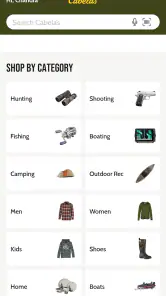
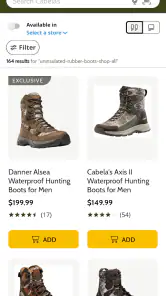
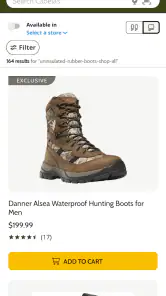
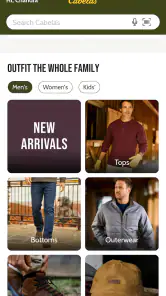

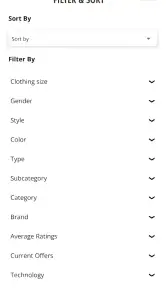
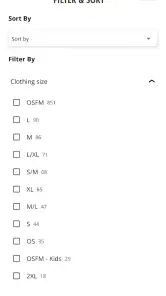
Analysis by Reviewed
I spent time with Cabela’s as a shopping app from Bass Pro Shops, and my overall impression is fairly practical: it is most useful when I already know what kind of outdoor, hunting, fishing, or general sporting item I want and prefer to browse that retailer from my phone. It is free to install, aimed at Everyone, and available for Android devices running version 8.0 or later. That makes trying it low-risk, but “free” here means access to the shopping experience, not that the products themselves cost nothing.
The app has a modest average rating of 3.2 from around 3,100 ratings, with roughly 1,500 written reviews and over 500,000 installs. I would not treat those figures as a final verdict on every shopping session, but they do suggest a mixed experience rather than a universally smooth one. In my view, Cabela’s works best as a focused retail tool, not as a replacement for every shopping app on your phone.
Shopping value, practical trade-offs, and who should use Cabela’s
What the free app actually gives you
The strongest point is straightforward: there is no app purchase price to get started. Cabela’s is a free retail app, so I can install it, look through the catalog, compare possible purchases, and decide whether the retailer is right for me before spending money on an item. That is a useful distinction for shoppers who want to research first rather than walk into a store with no idea what is available.
I see the app as a mobile storefront for Bass Pro Shops’ Cabela’s retail operation. Its value depends on how often I shop in that particular ecosystem. If I am looking for outdoor clothing, camping equipment, fishing supplies, hunting gear, footwear, or other merchandise associated with the brand, having the catalog in my pocket is more convenient than relying on a desktop browser every time.
The app does not create value simply because it is free. The real question is whether it reduces the effort between identifying a product and deciding what to do next. For a returning customer who already trusts the retailer, that convenience can be worthwhile. For someone who is only searching for the lowest possible price across the entire internet, the app is less compelling because a retailer-specific catalog is naturally narrower than a broad marketplace or shopping comparison service.
I also appreciate that the age rating is Everyone. That makes the app approachable for ordinary household shopping, including situations where one person is researching gear for a family trip or helping another family member choose an item. Still, an Everyone rating describes suitability of the app, not the nature of every product sold through it, so I would always check the individual item and any relevant purchasing requirements before ordering.
How I would use it in an everyday shopping situation
Imagine I am preparing for a weekend outdoors and realize that I need a replacement rain jacket, a new pair of boots, and a small fishing accessory. My first step in Cabela’s would be to search for each item separately rather than browse aimlessly through the whole store. I would note the exact product names, sizes, colors, and any variations before moving toward checkout.
More From Our News Desk

Clash of Clans Is Won Between the Battles

Android Auto Makes the Case for Quieter Car Software

MobiOffice: Transforming Mobile Productivity with Seamless Integration

EA SPORTS FC™ Mobile Soccer: Redefining Mobile Sports Gaming

How Microsoft OneDrive Became a Mobile Productivity Giant

How Google Translate Breaks Language Barriers Effortlessly
That workflow matters because outdoor products often look similar while differing in small but important ways. A jacket may be offered in several colors and sizes; footwear can have different fits; fishing accessories may have multiple versions that are easy to confuse. I would slow down at the product-detail stage and confirm the selected variation before adding anything to the cart. This is one of the most useful habits with a retailer app: treat the cart as a final verification step, not merely a temporary holding area.
If I were shopping from home for a trip, I would use the app for research first and postpone the purchase until I had checked the total basket carefully. That helps avoid a common mistake with specialized retail shopping: buying one item that appears suitable, then discovering that the chosen size, color, or model is not the one I actually intended. The app is more valuable when it supports a deliberate list than when it encourages spontaneous browsing.
For a gift, I would use a similar approach but place more emphasis on product details and suitability. Outdoor equipment can be personal, especially clothing, footwear, and technical gear. Cabela’s can help me gather options, but I would not assume that a product is a safe gift choice merely because it looks popular or appears prominently in the catalog.
Where the app is more useful than ordinary browsing
Compared with opening a general web browser, a dedicated retail app can feel more direct. I am already entering a Cabela’s shopping environment instead of typing the retailer’s name, navigating through search results, and adjusting to a mobile webpage. That difference is small for a single visit, but it becomes meaningful when I regularly check outdoor products or revisit a purchase decision.
The app is also better suited to focused brand shopping than a general marketplace. If I specifically want to see what Cabela’s offers, a retailer-owned catalog keeps the search centered on that inventory rather than mixing unrelated sellers, duplicate listings, and products with inconsistent descriptions. That focus can save time when I already have a preferred retailer.
On the other hand, a general marketplace is usually better for discovering a wide range of competing brands and price points in one place. A browser search may also be preferable when I want to compare retailers, read independent product information, or check whether another seller offers a more suitable alternative. I would use Cabela’s for retailer-specific research and another tool when the main goal is broad market comparison.
That distinction is important for value. A free app is not automatically the best shopping option. If I am buying a highly specialized item where compatibility, material, sizing, or technical performance matters, I may need to research outside the app before committing. Cabela’s can be one part of that process, but I would not make it the only source of information for a decision where a poor fit would be expensive or inconvenient.
Small habits that make the experience more reliable
My first practical tip is to search with a product type and a defining detail rather than a vague word. “Boots” can produce a large and unfocused set of results, while a more specific phrase helps me reach the right part of the catalog sooner. Once I find a promising item, I would inspect every available option instead of assuming the first displayed version is the one I want.
My second tip is to keep a short comparison note outside the app when choosing between similar items. I would record the product name, selected size or variation, intended use, and final cost shown at checkout. This is especially helpful when I am comparing clothing or equipment for a trip and may return to the app later. It reduces the chance of relying on memory after looking at several nearly identical listings.
A third useful habit is to separate “research now” from “buy now.” I can use the free app to build an informed shortlist without feeling pressured to complete the purchase immediately. That gives me time to check whether the item genuinely fits my use case, whether I need more than one size to try, and whether another retailer is a better match. The app’s free access makes this cautious workflow easy to justify.
I would also review the cart from the perspective of the entire trip or project. Buying a single piece of gear in isolation can lead to a mismatch with what I already own. For example, a new accessory may not suit my existing equipment, or a clothing choice may leave an important layer missing. The app can help me shop, but it cannot replace planning the complete setup before I pay.
Trade-offs I noticed as a shopping tool
The clearest limitation is that the app’s usefulness is tied to Cabela’s catalog and shopping experience. That is a strength for loyal customers, but a restriction for people who want a neutral comparison of every available option. I would not install it expecting a universal shopping search engine.
The mixed average rating also makes me cautious. A 3.2 average is not a reason to avoid the app automatically, because shopping apps can be affected by account issues, checkout problems, device differences, or expectations about retailer services. Still, it tells me to keep a backup plan. If the app becomes frustrating during an important purchase, I would switch to the retailer’s other available shopping route rather than repeatedly fighting the same screen or workflow.
Another trade-off is the difference between digital convenience and physical inspection. An app can make it easier to find a jacket, boot, rod, or accessory, but it cannot let me feel the material, test the fit, or judge the scale of an item in person. For products where comfort or handling is decisive, a store visit or a careful return-aware buying strategy may be better than relying on mobile browsing alone.
I would also avoid assuming that seeing a product in the catalog settles every practical question. Before placing an order, I would read the available item information carefully, verify the selected variation, and examine the order summary. If I need an item by a particular day, I would pay close attention to the delivery information shown during the purchase process rather than treating the app itself as a guarantee of timing.
Who is likely to get the most value
Cabela’s is a good fit for shoppers who already buy from the retailer or who want a dedicated way to browse outdoor and sporting merchandise. It is particularly useful when I have a clear shopping mission, such as replacing a worn item, preparing for a trip, or comparing several products within the same retail catalog.
It can also suit someone who prefers researching on a phone. The free installation means I can keep the shopping tool available without paying for the app itself, then use it when a need arises. That is more convenient than starting from scratch through a browser every time I remember an item I need.
I would recommend it less strongly to bargain hunters whose main priority is checking many retailers at once. A broad comparison service, a general marketplace, or direct visits to several retailer websites may serve that purpose better. I would also suggest caution for anyone buying technical equipment without knowing the relevant specifications. In that case, independent research and expert advice may be more important than the convenience of a dedicated store app.
Families and casual shoppers may appreciate the Everyone rating and straightforward retail focus, but I would still encourage a checklist before ordering. Decide what the item must do, identify the correct size or version, and set a spending limit before opening the catalog. That approach keeps the app useful without allowing a long product selection to become an unplanned shopping session.
Device details and the long-term question
The app was released on July 16, 2020, and its current version is 26.07.02. I would make sure my Android device meets the minimum requirement of version 8.0 or later before trying to install it. For an older phone, the operating-system requirement is the first practical checkpoint; there is no benefit in planning a shopping workflow around an app the device cannot run.
The developer is Bass Pro Shops, which makes the retailer connection clear. That is useful context when deciding whether to keep the app installed: I would expect it to make the most sense for someone who wants Cabela’s shopping access, not for someone looking for a general-purpose product scanner or a multi-store wish list.
Whether I keep it long term would depend on my shopping habits. If I buy outdoor gear only once in a while, using the app for a specific purchase may be enough. If I frequently return to Cabela’s for clothing, equipment, or accessories, the convenience of having a dedicated retail channel becomes more valuable. Since the app itself is free, the decision is mainly about usefulness and phone space rather than an entry fee.
My buy-or-skip verdict
I would try Cabela’s if I already shop with the brand or want a focused mobile catalog for outdoor and sporting products. The free access makes it easy to test, and the app can simplify a planned purchase when I know what I am looking for. My strongest recommendation is to use it as a research and purchasing aid, while double-checking product variations and the final order details before paying.
I would skip it if my only goal were to compare the entire market, find the absolute lowest price, or research highly technical products without using any other source. In those situations, a general shopping comparison tool, a browser, a physical store, or specialist advice may be more useful.
My final view is balanced: the app offers convenient free access to Cabela’s retail shopping, but the value comes from focused use rather than from the installation alone. The rating suggests I should keep expectations realistic, yet the app remains worth trying for the right shopper. If my needs match the retailer and I prefer shopping from a phone, I would keep it available; if I rarely use Cabela’s or need broad price comparisons, I would spend my time elsewhere.
Cabela's Frequently Asked Questions
Is Cabela’s available for both Android and iOS?
Cabela’s is a mobile shopping app from Bass Pro Shops, and it is intended for shoppers using supported Android or iOS devices. Before downloading, check that your device meets the app’s operating-system requirements and that you are choosing the official app from your device’s app store. The app is free to download, and its content rating is Everyone.
How well is the Cabela’s app rated, and what should I expect from user feedback?
The app has an average rating of around 3.2, based on about 3.1K ratings, with roughly 1.5K written reviews. That gives you a useful snapshot of user sentiment, but experiences can differ depending on device, location, and shopping needs. It is worth reading recent reviews in your app store before installing, especially if you rely on a particular feature or need a smooth checkout experience.
What is Cabela’s, and what can I do with the app?
Cabela’s is the mobile shopping app for the outdoor retailer known for hunting, fishing, camping, shooting sports, boating, and outdoor clothing. After installing it, you can browse products, compare prices, read customer reviews, check availability, save items, and place orders. The app may also provide store information, current promotions, and options for pickup or delivery, depending on your location and the products selected.
Is the Cabela’s app free to download and use?
Yes, the Cabela’s app is free to download from the official Android or iOS app store, and there is normally no separate subscription required to browse products or place standard orders. However, you still pay for the items you purchase, along with any applicable shipping, taxes, service charges, or membership-related costs. A reliable internet connection is recommended for the best experience.
Can I order products through the Cabela’s app?
The app is designed to let you shop directly from your mobile device. You can search by category or product name, review specifications, select available options, add items to your cart, and complete checkout. Depending on the item and your address, delivery, shipping, or in-store pickup may be available. Before paying, carefully check stock status, estimated arrival dates, return conditions, and any restrictions on regulated products.
Pros
- Useful for browsing hunting
- fishing
- camping
- and outdoor gear in one place.
- Product pages typically include specifications
- images
- and customer reviews.
- Store locator helps users find nearby Cabela’s locations and services.
- Order tracking makes it easier to monitor purchases after checkout.
- Seasonal promotions and clearance deals can help reduce outdoor equipment costs.
Cons
- The app’s usefulness depends heavily on Cabela’s delivery and store coverage in your area.
- Some products may show limited stock or become unavailable during busy seasons.
- Large catalogs can make it time-consuming to compare similar products.
- Certain items may require in-store pickup or have shipping restrictions.
- Account creation may be needed to access the full shopping and order features.
- Category
- Shopping
- Version
- 26.07.02












