

Byga
- 104.00
- 4.7
- Installs
- 50.00K
- Price
- Free

Screenshots
Analysis by Reviewed
I found Byga most useful when I stopped thinking of it as a standalone sports app and treated it as a mobile doorway into an existing Byga.net account. That distinction matters. The app is designed for people whose club, academy, team, or sports organization already uses Byga for administration, rather than for someone looking for a general fitness tracker, live-score service, or training library.
In my experience, that focused purpose is both its main strength and its biggest limitation. When your organization runs through Byga, having account access on a phone can make everyday coordination much easier. If your club does not use the Byga system, however, there is little reason to install it simply because it belongs to the sports category.
How Byga fits into everyday sports administration
Byga is a free sports app developed by Byga, and its central role is mobile access to a Byga.net account. I would describe it as a companion to an organization’s existing online setup, not as a replacement for the coaching, social, or performance apps people often associate with sports technology.
That makes the first question simple: does your team or club already use Byga? If the answer is yes, the application can put relevant account activity closer at hand when you are away from a computer. If the answer is no, the free price does not automatically make it useful. Free access has value only when it connects you to a service you actually need.
The app sits in a practical space between a club website and a dedicated team-communication tool. A website may offer broader information but feel awkward on a phone. A messaging app may be quick for conversation but lack the structured account relationship managed by the organization. Byga’s purpose is narrower: it gives mobile users a way to work with their Byga account instead of relying entirely on a desktop browser.
I also appreciate that the product does not pretend to be a universal sports solution. Someone searching for workout plans, GPS tracking, match statistics, or personal progress charts should look elsewhere. Byga makes more sense for the administrative side of participation, where access to the organization’s account matters more than individual athletic measurement.
What the free price really means
There is no purchase cost for the app itself, so the initial barrier is low. I can install it without treating it like a paid subscription decision, and families or players can try the mobile access without committing money first. That is a meaningful advantage for a supporting app whose usefulness depends on membership in a separate organization.
More From Our News Desk

 Gmail
GmailGmail in a Busy Inbox: Who Benefits Most?
From first account to crowded workday, Gmail earns its place through dependable search and flexible sorting—but its best fit depends on how much inbox maintenance you can tolerate.

 Prime Video
Switching to Prime Video: What Changes in Your Viewing Routine
Prime Video can make a compelling second home for streaming, but switching means learning a different catalog, rental layer, and route from browsing to playback.

 Universal TV Remote Control
Universal TV Remote Control Works Best as a Reliable Backup
A phone remote earns its place through quick setup and reliable habits. Here is how to get more from Universal TV Remote Control—and where its limits show.

 Weather - By Xiaomi
Weather by Xiaomi Review: Clear at a Glance, Less Clear Up Close
Xiaomi’s weather app makes everyday forecasts quick to scan, but its calm surface can leave useful details and recovery paths harder to find than they should be.

 X
XX Under Pressure: Can It Recover When Posting Goes Wrong?
A resilience-focused review of X, examining setup, mistaken posts, interruptions, weak connections, and the gaps that matter when recovery needs to be dependable.

 Clash of Clans
Clash of Clans Is Won Between the Battles
Its raids are quick; its community is a long-term project of coordination, teaching, rivalry, and shared responsibility—with all the friction that entails.
Latest News



Still, I would not confuse a free download with unlimited value. The app’s practical usefulness depends on whether your club has a Byga.net setup and whether your account is connected to it. The free price covers access to the application, but it does not turn Byga into an independent sports service for everyone.
This is also why I would judge the app differently from a paid training product. A paid fitness app needs to justify its cost through workouts, coaching, analytics, or content. Byga is valuable in another way: it can reduce the friction of reaching the account your organization already uses. For the right user, that convenience may be enough. For an unaffiliated user, even a free app can be unnecessary clutter.
Its Everyone content rating also suits the audience it is likely to serve. Sports organizations often include young players, parents, coaches, and administrators, so an app intended for account access benefits from being approachable across age groups. I would still expect the actual experience to vary according to the account and organization behind it, because the app is a gateway rather than the whole sports program.
The everyday scenario where it earns its place
Imagine a parent leaving work and heading toward a child’s practice. Instead of waiting until a laptop is available, the parent can use the mobile Byga access associated with the family’s organization. That can be useful when the day is already split between work, transport, school, and training. The benefit is not flashy; it is the ability to check the account in the same place where the rest of the day is being managed.
A player can face a similar situation before leaving for a session. The phone is already the most convenient device, while opening a full website may feel like an unnecessary extra step. A coach or club administrator may also prefer having account access nearby when moving between fields or facilities, although the value will depend on what their organization has made available through Byga.
One practical tip is to think of the app as part of a routine rather than something to browse casually. I would open it when preparing for a training day, checking the organization’s latest account activity, or confirming that I am using the right login. That mindset prevents disappointment: Byga is most useful at the moment a club-related task appears, not as an app to explore for entertainment.
Where it compares well with usual alternatives
Compared with using a mobile browser, a dedicated app can feel more direct. The browser route may still be perfectly adequate for occasional access, especially for someone who rarely needs the account. The application becomes more convincing for people who return to the same sports account regularly and want a mobile-first entry point rather than repeatedly navigating through a website.
Compared with general messaging platforms, Byga has a different relationship with the organization. A chat group is good for quick discussion, last-minute reminders, and informal questions, but it can become disorganized as messages accumulate. Byga is tied to the club’s account structure, which is better suited to formal access and organized administration. I would not replace a team chat with it, nor would I expect a chat app to provide the same account-centered role.
Compared with sports-tracking apps, the difference is even clearer. A tracker is built around personal activity, routes, heart rate, goals, or performance history. Byga is not the app I would choose to monitor a run or analyze a match. Its value is organizational rather than athletic. Choosing between them is not really a matter of which is better; they solve different problems.
Small workflow choices that make access easier
The first useful habit is to confirm your organization’s account arrangement before blaming the app for a login problem. Because Byga is connected to Byga.net access, confusion about the account used by the club can create friction that has nothing to do with sports content. I would begin with the credentials and instructions supplied by the organization, then use the app as the mobile route into that account.
The second is to separate account access from team communication. If a coach posts an urgent change in a messaging group, that does not mean the same information will appear in the same way inside Byga. I would keep the organization’s preferred communication channel available and use Byga for the account-related side of participation. Treating one as a complete replacement for the other could cause missed information.
The third is to use a browser as a fallback when a task feels more comfortable on a larger screen. Mobile access is convenient, but not every administrative action is equally pleasant on a phone. I prefer the app for quick checks and the web account for anything that requires careful reading, extended form entry, or comparing several pieces of information. That combination is more realistic than expecting the mobile app to handle every situation equally well.
A fourth insight is that the app’s value can differ within one household. A parent who manages several sports commitments may use it frequently, while a player who only needs occasional account access may find the browser sufficient. I would not install it on every device automatically. I would put it on the phone of the person who actually handles the organization’s account most often.
What may feel limited in practice
The focused design can feel restrictive if you arrive expecting a full sports hub. There is no reason to choose Byga for independent training ideas, personal statistics, or a broad community of athletes. Its usefulness begins with an existing organizational relationship, so people outside that environment may open the app and find that it offers little relevance to their needs.
Dependence on the Byga.net account is another trade-off. The app cannot create the same value on its own as an independent sports product because the organization’s setup determines the context. If your club changes how it communicates, if your account details are unclear, or if you are between organizations, the mobile app may feel less useful even though the installation itself is free.
I also see a convenience trade-off between mobile speed and screen space. A phone is ideal for quick access while traveling, but a desktop browser can be easier for reading dense information or handling more involved account work. I would not call that a flaw unique to Byga; it is simply something to keep in mind when deciding which device should handle which task.
The app’s age is worth placing in context as well. It was released on October 5, 2018, and the current version is 2.23.2. That history suggests an established product rather than a brand-new experiment, while the current version indicates ongoing versioning. I would still judge the experience by how well it fits my organization’s current workflow, because longevity alone does not guarantee that every club uses the system in the same way.
Android users should also check compatibility before installing: the app requires Android 8.0 or later. That covers many reasonably modern devices, but someone using an older phone may need to rely on another route to the account. This is a practical consideration for families sharing older devices, especially when the app is being installed for a child or a less frequently used phone.
Who is most likely to get real value
I think Byga is a strong fit for players, parents, coaches, and club staff whose organization already relies on Byga.net. It is particularly sensible for people who manage sports commitments away from a desk and want a dedicated mobile path to the account. Families with busy schedules may appreciate the reduced dependence on a laptop, while administrators may value having the organization’s account available while moving between daily activities.
It is also a reasonable choice for someone who dislikes managing club information through a collection of browser tabs. A dedicated app can make the account feel like a clearer part of the phone’s routine. The improvement may be modest, but repeated small conveniences matter when sports participation involves regular planning.
I would be more cautious for occasional users. If you visit the account only once in a while and the mobile website already works well for you, the app may not change much. The free price removes financial risk, but it does not remove the cost of another icon, another login flow, or another place to remember when organizing your week.
I would skip it for anyone seeking a general-purpose sports companion. Runners, cyclists, gym users, and people looking for coaching content should choose an app built around those activities. Byga is also not my first recommendation for a team that does not use the Byga system, because its core purpose depends on that connection.
How the rating reflects its focused appeal
Byga holds a 4.7 average from around 1.8 thousand ratings, with more than a hundred written reviews. I read that as a sign that the app satisfies many of the people who need precisely what it offers. A focused account-access tool can earn strong approval when it removes a recurring inconvenience for an established user base.
That rating should not be interpreted as a promise that every sports fan will enjoy it. Ratings are most meaningful when the reviewer’s situation resembles yours. A parent whose club uses Byga may see the app as essential, while a person expecting workout tracking may judge it as irrelevant. The same narrow purpose that creates satisfaction for one group can make the app uninteresting to another.
Its reach is also modest compared with mass-market sports platforms, with over fifty thousand installs. I see that as consistent with a specialized service connected to participating organizations rather than a universal consumer app. The smaller audience is not automatically a weakness; it simply reinforces the need to verify that your club or team is part of the Byga environment.
My verdict for Android users
I would recommend Byga to anyone who already has a Byga.net account through a sports organization and wants a straightforward mobile access point. The app is free, carries an Everyone rating, and focuses on a practical need rather than trying to become a complete training or communication platform. For that audience, installing it is an easy decision and may make club administration feel less tied to a computer.
My recommendation becomes conditional for everyone else. If your organization does not use Byga, I would skip the download. If you only need occasional access and prefer the browser, I would treat the app as optional rather than essential. And if your goal is personal fitness tracking or sports coaching, I would choose a purpose-built alternative instead.
Overall, Byga is best understood as a free mobile companion for an existing sports account, not as a general sports app. That honest expectation makes its value much clearer. When the account connection is relevant, the focused design is useful; when it is not, no amount of free access can make it the right tool.
For me, the buy-or-skip decision is therefore simple: there is nothing to buy, but there is a clear reason to install it. Use it when your club, academy, or team already operates through Byga.net and you want that relationship available on your phone. Skip it when you are searching for training, tracking, scores, or a sports community unrelated to Byga.
Byga Frequently Asked Questions
What devices can run Byga?
Byga is a mobile app for accessing a Byga.net account, so it is intended for use on a compatible phone or tablet. The current version is 2.23.2, and it requires Android 8.0 or later. Before downloading, check that your device meets this requirement and that you can sign in with the account associated with your organization.
Who develops Byga, and is it suitable for all ages?
Byga is developed by Byga and is listed for Everyone, making it suitable for a broad audience, including families using it to stay connected with a sports organization. Its usefulness depends on whether your club or team uses the Byga platform and has connected your account. The app is free to download and provides mobile access to a Byga.net account.
What is Byga, and who is it designed for?
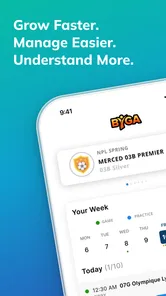
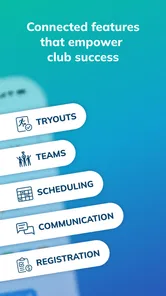
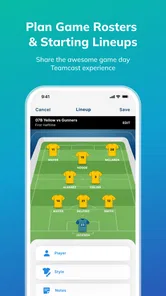
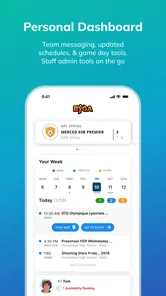
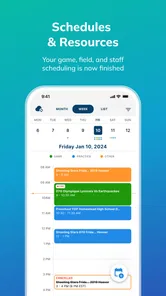
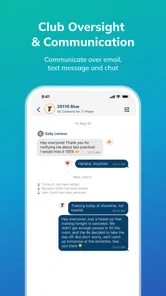
Byga is a sports team and club management platform designed to help organizations coordinate players, families, coaches, administrators, and staff in one place. It can be useful for youth sports clubs, leagues, academies, and recreational teams that need to manage schedules, attendance, communication, registration details, payments, and other daily activities without relying on several separate apps or long email threads.
What features can I use in the Byga app?
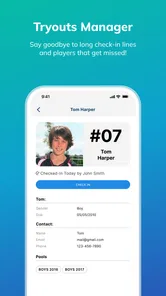
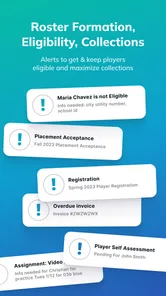
The available features may vary depending on how your club has configured Byga, but the platform generally focuses on team organization and communication. Users may be able to view practices and games, receive announcements, respond to availability requests, access team information, communicate with other members, review registration or payment details, and manage multiple players or family profiles from the same account.
Do I need an invitation from a club or team to use Byga?
In most cases, Byga works through an organization that already uses the platform. A parent, player, coach, or staff member will typically need an account connected to a club, team, or program before all features become available. Simply downloading the app may not provide useful access on its own, so you should check whether your organization has invited you and use the correct email address when creating or joining your account.
Pros
- Simple interface makes core features easy to find.
- Useful for organizing activities
- schedules
- and team information.
- Helps keep participants updated in one shared space.
- Supports better coordination between staff
- players
- and families.
- Convenient access to club-related information from a mobile device.
Cons
- Some features may depend on the organization’s Byga setup.
- Notifications can become excessive when several teams are active.
- New users may need time to understand the platform’s structure.
- Limited usefulness if your club or team does not use Byga.
- Performance may vary with older devices or weak connections.





