BRTA DNP & DRC Checker
- 8.00
- 3.9
- Installs
- 500.00K
- Price
- Free

Screenshots
Analysis by Reviewed
Checking vehicle paperwork can be surprisingly stressful when the information you need is split between a physical document, a registration process, and a government service. BRTA DNP & DRC Checker is designed for that specific situation. It is an Auto & Vehicles app from BRTA ICT that lets me check DNP or DRC status, obtain an electronic registration certificate, and verify whether that electronic document is authentic. I found it most useful as a focused verification tool rather than as a complete vehicle-management app.
The app is free, carries an Everyone age rating, and has reached more than 500,000 installs. Its average score is 3.9 from roughly 1,500 ratings, which suggests a generally useful service with some room for smoother experiences. It was released on January 2, 2024, and the current version is 1.0.8. Those details matter because a government-facing utility is often judged less by visual polish than by whether it helps someone complete an important task without confusion.
What the app is actually good at
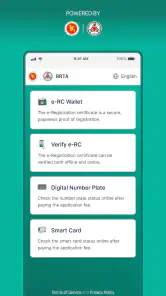
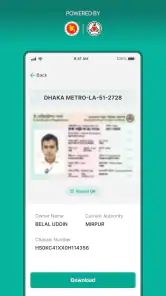
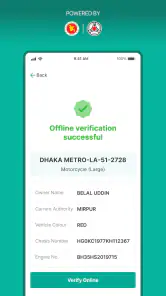
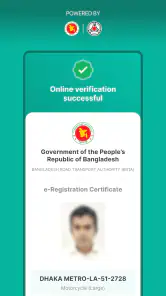
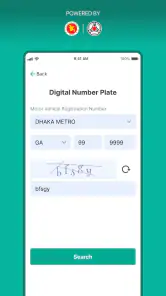
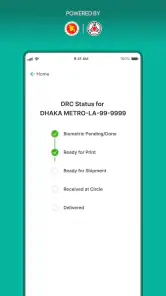
The central value is straightforward: I can use it to check the status of a DNP or DRC record, download an e-RC, and confirm the authenticity of that electronic registration certificate. Instead of treating the application as a broad transport portal, I would think of it as a digital checkpoint for registration information. That narrower purpose is useful because it keeps the main task clear.
For a vehicle owner, the app can be helpful when a registration process is in progress and the physical paperwork is not the most convenient thing to carry. It can also be useful when I want to inspect an electronic certificate before relying on it. A buyer, seller, driver, or family member handling vehicle documents may all benefit from having a direct way to check the relevant record.
One practical distinction is important: downloading an e-RC and verifying its authenticity are not the same action. I would not stop after obtaining the electronic certificate. I would also use the verification function when the document matters, especially before sharing it with another person or using it in a formal vehicle-related situation. That two-step habit reduces the chance of treating a file as trustworthy simply because it looks official.
Latest News
Where people are likely to get stuck
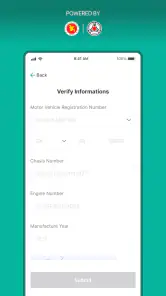
The first difficulty is usually not the app itself but the information entered into it. Vehicle records are sensitive to exact details. A small mismatch in a registration identifier, document reference, or other requested field can make a valid record appear unavailable. My advice is to copy information carefully from the relevant document rather than relying on memory or entering a shortened version.
I would also avoid switching between several documents while filling in a request. That sounds minor, but it is an easy way to mix a vehicle number with a document number or to overlook a character. Before submitting, I would compare each field with the source document once more. This is one of the most useful habits with a verification app because repeated attempts with incorrect information can look like a service failure.
Another point of friction is expectation. A status checker cannot necessarily make an unfinished government process complete immediately. If a record is still being processed, the application may simply reflect that state. I would read a pending or unavailable result as a reason to check the underlying paperwork and process status, not as proof that the vehicle has a problem.
Network conditions can create similar confusion. A request that fails while the connection is weak may be mistaken for an incorrect record. I prefer to retry only after confirming that the phone has a stable connection, and I take note of whether the same information works later. This simple comparison helps separate an input mistake from a temporary communication issue.
Setup checks that save time
Before using the service for an urgent task, I would install the current version and open it while I still have time to correct mistakes. The application supports Android 5.1 and later, so it is compatible with many older phones, but compatibility alone does not guarantee a smooth experience on every device. Keeping the phone’s normal system components current is sensible, particularly for an app that needs to communicate with an online service.
I would prepare the vehicle documents first and make sure the text is readable. If I am working from a photograph or scanned copy, I would zoom in and distinguish similar characters rather than guessing. This is especially valuable when a field contains a mixture of letters and numbers. Entering what appears visually correct but differs from the official record is a common cause of an unsuccessful lookup.
It is also worth checking that the phone has enough free space before downloading an e-RC. The app’s main job is not large-scale media storage, but a full device can still interrupt downloads or prevent a file from being saved properly. After a successful download, I would open the file immediately and confirm that it is present instead of assuming the process finished just because the screen changed.
I would not begin with a long chain of troubleshooting steps. The best setup sequence is short:
Confirm that the vehicle information is copied exactly from the official document.
Use a stable internet connection and avoid submitting the same request repeatedly.
Check that the app is updated to version 1.0.8 and that the device has room to save the e-RC.
After downloading, open the electronic certificate and use the authenticity check when appropriate.
This preparation is more useful than changing random phone settings. It focuses on the parts of the workflow that are most likely to affect the result: accurate input, communication with the service, and successful handling of the downloaded document.
A safer workflow for checking and downloading
My preferred workflow begins with the status check, not the download. I first confirm that the record is available and that the details shown correspond to the vehicle I am dealing with. If the result is unexpected, I pause there and review the entered information. Downloading a document before resolving a mismatch only creates another file to question later.
Once the status appears consistent, I proceed to the e-RC download. I would use a clear filename or place the file somewhere easy to find, if the phone allows that choice. I also avoid relying on a single copy when the document is important. Keeping the original electronic file intact is better than repeatedly editing, renaming in a confusing way, or sending screenshots that may omit useful details.
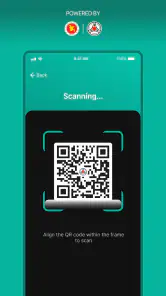
The authenticity check is particularly valuable when another person sends an e-RC or when I receive a copy through a messaging app. A screenshot can be cropped, compressed, or separated from its original context. The verification step gives me a more appropriate way to assess the document than judging its appearance. For important vehicle paperwork, verification should be treated as a separate step, not an optional decoration after downloading.
A realistic example would be a vehicle owner preparing documents for a sale. I would check the record at home, download the e-RC, open it to ensure the file is usable, and verify its authenticity before meeting the buyer. If the buyer later receives the file through a different channel, I would encourage them to verify it independently rather than asking them to trust a forwarded copy. This workflow is slower than simply sending an image, but it is much more responsible.
Another useful scenario involves someone handling a family member’s vehicle paperwork. In that case, the person using the phone may not know the identifiers by heart. I would keep the official document beside the device, enter one field at a time, and stop if the returned information does not clearly match. This prevents a well-intentioned helper from downloading or sharing the wrong record.
How to recover when a request fails
If a lookup does not work, I would begin by checking the entered characters and the order of the fields. I would not immediately uninstall the app or assume the record has disappeared. A second attempt should be deliberate, with the information copied again from the document and the connection checked first.
If the screen does not respond as expected, I would close and reopen the app, then try once more without rapidly tapping the same control. Repeated taps can make it unclear whether a request was sent, especially on a slow connection. Waiting for the result is usually better than creating several overlapping attempts.
When an e-RC seems to download but cannot be found, I would check the phone’s normal file locations and recent downloads before repeating the request. Opening the file directly is the important test. If it is present and readable, the problem was probably locating it rather than obtaining it. If the file is incomplete or cannot open, I would retry with stable connectivity and enough storage available.
For a failed authenticity check, I would first make sure I am checking the correct document and that the relevant information has not been altered while copying it. I would also avoid using a cropped image as the only reference if the app expects details from the electronic certificate. The cleanest approach is to work from the original downloaded e-RC or from the complete document details.
There is a trade-off here. Repeating a request can be useful after correcting an obvious mistake, but repeating it without changing anything rarely teaches me what went wrong. I prefer to change one likely cause at a time: correct the identifier, improve the connection, reopen the app, or check the saved file. That makes the recovery process easier to understand.
When the app is not the cause
Some problems belong to the record or the service rather than to the phone. If the same carefully entered information fails on more than one attempt while the connection is working normally, I would consider that the record may not yet be ready, may contain a mismatch, or may be temporarily unavailable through the service. The app can display the current state, but it cannot resolve an underlying registration issue by itself.
This is also why I would not use a single unsuccessful search as evidence that a vehicle lacks valid registration. A typo, an unfinished process, or a temporary service interruption can produce a similar result. For a purchase, transfer, or other consequential decision, I would compare the app result with the original paperwork and seek the appropriate official follow-up when the information still does not align.
The application is not the right replacement for every traditional alternative. If I only need to carry a document that has already been issued, keeping the original official copy may be simpler. If I need broader vehicle services, general driving information, or assistance with a complicated case, a direct official channel or in-person support may be more suitable than a focused checker.
On the other hand, ordinary paper handling has its own weaknesses. Documents can be misplaced, photocopies can become unclear, and a visual inspection does not provide the same confidence as checking an electronic record through the relevant service. That is where this app has a clear advantage: it brings status checking, e-RC access, and authenticity verification into one purpose-built place.
Who should use it, and who should skip it
I would recommend BRTA DNP & DRC Checker to vehicle owners who need a practical way to inspect registration-related information and to people who regularly handle vehicle documents for someone else. It is also a sensible tool for a buyer who wants to verify an electronic certificate rather than relying only on a forwarded image or a verbal assurance.
It is less suitable for someone expecting a full transport-management application. The focused design is a strength when the task is DNP or DRC checking, but it may feel limited if the user wants a wider collection of vehicle services in one place. I would also skip depending on it during a last-minute appointment until I had already tested the relevant workflow and confirmed that the necessary document details were available.
The free price makes trying it low-risk, and the Everyone rating means it is positioned for general use rather than a specialist audience. Still, free access does not remove the need for care. The important information is official vehicle documentation, so I would treat every displayed result as something to compare carefully with the vehicle and its paperwork.
My practical verdict after using it
BRTA DNP & DRC Checker succeeds because it concentrates on a real administrative need instead of trying to become an all-purpose automotive app. The combination of DNP or DRC status checking, e-RC downloading, and authenticity verification gives me a useful workflow for handling digital registration documents. Its strongest feature is not convenience alone; it is the ability to add a verification step where a screenshot or paper copy may leave questions.
The main friction comes from the nature of the task. Exact document details matter, online requests can be affected by connectivity, and an app cannot instantly fix a record that is still processing or contains an underlying discrepancy. Users who prepare their information, check the downloaded file, and distinguish service delays from input errors will get much more from it than users who simply retry whenever a result looks wrong.
With a 3.9 average and more than 500,000 installs, it has clearly found an audience, while its current version shows that it remains an actively maintained utility. I would keep it on my phone if I owned or regularly handled a vehicle registered through BRTA. I would not treat it as the only source for resolving a disputed record, but as a focused first check, it is practical, free, and worth using.
BRTA DNP & DRC Checker Frequently Asked Questions
Can I download an electronic registration certificate using BRTA DNP & DRC Checker?
The app’s stated purpose includes checking DNP and DRC status, downloading an e-RC, and verifying its authenticity. If a certificate is available for your vehicle, the app can help you access it through its relevant feature. Keep in mind that you may need to provide matching vehicle or registration details, and the result depends on the information available through the connected BRTA service.
Which devices can run BRTA DNP & DRC Checker?
BRTA DNP & DRC Checker is an Auto & Vehicles app from BRTA ICT. On Android, it requires Android 5.1 or later, so check your device’s operating system before downloading. The app is free and is rated for everyone. If your device meets the requirement, you can install it and use the checker’s features, including checking DNP or DRC status and working with an e-RC.
What is BRTA DNP & DRC Checker used for?
BRTA DNP & DRC Checker is designed to help users check vehicle-related information associated with Bangladesh Road Transport Authority services, particularly Digital Number Plates (DNP) and Digital Registration Certificates (DRC). It can be useful for confirming whether an application, plate, or registration document is available or has progressed. The exact information displayed may depend on current BRTA records and the details entered by the user.
What information do I need to use BRTA DNP & DRC Checker?
Before using the checker, you will generally need vehicle or registration details such as a registration number, application reference, owner information, or another identifier requested by the service. Enter the information carefully and exactly as it appears on your official documents. Incorrect spacing, digits, or Bengali and English character formats may prevent the app from finding a matching BRTA record.
Does BRTA DNP & DRC Checker provide official and real-time results?
The app is intended to display information connected with BRTA services, but users should not automatically treat every result as a legally valid document or final confirmation. Availability and accuracy depend on the underlying BRTA system, data updates, and the app’s connection to that service. For ownership, registration, or legal decisions, always verify important information through an official BRTA channel.
Pros
- Quickly checks BRTA driving license and vehicle registration details.
- Useful for verifying documents before buying or transferring a vehicle.
- Simple interface with focused features and minimal navigation.
- Helps users access official transport-related information remotely.
- Saves time compared with visiting a BRTA office for basic checks.
Cons
- Requires an active internet connection for searches and verification.
- Results may be unavailable during BRTA server maintenance or outages.
- Personal and vehicle data availability depends on official records.
- Some users may find the verification process unclear without guidance.
- Unofficial third-party apps may raise privacy and trust concerns.

- Category
- Auto & Vehicles
- Version
- 1.0.8











