BlueDriver OBD2 Scan Tool
- 6.78K
- 3.9
- Installs
- 1.00M
- Price
- Free

Screenshots
Analysis by Reviewed
Ever been in a situation where your car's check engine light comes on, and all you can do is guess what the problem might be? Well, that's where the BlueDriver OBD2 Scan Tool swoops in like a hero. I recently got my hands on this app, and let me tell you, it's a game-changer for anyone who loves their car as much as I do.
Why BlueDriver Stands Out
First off, let's talk about why the BlueDriver OBD2 Scan Tool is the bee's knees. This app, available for both Android and iOS, pairs seamlessly with the BlueDriver Sensor to give you an in-depth diagnosis of your vehicle's health. It's like having a mechanic in your pocket. But what really sets it apart? It's the depth of the data it provides. We're talking about everything from engine codes to live data streams.
Easy to Use
One of my favorite aspects of BlueDriver is its user-friendly interface. Seriously, even if you're not a car expert, this app makes you feel like one. You just plug in the sensor, connect via Bluetooth, and voila! Your car's secrets are revealed. The app walks you through the process with clear instructions, making it accessible for everyone.
Comprehensive Diagnostics
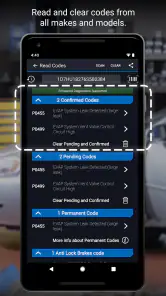
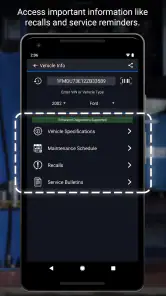
Now, onto the nitty-gritty. The diagnostic capabilities of BlueDriver are nothing short of impressive. It doesn't just read codes; it offers possible causes and even suggests verified fixes. Plus, the app keeps a history of your scans, so you can track how issues develop over time. This feature is a lifesaver for those of us who like to stay on top of our car maintenance.
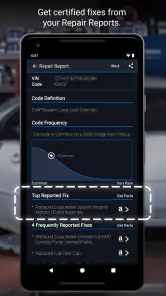
Another cool feature is the ability to access Repair Reports. These reports are generated from a database of over 30 million fixes verified by professional mechanics. So, when it tells you a solution, you can trust that it's legit. It's like having a second opinion without the extra cost.
Latest News
Real-Time Data
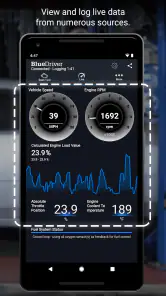
For those who want to dive deeper, BlueDriver offers real-time data streaming. You can monitor various parameters like engine RPM, vehicle speed, and even fuel efficiency. It's fascinating to see how your car performs and helps you understand what's going on under the hood. It's almost like playing a car-themed video game, but with real-world benefits.
However, the app isn't just for gearheads. Whether you're a novice or a seasoned car enthusiast, BlueDriver makes car diagnostics accessible and understandable. It's designed to empower you with knowledge about your vehicle, which is pretty awesome if you ask me.
So, if you're tired of being in the dark about your car's health, give the BlueDriver OBD2 Scan Tool a shot. It's an investment in peace of mind, and frankly, who doesn't want that?
BlueDriver OBD2 Scan Tool Frequently Asked Questions
Does BlueDriver require an internet connection to diagnose a vehicle?
BlueDriver pairs the app with its dedicated scan tool so you can access vehicle diagnostic information on your smartphone. An internet connection may be useful for downloading the app, updates, or related information, while the scan itself depends on the phone communicating with the plugged-in tool. Before relying on it away from home, install the app and review its setup guidance so you understand how it behaves in your usual driving environment.
Can I use BlueDriver with more than one vehicle or share it with another driver?
BlueDriver is intended to work with a vehicle’s OBD2 port and a compatible smartphone, making it a practical option for checking different cars when the scan tool can be moved between them. Each vehicle can produce its own diagnostic information, so keep track of which car is connected when reviewing results. If another driver will use the setup, they will also need access to the app and scan tool.
What phones and operating systems can run the BlueDriver app?
BlueDriver is an Auto & Vehicles app from Lemur Vehicle Monitors, designed to work with the BlueDriver scan tool. The app is free to download and is rated for Everyone. Before installing, check that your device runs Android 8.0 or later, or meets the requirements shown in the iOS app store. The app’s current version is 8.5.
Is BlueDriver free to download, and what should I know about the cost of using it?
The BlueDriver app is free to download. The scan tool itself is a separate piece of hardware used with the app, so downloading the app alone does not provide the complete diagnostic setup. The app is listed with an average rating of 3.9 from around 17,000 ratings, and has been installed over one million times. Consider the tool and app together when deciding whether BlueDriver fits your needs.
What is the BlueDriver OBD2 Scan Tool and how does it work?
The BlueDriver OBD2 Scan Tool is a professional-grade car diagnostic tool that connects to your vehicle via the OBD2 port and communicates with your smartphone. It provides detailed reports on potential vehicle issues, helping users understand their car's health. By using Bluetooth technology, it offers a wireless and easy-to-use experience for car owners and mechanics alike.
Pros
- User-friendly interface for beginners
- Real-time vehicle diagnostics
- Compatible with most car models
- Continuous software updates
- Comprehensive error code info
Cons
- Limited functionality without subscription
- Bluetooth connectivity issues
- App interface can be slow
- Requires permission access
- In-app ads can be intrusive

- Category
- Auto & Vehicles
- Version
- 8.5











