Belk – Shopping App
- 7.04K
- 4.0
- Installs
- 1.00M
- Price
- Free

Screenshots




Analysis by Reviewed
I often find that household shopping works best when one person can browse calmly and everyone else can weigh in without turning the trip into a long group outing. The Belk – Shopping App gives me a straightforward way to look through clothing, shoes, home goods, handbags, and beauty items from a phone. I see its biggest value when I already have a particular kind of purchase in mind and want to compare options at home, rather than when I’m simply looking for the broadest possible shopping marketplace.
That focused role matters in a shared household. I wouldn’t expect a retailer app to organize everyone’s needs automatically; I see it as a useful place for one person to gather choices and bring them to the people who will use or pay for the purchase. That makes it easier to separate browsing from deciding, especially when a household is shopping for different tastes rather than one clearly defined item.
Shopping that fits around a household
For a shared-use situation, I’d treat the app as a place to research and assemble ideas, not as a shared family account. One person can browse, note the options they like, and show the screen to someone else before deciding. That works well for a household choosing a gift, coordinating a home purchase, or narrowing down clothing choices while everyone is in the same room. It keeps the discussion practical without requiring everyone to browse at once.
For example, if I were helping choose a gift for someone whose style I only partly know, I’d browse a few relevant categories first, then ask another person who knows them better to weigh in. That is more useful than passing a phone around with no plan: each person can comment on a short list instead of restarting the search. It also keeps the app’s role clear. It helps us compare possibilities, but the household still supplies the context about the recipient, the occasion, and what feels appropriate.
Getting started and keeping account boundaries clear
First off, downloading and setting up the Belk app is a breeze. Available for both Android and iOS, it’s just a matter of a few taps, and you’re in! Once you open the app, you’re greeted with a clean, user-friendly interface. It doesn't overwhelm you with too much info at once, which is something I really appreciate. The navigation is intuitive, with a neat layout that makes finding what you need almost effortless.
Belk is a free shopping app from developer Belk, and it has been around since 2013. Its current version is 59.0.3, and it requires Android 10 or later on Android devices. I’d check that requirement before asking someone in the household to install it, especially if they use an older phone. The app is rated for Everyone, but that age label doesn’t mean a child should make purchases or use an adult’s payment details without supervision.
For account boundaries, my practical advice is simple: keep checkout decisions with the person responsible for the order. A phone passed around for browsing is different from a phone that is signed in and ready to pay. Before letting someone else use your device, review what is visible on-screen and make sure the final order is placed by the account holder. That small separation helps prevent mix-ups between someone’s browsing choices and the household’s actual purchase.
More From Our News Desk

Clash of Clans Is Won Between the Battles

Android Auto Makes the Case for Quieter Car Software

MobiOffice: Transforming Mobile Productivity with Seamless Integration

EA SPORTS FC™ Mobile Soccer: Redefining Mobile Sports Gaming

How Microsoft OneDrive Became a Mobile Productivity Giant

How Google Translate Breaks Language Barriers Effortlessly
I’d also decide in advance whether the other person is only looking or is allowed to change the cart. That distinction is easy to overlook when a phone is being shared, but it avoids confusion about whether an item is merely under consideration or ready to buy. If a purchase needs another person’s approval, I would show them the item details first and leave the final checkout step to the buyer. It is a low-effort habit that makes shared browsing more comfortable without assuming the app provides family permissions.
Features that catch the eye
One of the standout features of the app is its personalized shopping experience. As you use the app, it learns your preferences and suggests items you might like. It’s like having a personal shopper, minus the awkward small talk. Also, the app keeps you updated with the latest sales and discounts, ensuring you never miss a bargain. I found the push notifications quite handy, though some might find them a tad intrusive. You can easily tweak these in the settings.
That personalization can be useful when you tend to shop for similar things, but I wouldn’t treat recommendations as a complete household shopping plan. A suggestion that suits one person may not suit another, and browsing together is still the better way to agree on shared purchases. If alerts start interrupting everyday phone use, adjusting them is a sensible trade-off: you can choose a quieter experience instead of giving up the app entirely.
One practical way I’d keep recommendations useful is to treat them as prompts, not a decision-maker. If something catches my eye, I’d still compare it with the original need and ask whether it suits the person who will use it. That matters particularly for a shared home purchase: a recommendation can be appealing to the person holding the phone while missing a preference that another household member considers essential.
Another cool feature is the barcode scanner. Ever been in a store and wondered if you could get a better deal online? Just scan the barcode with the app, and you can instantly check the price on Belk. It’s super handy and feels like having a magic wand that makes prices appear out of thin air.
I’d use that scanner as a comparison tool, not as an automatic reason to buy. If you’re already in a store with an item in hand, checking the Belk price can help you decide whether to continue shopping there or look at the app later. For a shared purchase, show the result to whoever is helping decide before ordering; a quick comparison is most useful when everyone is comparing the same item, rather than relying on a vague memory of its price.
There’s a useful distinction here between checking a price and deciding the whole purchase is settled. A scan can make one comparison faster, but it doesn’t answer whether the item suits the household or whether someone would rather buy it in person. I’d use it to inform the conversation, then make the choice based on the item and the household’s priorities rather than treating a single price check as the final word.
Coordinating a purchase without a group checkout
A realistic use for me would be shopping for a household item after dinner: I’d search for a few options, narrow them down, and let the other person who will use the item look at the choices before I add anything to the cart. That’s less stressful than trying to settle every detail while standing in a busy shop. The app is especially handy when one person is doing the browsing and another has the final say on color, style, or whether the item suits the room.
It is still worth agreeing on the basics before checkout. Decide what kind of item you need, what details matter, and who will place the order. That avoids a common shared-device snag: one person assumes an item is only being considered, while the person holding the phone thinks the group has already chosen it. I find the app works best as a browsing and decision aid, with the household’s agreement happening outside the cart.
For a smoother handoff, I’d narrow the search before asking someone else to review it. A short set of options is easier to compare than an open-ended scroll, and it gives the second person something concrete to react to. If neither option feels right, return to the search with a clearer idea of what needs to change. This approach makes the app more useful for coordination without turning it into a substitute for a conversation.
Shopping experience and alternatives
Now, let’s talk about the actual shopping experience. The product range is vast, covering everything from clothing and accessories to home goods and beauty products. The search function is quite robust, allowing you to filter by brand, price, or even color. I loved how detailed the product descriptions are; it’s like the app anticipates every question you might have about an item.
Compared with a general online marketplace, I’d choose Belk when I want to browse its mix of fashion, shoes, home, designer handbags, and beauty in one place. A broad marketplace may be more convenient if my priority is comparing products across many different sellers or categories. A physical store is still the better option when I need to judge how something feels in person or want to make a decision without relying on a screen. The app is most useful when its selection matches what I’m looking for and I have time to compare.
One practical way to avoid aimless browsing is to begin with the item type and use the available filters to narrow the field. For clothing or accessories, color and brand can help turn a wide search into a manageable set of choices; for a home purchase, price may be the more useful starting point. I’d still read each item’s details before deciding, particularly when the choice depends on a specific style or use. Filters save time, but they don’t replace checking whether the product actually fits the need.
In a household, the most useful filter may depend on who is making the decision. Someone buying for themselves may start with a preferred brand, while a person shopping for a shared space may need to begin with color or budget so other people can quickly rule options in or out. I’d agree on that starting point before browsing together. It reduces the chance of debating items that were never suitable for the room or the intended user in the first place.
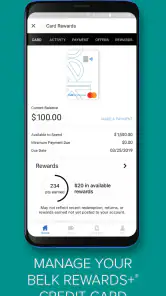
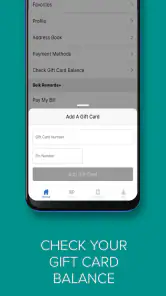
Once you’ve found your must-have items, adding them to your cart and checking out is seamless. The app supports various payment methods, including PayPal, which adds a layer of convenience for those who prefer digital wallets. Plus, the app securely stores your information, so you don't have to re-enter details every time you shop.
That convenience is also a reason to be deliberate about whose device and account are being used. If you are shopping with someone else, let them review the cart before the order is submitted, then keep payment and checkout with the person who intends to buy. This is a simple way to reduce accidental orders and make sure a shared decision is actually reflected in the final purchase.
If you are wondering whether the app makes more sense than simply using a retailer’s website, I’d base that choice on how often you browse Belk and whether you value having the shopping experience on your phone. The app is a natural fit for repeated browsing, quick product checks, and scanning while already in a store. For a one-off purchase, or when you prefer not to add another retailer app to your device, a web search or an in-person visit may be enough.
Who will appreciate it, and who may prefer another route
I’d recommend the app to people who already shop for several kinds of Belk merchandise and like browsing from home, as well as households where one person often researches purchases for others. It has an average rating of 4.0 from around 19,000 ratings, and it has been installed over a million times. Those figures suggest a well-established shopping option, though they don’t guarantee that every shopper will like its layout or find the items they want.
I’d skip it if you mainly want a general marketplace for comparing a huge range of unrelated sellers, or if you prefer to inspect every purchase in person before choosing. It may also be more app than you need if you only make an occasional, narrowly defined purchase and would rather search the web once than keep a retailer-specific shopping app on your phone. The right choice depends on whether Belk’s range and browsing style suit your habits.
It is also not the best choice when a household cannot agree on what to buy and expects an app to settle the disagreement. The useful part is that it gives people items to discuss; deciding what matters most still takes a conversation. For a purchase where fit, texture, or appearance in the room is decisive, seeing the product physically may be more valuable than browsing more options on a screen.
For households with children, I’d keep the distinction between browsing and buying especially clear. The Everyone rating describes the app’s content age category, not a reason to hand over an adult account or payment method. A child can participate in choosing a gift or looking at styles with an adult, but the responsible buyer should retain control of the order. That boundary is sensible for any shopping app and particularly important on a device used by more than one person.
The app’s free price makes trying it a low-commitment way to see whether Belk’s selection suits your shopping habits. I’d still think about the value of keeping a retailer-specific app installed: if you often browse its departments, quick access may be worthwhile; if your shopping is infrequent, a browser may keep your phone simpler. Neither choice is automatically better—the deciding factor is whether the app supports a routine you actually have.
A household verdict
In conclusion, the Belk – Shopping App is a solid choice for anyone looking to simplify their shopping habits. It combines convenience, efficiency, and a personalized touch that makes the shopping experience enjoyable. Whether you’re hunting for the latest fashion trends or just looking to snag a deal, this app has got you covered. So, if you haven't yet, give it a whirl and see how it transforms your shopping game!
Happy shopping, and may your virtual carts be ever full!
Belk – Shopping App Frequently Asked Questions
Is the Belk Shopping App suitable for first-time Belk shoppers?
Yes. The app gives first-time shoppers a mobile place to explore Belk’s shopping categories, including fashion, shoes, home goods, designer handbags, beauty, and more. You can browse before deciding whether to buy, which makes it useful for getting familiar with the range of products. The app is free to download, so you can explore it without paying an app fee.
Who develops the Belk Shopping App, and what is it for?
The Belk Shopping App is developed by Belk and belongs to the shopping category. Its purpose is to let customers browse and shop for products through a mobile app. The store summary highlights fashion, shoes, home, designer handbags, beauty, and more, so it brings several types of shopping together in one place rather than focusing on a single product category.
What products can I browse in the Belk Shopping App?
The Belk Shopping App is for shopping across fashion, shoes, home goods, designer handbags, beauty, and more. It brings these departments together in one mobile experience, so you can browse different kinds of products without switching between separate apps. If you are interested in a particular item, explore the relevant category and review its details before deciding whether to purchase.
What devices can run the Belk Shopping App?
The Belk Shopping App is available for Android devices running Android 10 or later. Before downloading, check your device’s operating-system version in its settings to make sure it meets that requirement. The app is free to download, and its age rating is Everyone. If your device is compatible, you can install the app and browse Belk’s shopping categories from your phone or tablet.
What is Belk Shopping App?
Belk Shopping App is a mobile application designed to enhance your shopping experience by providing an easy and convenient way to browse, shop, and purchase products from Belk, a popular department store chain in the United States. The app offers a wide range of products, including clothing, accessories, beauty products, and home goods, allowing users to shop from the comfort of their own homes.
Pros
- Wide variety of products available.
- User-friendly interface.
- Frequent sales and discounts.
- Fast and reliable delivery.
- Secure payment options.
Cons
- Limited customer support.
- App occasionally crashes.
- High shipping fees for some items.
- Limited international shipping.
- Inconsistent product quality.

- Category
- Shopping
- Version
- 59.0.3











