Autotrader: Shop Cars For Sale
- 11.60K
- 4.4
- Installs
- 5.00M
- Price
- Free

Screenshots


Analysis by Reviewed
Car shopping on a phone is useful right up until a slow connection turns a promising listing into a blank screen. I judge a marketplace app not just by how many cars it can show, but by whether it helps me make sensible decisions between errands, at home, and when I’m ready to contact a seller. Autotrader: Shop Cars For Sale is built around browsing new and used cars, and its strongest role is helping me narrow a broad search before I commit time to a visit.
Where a connection makes the difference
Searching, opening listings, viewing photos, and contacting sellers all depend on information moving between the app and its services. On a reliable connection, that makes it practical to compare cars from the sofa or check a saved search during a break. If reception is weak, I would avoid treating a listing as something I can fully inspect later without a connection; it is better to note the key details while the page is available and revisit it when service improves.
For a realistic weekday workflow, I might set a make, model, and budget at home, then check a few candidate listings while waiting for an appointment. Rather than sending a rushed message from a crowded place, I can shortlist the cars and contact sellers once I have time to ask useful questions. That small separation between browsing and outreach can make the search calmer and more deliberate.
Your Personal Car Shopping Assistant
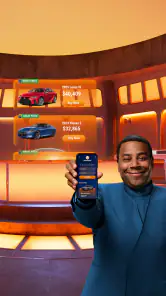
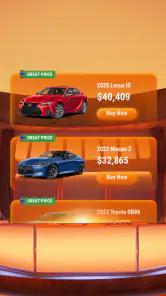
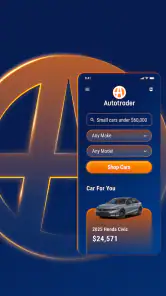
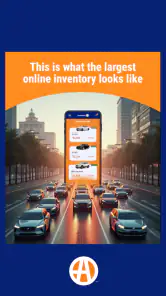
The moment you open Autotrader: Shop Cars For Sale, you're greeted with a sleek and intuitive interface. It's like having your personal assistant ready to cater to all your car needs. You can search for cars right from your phone, whether you’re lounging on your couch or sneaking a peek during your lunch break. The app offers a wide range of filters - from make and model to price range and even mileage. It’s like having the power of a thousand dealerships right in your pocket!
Features That Stand Out
One of the first things that caught my eye was the app's ability to provide personalized results based on my preferences. You can save your favorite searches, making it easier to compare different options. Plus, the app alerts you about price drops or new listings, so you never miss out on a great deal. It's like having a car-savvy friend whispering in your ear, "Hey, check this out!"
Latest News
Another nifty feature is the payment calculator. This little tool allows you to estimate your monthly payments, which is super handy for budgeting. Gone are the days of surprise expenses. Now, you can plan ahead and know exactly what you’re getting into financially.
Making a shortlist that holds up
A saved search is most useful when it reflects a real decision, not a vague wish list. I would choose a sensible mileage ceiling and price range first, then save a couple of searches that represent different compromises—for example, a newer car with fewer miles versus an older one with a lower asking price. That makes incoming listings easier to judge against a consistent baseline instead of reacting to whichever car happens to look appealing that day.
I’d also treat the payment calculator as a planning aid, not a complete ownership budget. A monthly estimate can help me see whether a listing is worth exploring, but it does not replace checking the full cost of buying and running a particular vehicle. The practical move is to use the estimate to narrow options, then verify the details that matter to my finances before making a commitment.
When a phone is the right tool
The app suits people who want to scan a broad set of new and used listings without beginning at one dealership’s inventory. That is especially handy if I’m still deciding between several makes or trying to understand what is available in my price range. By contrast, someone who has already chosen a specific local dealer may find that dealer’s own inventory is a quicker route to its current stock and direct sales process.
Compared with general classified marketplaces, Autotrader’s car-focused search and filters make it easier to organize a vehicle hunt around make, model, price, and mileage. The trade-off is that no search tool can replace checking the individual listing carefully or assessing a car in person. I would use it to build a shortlist, not as proof that a vehicle is in the condition I expect.
Seamless User Experience
What I truly appreciate about this app is its user-friendly design. Navigating through the app is a breeze, even for someone who isn’t exactly tech-savvy. The images are high-quality, and the detailed descriptions make it easy to get a feel for the car without seeing it in person. Plus, the ability to contact sellers directly through the app is a game-changer. No more awkward phone calls or emails - just a simple tap, and you’re connected.
And let’s not forget about the comprehensive reviews from other users, which provide insights that you won’t find in a standard car listing. It’s like having a community of car enthusiasts sharing their two cents, helping you make a more informed decision.
Using it carefully on the move
Photos and descriptions can help me eliminate poor matches, but I would still check whether a seller has answered the practical questions that affect a viewing: whether the car is still available, what its history is, and whether I can inspect it at a convenient time. A useful habit is to compare those details across my shortlist before arranging travel. It keeps a polished listing from getting more weight than the facts I actually need.
If a page or image stalls, I would first check whether the connection has recovered, then reopen the listing or return to the saved search and try again. I would avoid repeatedly tapping contact or assuming a message went through if the app has not confirmed the action. For data-conscious browsing, narrowing the search before opening many photo-heavy listings is a sensible way to keep the session focused, especially when I’m away from Wi-Fi.
From browsing to a useful seller conversation
Once I have a short list, I’d use each listing as a prompt for a focused conversation rather than treating its description as the whole story. I’d note what is clear, what is vague, and what needs an answer before travelling. For instance, if two cars look similar on paper, the one with a seller who can answer questions plainly may be easier to evaluate than the one with more appealing photos but less useful detail. That is not a judgment about the vehicle itself; it is a way to spend my time wisely.
I would also avoid contacting several sellers with the same hurried message. A brief, specific question tied to a listing makes it easier to compare replies and keep track of which car each conversation concerns. If I am checking options in short bursts, I can jot down the model, asking price, and my next question outside the conversation so I do not confuse one candidate with another. The app helps organize discovery, but the buyer still has to keep the decision process organized.
What to check before arranging a visit
A listing can answer some early questions while leaving the important ones for the seller or an in-person inspection. Before setting off, I would confirm the car is still available, agree on a time, and ask what documentation or vehicle-history information can be reviewed. I would also make sure the location and viewing plan are clear. Those checks are especially worthwhile when a trip takes time or involves coordinating with someone else.
For a first-time buyer, this extra step can prevent a common mistake: falling in love with a picture and treating every other detail as a formality. I’d use the app to narrow the field, then slow down at the point where a real financial decision begins. A promising listing is a reason to investigate, not a guarantee about condition, ownership costs, or suitability.
Choosing between broad search and direct inventory
The best alternative depends on how settled my requirements are. If I am comparing types of cars and still learning what my budget can reach, a marketplace with car-specific filters is a more natural starting point than visiting dealer pages one by one. If I already know the exact model and want to check a nearby dealer’s stock or arrange a conversation through its own process, going directly to that dealer may take fewer steps.
General classifieds can be useful when I want to look across a wider range of local listings, but the experience may ask me to do more work separating relevant cars from unrelated posts. Autotrader’s focused search makes the browsing task feel more structured, yet it does not remove the need to verify an individual seller or listing. I see it as a strong discovery tool, not a replacement for every other part of buying a car.
Who should use it—and who may not need it
I’d recommend this app to a buyer at the discovery stage, especially someone weighing different models, price points, or mileage levels and wanting to keep promising options together. It can also help a seller understand the wider shopping context buyers are comparing against. If you are only looking for a particular dealer’s stock, need an immediate in-person appraisal, or prefer to research cars without relying on a network connection, another route may suit you better.
It is also less useful for someone who wants a complete buying decision made on a phone. Browsing can show what deserves attention, but it cannot tell me how a specific vehicle feels on a test drive or settle every question about its condition. I would pair the app with careful seller conversations and an inspection process suited to the car. That makes it most valuable as one stage of a purchase, rather than the purchase process by itself.
Autotrader, Inc. develops the app, which is free and rated for Everyone. It has an average rating of 4.4 from around 39,000 ratings, and more than 5 million installs. Version 4.24.0 supports devices running Android 9 or later. Those details fit its role as an established mobile option for everyday car research, though the best results still come from combining its search tools with careful checks of each listing.
Final Thoughts
In the end, the Autotrader: Shop Cars For Sale app is a must-have for anyone in the market for a new ride. It’s convenient, comprehensive, and, honestly, just makes car shopping fun! Whether you’re a first-time buyer or a seasoned car enthusiast, this app has something for everyone. So why not give it a spin? You might just find your dream car without even leaving your home!
Autotrader: Shop Cars For Sale Frequently Asked Questions
Do I need an Autotrader account to browse car listings?
You can use Autotrader to explore car listings and compare available options as part of your shopping research. Creating an account may be useful for features such as saving favorite listings or managing searches, but you can start by browsing to see whether the app fits your needs. The app is free to download.
How much storage space does Autotrader need, and will it work on my phone?
Autotrader is a mobile app for buying and selling cars, and it requires a device running operating-system version 9 or later. If your phone meets that requirement, you can look for the app in its app store and check the installation details shown there. It is free to download and is rated for a general audience.
Can I contact a seller directly through Autotrader?
Autotrader is intended to help people shop for cars and connect with sellers, so it can support the process of following up on a vehicle that interests you. Review the listing details and the contact options presented for that vehicle, then communicate with the seller to ask questions or arrange next steps. Listings and available options can vary.
Does Autotrader include cars from dealerships as well as private sellers?
Autotrader is an online solution for buying and selling new and used cars, with vehicle listings that users can browse and compare. The seller and the details available can differ from one listing to another, so check each vehicle’s listing to understand who is offering it and how to make contact. This can help you focus your search.
Is Autotrader: Shop Cars For Sale available on both Android and iOS?
Autotrader: Shop Cars For Sale is a mobile app for shopping for cars, so you can look for it in the app store on your device. Before downloading, check that your device meets the app’s operating-system requirement; the app requires version 9 or later. The download is free, and the app is intended for a general audience.
Pros
- Wide selection of vehicles available.
- Easy-to-use interface for browsing.
- Detailed car information provided.
- Advanced search filters enhance usability.
- Useful buyer and seller resources.
Cons
- Limited private seller listings.
- Some features require account creation.
- Occasional app crashes reported.
- Geographic limitations on listings.
- Limited customer support availability.

- Category
- Auto & Vehicles
- Version
- 4.24.0











