Autolist: Used Car Marketplace
- 9.68K
- 4.5
- Installs
- 5.00M
- Price
- Free

Screenshots


Analysis by Reviewed
When a car search feels overwhelming, I find it helps to separate browsing from deciding. Autolist: Used Car Marketplace is an Auto & Vehicles app from CarGurus, Inc. that puts used-car listings in one place so I can narrow down possibilities before contacting a seller. It is free, rated for Everyone, and has a 4.5 average from around 31,000 ratings. That makes it easy to try as a shopping companion, though I still treat any listing as a starting point rather than a guarantee about a vehicle.
Where a car search can get stuck
The hardest part of used-car shopping is often not finding a car, but deciding which listings deserve attention. A long list of loosely matching vehicles can make it tempting to focus on one attractive photo or a low asking price. I get more value from Autolist when I begin with a few practical priorities—body style, price range, and the features I genuinely need—then refine the search rather than trying to specify every detail immediately.
That approach also helps when a search returns too few options. I would relax one preference at a time, such as model year or mileage, instead of removing several filters at once and losing track of what changed. If a particular vehicle seems unusually appealing, I compare it with similar listings before contacting the seller. A price comparison can help frame the asking price, but it cannot tell me whether that specific car has been maintained well or suits my needs.
Getting Started with Autolist
First things first, downloading the Autolist app is a breeze. It’s available on both Android and iOS, so no one’s left out. Once installed, you’re greeted with a clean and intuitive interface. The app doesn’t waste any time; it jumps straight into helping you find the car of your dreams. The current version is 13.61.1, and the app has passed five million installs, so it is a well-established option for browsing rather than a niche listing tool.
Setup checks that make searches more useful
Before building a shortlist, I would check that the selected location makes sense for how far I am actually willing to travel. A search that is too local can hide reasonable alternatives, while an overly broad area can fill the screen with cars that are impractical to inspect. I also make a note of the filters I chose; if results look sparse, that gives me a clear way to loosen the search instead of assuming the app has failed.
Latest News
For a first-time buyer, it is worth deciding in advance what counts as a deal-breaker and what is merely a preference. If a listing includes photos, dealer details, or a history report, I use those as prompts for questions, not as a substitute for checking the vehicle. Photos can show visible wear, but they cannot establish how a car drives. I would confirm important details with the seller and arrange an appropriate inspection before making a commitment.
Searching for Your Dream Car
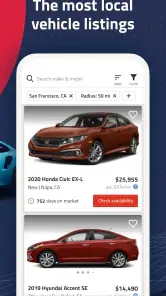
The search functionality is where Autolist truly shines. With a vast database of listings, you can filter your search by make, model, price, year, mileage, and more. I was impressed by how specific you can get with your search criteria. Looking for a red 2018 Honda Civic with less than 30,000 miles? You got it. The app’s algorithm is snappy and delivers results in seconds.
For a realistic weekday workflow, I might browse during a commute break, save a few plausible options, and return later when I can compare them calmly. Rather than messaging every seller immediately, I would first look for gaps between listings: differences in mileage, asking price, photos, or seller information. That makes follow-up questions more focused and helps avoid spending time on cars that already miss an essential requirement.
User-Friendly Features
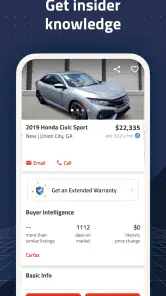
One of the standout features is the price analysis tool. It gives you an idea of whether a car is priced fairly compared to similar listings. This feature is a lifesaver if you’re like me and dread the thought of overpaying. There’s also a handy feature that allows you to save your favorite cars and get alerts when prices drop. It’s like having a personal car-buying assistant in your pocket.
I would treat a price indication as a comparison aid, not a verdict. Similar-looking vehicles can differ in condition, equipment, location, or seller circumstances, so a favorable comparison is a reason to investigate rather than rush. Saved listings are useful for a second reason: they let me track a small shortlist and notice when an option changes, instead of relying on memory after browsing many near-identical cars.
Detailed Listings
Each car listing is packed with details. From high-resolution photos to vehicle history reports, you get an in-depth look at each option. I found the photos particularly useful, as they provide a good sense of the car’s condition. The app even includes dealer ratings and reviews, which is great for getting a feel for whom you’re buying from.
When a listing seems promising, I would check whether the photos show the areas I care about and write down what remains unclear. A missing view or vague description is not proof of a problem, but it gives me a specific point to ask about. I would also compare the listing details with what the seller tells me; if the answers do not line up, I would pause and verify before arranging travel or putting money down.
Making the Purchase
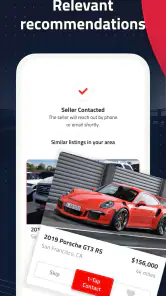
When you’re ready to take the plunge, Autolist makes it easy to connect with sellers. You can contact dealers directly through the app, and some listings even offer the option to get pre-qualified for financing. This seamless integration of steps takes a lot of the stress out of buying a car.
Contacting a seller is a useful handoff, not the end of the buying process. I would ask whether the vehicle is still available, confirm its current condition and the details that matter to me, and agree on what I need to see before visiting. If financing is relevant, I would compare the terms carefully rather than treating pre-qualification as a final loan decision. The app helps me discover and pursue options; the final checks still belong to me.
When a different approach makes more sense
Compared with searching one dealer’s inventory at a time, a marketplace is convenient for scanning multiple possibilities and building a shortlist. It is less helpful if I already know the exact vehicle and want to deal only with a particular seller, or if I expect an app to inspect a car on my behalf. Someone who prefers a face-to-face conversation from the outset may be happier starting with a local dealer. And if I am only casually curious, saved searches and price alerts may be more attention than I want; a simple occasional browse is enough.
If the app appears to show few suitable cars, I would first revisit location and search filters, then try again later rather than assume the marketplace is broken. If a listing is unavailable or a seller does not respond, I would move to another option and avoid sharing sensitive information or sending money before independently confirming the seller and vehicle. Those are sensible steps for any online car search, not a special workaround.
Making a shortlist that survives a busy week
A saved car is not automatically a serious candidate, so I would keep the shortlist small enough to review properly. For each option, I note why it made the cut, what I still need to confirm, and whether its location is realistic. This simple habit makes it easier to distinguish a genuinely suitable vehicle from one I saved just because its photos looked appealing. It also helps if I return after several days and no longer remember which listing had the feature I cared about.
When two candidates appear close, I compare them on the same few criteria rather than switching between whatever details happen to stand out. For example, I would put asking price, mileage, equipment, distance, and unanswered questions side by side. That does not produce a definitive ranking—condition and service history still matter—but it can reveal that a slightly less exciting listing is the more practical one to inspect first.
There is a trade-off to broad browsing: seeing more choices can improve perspective, but it can also encourage endless comparison. I would set a point at which I contact sellers about the strongest candidates instead of waiting for a perfect listing. If the market changes or none of the options checks out, I can adjust the search then; a marketplace is most useful when it supports a decision, not when it postpones one.
When results or listings do not behave as expected
If a search seems stuck on an old set of results, I would first check the selected location and filters, then refresh the search and give it another try. A narrow combination of model, year, mileage, and price can naturally leave very little to browse. Changing one condition at a time is a better diagnostic than clearing everything, because it shows which requirement is restricting the results.
If a saved option disappears or a seller does not reply, I would not assume that the app can restore the opportunity. Listings and availability can change, and the practical response is to move on while keeping another candidate in view. I would also make sure I am using the current app version available to me and that my device meets the Android requirement; these are sensible first checks before treating an unexpected display or loading issue as a marketplace-wide problem.
Some friction is outside the app’s control. A seller may update information late, respond slowly, or describe a vehicle differently in conversation than the listing does. In that situation, I would rely on clear confirmation from the seller and inspect the car before making a decision. The app organizes discovery; it cannot make a private seller responsive or guarantee that every description is complete.
Who benefits most from this kind of marketplace
I see the strongest fit for shoppers who are still comparing makes or models, want to scan listings from multiple sellers, and are willing to do the follow-up work themselves. It can also suit someone who has a rough budget and wants to learn what trade-offs are available locally before settling on one exact car. A person who already has a mechanic or trusted inspection process can use the app to identify candidates, then apply that process offline.
It is a weaker fit for anyone who wants a single guaranteed recommendation, a complete purchase handled without direct seller contact, or certainty based only on a listing. It may also be overkill for a shopper who has already picked a specific vehicle at a known dealership and simply wants that dealer’s current stock. In those cases, going directly to the seller can be quicker and avoids managing a wider comparison set.
Compared with general classifieds, Autolist’s vehicle-focused search and listing context can make browsing feel more directed. Compared with a single dealer’s site, a multi-seller marketplace is better for surveying alternatives but may require more effort to verify details and coordinate visits. I would use those sources together when the purchase matters: one tool to discover possibilities, then direct conversations and independent checks to decide whether a particular car is worth pursuing.
In conclusion, Autolist: Used Car Marketplace is a must-have tool for anyone in the market for a used car. Its comprehensive search filters, user-friendly interface, and invaluable pricing tools make it a standout in the realm of car-buying apps. So, if you're hunting for your next ride, give Autolist a spin—you might just find the car of your dreams without ever leaving your couch.
My practical verdict
With a 4.5 average and around 9,700 written reviews, Autolist has attracted substantial feedback, and its free access makes it straightforward to test whether its browsing style suits me. It was released on December 10, 2014, and requires Android 8.0 or later. I would recommend it to someone comparing used cars across several sellers who is comfortable doing their own checks. I would skip it as my only resource if I need a guaranteed assessment, a completed purchase entirely inside an app, or a highly specific vehicle that I would rather source directly. Used thoughtfully, it is a practical way to organize the search—not a replacement for seeing, checking, and questioning the car in person.
Autolist: Used Car Marketplace Frequently Asked Questions
Can I search for both cars and trucks on Autolist?
Yes. Autolist is focused on local used cars and trucks, so it can be useful if you are comparing different kinds of vehicles rather than shopping for a car alone. You can browse listings and weigh the options that fit your needs. Before contacting a seller, review each listing carefully and confirm the vehicle details directly.
Who develops Autolist, and what kind of app is it?
Autolist is an Auto & Vehicles app developed by CarGurus, Inc. Its purpose is to help people explore local used-car and truck listings in one place. If you are looking for a marketplace app rather than a general automotive reference tool, its focus may suit your shopping process. You can download it for free and see whether its approach works for you.
Can I use Autolist to compare vehicles before contacting a seller?
Autolist is designed to bring used-car listings together so you can browse and compare possibilities before reaching out. Take time to look over the information in each listing and consider how the options match your needs. Comparing listings can help you narrow your choices, but it is still sensible to confirm important details with the seller before making a decision.
Does Autolist focus on local used vehicles?
Yes. Autolist’s focus is finding local used cars and trucks, which can help shoppers explore nearby marketplace options. The app aggregates listings from different sources, giving you a place to browse and compare vehicles. As with any marketplace, check the location and details in each listing and contact the seller to confirm that the vehicle is still available.
Is Autolist available on iPhone as well as Android?
Autolist is an app for browsing used-car and truck listings, and it is available for Android devices running version 8.0 or later. Its content rating is Everyone, making it suitable for a broad audience. If you are choosing a device to download it on, check the app store on your phone for its current availability and compatibility details.
Pros
- Wide selection of used cars available.
- User-friendly interface simplifies searches.
- Detailed car history reports accessible.
- Advanced filtering options for precision.
- Active customer support for inquiries.
Cons
- Limited to used cars
- no new listings.
- Some listings may be outdated or sold.
- App occasionally experiences slow loading.
- Notifications can become overwhelming.
- Limited financing options within app.

- Category
- Auto & Vehicles
- Version
- 13.61.1











