AutoExpreso Móvil
- 474.00
- 3.6
- Installs
- 500.00K
- Price
- Free

Screenshots
Analysis by Reviewed
For drivers who use Puerto Rico’s toll roads, the useful question is not just whether an account can be managed on a phone, but whether checking it can become a dependable part of getting ready to drive. AutoExpreso Móvil is built for that narrow job: keeping an electronic toll account within reach. I see its value less as a replacement for every driving app and more as a way to make toll-related checks easier to remember and repeat.
Who benefits from keeping it close
The clearest fit is someone whose regular commute, work route, or family routine includes toll roads. For that driver, having account management on a phone can make a quick balance check part of the same pre-trip habit as checking the weather or confirming the destination. It can also help a household member who handles toll funds stay oriented without treating toll expenses as an afterthought.
It is less compelling for a driver who uses toll roads only occasionally, does not manage an AutoExpreso account, or already has a routine that works well without mobile account access. In those cases, installing a dedicated app may add another place to check without solving a frequent problem. I would decide based on how often tolls affect your actual driving, not on the assumption that every motorist needs a separate toll tool.
A realistic day-to-day routine
Imagine a weekday with a commute followed by errands on the other side of town. Before leaving home, I’d check the account while parked, confirm that the balance looks suitable for the planned drive, and consider whether a manual top-up is needed. If I’m unfamiliar with the route, I’d consult the toll-station map as a planning check, then use my regular navigation app for directions and traffic decisions.
After the trip, reviewing recent transactions while the drive is still easy to remember gives me a practical chance to notice a charge that seems unexpected. I would make a note of anything I need to investigate rather than assume a transaction list is a full personal expense report. This small separation—app for account oversight, personal records for broader budgeting—keeps the tool useful without asking it to do more than toll management.
Latest News
Small habits that prevent avoidable mistakes
One useful habit is to check the account details before a first recharge, especially if another person in the household helps manage the vehicle. A quick confirmation that the account is the one you intend to fund is a better safeguard than relying on memory when several drivers or vehicles are involved. I’d also review the selected payment method before choosing automatic recharging, so the convenience does not come at the cost of losing track of how funds are added.
Another practical distinction is between a warning and a plan. A low-balance notification can be a helpful prompt, but I would not wait for one just before a toll-heavy journey. Checking earlier gives you time to decide whether to add funds manually or leave an existing automatic arrangement in place. These are not complicated steps; their value comes from doing them consistently while parked, rather than trying to sort out account details during a rushed departure.
For people who share responsibility for toll expenses, a simple agreement can reduce confusion: decide who checks the balance, who handles a top-up, and whether automatic recharging is acceptable. The app can support that routine, but it does not remove the need for clear communication between drivers. This matters most when one person uses the vehicle and another person is responsible for the account or payment method.
How it compares with other driving tools
Compared with a general navigation app, this one has a different job. Navigation is where I would look for directions, traffic conditions, and route choices; AutoExpreso Móvil is for the toll account itself. The map can help me understand where toll stations fall in a planned trip, but it should not be treated as a substitute for turn-by-turn guidance or a way to find the best route.
Compared with handling toll matters through a less frequent, non-mobile routine, a phone-based account tool can make quick checks easier to fit into the day. The trade-off is that a dedicated app becomes another account-related tool to keep track of, and its usefulness depends on having the right account information available. Drivers who prefer to keep all vehicle spending in a single budgeting system may still need that system for the wider picture, even if they use this app for toll-specific checks.
I would not use it as a complete commuting organizer or vehicle-cost tracker. It serves drivers best when expectations stay focused: use it to oversee the electronic toll account, and keep route planning, general trip records, and broader budgeting in the tools suited to those tasks. That division is not a weakness so much as a sensible boundary, provided you want a separate place for toll management.
What to consider before relying on it
A common practical question is whether it makes sense to use automatic or manual recharging. I’d choose automatic recharging only if I’m comfortable with the linked payment method and want top-ups to happen without making a fresh decision each time. Manual recharging is a better match for someone who wants to control each addition to the account or keep a closer eye on the timing of toll-related spending.
Another question is whether the map replaces a route planner. I would say no: it is useful for toll-station awareness, while a navigation tool remains the better choice for the actual journey. And if a charge looks unfamiliar, the transaction history is a sensible place to start reviewing it, but I would avoid drawing conclusions from a quick glance alone. Keeping the date and trip in mind can make that review more meaningful.
Drivers may also wonder whether they need to keep the app open while driving. My approach would be to handle account checks and any recharge while parked, then leave the phone alone on the road. The app’s purpose is preparation and follow-up, not something that should compete for attention behind the wheel. That simple boundary makes the tool easier to use responsibly.
Getting Started with AutoExpreso Móvil
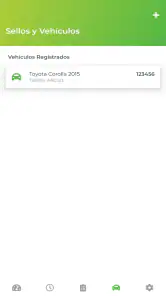
First off, if you’re like me and spend a good chunk of your day on the road, AutoExpreso Móvil can be a real lifesaver. It's available on both Android and iOS, so downloading it was a breeze. Once you’ve got it installed, setting up your account is straightforward. You’ll need your AutoExpreso account number, which links directly to your vehicle’s transponder. Once that’s done, you’re pretty much set to go!
User Interface and Experience
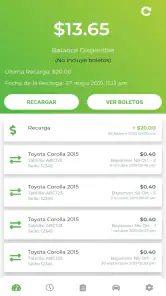
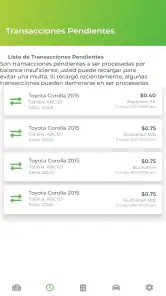
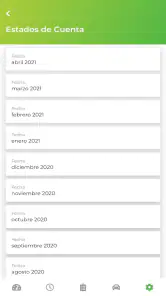
One of the first things I noticed about AutoExpreso Móvil is its clean and intuitive user interface. The design is minimalistic, which I appreciate because it makes navigation simple. The main dashboard gives you an overview of your account balance and recent transactions. With just a few taps, you can see a detailed list of all your toll charges. It's user-friendly even if you’re not tech-savvy, and that’s a big plus.
My most useful habit is to check the balance while I’m parked before a day that includes several toll roads, rather than opening the app at the last moment. A quick look at recent charges can also help me spot an unexpected toll entry while the trip is still fresh in my mind. I treat that record as a practical reference, not a substitute for keeping my own travel or expense notes when I need a fuller picture.
Managing Your Account
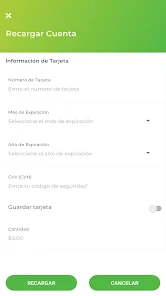
The app excels in managing toll payments, which is its primary function. I found that recharging my account was incredibly easy. You can link a credit or debit card, and with a few clicks, add funds to your account. The app sends notifications when your balance is low, which is handy to avoid any unexpected surprises on the road. Plus, it keeps a record of all transactions, so you can always go back and check your toll spending.
For a repeatable routine, I’d check that the account details and payment method are current before relying on a recharge, then use the balance and transaction history as a quick pre-drive review. Automatic recharging is convenient, but it also means the account can add funds without a fresh decision each time. I’d choose that option only if I’m comfortable with the linked card and the way recurring top-ups fit my budget; otherwise, manual recharges offer more control.
Additional Features
Beyond the basics, AutoExpreso Móvil includes some nifty features. For instance, it offers a map that shows all the toll stations across Puerto Rico. This feature can be especially helpful if you’re planning a trip and want to avoid any toll surprises. I also liked the option to set up automatic recharges, ensuring that your account always has sufficient funds.
The map is most useful as a planning aid, not as a replacement for route guidance. Before setting out somewhere unfamiliar, I’d use it to understand where toll stations fit into the trip, then rely on my usual navigation method for the actual drive. That distinction matters: this app is designed around the toll account, while a general navigation app is better for turn-by-turn directions, traffic choices, and comparing routes.
A Better Fit for Some Drivers Than Others
I’d recommend the app most to people who regularly drive through tolls in Puerto Rico and want their account balance, charges, and recharging options close at hand. Imagine leaving for a workday with several errands: checking the balance at home, reviewing the route’s toll stations, and topping up before departure is a simple routine that can reduce last-minute uncertainty. Someone who rarely uses toll roads may get little value from keeping a dedicated toll-management app on their phone.
It also isn’t a replacement for every account task or driving tool. If you need broad trip planning, navigation, or a complete vehicle expense system, those usual alternatives serve a different purpose and may be the better choice alongside—or instead of—this app. I’d keep toll-account management separate from route planning rather than expect one focused app to do both jobs.
Practical Limits and Account Habits
Because the account is tied to a vehicle transponder, I’d take care during setup to use the right account information and verify that I’m looking at the intended account before adding funds. That small check is especially worthwhile for households with more than one vehicle or for anyone who helps manage another driver’s toll account. It is easier to build that check into the routine than to sort out a mismatch after a charge or recharge.
The app’s value also depends on having access to the account information and a payment method you’re willing to use for recharging. Notifications and transaction records help with routine oversight, but I wouldn’t make them my only safeguard: checking the balance before a longer toll-heavy drive is still a sensible habit. If you prefer not to link a card or want to make every top-up decision manually, the automatic option may not suit your style.
Overall Impressions
All in all, AutoExpreso Móvil is a must-have app for anyone who drives through tolls regularly in Puerto Rico. Its ease of use, combined with practical features like automatic recharges and transaction tracking, makes it invaluable. While it’s primarily focused on toll management, the additional features add to its overall functionality, making commuting less of a hassle. If you haven’t tried it yet, I’d say give it a go—you might just find it makes your daily drive a little smoother!
Technology Partners develops this free Auto & Vehicles app, which is rated for Everyone and has reached over 500,000 installs. Its average rating is 3.6 from around 2,600 ratings, with 474 written reviews. Version 1.0.51 supports Android 6.0 and newer. Those figures suggest a useful, established niche service, though the rating is a reminder that experiences are not uniformly positive; I’d approach it as a practical account companion, not a guarantee that every interaction will feel seamless.
My verdict is straightforward: if tolls are part of your normal driving in Puerto Rico, make the app part of a calm, repeatable routine—check the account before the trip, review charges afterward, and choose manual or automatic recharging based on how much control you want. If toll roads are only an occasional exception, or you primarily need navigation rather than account management, your existing tools may be enough. For regular users, its focused role is precisely what makes it worth considering.
AutoExpreso Móvil Frequently Asked Questions
What should I check before installing AutoExpreso Móvil on my phone?
AutoExpreso Móvil is an Auto & Vehicles app for managing an electronic toll account in Puerto Rico. Before downloading, check that your device runs Android 6.0 or later if you are using Android. The app is free and rated for Everyone, so it may suit drivers looking for a mobile way to manage their toll account.
Who develops AutoExpreso Móvil, and what is its current version?
AutoExpreso Móvil is developed by Technology Partners. Its current version is 1.0.51, which can help you identify the app when comparing it with similarly named results in an app store. As with any app, it is sensible to install updates when available so you can use the current release and its supported features.
What is AutoExpreso Móvil and how does it work?
AutoExpreso Móvil is a mobile application designed to facilitate the management of toll payments in Puerto Rico. Users can link their toll accounts to the app, enabling them to view their balance, track toll transactions, and recharge their account directly from their mobile device. The app offers a convenient way to manage toll payments without needing to visit a physical location.
How can I download AutoExpreso Móvil?
AutoExpreso Móvil is available for download on both Android and iOS platforms. Users can find the app on the Google Play Store for Android devices and the Apple App Store for iOS devices. Simply search for 'AutoExpreso Móvil', download, and install the app on your device to start managing your toll account effortlessly.
Is there a fee for using the AutoExpreso Móvil app?
No, there is no additional fee for downloading or using the AutoExpreso Móvil app. The app is free to download and use. However, users must ensure their toll accounts are funded to facilitate toll payments. Any charges incurred will be directly related to toll usage rather than app use.
Pros
- User-friendly interface enhances navigation.
- Real-time balance updates for convenience.
- Secure payment gateway ensures safety.
- Quick access to transaction history.
- Efficient customer support available.
Cons
- Limited features for advanced users.
- Occasional app crashes reported.
- Requires stable internet connection.
- Interface lacks customization options.
- No dark mode available.

- Category
- Auto & Vehicles
- Version
- 1.0.51











