

Applied Ballistics Quantum
- 411.00
- 4.6
- Installs
- 100.00K
- Price
- Free

Screenshots
Analysis by Reviewed
I tend to judge a ballistics app by what happens when I’m setting up, not by how impressive its calculations sound. Applied Ballistics Quantum is aimed at people who want more than a quick estimate, and that focus makes it useful—but also means there is a little more to think through than with a basic shooting calculator. I’d treat it as a technical tool to learn and check carefully, rather than something to rely on without understanding the inputs.
Where setup can feel demanding
The first hurdle is knowing what information to enter and whether it matches the equipment and conditions you’re working with. A detailed calculator is only as helpful as its inputs; a mistaken profile or overlooked setting can make a polished result misleading. I’d take time to review each field instead of rushing through setup just to get a number on screen.
That’s also why this app may feel like too much for someone who only wants a simple, occasional reference. If you’re new to the subject, expect to learn some terminology along the way. I find that worthwhile for a serious hobby, but not everyone wants a phone app to become another piece of technical homework.
Checks that make a session smoother
Before heading out, I’d confirm that the selected bullet profile actually corresponds to the ammunition in use and that any entered values are current. A profile library is a helpful starting point, not a reason to skip verification. Keeping a note of the configuration you used can also make it easier to spot a changed setting later and avoid rebuilding the same setup from memory.
In the field, I’d enter information methodically and pause when a result looks inconsistent with what I expect. Rather than adjusting several inputs at once, change one at a time and see what difference it makes. That habit is useful for learning which assumptions matter, and it makes troubleshooting much less confusing.
Recovering from a confusing result
If a calculation seems off, I’d first revisit the selected profile and the values I entered, then check whether I may have left an old setup active. Reopening the relevant screen and reviewing the inputs is a more sensible first step than assuming the app has failed. For a complicated question, comparing the setup with a trusted reference or asking an experienced shooter to review it is better than treating an unexplained result as certain.
It also helps to separate a display or workflow problem from a real-world mismatch. A phone can present a calculation clearly while the conditions or assumptions behind it are incomplete. I wouldn’t use a single app result as a substitute for safe judgment, established procedures, or appropriate training.
More From Our News Desk

 Gmail
GmailGmail in a Busy Inbox: Who Benefits Most?
From first account to crowded workday, Gmail earns its place through dependable search and flexible sorting—but its best fit depends on how much inbox maintenance you can tolerate.

 Prime Video
Switching to Prime Video: What Changes in Your Viewing Routine
Prime Video can make a compelling second home for streaming, but switching means learning a different catalog, rental layer, and route from browsing to playback.

 Universal TV Remote Control
Universal TV Remote Control Works Best as a Reliable Backup
A phone remote earns its place through quick setup and reliable habits. Here is how to get more from Universal TV Remote Control—and where its limits show.

 Weather - By Xiaomi
Weather by Xiaomi Review: Clear at a Glance, Less Clear Up Close
Xiaomi’s weather app makes everyday forecasts quick to scan, but its calm surface can leave useful details and recovery paths harder to find than they should be.

 X
XX Under Pressure: Can It Recover When Posting Goes Wrong?
A resilience-focused review of X, examining setup, mistaken posts, interruptions, weak connections, and the gaps that matter when recovery needs to be dependable.

 Clash of Clans
Clash of Clans Is Won Between the Battles
Its raids are quick; its community is a long-term project of coordination, teaching, rivalry, and shared responsibility—with all the friction that entails.
Latest News



For a typical range day, I can imagine preparing a known setup at home, checking the selected profile before leaving, and using the app as a reference once I’m there. That is a more useful role than trying to create a complete setup in a hurry between shots. If you’re comparing it with a basic calculator, the extra depth is the point; if all you need is a quick, uncomplicated estimate, a simpler option may be easier to live with.
Getting Started with Applied Ballistics Quantum
From the get-go, the installation is a breeze. Once you fire up the app, you’re greeted with a sleek, intuitive interface. It’s like the app developers knew exactly what we needed—a clean, no-nonsense layout that doesn’t overwhelm you with information right off the bat.
Features That Hit the Bullseye
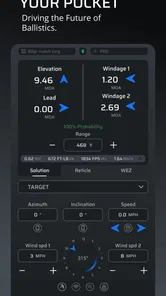
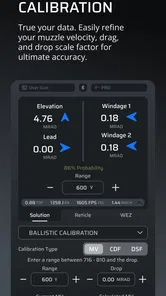
One of the standout features is its comprehensive ballistics calculator. It’s designed to compute all the crucial data you need for a perfect shot. Whether it’s calculating bullet trajectory, wind deflection, or velocity, the Applied Ballistics Quantum app has got you covered. And let me tell you, having this kind of precision in your pocket feels empowering!
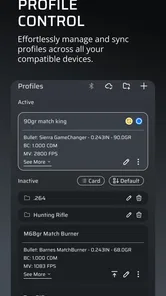
Another cool feature is the library of bullet profiles. It’s like having a ballistic encyclopedia at your fingertips! The app provides detailed data on a plethora of bullets, which is super handy for both amateurs and seasoned shooters.
User Experience & Accessibility
What I genuinely appreciate is the app’s commitment to user experience. The developers have clearly thought about accessibility, ensuring the app is usable for everyone. The navigation is smooth, and the functions are laid out logically, making it easy for users to find exactly what they’re looking for without any hassle.
This app is also pretty lightweight, so it doesn’t hog your phone’s resources. I didn’t notice any lag or crashes during my time with it, which is always a big plus in my book!
Making the most of profiles and repeat sessions
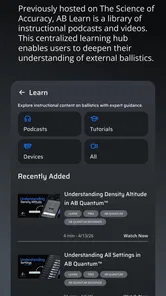
A useful way to approach a profile library is as a starting point for a careful comparison, not as a shortcut that settles every question. If two entries appear close, I’d resist choosing the one that merely looks familiar. I’d check the exact ammunition details I have available, keep a record of the choice, and avoid changing several related assumptions together. That makes later review much easier: I can tell whether a different result came from a deliberate change or from an unnoticed selection.
For someone who visits the range regularly, the app’s value is less about opening it once and more about building a repeatable preparation habit. I’d make a short written checklist outside the app: what setup I intend to use, which profile I selected, and which inputs I still need to confirm. That doesn’t replace the app; it makes the app’s calculations easier to interpret and reduces the chance of relying on memory when switching between setups.
There is a trade-off here. More reference detail can be useful when you are learning, but it can also slow down a session if you try to investigate every option while other people are waiting. I’d do the reading and profile review beforehand, then use the range visit to observe and check rather than to improvise a full configuration. If you cannot explain why an input belongs in a setup, I’d pause and ask someone qualified instead of treating a plausible-looking output as an answer.
A realistic day at the range
Imagine arriving with a familiar setup but noticing that the conditions differ from those you had in mind when preparing. I’d first make sure the app is still using the intended profile, then review the values that are relevant to the situation and change only what I can confidently establish. If a result shifts in a way I do not understand, I would not chase it by tapping through unrelated settings. I’d step back, compare my notes, and use safe, established range practice to decide what to do next.
That scenario shows why I see this as a planning and reference tool rather than an automatic decision-maker. It can help organize information and show the implications of the inputs, but it cannot make uncertain information reliable. A beginner may get more out of it by studying one setup carefully than by trying to use every available detail on the first visit.
It also answers a practical question: should you set it up at home or at the range? My preference is to do the unfamiliar work somewhere calm, then check the setup before using it outdoors. A quick review at the range is sensible; learning the interface and filling in a profile under time pressure is a poor way to avoid mistakes.
How it compares with simpler alternatives
In the sports-app category, the usual alternatives are a paper record, a basic calculator, or a more detailed reference tool. Paper is dependable for notes you have already checked, but it will not calculate a changing set of inputs for you. A simple calculator is easier to approach when you need only a quick estimate, while a specialist tool like this is more appealing when you want to explore profiles and understand how a set of assumptions affects a result.
That extra depth is not automatically an advantage. If you only need occasional, straightforward help, the additional setup and terminology may be needless friction. If you are studying ballistics or managing more than one carefully documented setup, having calculations and profile information in one place may be worth the learning curve. I’d choose based on how often I expect to check or compare information, not on the assumption that the most technical option is always the best one.
Another sensible question is whether the free download means every useful part is included. The app is free to install, while optional in-app purchases are offered at different prices. I’d look at the specific purchase description before paying and decide whether it addresses a need I actually have. The price range is broad enough that I would not make a purchase simply because I had reached a confusing point in setup; first I’d establish whether the issue is a missing capability, an incorrect input, or unfamiliarity with the workflow.
When the app may not be the cause
A confusing result does not always point to a software problem. The profile may not match the equipment, a value may be stale, or the assumptions behind a calculation may not reflect the current situation. I’d check those possibilities before reinstalling or repeatedly changing settings. If the screen itself behaves unexpectedly, closing and reopening the app and reviewing the same inputs again are reasonable first checks, but I would still treat the result cautiously until I understand what changed.
Phone compatibility is another practical check before downloading. Applied Ballistics Quantum is listed for iOS 8.0 or later, and version 3.4.17 is the current version. Its long availability, having been released on May 14, 2012, does not mean every older device will feel equally comfortable to use; I’d consider whether my own device and operating system can run it smoothly. The app is rated for Everyone, but its subject matter is technical, so the age label should not be mistaken for a promise that a young or inexperienced user will find the material easy.
There is also a difference between being able to open an app and being ready to interpret it responsibly. The developer, Applied Ballistics, positions this as a technical ballistics tool, and I think that makes sound judgment especially important. If the numbers do not make sense, the safest response is to slow down, verify the inputs, and seek instruction—not to keep adjusting values until the result looks reassuring.
Who it suits—and when I’d choose something else
Developed by Applied Ballistics, this free sports app has an average rating of 4.2 from around 1,500 ratings, with more than 50,000 installs. It is rated for Everyone, runs on iOS 8.0 or later, and version 3.4.17 is the current release. Some optional purchases range from $1.99 to $299.99 per item, so I’d check what a purchase covers before committing; the free download is a low-risk way to see whether the workflow suits you.
I’d recommend it most to a shooter who wants to understand and manage ballistic inputs, or to someone studying the subject who values a calculator alongside profile information. It is less compelling for casual users who rarely need these details, and it is not a substitute for instruction or sound range practice. Compared with a paper note or a very simple calculator, it can bring more reference material together; compared with those simpler alternatives, it asks more of you in setup and careful data entry.
One practical trade-off is that a library entry can save time, but it can also encourage a false sense of certainty if you select a similar-looking profile without checking it. I’d use the library to narrow down the right information, then verify that it fits the specific equipment and conditions at hand. For a new user, learning the app at home is a better plan than trying to decode unfamiliar fields during a busy session.
Overall Impressions
In conclusion, the Applied Ballistics Quantum app is a must-have for anyone serious about shooting sports or ballistics research. It’s not just an app; it’s a toolkit that can significantly enhance your shooting accuracy. I’d say it’s worth every penny, especially if you’re looking to up your game or delve deeper into the science of ballistics.
So, if you’ve got a curious mind or a passion for precision, give this app a shot. Pun intended!
Applied Ballistics Quantum Frequently Asked Questions
Is Applied Ballistics Quantum free to download, and are there optional purchases?
Applied Ballistics Quantum is free to download, so you can install it without paying an upfront price. The app also offers in-app purchases, with items ranging from around two dollars to around three hundred dollars. Consider what you need from the app before buying anything, and check the purchase details shown in the app store so you understand the cost of each option.
What kind of app is Applied Ballistics Quantum, and who develops it?
Applied Ballistics Quantum is a sports app developed by Applied Ballistics. Its short description is simply “Applied Ballistics Quantum,” while its broader purpose is reflected in its description as a state-of-the-art ballistics application. It is intended for people interested in ballistic calculations, especially shooters and hunters looking for tools to support precision shooting.
What is Applied Ballistics Quantum used for?
Applied Ballistics Quantum is a comprehensive ballistics calculator app designed for precision shooters and hunters. It provides detailed trajectory calculations, bullet performance data, and environmental condition adjustments to ensure accurate shooting solutions. The app is ideal for anyone who needs precise ballistic computations for long-range shooting scenarios.
Is Applied Ballistics Quantum suitable for beginners?
While Applied Ballistics Quantum offers advanced features that are highly beneficial for experienced shooters, beginners may find it complex due to its extensive data inputs and calculations. However, with some learning and practice, new users can also benefit greatly from its robust capabilities to improve their shooting accuracy.
What devices are compatible with Applied Ballistics Quantum?
Applied Ballistics Quantum is available for Android and iOS. On Android, it requires version 8.0 or later, so check your device’s operating system before downloading. The app is rated for Everyone, but its subject matter and detailed ballistic calculations are most relevant to users who are already interested in shooting or hunting.
Pros
- Accurate real-time ballistics calculations.
- User-friendly interface for easy navigation.
- Comprehensive bullet database included.
- Customizable environmental conditions.
- Supports multiple firearms and ammunition.
Cons
- Requires in-app purchases for full features.
- Complex for beginners to understand.
- Limited offline functionality.
- High battery consumption during use.
- Occasional app crashes reported.





