

Altimeter Variometer (Wear OS)
- 0.00
- 0.0
- Installs
- 50.00
- Price
- $18.99

Screenshots
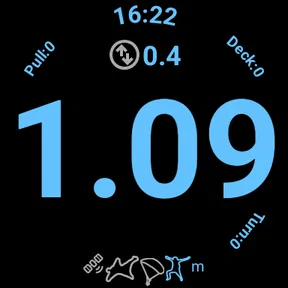
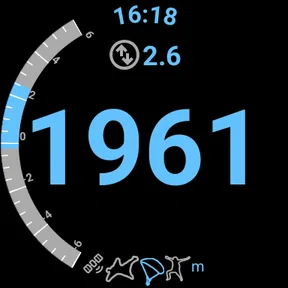
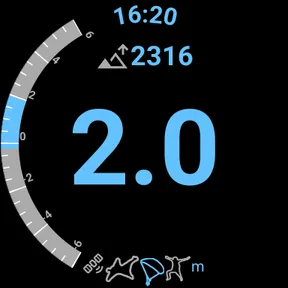
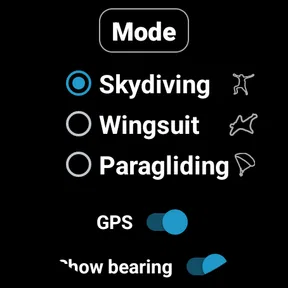
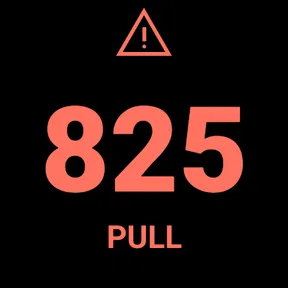
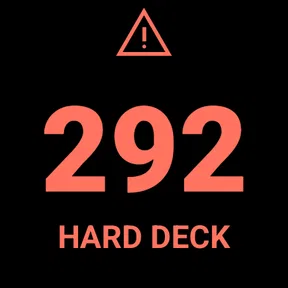
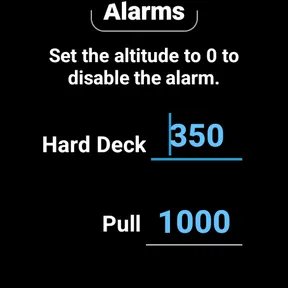
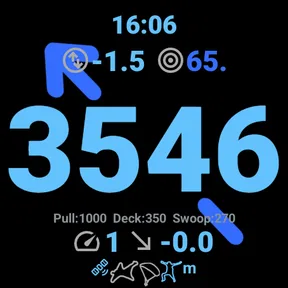
Analysis by Reviewed
When I choose a wrist instrument for flying or a mountain outing, I care less about a long feature list than about whether the readings are easy to check at the moment I need them. Altimeter Variometer (Wear OS) is a focused sports app by jeromej for people who want altitude and vertical-speed information on a Wear OS watch. Its appeal is the directness of that purpose; it is not trying to replace a map, flight computer, or full navigation setup.
That distinction matters before spending money. It is a paid app at $18.99, so I would consider how often I actually need these readings and whether I already rely on another instrument. The app is rated for Everyone, and its current version is 3.8. It has over 50 installs, which makes it a relatively little-known option rather than an established default. I would treat that as a reason to check compatibility and test it carefully before depending on it outdoors, not as proof that it is unsuitable.
Choose it for a specific wrist-based job
The strongest case for this app is a Wear OS owner who wants a quick glance at altitude or vertical movement without reaching for a phone. A hiker can use that information as context during a climb, while a paraglider, glider, skydiver, or wingsuit flyer may value having a variometer-style readout close at hand. The watch format is most useful when hands are occupied or pulling out a phone would interrupt the activity.
I would still separate convenience from safety. A wrist reading can support awareness, but it should not be treated as a substitute for appropriate training, established flight instruments, route planning, or a sound decision about conditions. Before heading out, I would learn how the display behaves on my own watch and compare it with a trusted reference in a safe setting. Sensor readings can be affected by the device and circumstances, so a number on screen is only as useful as the way I interpret it.
Features that Stand Out
First things first, let’s discuss what makes the Altimeter Variometer so special. This little gem is designed specifically for Wear OS devices, which means it sits comfortably on your wrist, ready to provide you with real-time data as you scale mountains or glide through the skies. The app uses your device’s built-in sensors to provide accurate altitude readings, which is a godsend when you're trying to navigate tricky terrains.
User Experience
Now, onto the user experience. The interface is refreshingly simple, which is a huge plus when you’re out in the wilderness and need quick access to information. With a few taps, you can check your current altitude, and even track your vertical speed, which is super handy for paragliding enthusiasts. The app’s developers have clearly put a lot of thought into making it as intuitive as possible, which I appreciate immensely when I’m out and about.
Another aspect worth mentioning is how smoothly it runs on Wear OS. I haven’t experienced any lag or crashes, which is crucial when you're relying on an app for safety and navigation. It’s lightweight and doesn’t drain your battery excessively – a major win in my book.
More From Our News Desk

 Gmail
GmailGmail in a Busy Inbox: Who Benefits Most?
From first account to crowded workday, Gmail earns its place through dependable search and flexible sorting—but its best fit depends on how much inbox maintenance you can tolerate.

 Prime Video
Switching to Prime Video: What Changes in Your Viewing Routine
Prime Video can make a compelling second home for streaming, but switching means learning a different catalog, rental layer, and route from browsing to playback.

 Universal TV Remote Control
Universal TV Remote Control Works Best as a Reliable Backup
A phone remote earns its place through quick setup and reliable habits. Here is how to get more from Universal TV Remote Control—and where its limits show.

 Weather - By Xiaomi
Weather by Xiaomi Review: Clear at a Glance, Less Clear Up Close
Xiaomi’s weather app makes everyday forecasts quick to scan, but its calm surface can leave useful details and recovery paths harder to find than they should be.

 X
XX Under Pressure: Can It Recover When Posting Goes Wrong?
A resilience-focused review of X, examining setup, mistaken posts, interruptions, weak connections, and the gaps that matter when recovery needs to be dependable.

 Clash of Clans
Clash of Clans Is Won Between the Battles
Its raids are quick; its community is a long-term project of coordination, teaching, rivalry, and shared responsibility—with all the friction that entails.
Latest News



Practical Applications
I’ve used the Altimeter Variometer during several hikes and a couple of paragliding sessions, and let me tell you, it’s been a game-changer. Whether I’m trying to gauge how much further I have to climb or ensuring I’m maintaining a steady altitude while paragliding, this app has got my back. It’s accurate, reliable, and provides peace of mind knowing I have vital data right there on my wrist.
For a practical routine, I would check the watch reading before setting off, then use the same watch and display throughout the outing rather than switching between devices and comparing figures mid-activity. On a hike, a change in altitude can help me understand progress, but it does not tell me how far the trail goes or whether the route is safe. In flight, vertical-speed information is more relevant as one part of a broader instrument picture. This is a useful distinction: the app can answer a narrow question quickly, but it cannot make the larger outdoor decision for me.
Another useful trade-off is the wrist placement itself. It saves the small but repeated hassle of handling a phone, yet the display is still something I need to read at a glance and operate on a small screen. I would set up and become familiar with the app before leaving home, rather than trying to learn its controls in gloves, wind, or an awkward launch area. A short test in familiar surroundings is also a sensible way to see whether the readings are stable enough for my own use.
One feature that I found particularly nifty is the history log. It allows you to look back at your previous activities and analyze your performance. This is particularly useful if you’re trying to improve your skills or simply want to keep track of your adventures.
Making a useful test before relying on it
I would make the first outing a low-pressure one rather than choosing a demanding hike or flight as my test. A familiar route gives me a chance to learn where the readings appear, how quickly I can check them, and whether the watch is comfortable to glance at while moving. I would also note the conditions and compare the display with a trusted reference when stopped. That gives me a personal baseline without encouraging mid-activity fiddling.
For a flight-oriented user, the same approach matters even more: become comfortable with the watch on the ground, and keep the app in a supporting role. A variometer-style indication can be useful to observe, but a small screen is not a good place to learn controls under pressure. If I cannot read or operate it naturally during a calm practice session, I would not expect it to become convenient simply because the activity is more intense.
Everyday fit and practical trade-offs
A realistic use case is a weekend hill walk where I already have a route plan and want to check how my ascent is progressing without repeatedly taking out my phone. I can glance at the watch at a safe pause, use the change in altitude as one clue about the climb, then keep following the route and conditions rather than treating the reading as a navigation answer. That small, specific role is where a wrist altimeter can earn its place.
There is a trade-off in choosing one device to wear throughout an outing: I get continuity, but the result is tied to that watch and its sensors. Changing watches, swapping devices, or comparing readings from different sources can make a personal record harder to interpret. I would keep the same setup for a session when possible and treat differences between devices as a reason to check context, not as proof that one number is automatically correct.
It is also worth thinking about when I need the information. If I only want to know the elevation of a viewpoint once, a phone or another simple reference may be enough. If I want a glanceable reading repeatedly while climbing or flying, the wrist format becomes more persuasive. The $18.99 price is easiest to justify when that repeated access solves a real inconvenience, not when I expect the app to replace several separate outdoor tools.
When another tool makes more sense
If I need detailed route guidance, maps, or a broader record of an outing, I would choose a dedicated navigation or activity-tracking option instead of expecting this app to cover those jobs. A phone-based tool may be better for planning a hike, while a specialist flight instrument may be the more appropriate primary choice for someone who needs a complete flight setup. The advantage here is narrower: a watch-based readout can be convenient alongside those tools, not necessarily a replacement for them.
The choice also depends on what watch I own. This is specifically for Wear OS, so it is not the right purchase for someone using an Apple Watch or wanting a phone-only altimeter. Even within Wear OS, I would verify that the app works as expected on my device before building a routine around it. That extra check is worthwhile when a paid, relatively uncommon app is intended for outdoor use.
Who I’d recommend it to
For someone who already wears a compatible watch and regularly hikes or flies, I can see the value in keeping altitude and vertical movement accessible without reaching for a phone. It is also a reasonable fit for a curious outdoor user who wants a focused instrument and is comfortable checking it against other information. If I only hike occasionally, do not own a Wear OS watch, or need maps and comprehensive navigation, I would skip it and put that money toward a tool that better matches those needs.
I would also distinguish between casual curiosity and a genuine instrument need. Someone who enjoys checking elevation on a walk may find the watch format pleasant, but that alone may not make a paid specialist app worthwhile. A regular pilot or frequent hill walker has a clearer reason to value quick access, while someone looking for a complete outdoor dashboard should compare broader navigation or flight options first. The deciding question is not whether altitude is interesting; it is whether having it on the wrist changes what I can conveniently do.
Final Thoughts
In conclusion, if you’re an outdoor enthusiast with a penchant for technology, the Altimeter Variometer (Wear OS) might just be your new best friend. It’s practical, easy to use, and incredibly helpful for anyone who needs to keep track of their altitude and vertical speed. While it might not have all the bells and whistles of more complex navigation tools, its simplicity and reliability make it a must-have for adventurers like us.
So, if you’re planning your next big outing, why not give the Altimeter Variometer a whirl? It could just be the edge you need to elevate your adventures to new heights – literally!
Altimeter Variometer (Wear OS) Frequently Asked Questions
Is Altimeter Variometer intended for a particular kind of activity?
Altimeter Variometer is a Wear OS app in the Sports category, with a focus on altitude and vertical-speed readings for activities such as skydiving, paragliding, gliding, and wingsuit flying. Its straightforward purpose makes it most relevant to people who want those readings on their smartwatch during an outing. Consider whether your watch and the app’s functions suit your activity before downloading.
What does Altimeter Variometer cost, and is it suitable for everyone?
Altimeter Variometer costs $18.99 and has an Everyone content rating. The price is worth considering alongside how often you expect to use an altitude and variometer tool on your Wear OS watch. Its intended audience includes people involved in aerial sports, but the rating means the app is not restricted to adults. Check the purchase details on the store page before you proceed.
What is Altimeter Variometer (Wear OS) and how does it work?
Altimeter Variometer for Wear OS is an app designed to provide real-time altitude and vertical speed data directly on your smartwatch. It uses the device's built-in sensors to measure atmospheric pressure, converting this data into altitude readings. This is especially useful for hikers, pilots, and outdoor enthusiasts who need to monitor elevation changes quickly and conveniently. By pairing with your smartphone, it can also offer more detailed analysis and historical tracking of your altitude changes.
Is Altimeter Variometer accurate enough for professional use?
While Altimeter Variometer is quite accurate for casual and recreational use, it may not replace professional-grade altimeters used in aviation or scientific research. The accuracy largely depends on the quality of the sensors in your Wear OS device. For most outdoor activities like hiking or cycling, it provides a reliable reading, but pilots and professionals should rely on calibrated instruments for critical readings.
Can I use Altimeter Variometer without an internet connection?
Yes, you can use Altimeter Variometer without an internet connection. The app relies on the built-in sensors of your smartwatch to gather data, which means you can access altitude and vertical speed information offline. This makes it an ideal tool for outdoor adventures in remote locations where internet access is unavailable. However, syncing with your smartphone for additional features may require a connection.
Pros
- Accurate altitude readings.
- Real-time data updates.
- Intuitive user interface.
- Wear OS compatibility.
- Low battery consumption.
Cons
- Limited offline functionality.
- May require calibration.
- Ads in free version.
- Limited customization.
- Occasional app crashes.





