Ace Hardware
- 8.89K
- 4.7
- Installs
- 1.00M
- Price
- Free

Screenshots
Analysis by Reviewed
When a household repair turns into a parts hunt, I want to know what I need before I leave home and avoid an unnecessary trip if I can. That practical focus is what makes Ace Hardware worth a look: it brings hardware shopping into an app, with tools for browsing products and checking nearby store availability. I find it most useful as a companion to a specific job, rather than something I would open just to pass the time.
Reading and finding your way around
The moment I fired up the Ace Hardware app, I was greeted with a user-friendly interface that makes navigating through the sea of options a breeze. Whether you're a seasoned handyman or just dipping your toes into the DIY world, the app caters to all skill levels. I mean, I found myself browsing through tools I didn’t even know existed!
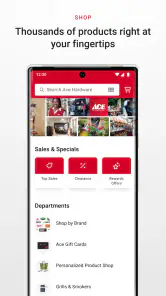
That browsing can help when I know the task but not the exact product name. I can explore the range, compare options, and then use customer reviews to get a sense of how other shoppers have found a product. For a first-time DIYer, that is a useful way to build a shortlist before standing in an aisle; for an experienced repairer, it can make a quick check of a replacement item easier. I would still treat reviews as one perspective, not as a substitute for checking that a part fits the job.
Making a shortlist before the trip
One useful habit is to separate identifying the product from deciding to buy it. I would first search for the item that seems to match the repair, then compare the options and note any details I need to verify, such as dimensions or the model of the thing being repaired. Only after that would I check nearby availability. This avoids letting an appealing listing rush me into choosing a part that looks right but may not fit.
That approach is especially handy for a small repair with several possible causes. If a cabinet door is sagging, for example, I might need to distinguish between a loose screw, a damaged hinge, or a problem with the mounting surface. The app can help me explore likely hardware, but it cannot diagnose the cabinet from a product search. I would inspect the hinge and take any useful measurements first, then use the catalogue to narrow down what to look for.
Explore the Ace Hardware Universe
The app is a free shopping app from Ace Hardware Corporation. It has a 4.7 average from around 83,000 ratings, and more than a million installs. Its Everyone age rating makes it broadly suitable for general household use. The current version is 3.1.14, and the app first appeared on February 17, 2020. Those details give a useful sense of its established presence, but my decision to keep it would come down to whether I shop at Ace and whether its store tools match the way I plan projects.
Features that Make Life Easier
One feature I absolutely love is the product locator. Have you ever walked into a hardware store only to wander aimlessly? With this app, those days are over. Just pop in what you need, and it’ll guide you to the nearest store that has it in stock. And if you’re like me, preferring to avoid unnecessary trips, the inventory checker is a lifesaver. It's like having a personal assistant in your pocket, minus the coffee runs.
More From Our News Desk

Clash of Clans Is Won Between the Battles

Android Auto Makes the Case for Quieter Car Software

MobiOffice: Transforming Mobile Productivity with Seamless Integration

EA SPORTS FC™ Mobile Soccer: Redefining Mobile Sports Gaming

How Microsoft OneDrive Became a Mobile Productivity Giant

How Google Translate Breaks Language Barriers Effortlessly
For a realistic use, picture noticing a loose cabinet hinge while making dinner. I would check the likely replacement in the app, look at nearby availability, and make a short list of what else the repair needs before setting out. That sequence is more helpful than browsing once I am already in the store: it gives me a chance to compare likely options and avoid arriving without a basic idea of the part. Availability can change, so I would use the check as a planning aid rather than a promise that an item will still be waiting when I arrive.
This is where Ace’s approach differs from a broad online marketplace. A marketplace can be better when I want to compare many sellers or hunt for an unusual item; Ace’s app makes more sense when I want a nearby hardware-store option and a way to prepare for a local visit. It is not a universal product catalogue, so if I am sourcing a specialist component or want the widest possible range, I would search elsewhere too. The practical advantage here is the connection between product discovery and a nearby store, not a guarantee that every repair can be solved in one trip.
There is also a simple workflow that saves effort: search by the task or item I can describe, use reviews to narrow the choice, then check local stock before planning the trip. If I am unsure about compatibility, I would write down the measurements or model details I need to compare, rather than relying on a product name alone. That small preparation matters with fittings and replacement parts, where two items that look similar may not suit the same repair.
When the local-store focus helps
The app is at its strongest when a project needs ordinary hardware soon and I already have a reason to visit a nearby Ace. Instead of treating it as a place to browse indefinitely, I can use it to answer a practical sequence of questions: what might solve the problem, which options deserve a closer look, and whether a local trip seems worthwhile. That is a different kind of value from a retailer whose main appeal is shipping a large catalogue to my door.
For a weekend task, I would group related needs into one visit. If I am fixing a gate, for instance, I would check the likely latch or fasteners alongside any other supplies I have already identified, rather than making separate searches after each step. This does not guarantee that every item will be available, but it can help me notice gaps in my plan before leaving. I would still keep a backup option for anything essential to finishing the job.
Motor and sensory considerations
For someone shopping on a phone while juggling a project list, the main benefit is being able to browse and check products without walking through several aisles first. The app’s straightforward navigation, as I experienced it, keeps the basic shopping task approachable. Still, a screen-based catalogue asks users to read product names and descriptions, scroll through choices, and make selections with touch controls. Anyone who finds small on-screen targets, dense product details, or prolonged phone use tiring may prefer to browse with another person or ask for help in a store.
I also would not assume that a digital product page answers every practical question. Reviews can add context, but they may not address a particular user’s grip, reach, vision, or other needs when choosing a tool. When those details matter, I would use the app to identify candidates and then seek a closer look or advice before buying. That keeps the app useful without expecting it to replace hands-on judgement.
There is a meaningful difference between being able to read about a tool and knowing whether it will be comfortable to use. Someone choosing a hand tool may care about handle shape, weight, or how much force a task requires, and a catalogue search cannot reproduce that physical experience. I would treat the app as an early research step, then ask for an in-person look or support from someone who can assess the item directly if comfort and control are deciding factors.
Easy Shopping and Saving
Shopping through the app is as straightforward as it gets. The checkout process is smooth, and there are often exclusive deals and promotions that you won't find in-store. I can’t emphasize enough how much I’ve saved just by keeping an eye on the app’s special offers. It feels like having a secret weapon in my back pocket every time I need to stock up on supplies.
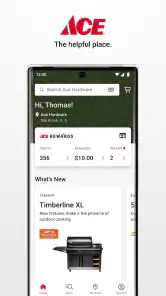
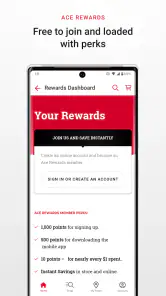
Another nifty feature is the Ace Rewards integration. For those who love racking up points, this app syncs seamlessly with your rewards account. It's satisfying to see those points add up, knowing they’ll translate into future savings.
For regular Ace shoppers, that combination of offers and rewards can make the app more useful over time than a one-off product search. I would check the offer details before building a project budget around a promotion, though: a deal only helps if it applies to the items I actually need. If I shop at several different hardware retailers, I would compare the final basket and convenience rather than assuming one app will always be the best value.
My practical tip is to decide what the repair needs before browsing offers. It is easy to let a discount shape a shopping list, but a cheaper item is not a saving if it is the wrong size or does not suit the job. I would use promotions as a final check on items already under consideration, and compare the complete basket when another retailer is a realistic option. That keeps rewards and deals in perspective rather than making them the main reason for a purchase.
Situational access and remaining barriers
The app is a natural fit for planning a repair at home, checking a product while already near a store, or preparing a shopping list before a weekend project. It can also help someone who prefers to make decisions in a quieter setting before entering a busy shop. For a rushed job, the stock check may save time, but I would leave room for a backup plan if a particular item is unavailable or the match is uncertain.
It is less compelling if I rarely shop at Ace, need a specialist supplier, or prefer to ask a knowledgeable person questions before choosing hardware. The app can help me narrow down what to ask for, but it cannot assess a repair in my home or confirm that I have diagnosed the problem correctly. When a job involves safety, unfamiliar wiring, or a repair beyond my skills, I would not treat an app search as a substitute for qualified help.
There is also a situational trade-off when I am already in a store. Searching on my phone can be convenient if I want to compare an item quietly or check a detail without feeling hurried, but it can be less useful if I need an immediate answer about a physical product. In that moment, asking store staff or examining the item directly may be faster. I see the app and in-person help as alternatives that can work together, rather than assuming one should replace the other.
On the technical side, the app is listed for devices running Android 7.1 or later, which is useful to know before downloading it onto an older phone. The app itself is free, so trying it does not require a purchase; any shopping decision remains separate. If phone navigation is uncomfortable, using the app alongside in-person assistance is a sensible alternative rather than forcing the whole task through a small screen.
Who benefits most from keeping it installed
I would keep it on my phone if I regularly shop at Ace and tend to arrive with a particular repair or supply need. It is also a reasonable choice for someone learning basic DIY who wants to explore product options before entering a store, as long as they are willing to double-check fit and suitability. The app offers a useful starting point, not a shortcut around learning what a project requires.
I would skip it if my hardware shopping is mostly tied to another retailer, if I need rare or highly specialized parts, or if I strongly prefer to handle products before making a choice. Someone who wants the broadest seller comparison may find a general marketplace more useful; someone who needs detailed diagnosis may be better off speaking with a knowledgeable person or qualified professional. The right choice depends less on how often I shop online and more on whether the nearby-store workflow fits my errands.
A Handy App for Every DIYer
In a nutshell, the Ace Hardware app is a must-have for anyone who loves tackling home improvement projects. It’s not just about buying tools; it's about enhancing your DIY experience. With features that simplify shopping and ensure you're getting the best deals, it’s a tool in its own right.
Whether you’re fixing a leaky faucet or building a backyard oasis, this app will undoubtedly be your trusty sidekick. So next time you’re in need of a quick fix or planning a major project, give the Ace Hardware app a whirl. Trust me, your future self will thank you.
Who I would recommend it to
I would recommend it to people who already shop at Ace, especially if they often need to check a product before travelling or like to plan a project from a phone. The strongest reason to install it is the practical chain from browsing to checking a nearby store, with reviews, offers, and rewards adding value for repeat use. Someone who mainly wants broad price comparisons, rare parts, or detailed personal guidance may be better served by comparing other retailers or speaking with a local hardware specialist.
My overall take is that this is a useful shopping tool when it fits your store habits, not a replacement for careful measuring, product know-how, or hands-on advice. I would use it to make a hardware run more deliberate: identify the likely item, check availability, and arrive with a short plan. That is a modest role, but for everyday repairs it can be exactly the kind of help that saves time and makes the next step clearer.
Ace Hardware Frequently Asked Questions
What should I know about the Ace Hardware app before downloading it?
Ace Hardware is a free shopping app from Ace Hardware Corporation, intended for people who want a mobile way to explore the retailer’s hardware products. It is rated Everyone, so its content rating is suitable for a broad audience. Check that your device meets the stated minimum operating-system requirement before installing, and consider whether shopping for Ace Hardware products on a phone or tablet fits the way you prefer to browse.
Does the Ace Hardware app offer a way to browse hardware products?
The app’s focus is shopping for hardware products, and its store summary describes it as offering great hardware products. It may be useful if you want to explore Ace Hardware’s offerings from a mobile device. Before downloading, think about whether you are looking for a dedicated shopping experience or simply need occasional product information; the app is presented as a shopping option rather than a general-purpose hardware guide.
Is the Ace Hardware app free, and what devices can run it?
The Ace Hardware app is free to download and is intended for shopping. It is rated Everyone, making it suitable for a broad audience. Before installing, check that your device runs Android 7.1 or later, the stated minimum operating-system requirement. The app is published by Ace Hardware Corporation and offers a mobile way to explore Ace Hardware products.
Who develops the Ace Hardware app, and how popular is it?
Ace Hardware Corporation develops the app, which focuses on shopping for hardware products. It has a 4.7 average rating from around 83 thousand ratings, with about 8.9 thousand written reviews and over 1 million installs. Those figures suggest many shoppers have tried it, though individual experiences can differ depending on what they use the app for and how they prefer to shop.
What is Ace Hardware's mobile app used for?
Ace Hardware's mobile app is a comprehensive tool designed to enhance the shopping experience at Ace Hardware stores. Users can easily browse the vast inventory of products, check availability, and read product descriptions and reviews directly from their mobile devices. The app also includes features such as store locator, personalized offers, and exclusive promotions, making shopping more convenient and rewarding.
Pros
- User-friendly interface for easy navigation.
- Extensive range of products available.
- Real-time inventory updates for accurate stock info.
- Loyalty program for exclusive discounts.
- Convenient store locator feature.
Cons
- Limited international shipping options.
- Occasional app crashes reported.
- Login issues persist for some users.
- Some features require account creation.
- Notifications can be overwhelming.

- Category
- Shopping
- Version
- 3.1.14











