

15th Club Golf GPS Rangefinder
- 178.00
- 3.6
- Installs
- 50.00K
- Price
- Free

Screenshots
Analysis by Reviewed
I found 15th Club Golf GPS Rangefinder most useful when I treated it as a practical course companion rather than a complete replacement for every piece of golf equipment. It is a free sports app from Advantage Golf GPS Technology, built around distance information, course maps, scoring, and shot tracking. That combination makes it appealing to golfers who want more context during a round without carrying a dedicated handheld GPS.
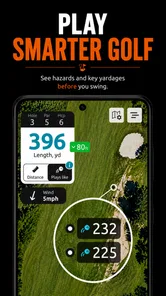
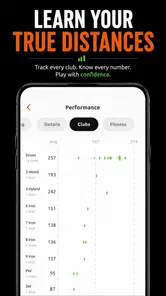
My first impression was that the app has a clear purpose: help me make quicker decisions before a shot, then leave me with a more useful record afterward. The experience is not only about seeing a yardage number. A map can help me understand the shape of a hole, a scorecard can keep the round organized, and shot tracking can turn a vague feeling about my game into something I can review later.
That said, this is not the right tool for everybody. Golfers who already own a dependable rangefinder and prefer writing scores on paper may find the extra interaction unnecessary. Players who want highly polished coaching, deep statistics, or a very lightweight battery footprint may also need to compare it carefully with alternatives. My view is that its value depends on how much of its connected workflow I actually use.
How 15th Club fits into a real round
The most convincing use case is a casual or regular round where I want distances and scoring in one place. Instead of checking one device for the hole layout, another for the score, and relying on memory for shots, the app brings those tasks together. That does not automatically make every decision better, but it reduces the number of separate tools I need to manage.
I would start by opening the app before reaching the first tee, selecting the course, and checking that the relevant course information is ready. This preparation matters more than it may seem. On the course, the best golf apps are the ones that stay out of the way, so spending a moment getting organized before play is preferable to troubleshooting while a group waits.
The distance function is most helpful when I use it as a planning aid rather than an unquestionable answer. A number can suggest which club to consider, but it cannot account for wind, lie, elevation, temperature, or the quality of my contact. The course map adds useful visual context: I can think about where I want the ball to finish instead of focusing only on the flag.
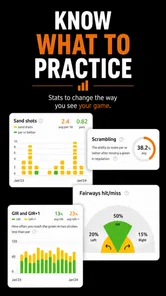
The scorecard side is particularly sensible for players who dislike carrying a separate paper card. Entering a score immediately after a hole is less demanding than trying to reconstruct the round at home. I also prefer recording information while the details are fresh, because a forgotten penalty or missed putt can distort any later review of performance.
More From Our News Desk

 Gmail
GmailGmail in a Busy Inbox: Who Benefits Most?
From first account to crowded workday, Gmail earns its place through dependable search and flexible sorting—but its best fit depends on how much inbox maintenance you can tolerate.

 Prime Video
Switching to Prime Video: What Changes in Your Viewing Routine
Prime Video can make a compelling second home for streaming, but switching means learning a different catalog, rental layer, and route from browsing to playback.

 Universal TV Remote Control
Universal TV Remote Control Works Best as a Reliable Backup
A phone remote earns its place through quick setup and reliable habits. Here is how to get more from Universal TV Remote Control—and where its limits show.

 Weather - By Xiaomi
Weather by Xiaomi Review: Clear at a Glance, Less Clear Up Close
Xiaomi’s weather app makes everyday forecasts quick to scan, but its calm surface can leave useful details and recovery paths harder to find than they should be.

 X
XX Under Pressure: Can It Recover When Posting Goes Wrong?
A resilience-focused review of X, examining setup, mistaken posts, interruptions, weak connections, and the gaps that matter when recovery needs to be dependable.

 Clash of Clans
Clash of Clans Is Won Between the Battles
Its raids are quick; its community is a long-term project of coordination, teaching, rivalry, and shared responsibility—with all the friction that entails.
Latest News



What feels quick, and what needs patience
For normal use, I would expect the app to feel fastest when I keep my workflow simple: open the current hole, check the distance or map, make a club decision, and record the result. That sequence gives the app a clear job. Jumping repeatedly between mapping, scorekeeping, and shot history during a busy round is more likely to feel demanding, especially for someone who wants to play without touching a phone very often.
The perceived speed of any GPS golf app also depends on conditions outside the app itself. Course selection, location availability, screen brightness, and the phone being used all affect how quickly the experience feels ready. I would not judge it solely by the first screen after installation. The more meaningful test is whether it gets me to the information I need without making me wait at every tee.
One practical tip is to decide in advance how much detail I want to capture. If I only need scores and occasional distance checks, the round should remain relatively simple. If I want to track individual shots, I should accept that this creates more interaction. That trade-off is easy to overlook: shot tracking can produce a richer record, but it also asks me to be more disciplined after each shot.
Where the app earns its place during heavy use
A demanding moment comes when several tasks arrive together. I may be checking a landing area on the map, confirming a distance, remembering the previous score, and trying not to slow down the group. This is where the app’s unified design can help, because the information belongs to the same round. It is also where clutter or extra taps would become most noticeable.
I would use the map before the shot rather than staring at it while preparing to swing. That small change makes the app less distracting. Looking at the hole layout from behind the ball, deciding on a target, and then putting the phone away creates a better rhythm than repeatedly checking the screen during the address routine.
Shot tracking has a second heavy-use moment: the transition between holes. If I record every shot, I need a consistent habit. A good routine is to enter the result once the ball is safely out of play and then confirm the next hole only when I am ready. This avoids trying to remember several shots later, while also keeping the phone from becoming the focus of the round.
There is a useful trade-off here for beginners. Detailed tracking can teach a new player where decisions went wrong, but it can also make the game feel like data entry. I would recommend starting with the scorecard and adding shot tracking only after the basic routine feels comfortable. That approach lets me learn the app without turning a relaxed round into an administrative task.
Reliability is more than a distance number
For me, reliability means more than whether the app displays a yardage. It includes whether I can return to the round smoothly, whether the score remains understandable, and whether the map supports a decision instead of creating uncertainty. The app’s combination of course maps, scoring, and shot records gives it several points where reliability matters.
I would make a habit of checking the selected course and current hole before relying on a distance. That is not a criticism unique to this app; it is a sensible safeguard for any digital golf assistant. A wrong hole or an overlooked screen can lead to a confident but unsuitable club choice. A quick visual check of the map is worth the few seconds it takes.
Recovery is another important part of the experience. If I receive a call, lock the phone, or move between screens, I want to return to the same round without losing track of what I have entered. I would keep my scoring routine straightforward and verify the hole after interruptions. That makes recovery easier because I am not trying to reconstruct a complicated sequence from memory.
The app has an average rating of 3.6 from around 800 ratings, with about 180 written reviews. I read that as a sign that the experience is useful for some golfers but not universally frictionless. It is not a reason to dismiss the app, yet it does encourage realistic expectations: the best fit will probably be someone who values the feature mix enough to tolerate occasional phone-based inconvenience.
Phone limits, battery choices, and course habits
A phone GPS app naturally asks more from a device than a paper scorecard. The screen, location functions, maps, and repeated interaction can all matter during a long round. I would begin with a reasonably charged phone and avoid leaving the display active when I am not checking it. That habit protects battery life and keeps the app from competing with the actual game.
Screen visibility is another practical constraint. Bright sunlight, polarized sunglasses, and a phone kept in a pocket can make quick checks less comfortable than using a dedicated golf watch or handheld rangefinder. If I already dislike pulling out my phone between shots, the app may feel like extra work even when its information is useful.
There is also a social constraint. In a fast-moving group, frequent data entry can slow me down. In a solo practice round, the same tracking may feel worthwhile because I have more time to analyze decisions. The app therefore suits reflective practice better than a rushed round where I want every interaction minimized.
The free price makes it easy to try without committing money at the start, although in-app purchases range from $4.99 to $79.99 per item. I would look closely at what I need before paying for anything. A golfer who only wants occasional basic assistance should not assume that every paid option is necessary, while a committed player may see value in investing in the parts of the experience that support regular use.
The Everyone content rating also makes the app broadly approachable from an age-rating standpoint. More important for a family or shared-device situation is whether each person is comfortable with the phone workflow. A younger golfer may enjoy the map and tracking elements, while an older player who prefers a simple card may find the same features distracting.
Three workflows that reveal the app’s real value
The first workflow is the “decision before score” method. I use the map and distance information before the shot, choose a target, put the phone away, and record only the score afterward. This gives me the main benefit of the app without allowing tracking to dominate the round. It is a strong starting point for most recreational players.
The second is the “practice diagnosis” method. During a quieter round, I track selected shots rather than every single one. For example, I might record approach shots or recovery decisions while leaving routine taps untracked. The result is less complete than a full log, but it is easier to maintain and may highlight a specific weakness without overwhelming me with entries.
The third is the “post-round reconstruction” method. If I did not track everything live, I can still use the scorecard as the reliable backbone of the round and add observations afterward while they are fresh. This is a useful compromise for golfers who want a record but do not want to handle the phone after every shot. It also reduces the chance that technology interferes with pace of play.
These workflows show why I would not judge the app only by its rangefinder function. Its strongest idea is the connection between planning and reflection. The distance helps with the next shot, while the scorecard and shot history can help me think about the previous one. That continuity is more valuable than any single screen.
How it compares with familiar alternatives
Compared with a traditional paper scorecard, the app offers more context. A paper card is faster for someone who only wants to write numbers, and it never needs charging, but it cannot show a digital course map or support the same kind of shot record. I would choose paper for a social round where simplicity matters most, and the app for a round where I want to learn from my decisions.
Compared with a dedicated laser rangefinder, this app has a broader role but may not provide the same focused experience. A laser device can be appealing when I want to identify a precise target and avoid phone distractions. The app is more attractive when I want distance information alongside hole layout, scorekeeping, and tracking. These are different priorities rather than a simple winner and loser.
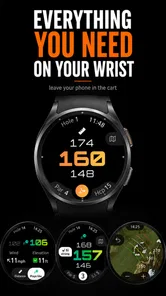
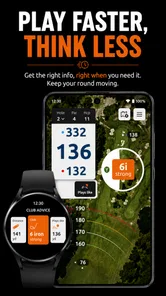
Compared with a golf watch, the phone may offer a larger map and a more familiar screen, while the watch can be easier to glance at without reaching into a pocket. A watch may suit golfers who prioritize quick checks and low handling. I would favor 15th Club when I want a fuller view of the hole and do not mind using the phone as part of my routine.
Compared with highly specialized golf analysis platforms, this app appears better suited to practical round management than to an intensive coaching system. If my main goal is advanced training feedback, I would investigate a dedicated analysis product. If I want a balanced mix of distance, mapping, scoring, and shot tracking in a free starting point, this app makes more sense.
Who should use it, and who should skip it
I would recommend it to a golfer who regularly forgets scores, wants a visual understanding of holes, or is curious about tracking decisions without buying a separate device immediately. It is also a reasonable choice for someone moving from paper to digital scoring and wanting more than a basic scorecard.
I would be more cautious if the golfer plays with a nearly empty phone, dislikes screen interaction, or expects a completely hands-off experience. The app cannot remove the practical limits of using a phone outdoors. Players who already have a trusted watch or rangefinder may gain little unless they specifically want the combined score and shot workflow.
The developer is Advantage Golf GPS Technology, and the app reached the catalog on April 8, 2022. Its current version is 4.4.2, while its install count is above 50,000. Those details place it in the category of an established but not enormous golf utility, so I would approach it as a focused tool rather than assuming it will match the polish or ecosystem of the biggest names in golf technology.
My performance verdict after weighing the trade-offs
My overall impression is that 15th Club works best when I use it deliberately. It can make a round feel more organized by putting course context, distances, scoring, and shot tracking into one golfing workflow. The app’s perceived speed should be satisfactory for straightforward checks, but heavy tracking and repeated map use can make the experience feel more involved, especially on a long round or a less capable phone.
Its biggest strength is not a single spectacular feature. It is the way the tools can support a complete cycle: plan the hole, play the shot, record the result, and review the decision. Its biggest weakness is the same thing viewed from another angle: the more complete the record becomes, the more attention I must give the phone.
I would install it before paying for a dedicated solution, then test it during a relaxed round rather than judging it in a hurry. I would check how naturally course selection, distance checks, score entry, and recovery after interruptions fit my own habits. If those steps feel comfortable, the free entry point makes the experiment worthwhile.
In the end, I see it as a useful middle ground between a paper card and a collection of specialized golf devices. It is not ideal for golfers who want zero screen time or highly advanced coaching, but it is a sensible companion for players who want practical GPS help and a clearer record of their rounds. Use it as a decision aid, not as a substitute for judgment, and its mix of tools becomes much easier to appreciate.
15th Club Golf GPS Rangefinder Frequently Asked Questions
Is 15th Club Golf GPS Rangefinder suitable for beginners as well as experienced golfers?
The app is designed around practical golf-round tools, including GPS distances, course maps, scorekeeping, and shot tracking, so it can be useful to players at different experience levels. Beginners may appreciate having course information and distance estimates together, while experienced golfers can use those tools to support their own club and shot decisions. It remains a planning aid rather than a substitute for learning the course or using sound judgment.
What is 15th Club Golf GPS Rangefinder, and what does it do?
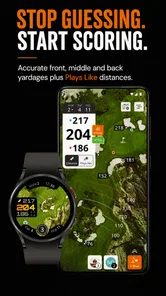
15th Club Golf GPS Rangefinder is a golf GPS application designed to help players plan shots directly from their Android or iOS device. It provides course information, distances to important targets such as the front, middle, and back of the green, and useful tools for estimating shot strategy. It is intended to complement your normal course knowledge, not replace good judgment or official tournament rules. Its golf-focused toolkit also includes scorecard, shot-tracking, and course-map features.
Does 15th Club Golf GPS Rangefinder work on every golf course?
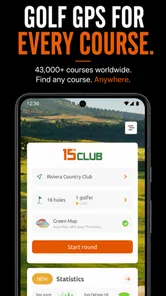
The app’s usefulness depends on whether the course you want to play is included in its supported course database. Before downloading or relying on it for a round, search for your home course and frequently visited courses if possible. Coverage can vary by country and course, and newly opened or recently redesigned layouts may not immediately have complete or perfectly updated information.
Does the app require an internet connection or GPS access?
15th Club Golf GPS Rangefinder generally needs location access and your device’s GPS to calculate your position and provide accurate on-course distances. Internet access may also be required to download course data, update maps, or synchronize account information. Mobile reception can be limited on some courses, so it is sensible to open the app and prepare the course before your round rather than waiting until you reach the first tee.
How accurate are the distances shown by 15th Club Golf GPS Rangefinder?
The displayed yardages or meter readings are useful estimates based on GPS positioning and the course data available in the application. Accuracy may be affected by weak satellite reception, trees, buildings, hills, device settings, or outdated course mapping. The app should therefore be treated as a practical planning aid. Players should still confirm targets visually and follow local course markings when making important decisions.
Pros
- Accurate GPS distances to greens
- hazards
- and fairway targets.
- Scorecard tools make it easy to track rounds and performance trends.
- Works across a large selection of golf courses worldwide.
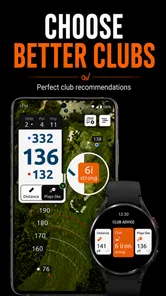
- Club recommendations can help players choose shots more confidently.
- Useful course maps support better planning before and during play.
Cons
- Some advanced features may require a paid subscription.
- GPS accuracy can vary with weak signal or poor course mapping.
- Continuous location tracking may drain the phone battery.
- Course data may occasionally be outdated after layout changes.
- The interface can feel crowded for first-time users.





