

Words in Color
- 25.00
- 4.4
- Installs
- 50.00K
- Price
- Free
Screenshots
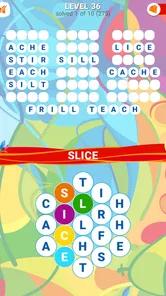
Analysis by Reviewed
I approached Words in Color expecting a small, easy-to-start word game, and that is exactly where it fits best. It is a free puzzle from Second Gear Games in which the central task is to connect letters and uncover words. The idea is simple enough for a first session without instructions, but it still gives me a reason to slow down and look at the letter arrangement rather than tapping randomly.
This is not the kind of word game I would choose when I want a long story, character progression, or a competitive multiplayer match. Its appeal is quieter: I can open it for a short mental break, work through a puzzle at my own pace, and stop when I feel finished. The “Words in Color” presentation gives the otherwise familiar letter-connection format a visual identity, while the gameplay remains focused on finding words.
The game is listed for Everyone, so it is a reasonable option for families and younger players who enjoy spelling challenges. It has passed the point of being an unknown experiment too: the listing shows a 4.4 average from around 389 ratings and over 50 thousand installs. Those figures do not replace personal testing, but they do suggest that the basic concept has found an audience.
What the first session feels like
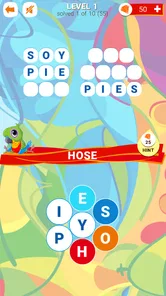
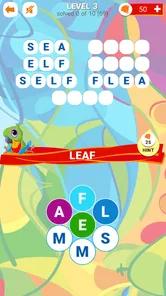
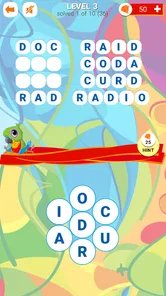
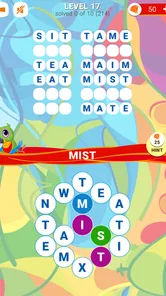
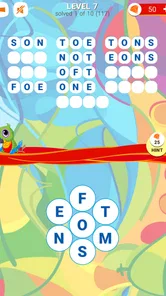
After installing it, I would not expect a complicated account journey or a lengthy tutorial before reaching the puzzle itself. The most useful mindset is to treat the opening board as a visual word search with a connection mechanic. I look at the available letters, identify familiar short words first, and then use those discoveries to understand what the game expects from my gestures.
That first approach matters because the game’s short description, “Words in Color,” tells me more about its presentation than about a large collection of extra systems. The main attraction is the act of spotting words inside the arrangement. If I enjoy an uncluttered puzzle loop, that directness is welcome. If I need constant rewards, dramatic changes, or a large set of modes, the experience may feel restrained.
My practical advice is to begin by scanning the whole board instead of immediately dragging across the first obvious letters. I check for common endings and beginnings, then test words that use letters close together. This gives me a clearer sense of how the board is organized and reduces the temptation to make hurried guesses.
The game works particularly well in everyday gaps: while waiting for an appointment, during a short commute when it is safe to use a phone, or at the end of the day when I want something more active than scrolling but less demanding than a strategy game. A single puzzle can serve as a small reset rather than an obligation to play for a long stretch.
More From Our News Desk

 Gmail
GmailGmail in a Busy Inbox: Who Benefits Most?
From first account to crowded workday, Gmail earns its place through dependable search and flexible sorting—but its best fit depends on how much inbox maintenance you can tolerate.

 Prime Video
Switching to Prime Video: What Changes in Your Viewing Routine
Prime Video can make a compelling second home for streaming, but switching means learning a different catalog, rental layer, and route from browsing to playback.

 Universal TV Remote Control
Universal TV Remote Control Works Best as a Reliable Backup
A phone remote earns its place through quick setup and reliable habits. Here is how to get more from Universal TV Remote Control—and where its limits show.

 Weather - By Xiaomi
Weather by Xiaomi Review: Clear at a Glance, Less Clear Up Close
Xiaomi’s weather app makes everyday forecasts quick to scan, but its calm surface can leave useful details and recovery paths harder to find than they should be.

 X
XX Under Pressure: Can It Recover When Posting Goes Wrong?
A resilience-focused review of X, examining setup, mistaken posts, interruptions, weak connections, and the gaps that matter when recovery needs to be dependable.

 Clash of Clans
Clash of Clans Is Won Between the Battles
Its raids are quick; its community is a long-term project of coordination, teaching, rivalry, and shared responsibility—with all the friction that entails.
Latest News



Getting ready without overthinking it
The technical entry point is broad. The current version is 1.0.4, and the listed minimum operating system is Android 4.0.3, which makes the game accessible to people using older Android hardware. I still recommend checking that the device has enough free space and that the screen responds reliably to swipes, because a word-connection game depends more on comfortable touch control than a casual glance at the minimum requirement might suggest.
There is no reason to prepare a strategy guide before starting. I would install the game, open the first available puzzle, and spend the opening minutes learning how letters can be connected. The best setup is simply a relaxed one: use a stable grip, keep the whole board visible, and avoid covering the letters with a finger while tracing.
Because the game is free, it is easy to try without committing money at the beginning. At the same time, in-app purchases range from $2.99 to $29.99 per item. That makes it worth deciding early whether I am comfortable with optional spending. I would not buy anything until I had played enough to know whether the core word search is genuinely enjoyable for me.
The age rating of Everyone also helps define the likely audience. Parents looking for a gentle spelling-oriented game can introduce it without expecting mature themes. Even so, I would still let a child play with an adult’s guidance around purchases, since the presence of optional items is relevant whenever a game is used on a shared device.
How I reach the first meaningful success
My first goal would not be to clear a board as quickly as possible. I would aim to find one obvious word cleanly and use that action to learn the game’s rhythm. I scan from left to right, then from top to bottom, looking for short, familiar combinations before attempting longer words. This is more reliable than trying to guess an unusually obscure answer from the start.
When I see a likely word, I trace it deliberately and watch how the board responds. That small observation is useful because it tells me whether I am following the intended connection path and whether completed discoveries affect the remaining visual layout. Instead of treating an unsuccessful attempt as wasted time, I use it as feedback about the board’s logic.
A helpful routine is to divide the puzzle into passes. On the first pass, I search for everyday words. On the second, I inspect unused letters and look for plural forms, common suffixes, or a different reading direction. On the third, I return to the areas I dismissed earlier. This method gives me a repeatable workflow and makes the first successful completion feel earned rather than accidental.
The most useful early habit is to search systematically, not frantically. Word games often become frustrating when I repeatedly drag across the same letters without changing my approach. A slow visual sweep gives me more information and keeps the game relaxing, especially when I am still learning its particular board design.
For a family session, I would also turn the first puzzle into a shared observation exercise. One person can point out possible starting letters while another traces the word. That makes the game approachable for players who are still building confidence with spelling, and it avoids making speed the only measure of success.
Where new players may become confused
The biggest likely source of confusion is assuming that every visible letter combination should be accepted. In a connection-based word puzzle, a word can look plausible while failing because the letters are not arranged in the required way. When that happens, I would first check the path rather than immediately deciding that the answer is missing.
Another common mistake is focusing only on long words. Short words are useful for learning the board and for revealing which letters remain important. I find it more productive to clear the easy possibilities first, then revisit the leftover pattern with fresh eyes. This also prevents one difficult guess from dominating the whole session.
Color can help with recognition, but it can also draw attention away from the letters themselves. If the visual styling makes a board feel busy, I concentrate on the letter shapes and the possible connections instead of trying to interpret every color change as a separate game mechanic. The color treatment is part of the presentation; the word remains the thing I need to solve.
It is also easy to confuse being stuck with having exhausted the puzzle. I take a short pause, look away from the screen, and return with a new starting point. In many word games, the first pattern I notice becomes a mental blind spot. Changing the order of my scan is more useful than repeating the same gesture.
Players who expect a dictionary lesson should adjust their expectations. The game’s focus is finding words through the board, not explaining every definition or teaching a structured vocabulary course. I enjoy it more as a recognition and pattern exercise. Someone specifically seeking pronunciation help, detailed word meanings, or formal language study would probably be better served by an educational app designed for those purposes.
Using the game as a short daily routine
Once I understand the basic gesture, I can make the game fit several kinds of downtime. In a five-minute break, I focus on one section of the board and stop after a useful discovery. During a longer quiet period, I work through the entire arrangement and use the remaining letters to guide the next search. This flexible rhythm is one of the game’s practical strengths.
I would avoid playing while walking, driving, or doing anything that requires full attention. The puzzles are visually dependent, so they are best enjoyed when I can look at the screen safely and comfortably. That may sound obvious, but the game’s short-session nature makes it tempting to open it anywhere, and a word puzzle is not a good reason to ignore surroundings.
For older phones, the low minimum operating-system requirement is encouraging, but comfort still depends on the actual display and touch response. A small or dim screen can make letter paths harder to inspect. If I were choosing between an old phone and a tablet, I would favor the device that lets me see the entire board without constantly shifting my hand.
The free entry point also makes it suitable for trying alongside another word game. I can compare how much I enjoy connecting letters here versus solving a crossword clue, arranging tiles, or guessing a daily word. Those alternatives reward different skills: this game emphasizes visual paths and immediate recognition, while a crossword may demand broader knowledge and a daily guessing game may place more pressure on a fixed attempt.
What changes after the opening puzzles
The next step is not to rush toward purchases or treat every puzzle as a test of speed. I would first see whether the central loop stays satisfying after the novelty of the color presentation fades. The important question is whether I continue enjoying the search itself: spotting a pattern, testing a connection, and gradually making the board clearer.
If I start needing help, I would use a deliberate escalation. First I rescan the letters in a different order. Then I focus on unused characters and common word structures. Only after those steps would I consider any assistance offered through the game. This keeps the solving process meaningful and helps me distinguish a genuinely difficult board from a momentary lapse in attention.
Optional purchases deserve a careful approach. Since individual in-app items are priced from $2.99 up to $29.99, I would treat them as convenience spending rather than part of the basic admission price. A player who enjoys solving independently may never need them, while someone who dislikes being blocked may find the temptation distracting. The right choice depends on whether help preserves enjoyment or removes the challenge that brought the player to the game.
Second Gear Games has kept the concept focused enough that I can understand its purpose quickly. That is good for accessibility, though it also means the game may not satisfy players who want a deep progression system. I would recommend it to someone who likes calm word puzzles, visual searching, and short sessions. I would skip it in favor of a richer alternative if I wanted competitive leaderboards, a narrative campaign, extensive customization, or a serious vocabulary curriculum.
The game’s broad compatibility and free starting point make experimenting easy, while the Everyone rating supports casual household use. Its 4.4 average and roughly 389 ratings indicate a generally positive reception, but my recommendation is based more on the fit between the design and the player. The experience is strongest when I want a focused little challenge rather than a complete entertainment platform.
My recommendation after settling into the loop
I would recommend Words in Color to a friend who wants a straightforward word game that can be understood quickly and played in small portions. The first meaningful success comes from learning to scan carefully, trace confidently, and return to overlooked letters instead of guessing wildly. Those habits make the opening feel reassuring and continue to help when a puzzle becomes less obvious.
I would also be honest about its limits. The simple format may feel repetitive to people who need constant novelty, and the visual focus can be less comfortable on a cramped screen. Optional purchases mean I would pay attention before spending, especially if I were handing the device to a child. Players seeking definitions, competitive play, or a large narrative journey should look elsewhere.
For me, the best reason to keep it installed is its low-pressure character. I can open it during a spare moment, make progress through observation rather than speed, and leave without feeling that I have missed a timed event. That makes it a pleasant choice for casual word-game fans, provided they enjoy the core act of connecting letters more than elaborate extras.
In short, this is a free, accessible word puzzle from Second Gear Games with a colorful visual angle and a clear path from installation to first success. I would start slowly, learn the connection behavior from an easy word, use systematic scanning when stuck, and postpone any purchase until the basic loop has proved itself. If that style of quiet letter hunting sounds appealing, it is worth trying; if I want competition, instruction, or constant progression, another category of word game would be a better match.
Words in Color Frequently Asked Questions
What devices can run Words in Color?
Words in Color is a word game for Android devices, with a minimum operating-system requirement of Android 4.0.3. Before downloading, check that your device meets this requirement and has enough available storage for installation. The game is made by Second Gear Games, and its simple letter-based premise makes it a straightforward choice for players looking for a casual word puzzle.
Is Words in Color suitable for short play sessions?
Yes. Its focus on connecting letters and finding words makes Words in Color easy to pick up for a quick puzzle, without requiring a long session just to understand the basic idea. You can work through a level when you have a spare moment and return to the game later. As with other puzzle games, some challenges may take longer when you want to consider several possible word combinations.
What is Words in Color and how does the game work?
Words in Color is a word puzzle game that combines vocabulary challenges with a colorful visual design. During play, you typically arrange, identify, or connect letters to form valid words while progressing through a series of levels. The early stages are easy to understand, but later puzzles require more careful thinking, pattern recognition, and a broader vocabulary to complete successfully. Its central idea is summed up simply: connect the letters and find all the words.
Is Words in Color free to download and play?
Words in Color is free to download, so you can try its word puzzles without paying an upfront price. The game also offers optional in-app purchases, ranging from $2.99 to $29.99 per item, so review purchase settings if you share your device or want to avoid accidental spending. Free access makes it easy to sample the gameplay before deciding whether any optional extras are worthwhile.
Can Words in Color be played offline?
Many of the core word puzzles in Words in Color may be available without a continuous internet connection, which makes the game convenient for travel or situations with limited mobile data. However, features such as advertisements, cloud synchronization, updates, leaderboards, or purchases may require internet access. It is recommended to open several levels online first and then test the game in offline mode.
Pros
- Simple color-based word puzzles are easy to understand.
- Short rounds make it convenient for quick play sessions.
- A relaxing format suits casual players of many ages.
- Minimal controls make the game comfortable on mobile devices.
- Word challenges can help keep vocabulary and visual focus active.
Cons
- Some puzzles may feel repetitive after extended play.
- Color perception issues can make certain challenges difficult.
- Difficulty may not satisfy players seeking complex word games.
- Ads may interrupt gameplay in the free version.
- Limited content could reduce long-term replay value.












