

Word Seeker
- 2.31K
- 4.4
- Installs
- 1.00M
- Price
- Free
Screenshots

Analysis by Reviewed
I like word games best when I can pick them up for a few minutes without needing to learn a complicated rule set, and that is the appeal I see in Word Seeker. It is a free word game from Gimica GmbH, with an Everyone age rating, and its central task is easy to understand: search a letter grid and connect words. The game has a 4.4 average from around 19,000 ratings, which gives a newcomer a useful sense of how other players have received it, though the rating alone cannot tell you whether its style will suit you.
Who will enjoy this kind of word search?
I’d point this toward anyone who likes visual puzzles and wants to start playing almost immediately. There is no need to keep a rack of letters in mind or decode a clue before making a move: the grid is right there, and the job is to notice possible words within it. That makes the game approachable for casual players, people who enjoy familiar word-search puzzles, and anyone who wants a low-pressure activity that can be paused when real life interrupts.
It is less convincing for a player who wants every puzzle to teach unfamiliar vocabulary or demand detailed knowledge. Finding a word can sharpen attention and pattern recognition, but that is not the same as a structured language course. I would also steer competitive players toward a game built around matches or score comparisons. Word Seeker’s appeal is the individual search itself, rather than a race against another person.
A New Twist on Classic Word Games
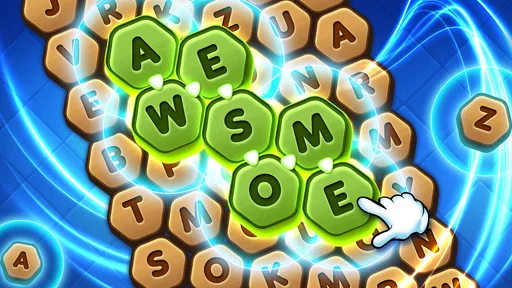
Word games have been around for forever, right? But Word Seeker manages to breathe new life into the genre. The game isn’t just about finding words; it’s about discovering them in the most unexpected places. It’s like a treasure hunt for your brain! The grid layout is intuitive, and you can slide your finger across, up, down, and diagonally to form words. It’s smooth, it’s slick, and it’s super satisfying when you nail that long, complex word.
Why It’s a Brain Booster
Not only does Word Seeker entertain, but it also exercises your brain. I’ve found myself becoming a word wizard of sorts, thanks to the app’s daily challenges and varied difficulty levels. Whether you’re a beginner just getting your feet wet or a seasoned pro looking for a serious mental workout, there’s something here for everyone.
One of the features I absolutely love is the “Word of the Day.” It’s like getting a little nugget of knowledge every day, something to chew on and expand your vocabulary. Plus, there are themed puzzles that keep things fresh and exciting. I mean, who knew learning could be this much fun?
A small routine that works better than random swiping
For a more satisfying session, I’d treat each grid as a sequence of searches rather than trying to spot everything at once. I start with one part of the board, look for a likely first letter, and trace outward in the available directions. Then I deliberately move to another area instead of circling back to the same obvious cluster. This simple reset matters: when I stare at one patch for too long, I tend to see the same near-matches and miss words elsewhere.
More From Our News Desk

 Gmail
GmailGmail in a Busy Inbox: Who Benefits Most?
From first account to crowded workday, Gmail earns its place through dependable search and flexible sorting—but its best fit depends on how much inbox maintenance you can tolerate.

 Prime Video
Switching to Prime Video: What Changes in Your Viewing Routine
Prime Video can make a compelling second home for streaming, but switching means learning a different catalog, rental layer, and route from browsing to playback.

 Universal TV Remote Control
Universal TV Remote Control Works Best as a Reliable Backup
A phone remote earns its place through quick setup and reliable habits. Here is how to get more from Universal TV Remote Control—and where its limits show.

 Weather - By Xiaomi
Weather by Xiaomi Review: Clear at a Glance, Less Clear Up Close
Xiaomi’s weather app makes everyday forecasts quick to scan, but its calm surface can leave useful details and recovery paths harder to find than they should be.

 X
XX Under Pressure: Can It Recover When Posting Goes Wrong?
A resilience-focused review of X, examining setup, mistaken posts, interruptions, weak connections, and the gaps that matter when recovery needs to be dependable.

 Clash of Clans
Clash of Clans Is Won Between the Battles
Its raids are quick; its community is a long-term project of coordination, teaching, rivalry, and shared responsibility—with all the friction that entails.
Latest News



It can also help to vary what I am looking for. Rather than chasing only the longest-looking word, I check for short, familiar patterns first, then return to less obvious combinations. That approach is useful when a puzzle feels crowded or when I have only a minute to play. If I am interrupted, I can put the phone down without needing to remember a long chain of clues or a complicated strategy; the main challenge remains visible in the grid.
How It Fits Into an Ordinary Day
I’d use the short, self-contained search as a small break between errands, or while waiting for a kettle to boil: open a puzzle, scan the letters, and stop when I need to move on. A practical trick is to change how I scan rather than repeatedly staring at the same cluster. I look for likely beginnings, trace in each permitted direction, then switch to the next part of the grid. That keeps the search deliberate instead of turning into random swiping.
The format also suits people who enjoy spotting patterns more than building words from a rack of tiles. Compared with crosswords, it asks less of your general knowledge and gives you a more visual task; compared with anagram games, it shifts the challenge from rearranging a known set of letters to locating sequences in a grid. That difference is a strength for a casual session, but it may feel less rewarding if you want clues, a story, or a competitive head-to-head match.
Choosing it over other word-game styles
The comparison with a paper word search is especially useful: the core pleasure is still visual scanning, but a phone makes it easy to fit a puzzle into a brief idle moment. In contrast, a crossword tends to reward interpreting clues and drawing on general knowledge, while a word-building game makes letter choices and vocabulary the central problem. I would choose Word Seeker when I want to search rather than solve a clue or plan a word from a limited set of tiles.
That focus is also its main trade-off. If you enjoy a strong narrative, an evolving set of mechanics, or the pressure of a live opponent, a simple grid search may not hold your attention for long. I would not choose it as my only word game if variety is the priority. It works better as a straightforward option for short sessions, or as a change of pace between more demanding puzzles.
User-Friendly Interface
Let’s talk about the user experience for a second. Word Seeker nails it with a clean, colorful interface that’s easy on the eyes. It’s clear the developers put a lot of thought into making sure players can focus on what matters most: the words. The app runs smoothly without any annoying glitches or crashes, which, let’s be honest, can be a rare find in mobile gaming these days.
For touch play, I’d use a steady, deliberate swipe instead of rushing through a path. That is a small but practical habit in a game where the interaction depends on tracing letters accurately: if I move too quickly, I can lose track of the sequence I meant to follow. Playing with the screen comfortably centered in my hand also makes it easier to scan the full grid instead of favoring the part closest to my thumb.
Hints, Pace, and the Trade-Offs
And can we talk about the hints system? It’s a life-saver when you’re stuck on a tricky word. You can earn hints through gameplay, or if you’re impatient like me, a quick in-app purchase will do the trick. Trust me, you’ll appreciate having them on standby when you’re just one word away from completing a puzzle.
I’d save a hint for a genuine dead end rather than spending one as soon as a word takes more than a few seconds. First, I’d scan for short, familiar letter runs and then check the corners and edges, where it is easy to overlook a path while focusing on the center. If I am still stuck, a hint can preserve the flow of a session; using one too freely, though, can take away the pleasure of finding the answer myself. The option to buy hints is worth keeping in mind, but I would not treat it as necessary to enjoy the basic search.
For families, the Everyone age rating makes the game broadly suitable, and the simple interaction is easy to explain. I would still set expectations around purchases if children use the device: the game is free to start, but hints can be bought in the app. That is a better conversation to have before a difficult puzzle becomes frustrating than after someone is already tempted to spend for an answer.
Where its limits become noticeable
This is a focused format, not a substitute for every kind of word puzzle. Someone looking for a deep vocabulary lesson, elaborate clue solving, or a social competition may be happier with a crossword, a spelling challenge, or a multiplayer word game. I’d also be cautious about assuming that a daily feature or familiar puzzle style will stay equally fresh forever: repetition is a natural risk in any game built around finding words in grids. Its appeal depends on whether you enjoy the act of scanning and spotting patterns.
That means the best test is not whether you like word games in general, but whether you enjoy the particular rhythm here: scan, trace, confirm, and look again. If that feels calming, the game can fit neatly into spare moments. If you prefer each turn to introduce a new rule or story beat, the repeated search may start to feel samey. I would give it a try for the core activity, not expect it to become a broader puzzle collection.
What the Current Version Means
The game was released on December 24, 2021, and its current version is 1.0.40; it supports Android 6.0 and later. It has passed 500,000 installs and has around 1,700 written reviews. Those details show that it has an established audience, while the version number gives a clear snapshot of the build available now. They do not, by themselves, tell me what changed between releases, so I would not read them as proof of a particular new feature or overhaul.
For someone already playing, the most useful question is whether the current build continues to provide the straightforward grid searching that makes the game easy to return to. For a new player, the practical checks are simpler: make sure your device meets the Android requirement, decide whether you are comfortable with optional hint purchases, and consider whether a solo visual puzzle is what you want. The free entry point makes it easy to try without committing to a paid download, but the purchase option means I would keep an eye on spending if a stuck puzzle tempts you to reach for help.
What I would watch as a player
The version number is a snapshot, not a changelog, so I would avoid assuming a specific development path from it. What matters to me in practice is whether the features I enjoy remain easy to access and whether the puzzle routine keeps feeling worthwhile. If you already play, you can judge that by how often you return for the grid search, not by expecting a particular kind of update. If you are deciding whether to install it, the current build gives you a clear starting point for trying the basic format.
It is also worth separating the game’s established audience from personal fit. Around 500,000 installs and a strong average rating suggest that many people have chosen to play, but they do not mean every word-game fan will enjoy the same pace. I would use those figures as reassurance that this is not an obscure experiment, then make the decision based on whether visual searching sounds relaxing or repetitive to you.
The Verdict
So, is Word Seeker worth your time? Absolutely! It’s a delightful mix of challenge and fun, with a sprinkle of learning thrown in for good measure. Whether you’re killing time on your commute or winding down after a long day, this app has got your back. Plus, with its user-friendly design and engaging content, it’s a must-have for any word game aficionado.
Download it, give it a whirl, and see if you don’t find yourself just a little bit hooked. After all, who doesn’t love a game that makes them feel smarter?
Word Seeker Frequently Asked Questions
Who develops Word Seeker, and when was it released?
Word Seeker is a word game developed by Gimica GmbH. It was released on December 24, 2021, and its current version is 1.0.40. If you are considering downloading it, these details help identify the game and its developer. The central appeal is its hidden-word premise: it is designed for players who enjoy spotting words and spending time with a word puzzle.
What kind of game is Word Seeker?
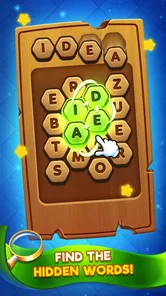
Word Seeker is a word game built around the idea of finding hidden words. Its short description is simply “Word Seeker,” while its summary invites players to try to find the hidden words. That gives prospective players a clear sense of the basic theme: it is aimed at people who enjoy searching for words rather than action-focused gameplay.
How much storage space does Word Seeker need?
It is sensible to check the available storage on your phone before downloading any game, especially if your device is already close to capacity. Word Seeker is a word game, so its appeal is centered on finding hidden words. Make sure your device has enough free space for the app and its installation, and consider removing unwanted files or apps if storage is limited.
Is Word Seeker suitable for children and casual players?
Word Seeker is a word game with an Everyone age rating, so it may be suitable for a broad audience, including families and casual players. Its central idea is to look for hidden words, making it a straightforward choice for people who enjoy letter puzzles. Players who prefer a relaxed activity can try it at their own pace, while word-game fans can focus on finding more words.
What is Word Seeker and how does it work?
Word Seeker is an engaging word puzzle app available for both Android and iOS platforms. It challenges players to find hidden words within a grid of scrambled letters. The game offers various difficulty levels and themes, making it suitable for both beginners and advanced players. The objective is to swipe through letters to form valid words horizontally, vertically, or diagonally. Players can enjoy daily challenges, compete in tournaments, and track their progress over time.
Pros
- Engaging and challenging puzzles
- User-friendly interface
- Regular updates with new levels
- Multilingual support
- Offline play available
Cons
- In-app purchases can be pricey
- Occasional ads disruption
- Limited free hints
- No dark mode option
- Requires internet for updates













