

Word Kitchen
- 1.34K
- 4.6
- Installs
- 1.00M
- Price
- Free

Screenshots

Analysis by Reviewed
I tend to enjoy word games most when they give me a clear little goal without making every spare minute feel like a commitment. Word Kitchen suits that mood: it turns letter-making into a casual puzzle routine, with a cooking theme that gives the activity a lighter feel. I found it easiest to enjoy in short bursts, when I wanted something more engaging than scrolling but not as demanding as a long strategy game.
Small goals make it easy to begin
The basic task is immediately understandable: connect the letters on screen to make words. That quick start is useful when you open a game during a break and do not want to learn a complicated set of rules first. The early puzzles provide a gentle entry point, while the promise of harder levels gives me a reason to keep trying rather than treating each round as an isolated diversion.
For a practical routine, I would play a few puzzles while waiting for a kettle to boil or before getting on the bus. I can pause when real life interrupts, then return when I have another moment. The game’s appeal is less about a deep narrative and more about the small satisfaction of spotting a word I had overlooked. If you enjoy a steady stream of bite-size tasks, that rhythm is a good fit; if you want a story, competitive matches, or a large sandbox of choices, I would look elsewhere.
What progress feels like
Word Kitchen is a word puzzle game from Gimica GmbH, and its simple letter-connecting format makes progress easy to understand: solve the current puzzle, then take on what comes next. The game’s average rating is 4.6 from around 17,000 ratings, and it has been installed over 500,000 times. Those figures suggest that its straightforward approach has found an audience, though they cannot tell you whether its puzzle style will match your own tastes.
I like this kind of progress because it gives me a clear stopping point. A level can feel like a small completed job rather than another open-ended feed to check. The useful habit is to focus on the letter combinations you have not tried yet instead of repeatedly swiping the same obvious words; a brief pause to rearrange the letters mentally can be more satisfying than reaching for a hint straight away. That is especially helpful when I want the puzzle itself, rather than just its completion, to be the reward.
Challenge, hints, and pacing
The difficulty rises as you advance, which helps the game avoid staying on autopilot. That change also means a quick session can shift from easy wins to a puzzle that asks for more patience. I would treat hints as a way to get unstuck, not as the default move: they can restore momentum, but using one too quickly may remove the best part of working out a tricky word yourself. If you are playing with a child or another casual player, taking turns suggesting letter combinations can keep the challenge social without turning it into a contest.
Daily challenges offer another reason to return, while rewards can add a little extra pull. That can be welcome if you like a routine, but it may also make a relaxed word game feel like something you should check every day. I would use those prompts as optional invitations, not obligations. If missing a daily task tends to bother you, a game with less emphasis on repeated check-ins may be a more comfortable choice.
More From Our News Desk

 Gmail
GmailGmail in a Busy Inbox: Who Benefits Most?
From first account to crowded workday, Gmail earns its place through dependable search and flexible sorting—but its best fit depends on how much inbox maintenance you can tolerate.

 Prime Video
Switching to Prime Video: What Changes in Your Viewing Routine
Prime Video can make a compelling second home for streaming, but switching means learning a different catalog, rental layer, and route from browsing to playback.

 Universal TV Remote Control
Universal TV Remote Control Works Best as a Reliable Backup
A phone remote earns its place through quick setup and reliable habits. Here is how to get more from Universal TV Remote Control—and where its limits show.

 Weather - By Xiaomi
Weather by Xiaomi Review: Clear at a Glance, Less Clear Up Close
Xiaomi’s weather app makes everyday forecasts quick to scan, but its calm surface can leave useful details and recovery paths harder to find than they should be.

 X
XX Under Pressure: Can It Recover When Posting Goes Wrong?
A resilience-focused review of X, examining setup, mistaken posts, interruptions, weak connections, and the gaps that matter when recovery needs to be dependable.

 Clash of Clans
Clash of Clans Is Won Between the Battles
Its raids are quick; its community is a long-term project of coordination, teaching, rivalry, and shared responsibility—with all the friction that entails.
Latest News



The Concept: Cook Up Some Words!
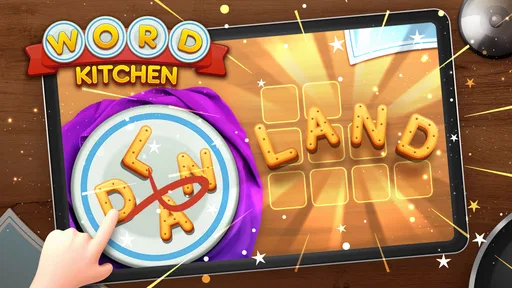
At its core, Word Kitchen is a word puzzle game that challenges your brain and enriches your vocabulary. The concept is simple yet addictive: you are given a set of letters, and your task is to form words by connecting these letters. It's like Scrabble meets MasterChef in the most delightful way possible! The game starts off easy, but don't be fooled; as you progress, the levels get more challenging, and you'll find yourself scratching your head trying to concoct the perfect word recipe.
Gameplay and Features
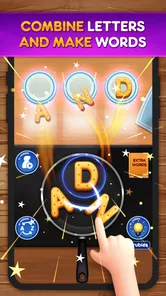
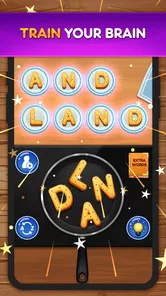
The gameplay in Word Kitchen is as smooth as butter. You swipe your finger across the screen to connect the letters and form words. The app provides a satisfying "ding" every time you create a valid word, which is oddly gratifying. There's a helpful hint system for when you're stuck, and trust me, you'll need it as the levels get tougher. One feature I particularly enjoyed was the daily challenges, which offer unique puzzles that keep the game fresh and engaging. Plus, the app's interface is sleek and intuitive, making it a breeze to navigate.
That simple swipe-and-solve loop also makes it easy to fit the game around interruptions. I would not plan a long, uninterrupted session around it; its strongest use is a handful of puzzles between errands or during a quiet pause. If I have only a minute, I can try a word or two and leave the more demanding puzzle for later. For anyone wondering whether it needs a long learning period, the basic action is clear from the start, so the bigger question is whether this particular style of word search stays enjoyable for you.
Visuals and Sound
Visually, Word Kitchen is a treat. The graphics are bright and colorful, perfectly complementing the game's lighthearted nature. Each level is designed to look like a cozy kitchen, complete with culinary-themed backgrounds. The sound effects add to the overall experience, especially the cheerful music that plays in the background, making you feel like you're in a whimsical cooking show.
The presentation helps the game feel friendly rather than like a vocabulary test, which is useful if you want something approachable to share with a younger player. At the same time, the kitchen dressing is atmosphere, not a substitute for variety in the puzzles. If you prefer a bare, high-contrast board where every element is strictly functional, this cheerful style may feel busier than necessary. I would keep the sound at a comfortable level in shared spaces; the audio adds charm, but the letter puzzle itself does not depend on hearing it.
What I Loved
One of the things that really stood out to me about Word Kitchen is its ability to keep players engaged. The combination of challenging puzzles, daily rewards, and the satisfaction of discovering new words makes it hard to put down. It's a fantastic way to kill time while simultaneously exercising your brain. I also appreciated that it's suitable for all ages, making it a great family-friendly app.
For a family session, I would make the goal collaborative instead of competitive: let one person scan for short words while another looks for less obvious combinations, then compare ideas before using a hint. That approach gives a child room to contribute without making speed the measure of success. It is also a handy way for an adult to play alongside someone who has a different vocabulary. The trade-off is that the game remains centered on the current letter puzzle; people looking for shared storytelling or a changing set of activities will probably get more from another kind of game.
Room for Improvement
While Word Kitchen serves up plenty of fun, there are a few spices missing from the mix. Occasionally, the hints can be a bit too revealing, taking away some of the challenge. Additionally, the ads can be a tad intrusive at times, but hey, that's the price of a free app, right? A premium version with an ad-free experience could be a great addition for those who want uninterrupted gameplay.
The advertising is worth weighing before you settle into a longer play habit. If an interruption breaks your concentration, this may be less relaxing than its light tone suggests, especially on a puzzle that has just started to feel difficult. The game is free to download, with in-app purchases priced from $0.99 to $12.99 per item, but I would not assume that making a purchase removes ads or changes the experience in a particular way. I would first play casually and decide whether the interruptions and hint balance are acceptable before spending.
Who will get the most from it?
My strongest recommendation is for people who like solo word puzzles and want an approachable way to fill small gaps in the day. Families can also use the letter sets as a low-pressure turn-taking activity: one person proposes a word, another looks for a different possibility, and the hint stays in reserve until everyone is properly stuck. Because the game is rated for Everyone, its general tone is suited to a broad audience, though younger players may still appreciate an adult nearby if they need help with unfamiliar vocabulary.
It is less compelling if you want the social competition of a head-to-head word board, or the freedom to build words from a large dictionary without a level-by-level structure. Compared with crosswords, it asks less general-knowledge recall and more pattern spotting; compared with a traditional letter-tile game, it feels more like a guided sequence of puzzles than a match against an opponent. That distinction matters: the fun here is finding combinations at your own pace, not proving you can beat someone else.
A realistic fit might be a short wait at a clinic or a few quiet minutes before dinner: I would open it, solve what I can, and stop when the moment ends rather than letting a daily prompt dictate the schedule. If you want an activity you can pick up without coordinating with another person, that flexibility is a strength. If your downtime usually means playing with friends, or you want to choose your own puzzle difficulty instead of moving through a sequence, a competitive word game or a more open-ended puzzle app is likely a better match.
Free to start, with a few trade-offs
The game is free to play, with in-app purchases ranging from $0.99 to $12.99 per item. I would begin without buying anything and see how the hints, ads, and level pacing feel in an ordinary session. The ads I encountered can interrupt the relaxed flow, so it is worth considering whether that bothers you before spending; a purchase should not be treated as a guaranteed ad-free option, since that is not established here. The current version is 1.0.12, and it runs on Android 6.0 or later, which makes it accessible to many older devices.
A small tip that helps preserve the puzzle’s value is to set yourself a personal rule: scan for short words first, then look for less obvious combinations, and only use a hint after changing your approach once. This keeps a difficult round from turning into random swiping. If you are playing in a noisy place, muting or lowering the sound may also make a quick session more comfortable; the cheerful effects are part of the charm, but they are not essential to solving the letters.
That strategy also gives you a fair way to judge the difficulty without spending hints too freely. First check whether a different starting letter or direction reveals a word you missed, then take a brief mental reset before asking for help. I find that useful when a puzzle seems stuck: the issue may be tunnel vision rather than a lack of vocabulary. It will not make every level easy, but it keeps the challenge feeling like word-finding instead of a race to tap through the hint system.
My progression verdict
Word Kitchen is best when its goals stay small: one puzzle, one satisfying discovery, then a natural stopping point. The rising challenge and daily activities give returning players a reason to come back, but the hints and ads can affect how rewarding that loop feels. I would recommend it to anyone who wants a friendly, family-appropriate word game for spare moments, especially if they enjoy solving alone. I would skip it in favor of a competitive word game or a more open-ended puzzle app if ongoing social play, extensive control over difficulty, or uninterrupted sessions matter more to you.
Released on March 1, 2023, it has a 4.6 average and over 500,000 installs. For me, those figures are less useful than the simple question of whether the letter puzzles suit your downtime. If they do, this is an easy game to pick up and put down; just treat daily rewards as a bonus, save hints for genuine stalls, and decide for yourself whether the advertising interrupts your enjoyment enough to change how you play.
Word Kitchen Frequently Asked Questions
Can I try Word Kitchen without paying?
Yes. Word Kitchen is free to download, so you can start playing without paying upfront. Optional in-app purchases are available for players who want them, but they are not required to enjoy the game. If you prefer to keep spending under control, check your device’s purchase settings before playing and be mindful of any purchase prompts.
What age rating does Word Kitchen have?
Word Kitchen has an Everyone content rating, making it a broadly approachable choice for families and players of different ages. Its word-puzzle format centers on finding and forming words, so it can also offer a light vocabulary challenge. Parents may still want to review purchase settings on the device, since the game includes optional in-app purchases.
Does Word Kitchen work on older Android phones?
Word Kitchen supports Android devices running version 6.0 or later. If your phone or tablet meets that minimum, you can install the game and try its word puzzles. Checking your Android version before downloading is a simple way to avoid compatibility surprises, especially if you use an older device or have not updated its software recently.
What is Word Kitchen about, and what kind of game is it?
Word Kitchen is a word game built around vocabulary puzzles and the challenge of finding words from letters. Its store summary asks, “Can you handle the heat of the Word Kitchen?”—a playful invitation to test your word-finding skills. The premise is easy to understand, making it a natural option for players who enjoy solving word challenges.
Who develops Word Kitchen, and what kind of game is it?
Word Kitchen is a free word game developed by Gimica GmbH. Its central appeal is the familiar challenge of spotting words in a letter grid, making it a straightforward choice for players who enjoy vocabulary puzzles. The game’s store summary asks, “Can you handle the heat of the Word Kitchen?”—a playful invitation to test your word-finding skills.
Pros
- Engaging word puzzles to challenge your mind.
- Simple interface easy for all ages.
- Includes daily rewards and bonuses.
- Offline play mode available.
- Wide range of vocabulary to learn.
Cons
- Limited hints can be frustrating.
- Ads can interrupt gameplay.
- No multiplayer mode available.
- Levels can become repetitive.
- In-app purchases for extra hints.













