Woodle Screw® Pin Nuts & Bolts
- 4.66K
- 4.8
- Installs
- 10.00M
- Price
- Free

Screenshots
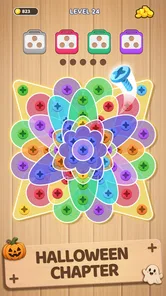

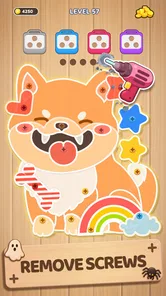

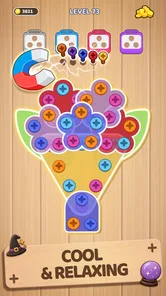
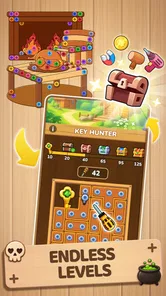
Analysis by Reviewed
I like puzzle games that give me a small, clear problem to work through without demanding a long session, and Woodle Screw Jam: Nuts & Bolts is built around that kind of appeal. Its wood-and-hardware theme gives the puzzles a playful identity, while the focus on moving screws and sorting colored pins suggests a mix of spatial reasoning and careful planning. I’d consider it when I want a quick mental reset, though its strongest fit is for players who enjoy thinking through a board rather than tapping through action.
Where this kind of puzzle fits in a day
I can picture opening it during a quiet coffee break, when I have enough time to focus on one board but not enough to settle into a long game. A useful way to approach that moment is to decide in advance whether I’m playing for one puzzle or simply exploring the mechanics. That small boundary helps keep a casual session casual, especially if a level takes longer than expected.
It also suits people who like tactile-looking puzzles but don’t necessarily want a physical puzzle box on the table. The screws and colored pins give the task a concrete visual language: I can inspect the arrangement, form a plan, and test it. If you enjoy logic that you can “read” at a glance, that may be more appealing than a word grid or a number puzzle. If you prefer puzzles with a story, character development, or a changing setting to explore, this is a narrower kind of enjoyment.
Getting Screwed in the Best Way
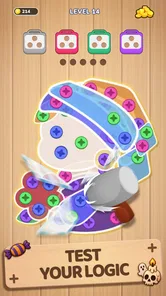
The first thing that caught my eye about Woodle Screw Jam: Nuts & Bolts is its vibrant graphics and intuitive gameplay. The game doesn’t just throw you into the deep end; it eases you in with a friendly tutorial that explains how to maneuver your screws and bolts to solve each puzzle. Trust me, once you start, it’s hard to put down.
A Whimsical World of Challenges
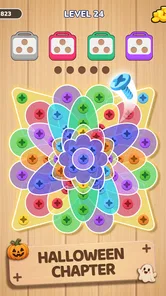
Each level of the game is like a new puzzle waiting to be solved. You’ll find yourself twisting and turning different screws to fit into their respective bolts, and believe me, it’s more satisfying than it sounds! What I loved about this game is that it’s not just about finding the right fit, but also figuring out the most efficient way to get there. The puzzles range from easy to mind-bending, keeping you on your toes and your brain engaged.
The whimsical design and quirky sound effects add a layer of fun that makes the game even more enjoyable. It's like being in a cartoonish workshop where everything is a bit topsy-turvy, and I’m all here for it!
Thinking Ahead Without Turning It Into Homework
For me, the useful habit is to pause before making a move and look at how the screws, openings, and colored pins relate to one another. A move that appears to clear space can leave a later piece awkwardly blocked, so treating each board as a small sequence rather than a set of isolated clicks makes the puzzle more satisfying. If I’m stuck, I’d rather scan the whole arrangement again than keep making moves just to see what happens.
More From Our News Desk

Weather by Xiaomi Review: Clear at a Glance, Less Clear Up Close

X Under Pressure: Can It Recover When Posting Goes Wrong?

Clash of Clans Is Won Between the Battles

Android Auto Makes the Case for Quieter Car Software

MobiOffice: Transforming Mobile Productivity with Seamless Integration

EA SPORTS FC™ Mobile Soccer: Redefining Mobile Sports Gaming
That makes the game a natural fit for a short break: a commute while seated, a quiet few minutes between tasks, or a bit of downtime at home. I wouldn’t choose it when I want fast reactions, a story to follow, or a game I can play without paying attention. Its pleasure comes from noticing a workable order, so interruptions can make it harder to hold a plan in mind.
Learning the board before chasing a solution
A practical tip is to separate what I can see from what I’m assuming. First, I look for which screws seem to affect access to other pieces; then I consider where the colored pins might need to go. That doesn’t guarantee a solution, but it keeps me from treating every available move as equally useful. In a puzzle built around moving parts, the order can matter as much as the destination.
If I’m playing while tired, I try not to turn a mistaken move into a string of hurried guesses. A short pause and a fresh look at the whole board can reveal a relationship I missed, while rapid tapping may only make the layout harder for me to interpret. That’s a small but meaningful trade-off: the game can provide a calm mental break, yet it still asks for enough attention that it isn’t ideal as background entertainment.
What You’re Paying For—and What Remains Unclear
The game is free to install, and it includes optional in-app purchases priced from $0.99 to $59.99 per item. That range is worth noticing before playing, especially if you share a device or let a child browse purchase screens. I can’t judge the value of individual items without knowing what each one provides, so I’d start by playing without spending and decide later whether any purchase solves a problem I actually have.
There’s no need to treat every difficult puzzle as a reason to pay. Try a fresh look at the board, trace a few possible move orders, and see whether the solution becomes clearer first. The game’s Everyone 10+ rating also helps families make an initial age-appropriateness decision, but it doesn’t replace checking purchase settings or deciding together how spending should work.
LifePulse Puzzle Game Studio’s puzzle is rated 4.8 on average from around 48,000 ratings, and it has been installed over a million times. Those figures suggest that plenty of players have tried it, but they don’t tell me whether its purchase balance, later puzzles, or presentation will suit every person. It is free, with purchases available, rather than a paid puzzle you buy once and assess on that basis.
How I’d think about the purchase choice
For a fair test, I’d begin by treating the free download as a chance to judge the central puzzle loop, not as a promise that every possible convenience will also be free. I’d pay attention to whether I’m enjoying the reasoning itself, whether I feel pushed to move on, and whether a purchase would address a genuine frustration rather than an impatient moment. That distinction matters in any free-to-start game: spending is easiest to justify when I understand exactly what I’m buying and why I want it.
For families, I’d set expectations before handing over a shared device. The age rating is useful context, but it doesn’t answer a household’s spending rules; those are better decided in advance. I’d also encourage a younger player to try rechecking a board before asking for help or reaching for a purchase. That keeps the focus on the puzzle and gives an adult a clearer sense of whether the challenge is enjoyable or simply frustrating.
Why You Should Tighten Those Screws
If you’re a fan of puzzle games, this is a must-try. It’s the perfect blend of challenge and entertainment that makes it ideal for killing time or simply having a bit of fun during your day. The game’s interface is user-friendly, which means you won’t find yourself fumbling around trying to figure out what to do next. Plus, the satisfaction of solving each puzzle is like a little victory dance for your brain.
Compared with a word puzzle, it asks more of your spatial planning; compared with a timed match-style puzzle, it puts more emphasis on working out a sequence than reacting quickly. That difference is exactly why I’d recommend it to someone who enjoys hands-on logic puzzles, but not to someone looking for competitive play, elaborate narrative, or a pure relaxation app with no decisions to weigh.
Who will enjoy it—and who may want another puzzle
I’d point a patient friend toward this game if they like manipulating a board until its pieces make sense, especially if they find satisfaction in spotting a sequence rather than racing a clock. It may also work for someone who wants a puzzle with a recognizable physical theme instead of abstract symbols. The wood-and-hardware presentation gives the reasoning a little character without asking the player to learn a large fictional world first.
I’d steer a different friend elsewhere if they want a broad variety of puzzle formats in one package. This is centered on screws, openings, and colored pins, so its appeal depends on enjoying that specific style of spatial problem. Likewise, anyone who wants a competitive leaderboard, a long narrative, or a game that can be played with almost no concentration is better served by a different kind of mobile game. Those aren’t flaws so much as clear limits on what this particular puzzle is for.
One practical question is whether it suits a very brief play session. The screw-and-pin premise is easy to grasp, and the tutorial helps with the basic interaction, so it’s approachable when you have only a little time. The tougher boards may reward a longer stretch of attention, though, and I’d avoid starting one when I know I’ll need to put my phone away immediately.
What to expect from a short session
If I have only a few minutes, I’d pick it up when I’m ready to focus rather than when I’m juggling a conversation or watching for a stop. A simple routine works well: take in the full arrangement, identify a likely first move, and check whether that move opens or closes options elsewhere. Even if I don’t finish the board, that process gives me a useful stopping point; I can return with a clearer idea of what I was trying to do.
The trade-off is that a puzzle’s visible simplicity can make it tempting to underestimate the attention it needs. A short break can become less relaxing if I begin a difficult board at the last minute. For me, the best moment is a stretch of spare time with no urgent interruption, while a quick distraction between rapid tasks is a poorer fit.
Another is whether it will work on an older Android device. Its minimum requirement is Android 5.0, and the current version is 1.0.5. It was released on October 23, 2024. Those details give Android users a concrete compatibility starting point, but I’d still check the device’s available storage and store compatibility before installing. The title is listed as a puzzle game, so players seeking a broad collection of unrelated game modes should look elsewhere rather than assume this is an all-purpose bundle.
Compatibility and the questions I’d settle first
For an Android user, the stated minimum operating-system requirement is a helpful first check, but it isn’t a substitute for confirming that the particular device can install the current release. I’d look at compatibility on the device’s own app store before planning to use it on an older phone. The game is currently at version 1.0.5, which gives a useful point of reference if I’m comparing what I see with a friend’s installation.
On the spending side, the purchase range tells me that optional items are available, but not what each item does or whether any is useful to a particular player. I wouldn’t assume purchases are required to solve the core puzzles, nor would I promise that they have no effect on convenience. I’d play first, read each purchase description carefully if I reach that point, and only then decide. That’s the most sensible way to answer the question of whether the free option is enough for me.
And hey, even if you’re not traditionally a puzzle game enthusiast, give it a whirl. The game’s charm lies in its simplicity and the little eureka moments you get every time you solve a puzzle. Just keep expectations in line with what it does best: compact mechanical puzzles, not a substitute for a deep strategy game or a no-cost experience with no purchase options.
So, if you’ve got some spare time and a penchant for puzzles, give it a try. My trust verdict is a cautious yes: the basic appeal is easy to understand, the theme gives the logic a bit of personality, and the free entry makes it reasonable to see whether the puzzles suit you. I’d recommend it to patient players who like arranging moves and solving one board at a time, while anyone uneasy about optional spending or hoping for a different kind of challenge should make that choice before installing.
Woodle Screw® Pin Nuts & Bolts Frequently Asked Questions
Is Woodle Screw Jam: Nuts & Bolts free to download?
Yes. Woodle Screw Jam: Nuts & Bolts is free to download, so you can try its wood-themed screw puzzles and color-pin sorting without paying upfront. The game also offers optional in-app purchases, with prices ranging from $0.99 to $59.99 per item. If you plan to let a child play, reviewing your device’s purchase settings can help prevent accidental transactions.
Who makes Woodle Screw Jam: Nuts & Bolts?
Woodle Screw Jam: Nuts & Bolts was developed by LifePulse Puzzle Game Studio. It is a puzzle game centered on wood-themed screw challenges and sorting colored pins, with an emphasis on testing your problem-solving skills. If you are comparing games before downloading, the developer name can help you identify the title in the app store and distinguish it from similarly themed puzzles.
Does Woodle Screw Jam: Nuts & Bolts work on older Android devices?
Woodle Screw Jam: Nuts & Bolts is a puzzle game that supports Android devices running version 5.0 or later. If your device meets that requirement, you can install it and try its wood-themed screw puzzles and color-pin sorting challenges. Checking your operating system before downloading is a simple way to avoid compatibility surprises.
What is the main objective of Woodle Screw Jam: Nuts & Bolts?
In Woodle Screw Jam: Nuts & Bolts, the primary objective is to solve intricate puzzles by strategically placing screws and bolts to connect various pieces. Players must use their problem-solving skills to figure out the correct combinations that lead to completing each puzzle level. The game blends creativity with logical thinking, offering a satisfying challenge for puzzle enthusiasts.
Is Woodle Screw Jam: Nuts & Bolts suitable for all age groups?
Woodle Screw Jam: Nuts & Bolts has an Everyone 10+ content rating, so it is aimed at a broad audience but is not labeled for every age without qualification. Its puzzle format focuses on screws, bolts, and color-pin sorting rather than fast action. Parents can consider the age rating alongside a child’s interests and check purchase settings before handing over a device.
Pros
- Challenging puzzles that stimulate thinking.
- Visually appealing with vibrant graphics.
- Smooth and responsive touch controls.
- Regular updates with new levels.
- Free to play with optional in-app purchases.
Cons
- Contains ads that can be disruptive.
- Some levels can be excessively difficult.
- In-app purchases can be pricey.
- Requires internet connection for some features.
- Limited hints available without purchase.