Sprunki All Phases Beat Maker
- 66.00
- 4.7
- Installs
- 10.00M
- Price
- Free

Screenshots
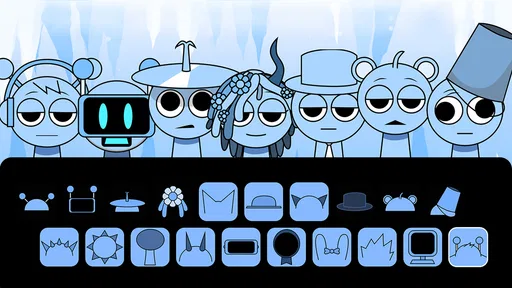
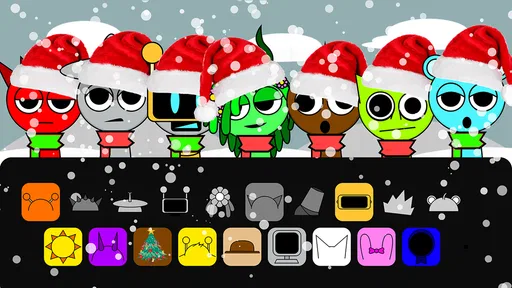
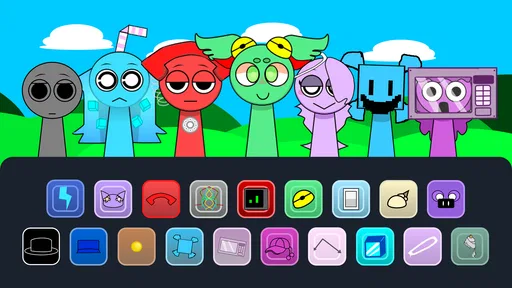
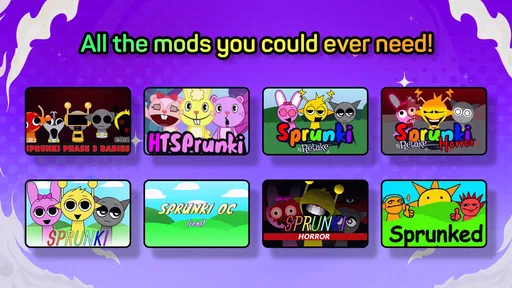
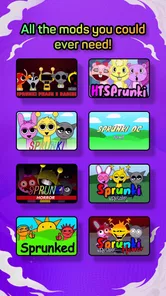
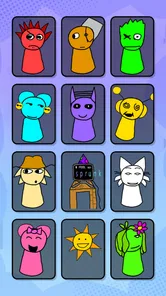
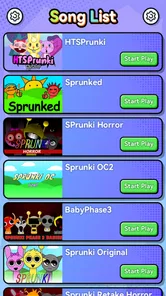
Analysis by Reviewed
I tried Sprunki All Phases Beat Maker as the sort of casual game that can pass between people on a shared phone or tablet. Its appeal is immediate: instead of competing for a high score, you build short musical ideas by combining beats, vocals, and effects across its different phases. I found it easier to pick up than a traditional music-making app, but more playful than a simple soundboard. That makes it a natural choice for a quick creative break, especially when several people want to take turns shaping the same kind of song.
The game comes from Gotstar Studio and is free to start. It is listed for everyone, runs on Android 7.0 or later, and currently appears as version 0.4.5. Those details matter in a household because the basic entry barrier is low: an older spare device may still be suitable, and nobody has to commit to a subscription just to try the central idea. There are optional in-app purchases priced at $3.99 per item, so I would still treat it as a game that needs a little conversation before a child uses a shared payment-enabled device.
How it works when several people share the same device
The most enjoyable shared-use scenario is a short turn-taking session. One person starts a musical combination, another changes the character of it with a different beat or vocal element, and a third person decides which effects make the result more interesting. Because the activity is based on arranging sound rather than mastering a complicated control scheme, each player can contribute without needing the same musical background.
I would use it during a quiet family break, on a long wait, or when friends want something creative that does not demand a winner. A younger player can experiment freely, while an older player can listen for balance and suggest a change. The important difference from many casual games is that the shared goal can be the sound itself. Nobody has to explain a complicated rule before the next person can participate.
That simplicity also creates a small limitation. If everyone wants to control the screen at once, the experience becomes less about making music and more about negotiating turns. On a phone, the workspace is naturally intimate, so two people leaning over it may interrupt each other. A tablet-sized screen would make collaboration more comfortable, but I would not assume that every device offers the same amount of room. For a household, a simple “one change per turn” rule works better than trying to operate it cooperatively at the same moment.
Why the phase-based approach suits casual play
The phase structure gives the session a sense of progression without turning it into a lesson in music production. I liked being able to treat each phase as a fresh direction rather than spending a long time perfecting one arrangement. That makes the game suitable for people who enjoy discovery but lose interest when an app asks them to learn a full mixer, timeline, or notation system first.
It is also useful for comparing tastes. One player may prefer a heavier rhythmic foundation, while another may focus on vocal textures or unusual effects. Instead of arguing about which choice is correct, you can hear how the same basic idea changes when the emphasis moves. That is a more meaningful group activity than simply passing around a game where each person repeats the same level.
More From Our News Desk

Weather by Xiaomi Review: Clear at a Glance, Less Clear Up Close

X Under Pressure: Can It Recover When Posting Goes Wrong?

Clash of Clans Is Won Between the Battles

Android Auto Makes the Case for Quieter Car Software

MobiOffice: Transforming Mobile Productivity with Seamless Integration

EA SPORTS FC™ Mobile Soccer: Redefining Mobile Sports Gaming
My practical tip is to make one deliberate change at a time. Adding every available sound immediately can make it difficult to understand what improved or became distracting. Starting with a beat, adding a vocal layer, and then testing an effect gives each contributor a clear role. This workflow is especially helpful for children, because it turns random tapping into a simple experiment: change one element, listen, and decide whether to keep it.
What to settle before handing over a shared phone
The first boundary is access to purchases. The game is free, but optional items cost $3.99 each. I would not hand it to a child while a payment method is exposed without first agreeing on whether purchases are allowed. The safest household habit is to make the rule explicit: playing is fine, but any purchase requires the device owner’s approval. That is not a criticism of the creative concept; it is simply sensible housekeeping for any free-to-start game.
The second boundary is device time. A musical toy can feel harmless because it is creative, yet a child may keep switching sounds long after the original activity has ended. I would set a clear session length before starting, particularly on a shared device that other people need. A short challenge, such as creating one arrangement for each person, gives the session a natural stopping point without making the game feel like a chore.
The third boundary concerns the device itself. Since the game depends on listening, a quiet setting is better than a noisy room. If one person is using headphones, others may not understand what is being changed, so shared listening is preferable when the goal is coordination. On the other hand, private listening can be useful when someone wants to explore without an audience. The right choice depends on whether the session is collaborative or individual.
I would also avoid treating the game as a replacement for a full music-production tool. Its strength is immediate experimentation with beats, vocals, and effects. Someone who wants detailed recording, precise editing, file management, or serious composition will likely be happier with a dedicated music app. Choosing this game for that purpose would create the wrong expectations and make its deliberately casual design feel restrictive.
Coordination that keeps the creative part enjoyable
Shared play improves when each person has a job. One player can choose the rhythmic base, another can listen for vocal contrast, and another can decide whether the effects support or overwhelm the arrangement. These roles do not need to be permanent. Rotating them prevents one confident player from taking over and gives quieter participants a concrete way to influence the result.
I found that verbal descriptions are less useful than short demonstrations. Rather than saying “make it more energetic,” a player can make one change and let everyone react. This is a small but important advantage of using the game together: the discussion is tied to something audible. It also reduces frustration when players have different ideas about what sounds good.
For a household with more than one interested player, I would create a simple rotation before opening the game. The first person starts the arrangement, the second modifies one layer, and the third chooses whether to keep the change. After that, the order moves forward. This prevents repeated grabbing of the device and gives everyone an expectation of when they will get control.
Another useful approach is to separate exploration from presentation. During exploration, players can make messy combinations without criticism. At the end, each person chooses one arrangement or phase they want everyone else to hear. That distinction makes the activity friendlier for beginners, because experimentation is not judged as though it were a finished song. It also gives older players a chance to discuss why a particular combination works for them.
Age context and the question of trust
The everyone rating fits the approachable nature of the activity, and I can see why it would attract younger players. Still, an age label does not remove the need for ordinary supervision on a shared device. A child may understand the creative controls perfectly well but not understand that an optional purchase affects the household budget. The conversation about spending is therefore more important than the game’s basic controls.
I would also explain that sounds do not need to be “right” immediately. Children may tap through combinations quickly, while adults may want a more orderly process. Both approaches have value. If the goal is confidence and curiosity, free experimentation is fine. If the goal is making one arrangement together, a turn system and a small number of deliberate changes will work better.
Trust also means respecting personal turns. A child who wants to explore alone should not have every decision corrected by an older sibling. Equally, a younger player should not be expected to surrender the device whenever someone else thinks they can make a better arrangement. The game is at its best when the household treats the result as shared play rather than a test of who has the best musical taste.
Because the game is casual, I would not use it as a formal learning tool unless expectations stay modest. It can encourage listening, comparison, timing, and creative confidence, but it does not replace structured instruction. That distinction helps parents and guardians recommend it honestly: it is a playful introduction to arranging sound, not a complete course in rhythm or composition.
What the popularity says—and what it does not
The game has a 4.7 average from around ten thousand ratings, and it has passed ten million installs. That level of reach suggests the basic idea connects with a large audience, especially people looking for a lightweight creative game rather than a demanding production environment. I would see those figures as a reason to try it, not as proof that every player will enjoy the same style of interaction.
Its current version is 0.4.5, which is worth keeping in mind when deciding how heavily to rely on it for a planned group activity. I prefer trying any casual app briefly before organizing a longer shared session, simply to make sure the device, sound output, and control response feel comfortable. That is particularly sensible when several people are waiting for a turn.
The alternative question is straightforward. Compared with a conventional rhythm game, this offers more freedom to shape a sound and less pressure to hit a sequence correctly. Compared with a dedicated beat-making app, it is quicker to understand and less intimidating, but it does not serve the same detailed production workflow. Compared with a passive music app, it gives each player something active to do. The best choice depends on whether the household wants competition, composition, or relaxed experimentation.
Where it fits into an everyday routine
Imagine two siblings waiting while a parent finishes a phone call. One starts a beat, the other adds a vocal element, and they agree to make only one change each before listening again. The activity can fill a short gap without requiring a long explanation or a saved campaign. When the parent is ready, the device can be put away after a clear final listen. That is a realistic use case because the game’s value is concentrated in small creative sessions rather than a lengthy commitment.
For an adult, the same pattern can work as a mental reset between tasks. I would use it when I wanted to make something playful without opening a complex workstation. The phase-based format encourages quick changes, and the combination of beats, vocals, and effects provides enough variation to make repeated short sessions feel different. It is not the tool I would choose to finish a polished track, but it is a pleasant way to break the habit of passive scrolling.
For a mixed-age household, the strongest routine is a shared challenge with a narrow goal. For example, each person can create a version that emphasizes a different element, then everyone can choose the arrangement they find most coherent. The point is not to declare an objective winner; it is to make the contrast audible. This gives the game structure while preserving its casual character.
One trade-off is that the game’s accessibility may reduce the sense of long-term mastery for experienced users. Someone who enjoys improving through increasingly technical controls may reach the limits of the format quickly. That player should probably move to a fuller music tool after the initial novelty. Someone who wants quick, social sound experiments may appreciate precisely the absence of a steep learning curve.
My household verdict
I recommend this game for families, friends, and individual players who want a low-pressure way to experiment with sound. Its free starting point, everyone rating, and support for Android 7.0 or later make it easy to consider for a shared device, while the combination of phases, beats, vocals, and effects gives each turn a clear creative purpose. Gotstar Studio has focused the experience on immediate interaction rather than technical production, and that focus is its main strength.
I would skip it if your priority is precision recording, advanced editing, competitive scoring, or a deep progression system. I would also avoid an unplanned shared session if nobody has agreed on turn-taking or purchase boundaries. The game cannot solve household coordination by itself; it works best when people establish a few simple rules before they start.
My final view is that this is a good casual game for making a shared device feel social instead of merely occupied. The most rewarding results come from listening carefully, changing one layer at a time, and allowing each player to leave a personal mark. The best reason to install it is not to chase a perfect track, but to give several people an easy, creative activity they can understand together. For that purpose, it earns a place among the more approachable music-focused games, even though it should not be mistaken for a professional studio.
Sprunki All Phases Beat Maker Frequently Asked Questions
What devices and operating systems can run Sprunki All Phases Beat Maker?
Sprunki All Phases Beat Maker is a casual game for Android, and it requires Android 7.0 or later. Check your device’s Android version before downloading so you can confirm it meets that requirement. The game is free to download, though in-app purchases are available. Keeping the app and your device software up to date can also help you get the intended experience.
What is Sprunki All Phases Beat Maker?
Sprunki All Phases Beat Maker is a music-creation experience inspired by the Sprunki universe, allowing players to build layered tracks by combining characters, sounds, rhythms, and vocal effects. Its main appeal is experimentation: you can arrange different performers, test unusual combinations, and create short musical compositions without needing professional production knowledge. The exact features may vary depending on the version or platform where it is offered. The game’s store summary highlights creating songs with beats, vocals, and effects across its phases.
How does the gameplay work in Sprunki All Phases Beat Maker?
The gameplay is generally based on selecting and arranging sound-producing characters or icons to form a beat. Each element contributes a different rhythm, melody, voice, or effect, so the goal is to discover combinations that work well together. Some phases may introduce new visual styles, sounds, or darker themes. The controls are usually simple, making the experience accessible to beginners while still encouraging repeated experimentation.
Is Sprunki All Phases Beat Maker suitable for children?
The basic music-making concept is easy for children to understand, and Sprunki All Phases Beat Maker has an Everyone content rating. Some Sprunki-inspired phases can include unusual, spooky, or mildly disturbing character designs and sound effects, so parents may still want to consider whether that style suits a younger player. As with any app, adults can review the experience together with children before they begin playing.
Does Sprunki All Phases Beat Maker require an internet connection?
Internet requirements can depend on whether you are using a browser-based version, an unofficial mobile port, or an app distributed through an official store. Some versions need a connection to load the game, advertisements, or online content, while others may allow limited offline play after installation. Before downloading, check the store description and test whether core music-making features remain available without Wi-Fi or mobile data.
Pros
- Covers multiple Sprunki phases with varied sounds and visual styles.
- Simple drag-and-drop controls make beat creation easy for beginners.
- Quickly layer vocals
- effects
- and rhythms without music theory knowledge.
- Fun for experimenting with unusual character and sound combinations.
- Works well for short
- casual music-making sessions.
Cons
- Some phases may feel repetitive after extended play.
- Limited tools for advanced editing
- mixing
- or precise timing control.
- Audio quality can vary between characters and phase sound packs.
- May offer less depth than professional beat-making applications.
- Availability and features can differ between Android and iOS versions.













