Spades: Classic Card Game
- 8.63K
- 4.9
- Installs
- 5.00M
- Price
- Free
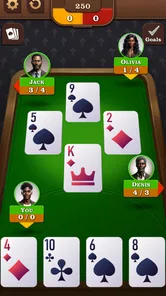
Screenshots







Analysis by Reviewed
For me, the appeal of Spades: Classic Card Game starts with a simple idea: a familiar trick-taking card game should be ready when I have a spare moment, not only when I can gather a group around a table. Its offline play makes that possible, turning a quiet stretch of a commute or a wait between errands into a chance to think through a hand. I like that the core draw is still Spades itself, rather than a pile of side activities competing for attention.
A classic game that fits a spare moment
Spades is a card game built around reading the hand, judging how many tricks you can take, and adjusting when the cards fall differently than expected. Playing on a phone changes the setting, not the basic appeal: I can focus on the choices in front of me without needing a partner physically beside me. The offline option is especially useful when a connection is unreliable, and it makes this a practical pick for travel or a short break when I do not want to depend on Wi-Fi.
That convenience has a trade-off. A solo session is not the same as a lively table with people you know, and a digital opponent cannot reproduce every human tell or playful bit of table talk. I see this game as a handy way to enjoy Spades on my own, not a replacement for every social game night. If your main goal is conversation with friends, a multiplayer option or a real deck may suit you better.
How I would use it day to day
On a busy day, I would open it when I have a few quiet minutes and want something more thoughtful than a quick reflex game. A useful habit is to pay attention to the bids and the tricks that have already been played rather than making each move in isolation. That gives even a brief session a little strategic focus, and it can help a newer player get more comfortable with the rhythm of Spades before joining a group in person.
I would also treat offline play as a deliberate choice when I know I will be without a dependable connection, rather than assuming every part of the app works the same way without internet. That keeps expectations sensible. For anyone deciding between this and a general card-game collection, the advantage here is its focus: if Spades is the game you want, a dedicated option is easier to settle into than browsing through unrelated games.
Getting Started with Spades
When you first open Spades: Classic Card Game, the clean and intuitive interface immediately stands out. The developers have done an excellent job of making sure that navigating through the app is as smooth as possible. You can easily start a new game or join a multiplayer match with friends or players from around the globe. The app also offers a tutorial mode, which is a great way for beginners to learn the rules and strategies of the game without feeling overwhelmed.
Features that Stand Out
One of the standout features of this app is the variety of game modes available. You can play solo against AI opponents, or if you're feeling competitive, dive into a multiplayer match. The app also includes a ranking system, which adds an extra layer of challenge and motivation to improve your skills and climb the leaderboard.
More From Our News Desk

 Gmail
GmailGmail in a Busy Inbox: Who Benefits Most?
From first account to crowded workday, Gmail earns its place through dependable search and flexible sorting—but its best fit depends on how much inbox maintenance you can tolerate.

 Prime Video
Switching to Prime Video: What Changes in Your Viewing Routine
Prime Video can make a compelling second home for streaming, but switching means learning a different catalog, rental layer, and route from browsing to playback.

 Universal TV Remote Control
Universal TV Remote Control Works Best as a Reliable Backup
A phone remote earns its place through quick setup and reliable habits. Here is how to get more from Universal TV Remote Control—and where its limits show.

 Weather - By Xiaomi
Weather by Xiaomi Review: Clear at a Glance, Less Clear Up Close
Xiaomi’s weather app makes everyday forecasts quick to scan, but its calm surface can leave useful details and recovery paths harder to find than they should be.

 X
XX Under Pressure: Can It Recover When Posting Goes Wrong?
A resilience-focused review of X, examining setup, mistaken posts, interruptions, weak connections, and the gaps that matter when recovery needs to be dependable.

 Clash of Clans
Clash of Clans Is Won Between the Battles
Its raids are quick; its community is a long-term project of coordination, teaching, rivalry, and shared responsibility—with all the friction that entails.
Latest News



Another feature I absolutely love is the customization options. You can choose your preferred deck style and even personalize your avatar. This adds a nice personal touch to the game, making it even more enjoyable. Plus, for those who like to keep track of their progress, the app provides detailed statistics and game history.
Why You'll Keep Coming Back
What keeps me coming back to Spades: Classic Card Game is the seamless gameplay and the social aspect. The chat feature allows you to interact with your opponents, making each game a more engaging and social experience. It's like having a virtual card night with friends, minus the hassle of setting up an actual table.
The app is also optimized for both Android and iOS, ensuring a smooth performance regardless of the device you're using. This is crucial because nothing is more frustrating than lag during a critical hand. Thankfully, the developers have clearly prioritized performance, and it shows.
For a free card game from NewPubCo, its appeal is easy to understand: it has a 4.8 average from around 37,000 ratings and has passed one million installs. The Everyone age rating makes it suitable for a broad audience. The current version is 2.3.0, and in-app purchases range from $0.99 to $9.99 per item, so I would check purchase prompts before tapping through if I want to keep my play strictly free. It was released on July 30, 2020, and requires Android 7.0 or later.
Who gets the most out of it
I would recommend this to someone who already enjoys Spades, wants a low-effort way to practice, or needs a card game that can keep going when internet access is patchy. Beginners can use the tutorial mentioned in the app to learn the basics, then build confidence by paying closer attention to bids and played cards. The game is less compelling if you want a constant stream of new challenges, a strong substitute for face-to-face company, or a card app that lets you switch among many different games.
NewPubCo’s version is at its best when I treat it as a focused Spades companion: convenient for a solo hand, and more social when I choose to play with others. I would not pick it for every mood, but when I want this particular card game without setting up a table, it is a useful option. If that matches what you are after, Spades: Classic Card Game is worth trying; just decide whether its offline, solo-friendly appeal matters more to you than the energy of a live game.
One final practical note
To get more from a short session, I would choose one decision to review after each hand: whether my bid matched the cards I held, or whether I changed plans sensibly once the tricks began. That small bit of reflection is more useful than simply chasing a streak, especially for a newcomer. With that approach, the game can be both a convenient way to pass time and a steady place to sharpen judgment, while still being clear about what it is: a focused digital take on Spades rather than a substitute for every kind of card night.
Putting offline play to a useful test
The offline capability matters most when it changes a real routine, not just when a connection icon disappears. I would use it during a train ride, in a waiting room, or in a place where mobile reception comes and goes. In those moments, a card game that can be played without relying on Wi-Fi is more dependable than a multiplayer-first alternative that needs a stable connection before a hand can begin. The point is not that every commute needs filling; it is that the game is available for the quiet stretches when I actually want it.
For a short break, I would set myself a modest goal: play a hand or two and focus on one choice, such as how confidently I bid with a mixed hand. Spades rewards attention, so it suits a pause when I can concentrate more than a few seconds at a time. If I am walking, working, or likely to be interrupted repeatedly, I would leave it for later rather than start a hand I cannot follow. That is a small but useful distinction between a game that is convenient to open and one that fits every spare moment.
Making each hand a little more informative
A practical way to improve is to keep track of the cards that have already appeared, especially the high cards that can affect whether a promised trick is still realistic. I would not try to memorize everything at once. Instead, I would watch one suit or one key card pattern during a hand, then compare what happened with my original bid. This makes the game a better practice space than tapping quickly through each trick, and it gives a beginner something specific to learn without turning a casual session into homework.
There is also a useful difference between judging a bid before play and judging it afterward. A result alone does not prove that the original decision was good or bad; a hand can turn unexpectedly. I would look at the cards I held and the information available when I made the bid, then ask whether the estimate was reasonable. The statistics and game history described in the app can support that kind of reflection, but I would use them as a prompt to notice patterns rather than as a score to chase. That approach is more likely to build sound judgment than treating every win as evidence that a risky bid should be repeated.
If I am playing while distracted, I would favor learning the flow over trying to optimize every decision. When I have a calmer stretch, I can pay closer attention to the cards and the bidding choices. This flexibility is one of the better reasons to keep a focused card game on a phone: the same familiar rules can make a short session relaxing or, with more attention, a small strategic exercise.
How it compares with other ways to play cards
Against a broad card-game collection, this game makes more sense when I already know I want Spades. A collection may be better for someone who likes switching between different formats or is still deciding which card game to learn. Here, the narrower focus avoids that browsing step and keeps the experience centered on one familiar game. The trade-off is just as clear: if I tire of Spades, there is no reason to expect a single-game option to provide the variety of a larger collection.
A physical deck with friends remains the better choice when the main attraction is conversation, shared jokes, or reading the people across the table. A digital solo game cannot supply that atmosphere. Multiplayer play can bring other people into the experience, but it is not the same as gathering a group in person, and it may be less suitable when I simply want a quiet, interruption-friendly session. I would choose between these options by mood: phone play for convenient practice or a solitary break, and a real table for the social ritual.
Compared with a reflex-based mobile game, Spades asks me to slow down and consider the hand. That is a strength when I want a calmer kind of engagement, but a weakness if I am looking for quick action or constant novelty. It is also not an ideal choice for someone who wants an entirely passive way to pass time; the decisions are the main activity. The best fit is a player who enjoys thinking through a hand, even when the session is brief.
What to expect before choosing it
The game is free to download, while optional in-app purchases are listed between $0.99 and $9.99 per item. I would treat that as a reason to pay attention to any purchase prompt, not as a reason to assume that spending is necessary to enjoy a hand. Someone keeping a strict budget can simply decide in advance not to buy anything and check carefully before confirming a transaction. That is a sensible habit for any free game with optional purchases.
The Everyone content rating makes it broadly suitable for family settings, but I would still consider whether the people playing are ready to learn a trick-taking game. The rules involve planning and following the flow of a hand, so a younger or brand-new player may need a little guidance at first. The tutorial can help with getting started, while playing patiently and explaining why a bid was made can make the learning process more rewarding when sharing the game with someone else.
For Android users, the listed minimum operating system is Android 7.0, and the current version is 2.3.0. I would check that compatibility before downloading, particularly on an older phone. The game is free, but compatibility and a preference for offline solo play are more relevant decisions than its price alone. On iOS, the app is presented as available for that platform too; the Android system requirement, of course, is specific to Android devices.
Who should choose it—and who should pass
I think this is a good match for someone who already understands Spades and wants a convenient place to play when no one else is available. It also suits a beginner who is willing to learn gradually, using the tutorial and paying attention to bids rather than expecting every hand to be obvious. The focused format is especially appealing if I want one familiar game that does not depend on being online for solo play.
I would skip it if I mainly want a lively group experience, a large menu of card games, or a game built around rapid action. I would also look elsewhere if I know I will be frustrated by making decisions without the conversation and unpredictability of people sitting together. A dedicated Spades game does one kind of job well; it does not need to replace every other way of playing cards to be useful.
My recommendation is straightforward: choose it if the combination of a familiar trick-taking game and offline availability fits how you spend small pockets of free time. Use the quiet sessions to practice a specific decision, and save the physical deck or a social multiplayer setting for evenings when company is the point. That distinction helps set fair expectations, and it is why I see this as a practical companion for Spades fans rather than a universal card-game solution.
Spades: Classic Card Game Frequently Asked Questions
Can I learn Spades by playing Spades: Classic Card Game?
Yes. The game is built around classic Spades play, so it can be a practical way to get familiar with making bids and winning tricks as you play. Its offline mode lets you practice without a Wi-Fi connection, which is useful if you want to take your time learning the flow of a hand before playing in other settings.
Does Spades: Classic Card Game need Wi-Fi to play?
No. Spades: Classic Card Game supports offline play, so you can enjoy a game without Wi-Fi or a mobile data connection. That makes it a convenient choice for travel or places with limited connectivity. The store summary highlights offline Spades, and the game lets you play against AI opponents while practicing your decisions and strategy.
Is Spades: Classic Card Game free to download?
Yes. Spades: Classic Card Game is free to download, so you can try its classic card-game format without paying upfront. It also offers optional in-app purchases, priced from $0.99 to $9.99 per item. Those purchases are separate from the free download, so consider them when deciding whether the app suits your preferences.
What do I need to run Spades: Classic Card Game on my device?
The minimum operating system requirement is version 7.0, which is worth checking before you download. The game is available for Android and iOS users, and its current version is 2.3.0. If your device meets the operating-system requirement, you can install the game and try its Spades gameplay; checking available storage beforehand is also a sensible step.
What is the objective of Spades: Classic Card Game?
Spades: Classic Card Game is a trick-taking card game where the objective is to accurately predict the number of tricks you can win with the hand dealt to you. Players form partnerships and work together to meet their bid, while also trying to prevent their opponents from meeting theirs. The game is played with a standard deck of 52 cards, and the player or team with the highest score at the end of the game wins.
Pros
- Addictive gameplay with strategic depth.
- Smooth animations enhance user experience.
- Multiplayer mode for social interaction.
- Customizable game settings.
- Offline mode available.
Cons
- In-app ads can be intrusive.
- Requires stable internet for multiplayer.
- Limited tutorial for beginners.
- Occasional app crashes reported.
- Some features locked behind paywall.