Dominoes: Classic Dominos Game
- 8.50K
- 4.7
- Installs
- 10.00M
- Price
- Free

Screenshots







Analysis by Reviewed
When I want a game that rewards a little patience rather than quick reflexes, digital dominoes is an easy choice. Dominoes: Classic Dominos Game brings the familiar challenge of matching tiles to a phone, where I can play without setting up a table or finding someone else at home. Its pace is deliberate, which makes it a good fit for a quiet break—but not necessarily for a moment when I may need to put my phone down without warning.
Quick sessions, with a familiar rhythm
For me, dominoes works best when I can settle into a few turns without needing a long setup or a complicated tutorial. The appeal here is the directness of a tile game: scan the open ends, decide whether to play, and keep track of what might still be in the other hand. It suits a short break, though a full match can naturally take longer than the few minutes you first set aside. I’d choose it when I want a focused pause, not when I need something that can be abandoned at any second without consequence.
A useful way to make a quick session more satisfying is to decide what you want from it before starting: practice reading the board, play casually, or test yourself against another person. That small intention changes how I approach each turn. If I’m learning, I pay attention to which tiles have already appeared rather than rushing to make the first legal move. If I’m simply unwinding, I let the game flow and accept that a round may not go my way.
Getting Started with the Game
So, what’s the deal with this app? Installing Dominoes: Classic Dominos Game is straightforward. The game is free, and it is listed for Android and iOS. Once you open it, you're greeted with a slick, user-friendly interface that's as inviting as a well-laid table of tiles. The app offers three popular versions: Draw Dominoes, Block Dominoes, and All Fives, catering to different tastes and skill levels.
Gameplay Experience
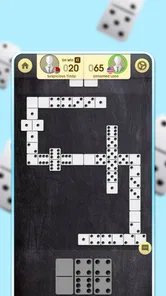
Diving into the game, I was immediately impressed by the smooth graphics and intuitive controls. The tiles are neatly designed, making it easy to spot and play your hand. What’s more, the app provides a seamless multiplayer experience, allowing you to challenge friends or random opponents from around the globe. There's nothing quite like the satisfaction of outsmarting a real opponent in a game of strategy.
The app also includes a practice mode where you can hone your skills against AI. This is perfect for those moments when you want to play a quick game but don't feel like engaging with other players. The AI is surprisingly smart, offering a decent challenge even for seasoned players. And trust me, practicing here can make you a formidable opponent in multiplayer matches.
Choosing how to play
The three named variants give the experience more range than a single ruleset, but they reward different habits. Draw is a comfortable starting point if you like having another chance to find a playable tile; Block puts more emphasis on remembering what has been used and judging when the board may close; All Fives asks you to watch the open ends as well as your own hand. I’d switch between them instead of treating one result as a complete measure of skill. A player who thrives in one format may need to adjust their timing in another.
More From Our News Desk

 Gmail
GmailGmail in a Busy Inbox: Who Benefits Most?
From first account to crowded workday, Gmail earns its place through dependable search and flexible sorting—but its best fit depends on how much inbox maintenance you can tolerate.

 Prime Video
Switching to Prime Video: What Changes in Your Viewing Routine
Prime Video can make a compelling second home for streaming, but switching means learning a different catalog, rental layer, and route from browsing to playback.

 Universal TV Remote Control
Universal TV Remote Control Works Best as a Reliable Backup
A phone remote earns its place through quick setup and reliable habits. Here is how to get more from Universal TV Remote Control—and where its limits show.

 Weather - By Xiaomi
Weather by Xiaomi Review: Clear at a Glance, Less Clear Up Close
Xiaomi’s weather app makes everyday forecasts quick to scan, but its calm surface can leave useful details and recovery paths harder to find than they should be.

 X
XX Under Pressure: Can It Recover When Posting Goes Wrong?
A resilience-focused review of X, examining setup, mistaken posts, interruptions, weak connections, and the gaps that matter when recovery needs to be dependable.

 Clash of Clans
Clash of Clans Is Won Between the Battles
Its raids are quick; its community is a long-term project of coordination, teaching, rivalry, and shared responsibility—with all the friction that entails.
Latest News



For a realistic everyday use, I can imagine opening a round while waiting for a meal or during a quiet stretch at home, then using the AI option when I don’t want to coordinate with another player. If I have a longer, uninterrupted break, multiplayer is the more engaging choice because another person’s decisions make the board less predictable. That distinction matters: practice is convenient, while a human match brings the uncertainty that makes careful tile tracking feel worthwhile.
Making a match fit the moment
I’d use the different play options as a way to manage my attention, not just to change the rules. Against AI, I can focus on the board and take my time learning how a variant feels. When I’m playing another person, I’m also responding to their choices, so I’d save that mode for a break long enough to finish a match. If I’m interrupted often, I’d choose a different activity rather than start a game and leave the other player waiting.
One practical habit is to pause briefly before each move and ask what the play does for the next turn, not only whether it is legal now. In Draw, keeping a playable option open can be more useful than rushing to shed a tile; in Block, noticing which numbers have disappeared helps me judge whether the board may soon stall. In All Fives, I pay attention to both ends because a move can affect scoring as well as the shape of the line. These small shifts make the variants feel meaningfully different even when the basic tile-matching idea stays familiar.
Features That Stand Out
One of the standout features of the app is its customization options. You can choose different tile designs and table backgrounds, allowing you to personalize your gaming experience. The app also keeps track of your stats, so you can see how you stack up against other players and aim to improve your game.
Another cool feature is the chat function. It’s always fun to engage in some friendly banter or light-hearted trash talk while playing. Plus, the app’s notification system ensures that you never miss a turn, which is a lifesaver for those of us who tend to get distracted easily.
Small choices that improve the experience
I’d treat the stats as a record of how I’m playing, not as a verdict on whether I’m good at dominoes. If I’m trying to improve, I’d look for patterns across several games: am I holding onto high-value tiles too long, or overlooking a chance to restrict the board? Changing one habit at a time gives those records more meaning than chasing a winning streak. Customization is more personal than strategic, but choosing a tile and table look that I can read comfortably matters during longer sessions.
Chat can make a human match feel less anonymous, though it won’t be everyone’s preference. I’d keep messages brief and friendly, and I wouldn’t count on conversation as the reason to play if I mainly want a quiet solo pastime. Notifications are useful when a match needs attention, but they can also be a distraction if I’m trying to keep my phone quiet. For a focused session, I’d decide in advance whether I want reminders rather than letting them interrupt another task.
How it fits beside other domino games
Compared with a physical set, this is easier to pick up when nobody else is nearby and removes the need to lay out and gather tiles. The trade-off is that a screen cannot replace the shared table atmosphere, and a digital opponent does not offer the same social read as a friend across from you. Compared with simpler digital dominoes, the choice of three variants and the option to play other people give this one more ways to stay interesting. If you mainly want quiet, uninterrupted practice, the AI mode is a practical fit; if your priority is face-to-face conversation, a real set is still the better choice.
Against casual phone games built around quick taps and constant visual changes, dominoes asks for a different kind of attention. I like that when I want to think through a choice instead of reacting quickly, but it is also why I wouldn’t recommend it to someone who needs immediate bursts of stimulation. A physical set is still preferable for a family evening where the conversation is the main event. This app makes more sense when convenience is the priority: I can play alone, try different formats, or seek a human opponent without arranging a table first.
Reliability, device fit, and value
I’d treat it as a lightweight board-game choice rather than a demanding action game: the play itself is turn-based, so quick reflexes are not the point. Its current version is 3.13.0, and Android support begins at version 6.0. That makes the minimum system requirement worth checking before installing on an older phone. I can’t promise identical speed on every device, but the kind of play involved should be comfortable for someone who prefers deliberate turns over fast visual effects. For multiplayer, a steady connection is also sensible; when I want a session that doesn’t depend on other people being available, I’d choose practice instead.
Because turns are taken one at a time, I wouldn’t expect the game to feel rushed in the way an action title can. That makes it easier to think through a move, although it does not guarantee that every screen or connection will behave the same way on every device. If a match is interrupted, I’d avoid assuming it will resume exactly where I left it; for a dependable short break, choosing a moment when I can stay with the round is the safer approach. If the phone feels sluggish generally, closing other demanding tasks before playing is a sensible basic step, rather than expecting a board game to fix device-wide slowdown.
For heavier use, such as playing several rounds in a row, I’d pay attention to whether I’m still enjoying the thinking or just repeating moves out of habit. The game’s variants offer a natural way to reset my attention: switching from Draw to Block changes what I need to watch, while All Fives gives me another reason to track the open ends. I wouldn’t treat that as a performance setting; it is simply a way to keep a longer play session mentally fresh without assuming extra features beyond the game itself.
The game is free to start, with optional in-app purchases ranging from $0.99 to $69.99 per item. I’d decide whether the core play suits me before spending anything, and keep purchase controls in mind if a child uses the device. It is rated for Everyone, while still being a better fit for people who enjoy thinking through a board than for someone seeking constant action. NewPubCo is the developer; the game has a 4.7 average from around 227,000 ratings and over 10 million installs. Those figures suggest broad interest, but they don’t tell me whether its pace or social style will suit a particular player.
Who will enjoy it—and who may not
I’d recommend it to someone who already likes dominoes and wants a convenient way to play without organizing a group, as well as a newcomer willing to learn by trying the three variants. The AI option makes solo practice useful when friends are busy, while multiplayer gives a longer break a more unpredictable edge. It is also a reasonable pick for a household where different people prefer different approaches to the same basic game. The Everyone age rating makes it broadly accessible, though adults should still consider purchase controls when sharing a device with children.
I’d skip it if I want a fast arcade game, a fully social substitute for sitting around a real table, or an activity I can reliably abandon mid-match. People who dislike turn-based thinking may find the pace too measured, and players who only want one specific ruleset may not care about the variety. If my main goal is conversation with family, a physical set is better; if I want quick, low-commitment phone entertainment, a shorter casual game may fit more naturally. The key question is whether I enjoy weighing a move before making it.
Final Thoughts
All in all, Dominoes: Classic Dominos Game is a fantastic app for anyone looking to enjoy this classic game in a modern format. Its blend of traditional gameplay and modern features creates an engaging experience that will keep you coming back for more. Whether you’re playing on your commute, relaxing at home, or just killing time, this app is a great companion.
So, if you haven’t already, give it a try. Who knows? You might just discover a newfound love for this classic game, one tile at a time.
Dominoes: Classic Dominos Game Frequently Asked Questions
Is Dominoes: Classic Dominos Game suitable for beginners?
Yes. Dominoes: Classic Dominos Game presents dominoes in a familiar board-game format, so newcomers can get comfortable with matching tiles as they play. The basic objective is easy to grasp, while learning when to place a tile can add a little strategy over time. It can be a relaxed way to try dominoes before moving on to more challenging play.
Who developed Dominoes: Classic Dominos Game, and when was it released?
Dominoes: Classic Dominos Game is a board game developed by NewPubCo. It was released on December 5, 2019, and its current version is 3.13.0. Those details can help you identify the game when browsing for it and distinguish it from other domino apps. Its short store description is simply “Dominoes,” while the store summary calls it “Domino Frenzy - Tile board game.”
Is Dominoes: Classic Dominos Game suitable for children?
Dominoes: Classic Dominos Game is rated Everyone, making it suitable for a broad audience, including children and families. Its board-game format is familiar and easy to approach, while the basic goal of matching tiles can help new players learn through play. Parents may still want to review the game’s in-app purchase options before letting a child play unsupervised.
Will Dominoes: Classic Dominos Game work on my phone or tablet?
The game is available for Android and iOS devices, and the Android version requires Android 6.0 or later. Before downloading, check that your device meets the platform’s requirements and has enough available storage. Dominoes is a straightforward board-game format, so it can suit either a phone or a tablet for casual play.
What is Dominoes: Classic Dominos Game?
Dominoes: Classic Dominos Game is a mobile app that brings the timeless game of dominoes to your Android or iOS device. It offers various modes and levels of difficulty, allowing both beginners and seasoned players to enjoy a traditional yet engaging gaming experience. The app features intuitive controls and vibrant graphics that make playing dominoes both fun and accessible. It is a free board game developed by NewPubCo.
Pros
- Easy to learn for beginners
- Smooth user interface
- Various game modes
- Multiplayer option available
- Engaging graphics
Cons
- Contains in-app ads
- Limited free features
- Requires internet for multiplayer
- Occasional bugs
- No offline mode