Princess Game Fantasy Coloring
- 62.00
- 4.6
- Installs
- 10.00M
- Price
- Free

Screenshots


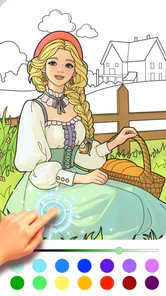



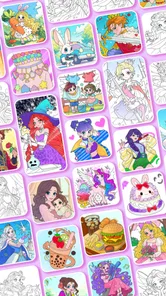
Analysis by Reviewed
When a child wants to color on a phone or tablet, the first question is often not what to draw but how quickly they can get started. Princess Game Fantasy Coloring is aimed at that easy, low-pressure moment: pick a picture, choose colors, and spend a little time making it your own. I see the appeal for families who want a simple creative activity rather than a game built around scores or competition.
Where a coloring session can get stuck
The game’s straightforward idea is also its main constraint. It is about princess-themed coloring, so it is not the best fit for a child who wants varied puzzles, a story to follow, or a broader collection of activities. A young user may also need an adult nearby at first to help find the picture they want and understand the available controls. I would treat it as a short creative break, not as a complete entertainment or learning package.
There can be a small mismatch between a child’s expectations and the freedom a coloring screen offers. Some children want to fill a picture quickly; others want to spend time choosing a palette and working carefully. Letting them know they can make the picture their own, rather than trying to color it “correctly,” can make the first session more enjoyable. That simple framing is useful whether they are using a phone during a wait or sitting down with a tablet at home.
Setup checks before handing it over
The game is free to download, with optional in-app purchases listed from $1.99 to $3.99 per item. I would check the purchase settings on the device before giving it to a child, and explain that paid items are not needed to begin using a free game. This is a practical precaution, not a reason to avoid it: it helps keep a casual coloring session from turning into an unexpected purchase conversation.
It is an educational game from BabyBus, rated Everyone, and it requires Android 5.0 or later. Its current version is 1.14.2.2. If it will not install or open, I would first check that the device meets the operating-system requirement, then make sure the download has finished and try opening the game again. These basic checks are more sensible than assuming a coloring feature is broken.
Making the most of a simple coloring game
I’d approach this as a small, child-led activity rather than a project that needs a polished result. Letting a child choose a picture and decide when they are done can make the session feel manageable, while an adult can help keep device use and purchases in view. That practical balance also makes it easier to judge whether the game’s focused coloring format suits your family.
A workflow that suits short sessions
For an everyday use case, imagine a child waiting for a meal or for an appointment to begin. I would offer one picture, let them choose the colors, and keep the session short enough that the activity stays relaxing. Saving a finished creation gives the child a natural stopping point; sharing it can be a fun way to show a parent, though I would supervise that step and keep device-sharing habits age-appropriate.
More From Our News Desk

Weather by Xiaomi Review: Clear at a Glance, Less Clear Up Close

X Under Pressure: Can It Recover When Posting Goes Wrong?

Clash of Clans Is Won Between the Battles

Android Auto Makes the Case for Quieter Car Software

MobiOffice: Transforming Mobile Productivity with Seamless Integration

EA SPORTS FC™ Mobile Soccer: Redefining Mobile Sports Gaming
A useful tip is to ask the child to choose a small theme before starting, such as colors for a night sky or a garden. That gives the activity a bit of direction without turning it into a lesson or limiting their imagination. If they become frustrated, switching to a simpler color choice or taking a break is often better than trying to finish the picture. The value here is the process, not a polished result.
How it compares with paper and other apps
Compared with a paper coloring book, a digital canvas is easier to carry and does not need crayons or cleanup. The trade-off is screen time and the less tactile feel of drawing on a display. Compared with broad kids’ game collections, this title has a more focused princess-and-fantasy identity, which may help a child settle into one kind of activity but can feel repetitive if they quickly want something new.
The game has an average rating of 4.6 from around 20,000 ratings, and it has been installed over 10 million times. Those figures suggest it has reached a large audience, but they cannot tell me whether a particular child will enjoy its theme or pace. I would use the first session as the real test: does the child happily choose colors and return to the picture, or do they soon ask for a different activity?
When the app may not be the cause
If a session is interrupted or the game behaves unexpectedly, I would separate device issues from the coloring experience. Check that the device has enough free space for normal use, close other apps if it is struggling, and reopen the game. If the problem began during installation, checking the connection and trying again is a reasonable first step. For a child’s saved artwork, avoid clearing app data as a casual troubleshooting move, since that can affect locally stored content in many apps.
For families who prefer a hands-on craft, need a game with more varied challenges, or want an activity that does not involve a screen, paper and washable coloring tools may be the better choice. I would also skip this one if the princess theme is not a draw; a different coloring app with subjects the child already likes is more likely to hold their interest.
A relaxed choice for the right child
In my experience, Princess Game Fantasy Coloring works best as an approachable creative diversion for children who enjoy fantasy pictures and like making visual choices at their own pace. The free entry point makes it easy to try, while the optional purchases are worth keeping in mind when setting up a child’s device. It is not a substitute for a varied game collection or an offline art activity, but for a quiet coloring break, its focused theme and simple premise are appealing.
Discovering the Magic of Colors
When I first stumbled upon this coloring game, I was intrigued by the idea of combining my love for coloring with a touch of fantasy. The app opens up to a delightful interface that's both user-friendly and visually appealing. It's like stepping into a fairytale, where every stroke of color brings a princess to life.
An Array of Features to Explore
One of the things I absolutely adore about this app is the variety it offers. From a wide selection of princesses to mythical creatures and enchanting landscapes, there's something for everyone. Whether you're a young artist or someone who's young at heart, the app caters to all age groups. The intuitive controls make it easy to select colors and brushes, allowing you to focus solely on your creativity.
What's more exciting is the option to add glitter! Yes, you heard that right. With just a tap, you can sprinkle some sparkle onto your artwork, giving it that extra magical touch. The app also lets you save your creations or share them with friends, spreading the joy of coloring far and wide.
Why It Stands Out
In a sea of coloring apps, this princess coloring game stands out for its attention to detail and the immersive experience it offers. The developers have done a fantastic job in creating a world that's both captivating and inspiring. The graphics are top-notch, and the colors are so vibrant, they almost leap off the screen.
Another highlight is the calming music that plays in the background. It adds a soothing element to the coloring process, making it a perfect way to unwind after a long day. For parents, this app is a great way to engage kids in a creative activity that also helps in developing their fine motor skills and color recognition.
Making the activity work for different ages
I would introduce the game differently depending on the child. A younger child may get more out of choosing a picture and tapping colors freely, with an adult nearby to keep the session moving if a control is confusing. An older child may enjoy setting a small challenge for themselves, like using a limited group of colors or deciding on a mood for the scene. Neither approach needs to produce a “finished” masterpiece; letting the child stop when they lose interest keeps coloring from feeling like homework.
That distinction matters because a digital coloring game can look educational without automatically teaching a child much on its own. I would use it as a prompt for conversation rather than assume it replaces guided art or lessons. Asking why they chose a particular color, or inviting them to describe what is happening in the picture, can add a little language and observation practice without turning play into a test. If they would rather color quietly, that is a perfectly good use too.
Small routines that reduce frustration
When I hand a device to a child, I find it helps to agree on a simple beginning and ending before opening a game. For this one, that could mean choosing a single picture, coloring until a natural stopping point, and then deciding whether to save it. This makes the activity easier to fit into a waiting-room pause or a calm moment at home, and avoids the awkwardness of stopping midway through a child’s favorite part without warning.
If the child is unsure what to do, I would resist taking over and coloring the picture for them. Instead, offer two easy choices: pick a picture first, or choose a color first. That keeps the child in charge while reducing the blank-screen feeling that can make an open-ended activity less inviting. It is a small facilitation trick, but it often works better than giving a long explanation of the controls.
What the digital format does and does not replace
Digital coloring has a practical advantage when a family is away from home: the activity is on a device they already carry, and there is no paper to pack or loose coloring tools to gather afterward. It also lets a child experiment visually without worrying about making a mark on furniture or clothing. For a quick diversion during travel or a short wait, those conveniences can be enough to make a phone or tablet the sensible option.
At the same time, I would not treat the screen version as a full replacement for drawing with physical materials. Paper gives children a different feel under their hands, and crayons or pencils let them practice pressure and movement in a more tactile way. If a child asks to make their own picture rather than fill in a fantasy scene, a blank sheet and basic art supplies may suit them better. I see the app as one useful choice in a mix, not the whole art cupboard.
Choosing it with realistic expectations
BabyBus has made an educational game with an Everyone age rating, but that does not mean every child will find it equally engaging or that every family will want a screen-based activity. The focused theme is a genuine strength for a child who likes princesses and fantasy imagery; it is also the clearest reason another child might lose interest. I would let the intended player’s tastes decide, rather than choosing it only because the premise sounds suitable for children.
It is also worth distinguishing a coloring activity from a game with goals and progression. If a child expects levels, timed tasks, or a story that advances as they play, this may feel too quiet. If they like making visual choices without pressure to win, that same lack of competition can be exactly the point. For a parent deciding between this and a more involved children’s game, the key question is whether the child wants a calm activity or an active challenge.
Questions I would settle before a longer session
Would I use it for a child who has never played a coloring app? Yes, with a brief introduction and a little patience while they get comfortable choosing a picture and colors. Would I rely on it to occupy a child for a long stretch? I would not plan on that; its appeal is more convincing as a short creative diversion than as an all-purpose way to fill an afternoon. Keeping the first try modest makes it easier to see whether the child genuinely enjoys the format.
Would I install it on an older Android device? The stated minimum is Android 5.0, so I would check that first and make sure there is enough room for ordinary app use. If it opens slowly or a session is interrupted, I would try closing other running apps and reopening it before assuming the game itself is at fault. And would I let a child explore purchases alone? I would not. The purchase options make a quick look at the device’s purchase controls worthwhile before handing it over.
For a household choosing between this and a general coloring app, I would compare the subject matter before anything else. A broad collection may be better for a child whose interests change from day to day, while this title’s princess-and-fantasy focus can be easier to choose when that is already a favorite. For a family choosing between it and a paper book, the decision is less about which is universally better and more about the moment: portability and less mess on one side, tactile materials and a screen-free break on the other.
The Verdict
All in all, the game is a delightful app that combines the joy of coloring with the allure of fantasy. Whether you're looking to relax, explore your creative side, or simply have fun, this app has it all. It's a pocket-sized art studio that allows you to bring your colorful dreams to life. So, grab your virtual paintbrush and let your imagination run wild!
Princess Game Fantasy Coloring Frequently Asked Questions
Is Princess Game Fantasy Coloring appropriate for a child who has not used a coloring game before?
Its straightforward coloring format makes Princess Game Fantasy Coloring approachable for children who are new to digital art activities. Players can choose a princess-themed picture and use colors and drawing tools to make it their own. The game is rated Everyone, which may help parents decide whether its content fits their household, while younger children may still appreciate a little guidance as they explore.
Who makes Princess Game Fantasy Coloring, and what kind of game is it?
Princess Game Fantasy Coloring is an educational game from BabyBus, centered on the enjoyment of princess-themed coloring. Its short description is simply “Princess Game,” while the overall idea is easy to understand: choose an illustration and add color. That makes it a natural option for children who enjoy fantasy imagery and creative activities, as well as families looking for a simple game to explore together.
Is Princess Game Fantasy Coloring free to download, and what does it cost inside the app?
Princess Game Fantasy Coloring is free to download, so you can try its princess-themed coloring activities without paying upfront. It also offers optional in-app purchases, with items priced from $1.99 to $3.99 each. Consider these purchases when deciding whether the free experience suits your family; they are separate from the initial download.
Will Princess Game Fantasy Coloring work on my Android device?
The game requires Android 5.0 or later, so check your device’s operating system before downloading. If your device meets that requirement, you can explore its coloring activities and see whether the interface feels comfortable to use. Princess Game Fantasy Coloring is an educational game developed by BabyBus, with a focus on princess-themed coloring.
What is Princess Game Fantasy Coloring and how does it work?
Princess Game Fantasy Coloring is an interactive coloring app designed for children and enthusiasts who enjoy fantasy themes. The app provides users with a wide array of princess-themed illustrations that can be colored using a palette of vibrant colors. Users can select different brushes and effects to bring their imaginations to life. The app is user-friendly, allowing children to easily navigate through different pictures and tools.
Pros
- Wide variety of coloring pages.
- User-friendly interface.
- Regular updates with new content.
- Supports offline use.
- Encourages creativity and relaxation.
Cons
- Contains in-app purchases.
- Ads can be disruptive.
- Limited free content.
- No multiplayer features.
- Requires iOS 11.0 or later.













