Lucy: Makeup and Dress up
- 25.00
- 3.7
- Installs
- 10.00M
- Price
- Free

Screenshots


Analysis by Reviewed
For a child who enjoys choosing colors, clothes, and accessories, the most useful question is not how many styling options there are but whether the game feels comfortable to use on the device they have. I’d begin with a short, supervised session: let them choose a look, notice whether the controls and pace suit them, and decide from there. Lucy: Makeup and Dress up is a free educational game from Wolfoo LLC for relaxed makeup-and-outfit play, with an Everyone age rating. It can be a pleasant creative diversion, but it is not a structured course or a substitute for a game built around puzzles, action, or clear challenges.
How quickly a styling session gets going
I tend to judge a dress-up game by how quickly I can get from opening it to making a satisfying styling choice. Lucy: Makeup and Dress up is aimed at that easy, creative kind of play: it gives you a character to style and puts makeup and clothing at the center. Its simple premise makes it approachable for children as well as anyone who enjoys experimenting with looks. The key question is whether that focused activity suits the way you want to play.
The game makes most sense in short stretches: a child has a few minutes before dinner, a family is waiting for someone to finish getting ready, or a quiet break needs a simple activity. Rather than treating each session as a project that must end with a perfect result, I’d use a small prompt—pick a color, a mood, or one item to build around. That gives a child a reason to make choices without making play feel like a test. If they lose interest after one look, the session has still done its job.
What to expect from a quick session
The appeal here is immediacy rather than a complicated challenge. I would treat it as a game to open when there is a short gap in the day, choose a look, and enjoy the process without expecting a long story or a demanding progression system. That makes it an easy fit for a child waiting at home or a family member who wants a calm activity nearby. It is less suited to someone looking for action, puzzles, or a goal that keeps unfolding over many sessions.
For a useful little styling exercise, I’d pick one idea before starting—such as a bright party look or a softer everyday outfit—and try to make the makeup and clothes feel consistent. That gives the choices a purpose instead of simply tapping through items. It can also help a younger player practice describing colors and preferences, though I see that as a playful conversation starter, not a substitute for a structured learning app.
Step into the Glam World
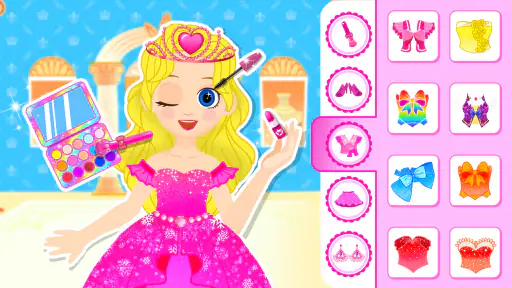
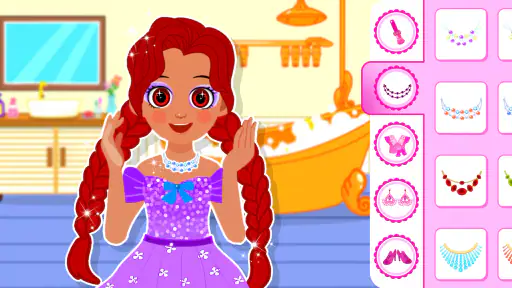
When you first open Lucy: Makeup and Dress up, you're greeted with vibrant colors and a user-friendly interface that instantly pulls you in. The game starts by introducing you to Lucy, your virtual model, who is in dire need of a makeover. From here, you have free rein to transform Lucy into the fashion icon she was always meant to be. The graphics are top-notch, making everything from the makeup brushes to the dresses look almost lifelike.
Keeping choices manageable
A useful way to keep the game comfortable for a younger player is to offer a choice rather than a long list of instructions: “Should the look feel bright or calm?” Once they answer, help them follow that idea through makeup and clothes. This gives the activity a little shape while leaving the creative decisions with them. It also makes it easier to stop at a natural point; after the central idea has come together, there is no need to keep searching for an imagined perfect combination.
More From Our News Desk

Weather by Xiaomi Review: Clear at a Glance, Less Clear Up Close

X Under Pressure: Can It Recover When Posting Goes Wrong?

Clash of Clans Is Won Between the Battles

Android Auto Makes the Case for Quieter Car Software

MobiOffice: Transforming Mobile Productivity with Seamless Integration

EA SPORTS FC™ Mobile Soccer: Redefining Mobile Sports Gaming
For a shared session, I’d avoid having two people make every decision at once. One person can choose the makeup direction and the other can suggest an outfit detail, then swap roles next time. That small turn-taking approach is more useful than trying to agree on every tap, especially when a child wants to feel in charge. The trade-off is that adults should be ready to let a look be unusual; the point is the child’s experiment, not matching a grown-up’s taste.
A Makeup Artist's Dream
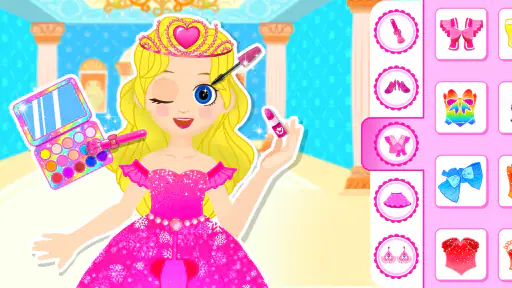
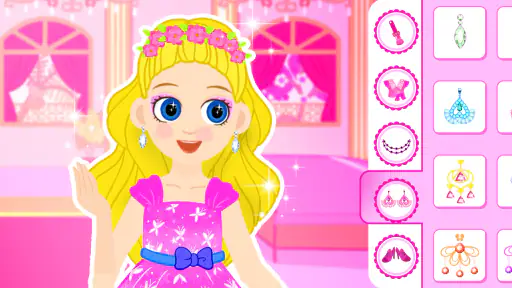
The makeup section of the game is where you can unleash your inner makeup artist. With a wide array of cosmetics at your disposal, you can experiment with different looks and find the perfect one for Lucy. Whether you're into bold eyeshadows or subtle lip colors, the game provides it all. The best part? You can mix and match different products to see what works best. It's like having a virtual vanity with endless possibilities.
One practical way to make the makeup stage feel less random is to settle on a feature you want to emphasize first, then build around it. A strong eye look can guide the rest of the palette, while a softer choice leaves more room for a striking outfit. This is a small creative constraint, but it often makes the finished styling feel more intentional. If the player is a child, taking turns choosing one element can make a brief session more interactive without turning it into a competition.
From makeup to a complete outfit
The most helpful question when moving from cosmetics to clothing is whether the look has one clear anchor. A bold makeup choice might call for simpler clothes; a more understated face can leave room for an expressive outfit. I’d use that as a gentle prompt rather than a rule, because playful combinations are part of the appeal. This approach also gives a child a chance to explain what they like about a choice, instead of just tapping through items as quickly as possible.
If a child starts to get stuck, I’d narrow the decision to two options they have already noticed, rather than proposing a whole new direction. That keeps the session moving without taking over. It is a small but practical way to make a broad dress-up activity feel less overwhelming, particularly when the player is tired or has only a few minutes. For an adult playing alone, the same idea can make a quick session feel more satisfying: pick a focal item and finish around it.
Fashion at Your Fingertips
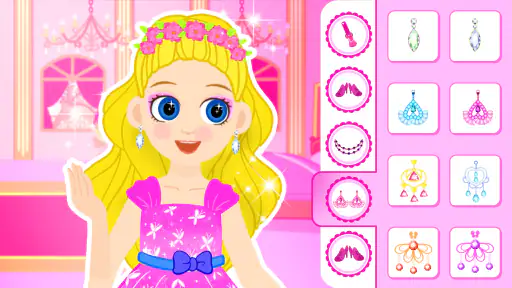
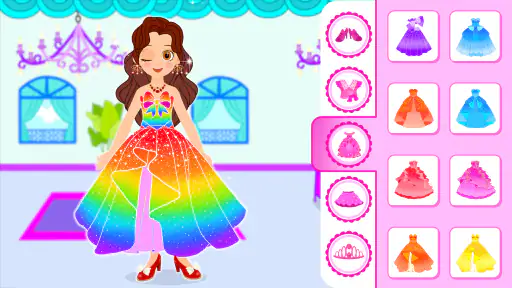
Once you've perfected Lucy's makeup, it's time to move on to the wardrobe. The dress-up part of the game is equally exciting, with a vast selection of outfits to choose from. Whether Lucy is going to a casual brunch or a glamorous red-carpet event, you'll find the perfect ensemble. The game offers everything from chic tops and jeans to stunning evening gowns. Plus, you can accessorize with jewelry, bags, and shoes to complete the look.
For me, the most useful part of combining makeup and clothes is seeing how one choice changes the feel of another. I’d choose the main clothing piece first if I wanted a clear theme, then use accessories as accents rather than adding everything at once. That workflow is handy for young players who get overwhelmed by lots of options: make one decision, check the overall look, and only then add another detail. It is also a good reason to play together, since two people can suggest different finishing touches.
What I particularly love about this game is the level of detail. Each piece of clothing and accessory is meticulously designed, giving you the feeling that you're working with real fashion pieces. The ability to create unique looks for different occasions makes the game incredibly engaging and fun.
Where it sits among dress-up games
Compared with a dress-up game built around timed tasks, collecting rewards, or a sequence of fashion challenges, this one is better approached as open-ended styling. That distinction matters if you are choosing a game for a particular moment. A child who wants to make a look at their own pace may prefer this kind of calm activity; someone who needs goals, changing rules, or a sense of measurable progress may be happier with a challenge-focused alternative.
It is also different from a conventional learning game. The educational label fits best as an opportunity for informal creativity and talking about choices, not as a promise of lessons or skill tracking. I would not pick it to teach a child a specific subject or to keep them occupied through a long stretch that needs varied activities. Its narrow focus is useful when you want styling, but it can feel repetitive if makeup and clothing are not the part of dress-up play that holds a child’s attention.
When another kind of game is a better fit
Compared with dress-up games that focus on collecting items or completing timed challenges, this one is best approached as a low-pressure styling activity. I wouldn’t choose it for a child who needs a structured sequence of lessons, nor for someone who wants a competitive fashion game with clear performance goals. Its broad theme is creative play, and that is a strength when the aim is relaxed experimentation, but a limitation when the player wants more variety in objectives.
The game is free to start, with optional in-app purchases priced from $0.99 to $5.99 per item. I’d keep that in mind if a child will be playing: agree on whether purchases are allowed before handing over the device, and stay nearby if they are likely to tap unfamiliar prompts. That simple boundary makes the free entry point easier to manage. The game has a 3.7 average from around three thousand ratings, so public reactions are mixed rather than universally glowing; I’d use that as a reason to try a short session and judge whether its particular style of play clicks for your household.
Speed, stability, and device fit
I’d expect a game built around choosing makeup and outfits to feel lighter in use than a large action game, but performance can still vary with the device. It requires Android 7.0 or later, and the current version is 3.1.0. If it feels slow on an older phone, closing other open apps and restarting the game are sensible first steps; I would not assume that every pause signals a deeper problem. A child’s device with limited free space or an older operating system may be a poor match, so checking compatibility before installing can save frustration.
For everyday reliability, I’d keep sessions modest and avoid interrupting the game repeatedly while a child is choosing a look. If it closes unexpectedly, reopening it is the obvious first recovery step, though I wouldn’t promise that every unfinished choice will be preserved. With over ten million installs, it has clearly reached a wide audience, but popularity alone cannot guarantee smooth behavior on every handset. The most realistic test is a brief supervised try on the actual device the child will use.
The release date was November 7, 2022, and the game is now at version 3.1.0. I’d treat those details as context rather than a performance guarantee: an app’s age or version number cannot tell me how it will behave on a particular phone. If the device is shared, it is sensible to check that it has enough room for another game and that its operating system meets the requirement before a child settles in to play. If it stutters, close other apps and try again; if it still feels uncomfortable to use, there is little reason to force it.
Who is likely to enjoy it
I think it is best suited to children who already enjoy dolls, fashion, or making up characters, and to adults who want a gentle, uncomplicated styling activity. It can work well as a short shared pastime when a parent or caregiver is nearby and happy to chat about color choices. It is less compelling for a child who prefers building, drawing, puzzles, or games with changing objectives. The clearest way to decide is to try a brief session and see whether the child naturally wants to make another look.
Before installing, I’d also decide what role the game should play in the day. It can fill a small waiting period or give a child something quiet to do while an adult is close by, but I would not rely on it as a full afternoon’s entertainment. A narrow activity can be a virtue when the need is specific; it is a drawback when you expect a single app to offer variety across a long session. That expectation is the main difference between a good fit and a frustrating one here.
Final Thoughts
Overall, Lucy: Makeup and Dress up is a delightful escape into the world of fashion and beauty. It offers a creative outlet for anyone looking to express their style and experiment with different looks. The game is perfect for all ages, whether you're a young fashion enthusiast or someone who simply enjoys a good dress-up game. The combination of stunning graphics, easy-to-navigate interface, and endless styling options make this game a standout in the world of mobile apps.
If you're ready to channel your inner stylist and give Lucy the makeover of a lifetime, this app is definitely worth a download. Get ready to unleash your creativity and step into a world where fashion knows no bounds!
Lucy: Makeup and Dress up Frequently Asked Questions
Is Lucy: Makeup and Dress up free to download and play?
Lucy: Makeup and Dress up is free to download, so you can try its fashion and makeup activities without paying upfront. The game also offers optional in-app purchases, with items priced from $0.99 to $5.99 each. If a child will be playing, it is worth reviewing purchase settings on the device and discussing when paid content may be used.
What is Lucy: Makeup and Dress up all about?
Lucy: Makeup and Dress up is an engaging and fun app designed for users who love fashion and creativity. It allows players to experiment with different makeup looks and dress up styles on a virtual character named Lucy. Users can explore various fashion trends, styles, and beauty tips, making it a perfect app for fashion enthusiasts and aspiring makeup artists.
Is Lucy: Makeup and Dress up suitable for all age groups?
Lucy: Makeup and Dress up is primarily designed for children and young teens, but it can be enjoyed by anyone interested in fashion and makeup. The app's user-friendly interface and vibrant design make it accessible for younger users, while its creative options offer something for fashion lovers of all ages. It has an Everyone content rating, though parents may still want to guide younger children as they explore the game.
What features does Lucy: Makeup and Dress up offer?
The app offers a wide range of features, including a variety of makeup tools, outfits, and accessories to customize Lucy's look. Users can choose from different hairstyles, eye colors, and makeup styles. Additionally, the app provides fashion challenges and themed events to keep the experience fresh and exciting, encouraging creativity and style exploration.
Does Lucy: Makeup and Dress up require an internet connection?
While Lucy: Makeup and Dress up can be enjoyed offline, certain features such as downloading additional content or participating in online events may require an internet connection. The app is designed to provide a seamless experience, allowing users to enjoy the core features without the need for constant connectivity. However, for the best experience, occasional internet access is beneficial.
Pros
- Wide range of makeup styles available.
- User-friendly interface for easy navigation.
- Regular updates with new fashion trends.
- Supports offline play for convenience.
- Interactive tutorials for beginners.
Cons
- Limited free features
- many require purchase.
- Occasional crashes on older devices.
- Ads can be intrusive during gameplay.
- Limited customization options for avatars.
- Requires constant internet for some features.
- Category
- Educational
- Version
- 3.1.0











