LeapFrog Academy™ Learning
- 396.00
- 3.3
- Installs
- 500.00K
- Price
- Free
Screenshots
Analysis by Reviewed
When I assess an educational game for a family, I look beyond whether it keeps a child busy. I want to know if the activities are understandable, whether a young player can make progress without constant adult help, and how well the experience fits real routines. LeapFrog Academy™ Learning is a children’s learning game from LeapFrog Enterprises, Inc, and its mix of literacy and math activities makes it most appealing as a guided supplement to learning, rather than a replacement for schoolwork or shared reading.
Readability and navigation
The app’s child-focused presentation aims to make moving between activities feel approachable. In my view, that matters as much as the lessons themselves: if a child can recognize where to go and what to do next, a parent does not need to turn every short play session into a set of instructions. Still, a simple interface is not the same as being suitable for every reading level or learning style, so I would watch a child’s first session and see whether the directions make sense to them.
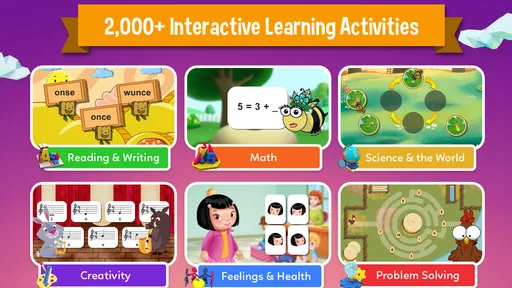
The game is rated for Everyone, and its educational focus is literacy and math, with other subject areas also represented in the published description. That broad mix can help a child shift between different kinds of activities instead of repeating one worksheet-style task. I would treat the activities as a way to spark practice and curiosity, then follow up with a conversation, a book, or an offline game when a child wants more explanation.
Motor and sensory considerations
Interactive games can make practice feel less formal, but tapping and following on-screen prompts may still be tiring or tricky for some children. I would try a brief session first, especially if a child is still developing precise touch control or tends to lose focus when screens are busy. Sitting together for the first few activities also lets an adult notice whether the pace, sound, and visual presentation feel comfortable to that child.
There is a useful distinction between an activity being playful and being accessible to every child. A young learner who enjoys tapping through short tasks may settle in quickly; a child who needs larger controls, reduced stimulation, or a different way to interact may do better with a physical book, manipulatives, or an adult-led activity. I would choose based on the child’s response rather than assuming one educational format works for everyone.
Situational access
For a family deciding what to try, the practical details matter too. The game is free to install, though it offers in-app purchases priced from $7.99 to $69.99 per item, so I would review purchase settings before handing a device to a child. It has more than 500,000 installs and an average rating of 3.3 from around 949 ratings, which gives a useful snapshot of its reception but does not tell me whether its style will suit a particular learner.
A realistic use case is a parent setting aside a short activity while preparing dinner, then joining the child afterward to ask what they tried. That works better than treating screen time as a substitute for attention: the game can provide a starting point, while a quick follow-up helps connect an activity to everyday learning. The current version is 1.1.1.1087 and it requires Android 5.0 or later, details worth checking against the device you plan to use.
More From Our News Desk

Weather by Xiaomi Review: Clear at a Glance, Less Clear Up Close

X Under Pressure: Can It Recover When Posting Goes Wrong?

Clash of Clans Is Won Between the Battles

Android Auto Makes the Case for Quieter Car Software

MobiOffice: Transforming Mobile Productivity with Seamless Integration

EA SPORTS FC™ Mobile Soccer: Redefining Mobile Sports Gaming
Remaining barriers
There are trade-offs to consider before making it part of a routine. The in-app purchase range is broad, so “free to install” should not be read as a promise that every part of the experience is free. I would check what is available without paying and set up purchase protections in advance, particularly if a child can use the device independently.
It also will not be the best fit for every family. If your child prefers hands-on counting, printed phonics practice, or a quiet one-to-one lesson, those options may be more engaging and easier to adapt. Likewise, if an adult wants a narrowly focused tool for one specific skill, a broader learning game may feel less direct. A few minutes of supervised exploration is a sensible way to decide before building it into a daily plan.
Inclusive verdict
LeapFrog Academy has potential as a flexible starting point for children who respond well to playful, screen-based learning. I would recommend trying it with an adult nearby at first, paying attention to navigation, comfort, and whether the child can follow activities without frustration. Its Everyone rating is helpful context, but a general age classification cannot tell a parent whether the interaction suits a particular child’s abilities or sensory preferences.
For families who want a varied digital option and can keep an eye on purchases and screen routines, it may be worth exploring. For children who need a quieter, more tactile, or more individually adapted approach, books, toys, and adult-guided practice may be the better first choice. My recommendation is to let the child’s actual experience—not the promise of educational screen time—decide whether it earns a place in the routine.
What’s the Buzz About?
Alright, let's get into it. LeapFrog Academy™ Learning is designed to give children an interactive educational experience. It’s like having a pocket-sized classroom with you wherever you go. The app covers a wide range of subjects including reading, math, science, and more, all wrapped up in fun games and activities.
Now, you might be wondering what makes this app stand out from the ocean of educational apps out there. Well, let’s break it down.
Interactive Learning
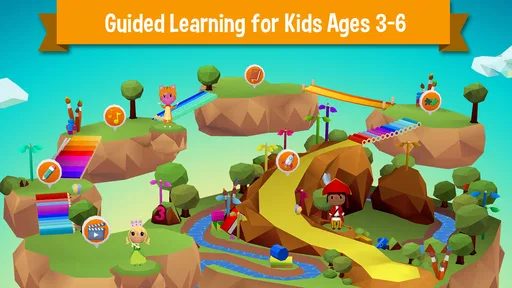
One of the coolest features of LeapFrog Academy is its interactive learning pathway. The app crafts a personalized learning journey for each child, allowing them to explore topics at their own pace. This means that if your little one is a math whiz but needs a bit more practice with reading, the app adjusts accordingly. Pretty neat, right?
Kids get to engage with different activities such as puzzles, games, and even creative challenges that keep their brains ticking. It’s all about making learning feel less like a chore and more like an adventure.
Play Anytime, Anywhere
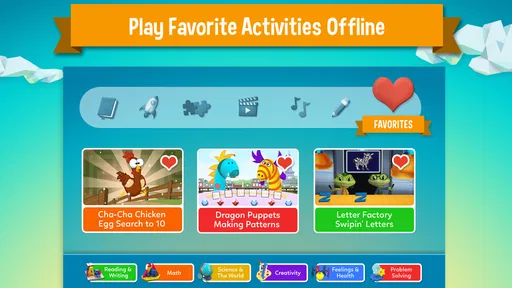
Another aspect I love is that it doesn't require a constant internet connection. So, whether you're on a long car ride or just chilling at home, your kids can access their lessons offline. Trust me, this feature can be a lifesaver on those "Are we there yet?" kind of trips.
Rewarding Progress
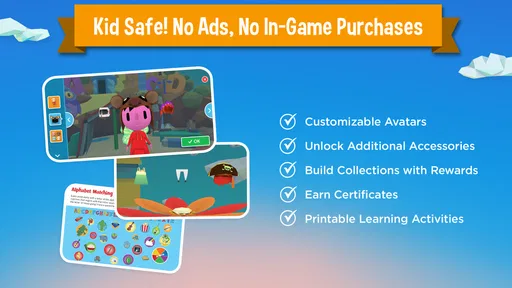
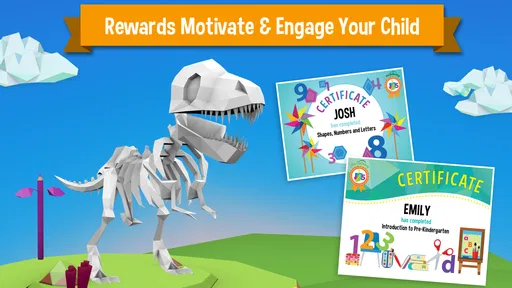
Let’s talk about motivation. The app includes a reward system that keeps kids motivated to keep going. As they complete lessons, they earn rewards and certificates. These little achievements can do wonders for boosting their confidence and willingness to learn.
Easy Navigation
If you're worried about whether your child will be able to navigate the app, fret not! LeapFrog Academy is designed with simplicity in mind. Its user-friendly interface means that even the youngest of users can find their way around without getting frustrated. Parents, you’re going to appreciate this ease of use as much as the kids do.
Parental Insights
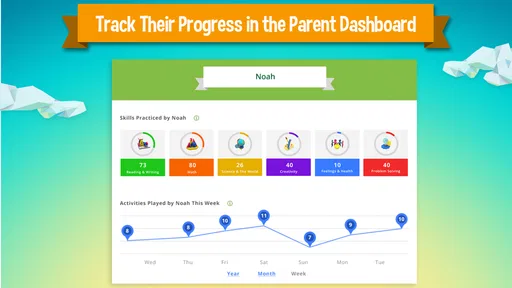
Speaking of parents, the app also provides insights into your child's progress. You can track what they’ve been learning and see where they're excelling or might need a little extra help. It's a great way to stay involved in your child's educational journey without hovering over their shoulder.
Content Variety
What I find particularly impressive is the variety of content available. From science experiments to musical activities, there’s something for every interest. It’s like a buffet of knowledge, and kids can pick and choose what excites them most.
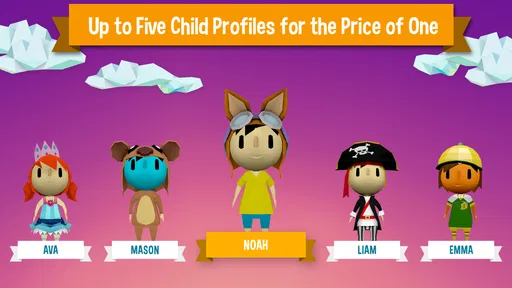
And let's not forget about the adorable characters that guide the way. They add a touch of personality to the app and make the experience all the more enjoyable.
Final Thoughts
So, is LeapFrog Academy™ Learning worth the download? If you're looking for an app that’s going to make learning fun, engaging, and adaptable to your child's pace, then absolutely. It’s a fantastic educational tool that doesn’t just teach, but inspires a love for learning.
Whether it's for supplementing school lessons or exploring new topics, this app has a lot to offer. Not to mention, it can give you a little peace of mind knowing your kids are spending screen time productively.
If this sounds like something your kiddos might enjoy, you might want to give it a try. Happy learning!
Making a short session useful
One way I would make this game work in a busy household is to set a simple stopping point before a child begins. For example, let them choose an activity and agree to talk about one thing they noticed afterward. That turns a spare moment into a small learning routine without expecting a parent to supervise every tap. It also gives you a practical way to see whether the child understood the prompts or was mainly following rewards.
If your child is using it while you handle a nearby task, keep the first few sessions close enough that they can ask for help. A child who can move around independently may still need support when a direction is unfamiliar or a task becomes frustrating. I would use those moments as a cue to pause, explain in ordinary language, or switch to a hands-on example rather than pushing through just to finish.
Choosing between a learning game and other practice
Compared with a basic alphabet or counting app, LeapFrog Academy is better suited to families who want a broader mix rather than one narrowly defined exercise. A focused app can be the clearer choice when a child needs repeated practice on one specific skill, because there is less switching between kinds of content. A workbook or a picture book, meanwhile, gives an adult more control over pace and lets a child point, draw, or talk without relying on touch-screen interaction.
I would not treat those formats as competitors that must be ranked once and for all. A useful combination might be a brief digital activity followed by a real-world version: count fruit while setting the table, or look for familiar letters on packaging after a literacy session. The screen activity can offer variety and structure, while the follow-up reveals whether the idea carries over beyond the game.
Questions worth settling before regular use
Parents may reasonably wonder whether the game is completely free. It costs nothing to install, but in-app purchases are available, so I would check the purchase controls and decide in advance whether spending is allowed. That small setup step matters more when a child can navigate the device alone than when an adult is sitting beside them.
Another practical question is whether it suits a child who is not yet confident reading instructions. I would not assume that an educational label guarantees independent use: try an activity together and notice whether the child can understand what to do from the on-screen guidance. If they need frequent translation, the app may still be useful as a shared activity, but it is less likely to work as an independent distraction.
For a child who gets overwhelmed by sound or busy visuals, the best test is a short, supervised trial rather than a long session. Watch for signs of fatigue, avoidance, or tapping without understanding, and stop if the experience is causing more strain than interest. A quieter book, physical counting objects, or an adult-led game may be a better match in that moment.
Who is most likely to enjoy it?
I can see it suiting a child who likes exploring different kinds of learning activities and is comfortable using a touchscreen, especially when a caregiver is willing to check in and connect the play to everyday questions. It may also help families who want a ready-made digital option for a short break in the day, rather than assembling a new activity each time.
I would be more cautious if the child needs a highly tailored teaching approach, is easily distracted by screens, or prefers learning through movement and physical objects. The app can be one part of a routine, but it is not a substitute for personal instruction or a guarantee that every skill will click. The strongest reason to try it is a child’s genuine interest; the strongest reason to stop is repeated frustration or a lack of meaningful engagement.
LeapFrog Academy™ Learning Frequently Asked Questions
Is LeapFrog Academy™ Learning free to download, and what might require payment?
LeapFrog Academy™ Learning is free to download, so families can install the educational game without paying upfront. It also offers in-app purchases, with items ranging from around $8 to $70. Check the purchase details in the app before confirming anything, and consider using your device’s purchase controls if children will be exploring it on their own.
What age group is LeapFrog Academy™ Learning suitable for?
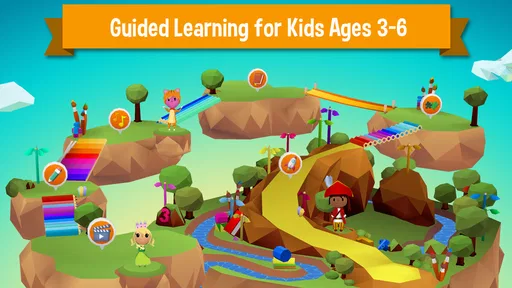
LeapFrog Academy™ Learning is designed for children aged 3 to 6 years old. The app provides a range of educational activities tailored to this age group, focusing on foundational skills such as math, reading, and critical thinking. Parents can feel confident that the content is age-appropriate and engaging for young learners.
Is LeapFrog Academy™ Learning available offline?
Yes, LeapFrog Academy™ Learning offers offline access to ensure that learning can continue without an internet connection. Parents can download activities and lessons when connected to Wi-Fi, allowing uninterrupted play and learning for their children during travel or in areas with limited connectivity.
How does LeapFrog Academy™ Learning personalize the learning experience?
The app personalizes learning by adapting to each child's progress and abilities. As children complete activities, the app adjusts the difficulty level to match their skill set, ensuring they are constantly challenged and engaged. This personalization helps foster an effective and enjoyable learning path for each child.
Are there any in-app purchases or ads in LeapFrog Academy™ Learning?
LeapFrog Academy™ Learning has in-app purchases, so it is worth checking purchase prompts before handing the device to a child. The app is intended as a learning experience, and reviewing any available purchase settings can help parents manage spending and keep playtime comfortable. Its listed content rating is Everyone.
Pros
- Interactive and engaging learning activities.
- Child-friendly interface for easy navigation.
- Tracks progress with personalized reports.
- Offers offline access to content.
- Wide range of subjects and skills covered.
Cons
- Requires subscription for full access.
- Limited content without internet connection.
- Graphics may seem outdated for older kids.
- Occasional app crashes on certain devices.
- Not suitable for advanced learners.