Kids Coloring Book by Numbers
- 100.00
- 4.3
- Installs
- 100.00K
- Price
- Free
Screenshots
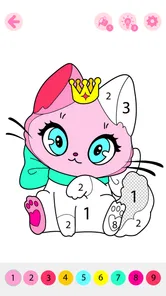


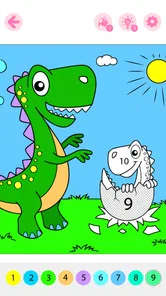
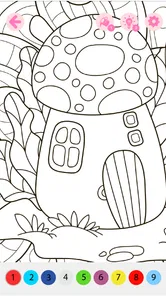
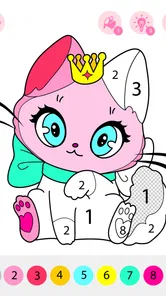


Analysis by Reviewed
Coloring apps for children are easy to underestimate. They can look like simple digital replacements for paper, yet the right one can turn a quiet few minutes into a shared activity between a child and an adult. After spending time with Kids Coloring Book by Numbers, I found that its central idea is more focused than a typical blank digital canvas: it guides children toward completing animated pictures by following numbered areas. That structure is the reason I would recommend it to some families, while also being the main reason others may eventually find it limiting.
This is a free educational game from GOBEEZ YAZILIM TİCARET, designed for Everyone and available on devices running Android 5.1 or later. It has reached over 100K installs and holds a 4.3 average from around 900 ratings, which suggests that many families find the basic experience worthwhile. The current version is 3.9. I see it less as a serious art tool and more as a guided coloring activity: something to open when a child wants to make a picture but benefits from clear direction.
Why coloring by numbers changes the experience
The important capability here is not simply that children can color pictures on a screen. It is that the numbered format reduces the uncertainty of starting. A blank page can be exciting for an imaginative child, but it can also create a small obstacle: where should the first color go, and what should the finished picture look like? Numbered coloring gives the child an immediate next step.
In practice, that guidance changes the mood of the activity. Instead of asking an adult which color belongs in each area, a child can look for the matching number and work through the image piece by piece. I find that useful for children who enjoy completion and visible progress. The activity has a clear destination without requiring the child to draw outlines, choose a palette, or decide how to fill a complicated shape.
The animated presentation also matters. A completed area feels more like part of a small game than a static coloring page. That can make the process more inviting for a child who would normally lose interest in ordinary coloring. The animation does not transform the app into a full game with a complex story or challenge system, and I would not use it as a substitute for creative drawing. Its value is simpler: it adds movement and reward to a familiar activity.
The strongest part of this game is the balance between independence and guidance. A child can make progress without constant adult instruction, but the experience still leaves room for an adult to sit nearby, talk about the picture, and help when a number or small area becomes difficult to identify. That makes it especially suitable for shared screen time rather than treating the device as an automatic babysitter.
What the numbered format is good at
Numbered coloring works well when the goal is concentration. The child has to scan the picture, connect a number with the appropriate color, and tap or fill the intended section. Even though the activity is relaxed, it encourages attention to small visual details. I would not describe that as formal learning, but it is a more purposeful use of a screen than endlessly switching between unrelated videos.
More From Our News Desk

Weather by Xiaomi Review: Clear at a Glance, Less Clear Up Close

X Under Pressure: Can It Recover When Posting Goes Wrong?

Clash of Clans Is Won Between the Battles

Android Auto Makes the Case for Quieter Car Software

MobiOffice: Transforming Mobile Productivity with Seamless Integration

EA SPORTS FC™ Mobile Soccer: Redefining Mobile Sports Gaming
It can also help a hesitant child experience success quickly. With freehand drawing, a child may decide that the result looks wrong and stop. Here, the structure makes it easier to complete recognizable images. That sense of finishing can be satisfying, particularly during a short break, after school, or before bedtime when a calm activity is preferable to something competitive.
There is a trade-off, though. The same structure that supports focus also limits artistic freedom. Children who want to invent unusual colors, draw outside the lines, or create their own characters may feel that the numbered areas tell them too much. For those children, a conventional drawing app or physical crayons will offer more room for expression.
How I would use it with a child
I would begin by treating the game as a joint activity rather than handing over the phone and walking away. I would let the child choose a picture, then ask what they notice before touching the screen. Once coloring starts, I would encourage them to find one number at a time instead of rushing to complete everything. That small change makes the process feel like observation and discovery rather than rapid tapping.
For a younger child, I would keep the session short and help with the smallest sections. Tiny areas can be frustrating on a phone, especially when a finger covers much of the image. An adult can turn that frustration into a useful moment by suggesting that the child look for larger matching areas first. The child still controls the activity, but the workflow becomes less tiring.
With an older child, I would use the finished image as a conversation starter. We might talk about the objects, colors, or animation instead of focusing only on completing the page. This is where the app has more value than a quick distraction: it can become a low-pressure prompt for vocabulary, visual description, and turn-taking between a child and a parent.
One practical tip is to use it when the child needs a predictable transition. For example, after returning from school, a child may not be ready for homework but may also be too restless for a quiet conversation. A short coloring session can provide a bridge between those activities. Because the numbered process has an obvious sequence, it is easier to stop at a natural point than with an open-ended game that constantly encourages “one more round.”
A realistic everyday scenario
Imagine a rainy afternoon when a parent needs to prepare dinner and a child wants attention. A blank sheet of paper may require more setup, while a fast-paced game may make the child more excited. I would open this coloring game, choose an image together, and agree that the child can complete a few sections while the parent works nearby. The parent can still check in, ask which number is being colored, and look at the picture as it develops.
That scenario shows both the benefit and the boundary. The app can support a calmer shared routine, but it should not be presented as a replacement for supervision or conversation. The best result comes when the adult remains available. If the child is expected to stay engaged alone for a long period, the appeal may fade quickly, especially if the available pictures do not match their interests.
Where the experience may feel less comfortable
The first friction point is precision. A phone screen gives a child less physical space than a sheet of paper, and small numbered regions can be awkward to tap. Younger users may accidentally touch the wrong place or become impatient when a section is difficult to select. I would choose a larger screen when possible, not because the game requires advanced hardware, but because the basic act of coloring is more comfortable when the image is easier to see.
The second issue is repetition. Numbered coloring is intentionally predictable. That is helpful for a child who wants a clear task, but it can become routine for a child who prefers novelty, storytelling, or open-ended challenges. I would watch how the child reacts after the initial excitement. If they start asking to draw their own picture or change every color, that is a sign that a more flexible creative app would be a better companion.
There is also a financial point for parents to consider. The game is free to start, while optional in-app purchases range from $9.99 to $149.99 per item. That is a wide range, so I would review the purchase choices carefully before allowing a child to use the device independently. I would also keep purchasing under adult control. A free download can be useful for testing the concept, but families should decide in advance whether the available free experience is enough for them.
The age rating of Everyone makes the app approachable for a broad family audience, but that does not remove the need for an adult to judge whether the interaction suits a particular child. A preschooler who struggles with small visual targets may need help, while an older child may find the guided format too restrictive. Age labels are a starting point; the child’s patience, coordination, and creative preferences matter more here.
How it compares with paper and other digital choices
Compared with paper coloring books, this game is quicker to begin and easier to tidy up. There are no loose crayons to organize, and an adult can keep the activity on a device already in use. The animated result gives it an advantage when a child wants immediate visual feedback. Paper remains better for hand strength, tactile sensation, and unrestricted color choices, so I would not replace physical coloring entirely.
Compared with a blank drawing app, the numbered format is more accessible for a child who does not yet know what to draw. It provides a finished-image goal and reduces decision fatigue. A blank canvas wins for imagination, experimentation, and personal style. I see the two formats as complementary: this game is a guided exercise, while free drawing is a creative workspace.
Compared with fast entertainment games, the pace here is calmer and the action is easier to explain. There is less pressure to react quickly, which can make it suitable for a quiet household routine. On the other hand, children seeking competition, exploration, or a strong narrative will probably find more excitement elsewhere. Choosing this app makes sense when the desired outcome is focused coloring, not a broad gaming experience.
Small habits that make it work better
I would keep the device brightness comfortable and avoid using the game in a rushed situation. The activity depends on seeing numbers and boundaries, so glare or a dim screen can make the task unnecessarily difficult. I would also encourage the child to pause between images instead of treating completion as a race. The point is to enjoy the process, not merely finish as many pictures as possible.
Another useful habit is to let the child explain the picture after finishing it. Even when the coloring choices are guided, the child can still describe what they see, invent a name for the image, or decide where it belongs in an imaginary story. This adds creative ownership that the numbered system alone does not provide.
For families sharing one device, I would establish a simple turn-taking rule before opening the game. One child can choose the picture and another can select the next color, or an adult and child can alternate sections. This works particularly well because the activity is naturally divided into small actions. It turns a solitary tapping exercise into cooperation without needing a separate multiplayer mode.
Who will gain the most from it
I think the best audience is children who enjoy pictures, patterns, and clear instructions. It is also a good fit for parents looking for a gentle activity they can do together without needing art supplies. Children who become discouraged by blank pages may appreciate the immediate direction, while children developing patience may benefit from completing an image gradually.
It is less suitable for a child whose main goal is to create original artwork. If the child wants to mix colors freely, draw characters from imagination, or control every part of the composition, the numbered approach may feel like following instructions rather than making art. In that case, I would choose a drawing-focused alternative and keep this game as an occasional structured activity.
I would also think carefully before paying for additional content. The free starting point makes it practical to see whether the child likes the format. If they repeatedly return to the activity and enjoy completing its pictures, optional purchases may feel more reasonable. If they lose interest after one or two sessions, spending money will not solve the underlying mismatch between the child and the guided design.
My final view after using the game
Kids Coloring Book by Numbers succeeds because it understands a specific need: some children want to color, but they enjoy it more when the first step is obvious. Its animated, number-guided pictures create a calm route from an unfinished image to a completed one. I appreciate that it can support a shared parent-and-child routine, especially when an adult uses the pictures as a starting point for conversation rather than relying on the app to provide all the interaction.
My recommendation is therefore selective rather than universal. Choose it if you want a free educational coloring game with a clear structure, a gentle pace, and an easy way for a child to work toward visible results. Try something else first if your child needs unrestricted drawing, physical materials, or a deeper game system. The current version 3.9 offers a focused experience, and that focus is both its most useful quality and its clearest limitation.
For the right child, the numbered format can make coloring feel manageable, rewarding, and pleasantly social. I would download it as a low-pressure activity, test it together, and decide based on the child’s response before considering any optional purchase. Used that way, it earns a place among simple family activities without pretending to be more than it is: a guided animated coloring game that works best when an adult helps turn screen time into shared time.
Kids Coloring Book by Numbers Frequently Asked Questions
What age rating does Kids Coloring Book by Numbers have?
Kids Coloring Book by Numbers has an Everyone content rating, making it suitable for a broad audience. The coloring-by-number format is especially approachable for children who enjoy pictures and can follow simple number cues. An age rating is not a substitute for a parent’s judgment, though, so it is still sensible to explore the game together and decide whether its activities suit your child.
Who developed Kids Coloring Book by Numbers, and is it available on Android?
Kids Coloring Book by Numbers is an educational game developed by GOBEEZ YAZILIM TİCARET. It is available for Android devices running Android 5.1 or later, and its current version is 3.9. The game has been installed over 100,000 times and has a 4.3 average from 924 ratings, giving families a quick sense of its reach and player reception.
What is Kids Coloring Book by Numbers?
Kids Coloring Book by Numbers is a digital coloring app designed to help children complete colorful pictures by following numbered sections. Instead of choosing colors freely, children match each number with the corresponding color and gradually reveal animals, characters, objects, and other illustrations. The simple format makes it suitable for young users who are learning numbers, colors, concentration, and basic hand coordination through a playful activity.
Is Kids Coloring Book by Numbers suitable for young children?
The app is generally aimed at children who can recognize numbers and understand simple visual instructions, although the ideal age may vary depending on the child’s development. Younger children may need help selecting small areas or understanding the color key at first. Parents should review the available picture categories, difficulty level, advertisements, and privacy information before allowing independent use.
Does the app require an internet connection to work?
Many coloring-by-number activities can usually be completed offline after the application and its required content have been installed, which is convenient for travel or use without mobile data. However, features such as advertisements, new picture downloads, cloud synchronization, updates, or optional purchases may require an internet connection. It is best to test the app in offline mode before relying on it away from home.
Pros
- Simple number-based coloring is easy for young children to understand.
- Offline play makes it useful during travel or in areas with limited internet.
- Bright visuals and cheerful sounds help keep children engaged.
- Many pictures offer variety without requiring advanced artistic skills.
- Touch controls support independent play for preschool-aged users.
Cons
- Some children may find the coloring mechanics repetitive over time.
- In-app purchases may be needed to unlock additional picture collections.
- Sound effects can become distracting during longer play sessions.
- Small details may be difficult for younger children to color precisely.
- The app may offer limited creative freedom compared with blank-canvas tools.











