Jigsawcard Solitaire Puzzle
- 4.69K
- 4.6
- Installs
- 10.00M
- Price
- Free

Screenshots
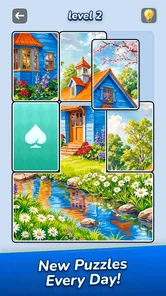
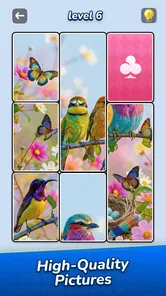
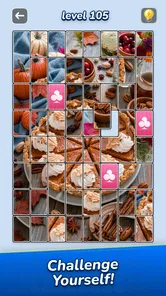
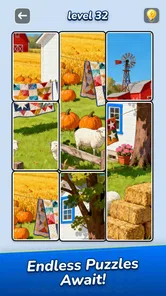
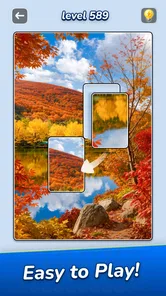
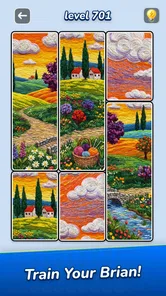
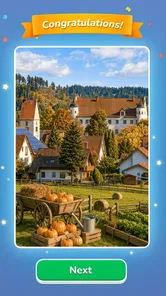
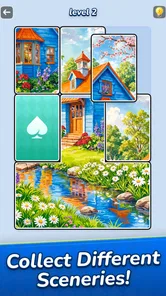
Analysis by Reviewed
I approached Jigsawcard Solitaire Puzzle as a small, low-pressure puzzle game for the moments when I want something more tactile than scrolling but less demanding than a long strategy session. Its central idea is easy to grasp: move picture cards, look for visual matches, and gradually bring an image together. The first satisfying moment is seeing a few pieces fit into a coherent picture; the appeal is less about speed than about noticing where each card belongs.
That makes it a natural fit for short breaks, a quiet commute, or a few minutes at the end of the day. I would not choose it when I want a complicated campaign or a fierce test of reflexes. I would reach for it when I want a simple visual task that can hold my attention without requiring a long warm-up.
What the puzzle feels like
Although it sits in the puzzle category, this is not quite the same experience as a traditional jigsaw spread across a table. The card-based format gives the activity a more compact, step-by-step rhythm: inspect the available picture pieces, move them, and use the image itself to judge whether they belong together. The solitaire element in the name suggests a familiar card-game flavor, but the main pleasure is still visual assembly rather than managing a complex hand of cards.
The store description presents it as a game built around sliding and matching photo cards, with high-definition puzzle images as the goal. That emphasis matters. In a conventional jigsaw, shape and edge fit often do most of the work; here, the photograph is an important guide. I found that makes the game approachable for people who enjoy pictures and pattern recognition, even if they are not devoted jigsaw fans.
The early appeal is also its main limitation: the basic loop is straightforward. If you enjoy steadily reading a board and making small, considered moves, that simplicity can be calming. If you need a story, elaborate rules, or a strong sense of progression to stay interested, the central activity may feel too narrow. I would treat it as a casual puzzle to dip into, not as a sprawling game that promises a new system every hour.
A gentle route from install to the first win
For a first-time player, I would keep the opening session simple. Launch the game, take a moment to study the picture rather than immediately moving cards, and look for obvious visual anchors: a strong color block, a clear object, or a distinctive patch of background. Starting with the easiest recognizable area gives you a quick sense of how the pieces behave and what counts as a useful match.
Once you begin, avoid trying to solve the whole image in your head. I get better results by choosing one small region and working outward from it. A recognizable object can serve as an anchor; after placing a couple of pieces around it, nearby colors and lines become easier to interpret. That approach turns the first successful action into a practical lesson: the game rewards observation and incremental progress more than hurried tapping.
More From Our News Desk

 Gmail
GmailGmail in a Busy Inbox: Who Benefits Most?
From first account to crowded workday, Gmail earns its place through dependable search and flexible sorting—but its best fit depends on how much inbox maintenance you can tolerate.

 Prime Video
Switching to Prime Video: What Changes in Your Viewing Routine
Prime Video can make a compelling second home for streaming, but switching means learning a different catalog, rental layer, and route from browsing to playback.

 Universal TV Remote Control
Universal TV Remote Control Works Best as a Reliable Backup
A phone remote earns its place through quick setup and reliable habits. Here is how to get more from Universal TV Remote Control—and where its limits show.

 Weather - By Xiaomi
Weather by Xiaomi Review: Clear at a Glance, Less Clear Up Close
Xiaomi’s weather app makes everyday forecasts quick to scan, but its calm surface can leave useful details and recovery paths harder to find than they should be.

 X
XX Under Pressure: Can It Recover When Posting Goes Wrong?
A resilience-focused review of X, examining setup, mistaken posts, interruptions, weak connections, and the gaps that matter when recovery needs to be dependable.

 Clash of Clans
Clash of Clans Is Won Between the Battles
Its raids are quick; its community is a long-term project of coordination, teaching, rivalry, and shared responsibility—with all the friction that entails.
Latest News



If a move does not help, pause and re-read the picture instead of repeating it quickly. The same piece can look plausible in more than one location when colors are similar, particularly around sky, foliage, or other broad areas. I find it useful to compare the direction of a line or the edge of an object, not just the general color. That small habit reduces aimless shuffling and makes the puzzle feel more deliberate.
The game is free, and its age rating is Everyone, so it is easy to consider for a family device or a casual player who prefers gentle content. It was released on Nov 14, 2025, and the current version is 1.5.20. The minimum operating-system requirement is 7.1. Those details help with basic compatibility decisions, but the more important practical question is whether a photo-led, card-based puzzle suits the person who will actually play it.
How to handle the moments that feel unclear
The most common confusion is likely to be mistaking a visually similar piece for a correct one. A patch of blue may blend with another blue patch, while a small change in a horizon or object outline reveals that the two belong in different places. When I hit that kind of uncertainty, I stop judging by color alone and look for continuity: does a line continue naturally, does a shape keep its proportions, and does the surrounding image make sense?
Another useful distinction is between a move that looks satisfying and one that genuinely helps. With card movement, it can be tempting to shift several pieces just to keep the board active. I recommend making a move only when you can explain what clue supports it. That does not mean every placement must be certain; it means avoiding random motion when a brief look at the photo could narrow the options.
It is also reasonable to stop mid-session if your attention fades. A picture puzzle depends on noticing details, and tired eyes can make otherwise clear matches harder to see. I would rather leave a partially solved image and return fresh than turn a relaxing game into a test of patience. This is one place where it differs from a timed arcade puzzle: the satisfying approach is careful attention, not frantic input.
Because the activity is visual, screen comfort matters. On a smaller phone display, I would play somewhere with decent lighting and hold the device at a comfortable distance, especially when several pieces share similar tones. If you usually prefer audio-led or text-heavy games, this may not be the best break-time choice; its useful clues are in the image, so it asks you to look closely.
Where it fits among other puzzle games
Compared with a standard jigsaw app, this game puts cards and their movement at the center instead of asking you to manage a familiar spread of interlocking pieces. That can make the process feel tidier and more approachable on a phone. The trade-off is that players who love the physical logic of matching tabs and sockets may prefer a conventional jigsaw, where piece shape itself offers more of the challenge.
Against match-three games, the pace is less about chasing a chain of quick combinations and more about interpreting a photograph. That makes it a better fit for a calm pause than for someone seeking constant feedback and rapid rewards. It also differs from logic-grid puzzles: there is no reason to expect the same kind of deduction from written clues. The thinking here is primarily visual, which is a strength if you enjoy spotting image patterns and a mismatch if you want a more mathematical workout.
Oakever Games is the developer, and the game has a 4.6 average from around 422,000 ratings, with roughly 4,700 written reviews. It has passed 10 million installs. Those figures suggest that many players have tried it, but popularity alone does not tell me whether its particular format will suit you. I would use them as context, then decide based on whether picture-based card puzzles sound appealing.
Who will enjoy it, and who may want something else
I can recommend it to someone who likes visual puzzles but wants a more manageable phone-sized activity than a large jigsaw. It also makes sense for a player who enjoys quiet, self-paced tasks and is happy to build a solution through small discoveries. A useful everyday scenario is waiting for an appointment: one image can give your attention somewhere to go without demanding that you commit to a long game or remember a complicated story.
It is less suited to people who want competitive play, substantial narrative, or a steep learning curve. If your favorite puzzle is about planning many moves ahead, the simple picture-matching loop may not offer enough depth. Likewise, if you find repeated visual searching tiring, a word puzzle or a game with more varied interaction may be a better choice. I would not install it expecting a broad collection of unrelated game modes; the appeal is the focused card-and-image concept.
For a first meaningful session, my advice is to choose one clear visual landmark, build around it, and take a short pause when the image stops making sense. That gives you a fair test of the game without turning the first puzzle into a race. If that measured rhythm feels satisfying, it is likely to suit the small gaps in your day. If you finish the first attempt wishing for more complex rules or faster action, you will have a good sign that another puzzle style is a better match.
My verdict after considering the trade-offs
Jigsawcard Solitaire is easiest to recommend as a relaxed, picture-led puzzle rather than a deep or fast-moving game. Its card format gives familiar image assembly a slightly different feel, while the visual focus makes the first steps easy to understand: inspect, make a considered move, and use the emerging picture to guide the next one. The best tip I can offer is to work from distinctive details toward less obvious areas instead of trying to solve everything at once.
I would keep it in mind for quiet breaks and casual play, especially if you find satisfaction in spotting how small pieces complete a larger image. I would skip it if you need variety, high-pressure challenge, or intricate strategy to stay engaged. For the right player, that focused simplicity is not a flaw; it is the reason to return. My recommendation is to try it with a patient mindset and judge the first session by whether the process of noticing and fitting details feels rewarding, not by how quickly the picture comes together.
Making a short session count
One practical way to test whether the format suits you is to give the first session a modest goal: learn how the picture clues work, rather than trying to finish as quickly as possible. I would begin with a brief scan for a distinctive subject, then make a few deliberate moves and reassess the image. If the board starts to make more sense as pieces settle into place, that is a stronger sign of fit than simply enjoying the finished picture.
This also helps when you are playing in a fragmented stretch of the day. If you have a few minutes before an appointment or while waiting for someone, focus on one recognizable patch instead of treating the whole image as a single task. You can stop once that area is clearer and return later with a fresh look. The useful trade-off is that the game can occupy a small pause without demanding a long commitment, but it still rewards enough attention that it may not work well if you are constantly glancing away.
Choosing it for the right player
I would be comfortable suggesting it to someone who enjoys photographs, visual matching, and quiet progress, including a family member who wants a gentle game with an Everyone age rating. The free price makes it straightforward to try, while its card-based approach offers a distinct alternative to the usual jigsaw board. It is not automatically the best choice for every casual player, though: someone who prefers word clues, tactile piece shapes, or fast combination-based play will probably get more from a different puzzle style.
That distinction matters if you are choosing a game for a shared device. A person who likes noticing small details may find the photo puzzle absorbing, while another player may see the same slow inspection as repetitive. I would let the intended player try a first image and decide based on the act of searching, not only on whether they like the subject of the picture. The central activity remains the same even when a particular image is appealing.
Small habits that reduce frustration
When several pieces share a color, I find it helpful to compare boundaries rather than broad areas. A roofline, a branch, or the contour of an object can provide a more reliable clue than a general patch of green or blue. If two placements both seem possible, I would hold off on committing to either until another nearby detail gives the image more context. This is a simple way to avoid turning uncertainty into a string of speculative moves.
It is also worth matching the session to your surroundings. The game depends on seeing image details, so a bright reflection or a rushed glance can make a fair puzzle feel more confusing than it is. If you are playing while walking or doing something that needs your attention, I would put it aside and return when you can look at the screen properly. Its relaxed pace does not make it a hands-free activity; the core challenge still asks for visual focus.
What to expect over time
The rating and install figures give a useful sense that this is an established option among casual puzzle players, but they should not be mistaken for a promise of long-term variety. I would approach it for the particular pleasure of assembling photo cards, not on the assumption that it will transform into a strategy game after the first session. If that core loop keeps feeling satisfying, the focused design is a strength. If you quickly want new rules or different kinds of decisions, that is a reasonable point to move on.
Overall, I see it as a specific tool for a specific mood: a visual puzzle to pick up when you want calm concentration and small signs of progress. The best first step is to install it only if that sounds enjoyable, check that your device meets the operating-system requirement, and let the first few moves teach you the rhythm. If you like reading the picture and placing pieces with care, this is an easy game to keep in rotation; if you want action, deep planning, or constant novelty, another puzzle will serve you better.
Jigsawcard Solitaire Puzzle Frequently Asked Questions
What is Jigsawcard Solitaire Puzzle?
Jigsawcard Solitaire Puzzle combines familiar solitaire-style card play with jigsaw-puzzle progression. You solve card challenges and use your progress to unlock or complete picture puzzles, giving the game two types of goals to work toward. The exact modes, themes, and progression options can vary by version, so check the app listing and in-game descriptions to confirm what is included in the release available for your device.
How do you play Jigsawcard Solitaire Puzzle?
The core experience centers on clearing card layouts according to the rules shown in each level, then progressing through picture-based jigsaw content. Before starting, review the tutorial and on-screen prompts, since layouts, available moves, and any special boosters may differ between stages. If you are new to solitaire, the game’s guidance should help you understand the basic actions, while experienced players can focus on planning moves and completing levels efficiently.
Is Jigsawcard Solitaire Puzzle free to download, and does it include in-app purchases?
The app may be available to download without an upfront charge, but free-to-play games can offer optional in-app purchases, such as currency, boosters, extra attempts, or other progression aids. Availability and pricing depend on the store, region, and current version. Check the Google Play or Apple App Store listing for purchase details before downloading, and review your device’s purchase controls if you want to prevent accidental spending.
Can I play Jigsawcard Solitaire Puzzle offline?
Offline access depends on how the current version handles level data, advertisements, rewards, and account features. Some previously loaded puzzle content may remain playable without a connection, while online functions can require Wi-Fi or mobile data. For a reliable answer, check the app’s store description and test it after installation by briefly disconnecting your device. Avoid assuming that progress, bonuses, or purchases will sync until you have confirmed the game’s account and connection requirements.
Which devices support Jigsawcard Solitaire Puzzle, and how can I protect my progress?
Compatibility depends on the app’s latest system requirements, so compare the store listing with your Android or iOS version before installing; available storage and device performance can also affect how smoothly it runs. If the game offers cloud saving, sign-in, or account linking, use that option to help preserve progress when changing devices or reinstalling. Check the privacy information and save settings in the app, because local progress may not transfer automatically.
Pros
- Combines solitaire-style card play with jigsaw puzzle assembly.
- Short rounds make it easy to play in quick sessions.
- A relaxing alternative to competitive or timed card games.
- Completing pictures adds a visual reward to each puzzle.
- Simple mechanics are approachable for casual players.
Cons
- The combination of card and jigsaw rules may not suit every player.
- Repeated puzzle formats can feel familiar over time.
- Progress may depend on finishing both card and picture tasks.
- Small card details can be harder to see on compact screens.
- Players seeking traditional solitaire may prefer a standard card game.