Grocery Market Cashier Store
- 405.00
- 3.4
- Installs
- 10.00M
- Price
- Free
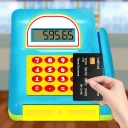
Screenshots

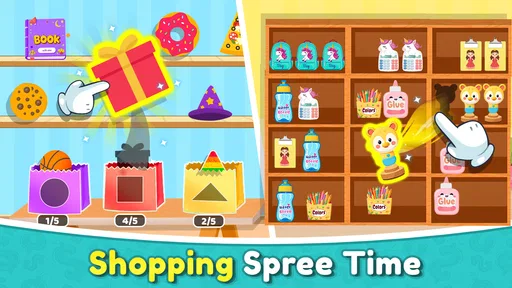

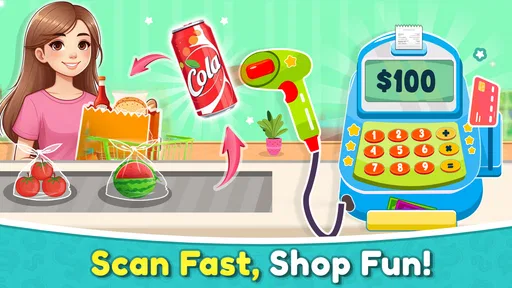

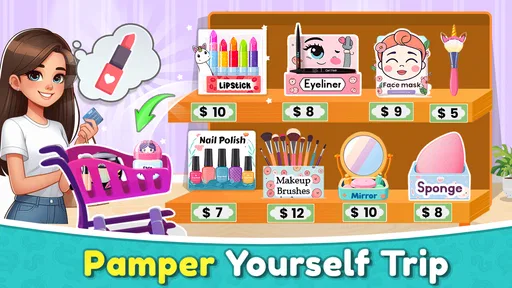

Analysis by Reviewed
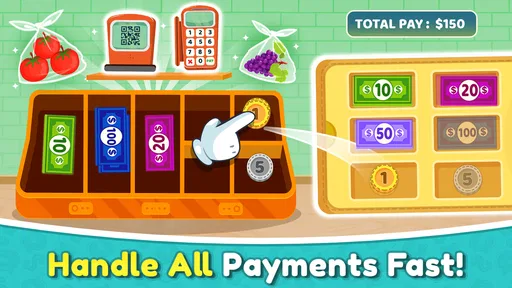
Grocery Market Cashier Store is a free educational game from NutBolt Games that turns a familiar shopping-counter task into a simple practice exercise. I spent time with it expecting a lightweight cash-register activity, and that is exactly where it works best: you handle a grocery-style checkout, operate the register, and build comfort with basic transaction steps without the pressure of a real queue.
The idea is easy to understand, but it has more practical value than the short store wording suggests. Instead of presenting cashier work as a dry lesson, the game gives the player a visual task with an immediate goal. That makes it approachable for children, beginners, and anyone who wants a casual way to practise recognizing prices, entering amounts, and dealing with payment. It is not a full retail simulator, and I would not treat it as professional cashier training, but it can make the basic sequence feel less intimidating.
How the checkout workflow feels in everyday play
The core routine is built around the kind of sequence a beginner needs to understand: look at the grocery purchase, work out the amount involved, use the cash register, and complete the exchange. I found that the strongest part of the experience is its immediacy. There is no need to learn a complicated rule set before starting. You can begin with the counter and learn by following the transaction in front of you.
That simplicity makes the game suitable for a short practice session. A parent could hand it to a child who is curious about shops, or a learner could use it before trying a more demanding money exercise. It also works as a gentle introduction to the idea that a cashier has to be accurate and orderly, not merely fast. When I deliberately slowed down and checked each step, the activity became a useful reminder that rushing creates avoidable mistakes.
A realistic everyday use case would be a child practising the difference between the price of an item and the amount a customer hands over. In ordinary life, that distinction can be confusing because both numbers appear at the same counter. The game gives the player a reason to keep them separate. I recommend saying the figures aloud while playing, especially with younger users: identify the purchase total, identify the payment, then think about what should happen next. That habit adds more learning value than simply tapping through the screen.
The game is also a reasonable choice for someone who wants an educational activity that does not feel like a worksheet. It is free, marked for Everyone, and available for devices running Android 8.0 or later. Those details make it easy to consider for a family phone or an older compatible handset, although the experience will still depend on how comfortable the player is with touch controls and small on-screen elements.
One point worth understanding is that this is a game, not a complete lesson plan. It can give practice with the checkout idea, but it does not replace a teacher explaining decimals, mental arithmetic, budgeting, or real shop procedures. I would use it as a starting point or reinforcement tool rather than as the only way to teach money handling.
More From Our News Desk

Weather by Xiaomi Review: Clear at a Glance, Less Clear Up Close

X Under Pressure: Can It Recover When Posting Goes Wrong?

Clash of Clans Is Won Between the Battles

Android Auto Makes the Case for Quieter Car Software

MobiOffice: Transforming Mobile Productivity with Seamless Integration

EA SPORTS FC™ Mobile Soccer: Redefining Mobile Sports Gaming
What I check before handing it to a beginner
I first let the player complete a transaction without correcting every move. That shows whether the layout makes sense naturally. If the player immediately understands which part of the screen represents the register and which part relates to the purchase, the game is doing its job as an introduction. If they struggle, I explain the transaction in plain language instead of taking over the controls.
For young users, the best approach is to turn each round into a small conversation. Ask what the customer bought, what amount is being handled, and whether the result seems sensible. This prevents the game from becoming a reflex exercise where the player only searches for the next button. The educational benefit comes from connecting the action on screen with the meaning of the money.
I also suggest short sessions rather than leaving a child to repeat the same action for a long time. The basic cashier routine is clear, but it is not deep enough to hold every player indefinitely. A few focused rounds followed by a real-world example, such as counting coins or comparing two grocery prices, gives the activity a better purpose.
Settings and habits that make the experience smoother
There is no reason to approach this game as if it were a large simulation with a long configuration process. Before playing, I check the device’s general volume, screen brightness, and touch responsiveness. Those are simple adjustments, but they matter in a game where the player needs to see the register clearly and tap accurately. On a smaller phone, a comfortable brightness level can make the difference between learning the workflow and guessing at the interface.
I also make sure the player is not distracted by notifications. A cashier exercise depends on following a sequence, and an interruption at the wrong moment can make a beginner forget what the current transaction requires. This is especially useful when the game is being used for practice rather than casual entertainment. The game itself remains straightforward, so preparing the phone is more valuable than searching for complicated options.
Players should also check whether the current version behaves comfortably on their device. The listed version is 4.8, and the game has been available since Aug 14, 2018. That long presence helps explain why it has reached a broad audience, but it does not guarantee that every phone will feel identical. Screen size, touch sensitivity, and performance can change how easy the register is to operate.
One of my preferred habits is to keep a small note beside the phone during a learning session. I write down one or two mistakes, not every action. For example, a player might confuse the purchase total with the customer’s payment, or tap too quickly before checking the amount. Reviewing that single mistake after a round gives the next attempt a clear goal. It is a more effective use of the game than simply trying to finish faster.
Another useful adjustment is choosing the right audience. The Everyone rating makes the game broadly accessible, but “suitable for everyone” does not mean every age group will find it equally engaging. A young child may enjoy the shop setting, while an older learner may find the activity too basic unless it is paired with mental-math questions. I would introduce it to children and beginners first, then decide whether it offers enough challenge for continued use.
How I use it as a learning tool rather than a tapping exercise
I divide a session into three stages. First, I let the player observe the transaction and identify the important amounts. Second, I ask the player to complete it independently. Third, I ask what could have gone wrong. This approach turns the register into a small problem-solving exercise. It also reveals whether the player understands the purpose of each action or is merely copying the visual pattern.
For someone learning English as an additional language, the grocery setting can provide useful vocabulary practice alongside money handling. The player can name the items, describe the purchase, and explain the payment process. I would not claim that the game is a language course, but its everyday shop context gives a tutor or parent something concrete to discuss.
For an adult preparing for a first retail job, the game may help reduce unfamiliarity with the general idea of a checkout. The limitation is important, though: real stores involve customer communication, product codes, refunds, card payments, receipts, stock questions, and workplace procedures. This game should be treated as a confidence-building introduction, not evidence that someone is ready to operate a real register alone.
Faster patterns that still protect accuracy
Once the basic workflow feels comfortable, I stop trying to play quickly and instead aim for a repeatable order. My preferred pattern is to read the purchase first, pause long enough to identify the payment, and only then operate the register. That sequence reduces the common beginner error of tapping as soon as something appears on screen.
Experienced users can make the game feel smoother by using the same mental checklist every time. I think of it as “read, separate, enter, verify.” Read the purchase, separate the price from the payment, enter the required information, and verify that the result makes sense. It is not a hidden shortcut or special feature; it is a practical habit that makes the visible workflow easier to follow.
Another useful pattern is to treat mistakes as information about the player’s process. If the same error happens repeatedly, speed is not the answer. Slow down at the exact point where the confusion occurs. If the player often loses track of the payment, say it aloud before touching the screen. If the player taps the wrong control, reposition the phone or use a steadier grip. These small changes can improve performance without pretending the game offers advanced controls.
I would also separate practice goals. One session can focus on recognizing the transaction. Another can focus on careful tapping. A later session can focus on completing the sequence with fewer pauses. Combining all three goals immediately may make the game feel harder than it is. Separating them gives the player a clearer sense of progress and makes the activity more useful for children who become frustrated by repeated mistakes.
The game’s free price is a genuine advantage here. Because there is no purchase decision before trying it, families and learners can test the workflow without committing money. At the same time, free access does not solve the question of long-term depth. If the player quickly understands the register routine and wants more complex arithmetic, the best next step may be a dedicated maths app, a budgeting activity, or a richer retail simulation.
Compared with a traditional worksheet, Grocery Market Cashier Store is more interactive and easier to approach casually. Compared with a full cashier simulator, it is lighter and less demanding. Compared with a general educational game, it has a narrower purpose, which is helpful when the learner specifically needs a shop-counter context but limiting when they want broad numeracy practice.
Three practical ways to get more from each round
- Use prediction before action: ask the player what should happen before operating the register. This checks understanding instead of rewarding blind tapping.
- Change the role occasionally: let one person act as the cashier and another explain the transaction. The explanation often exposes confusion that a completed round hides.
- Connect the screen to real objects: after playing, count coins, compare grocery prices, or make a pretend receipt. The game becomes more memorable when its action continues away from the phone.
These methods are especially useful because the game’s straightforward design can otherwise encourage repetition without reflection. The register is the centre of the activity, but the learning comes from understanding why each step matters. That is where an adult’s guidance can add depth without changing the game itself.
Where the game reaches its limits
The main limitation is scope. The game presents cashier work in a simplified form, so players looking for a realistic retail environment may find it too narrow. It does not serve as a substitute for workplace training, and it should not be used to teach someone every responsibility associated with a real checkout. The difference between practising a sequence and managing a busy store is substantial.
It may also feel repetitive to users who already handle money confidently. Someone who wants challenging calculations, timed problem solving, inventory decisions, or a broader business simulation will probably outgrow it. In that situation, a dedicated numeracy app or a more detailed management game would be a better choice. I would not recommend this one merely because it carries an educational label; the grocery cashier focus needs to match the learner’s goal.
There is a trade-off between accessibility and depth. The uncomplicated structure makes the game inviting for beginners, but it also means experienced players have fewer reasons to return once the basic process is familiar. That is not necessarily a flaw for a short learning aid. It becomes a weakness only if someone expects a long-form game with layered progression.
Device compatibility is another practical consideration. Android 8.0 is the minimum operating system listed, so users on older phones should not assume it will run. On compatible devices, I would still pay attention to touch accuracy and display size. A player who has difficulty selecting the register controls may appear to have a money-handling problem when the real issue is the phone itself.
The average rating is 3.4 from around 9.1 thousand ratings, with around 405 written reviews. I read that overall reception as mixed rather than alarming: plenty of people have tried it, but it is not a universal recommendation. Its audience is specific. Beginners who want a simple grocery-counter activity are more likely to appreciate it than players searching for a sophisticated simulation.
Its reach is significant, with over 10 million installs, but popularity should not be confused with suitability. I would choose it for a child’s first exposure to cashier routines, a quick refresher, or a playful classroom supplement. I would skip it for formal vocational preparation, advanced arithmetic training, or anyone who dislikes repetitive touch-based exercises.
Questions I would answer before recommending it
Is it suitable for children? Yes, the Everyone content rating and simple grocery setting make it a reasonable option for children, especially with an adult nearby to discuss the money concepts. I would still supervise younger players because the educational value improves when someone asks them to explain what they are doing.
Can it teach someone to work as a cashier? It can introduce the basic idea of operating a register, but it cannot cover the wider responsibilities of a real job. Use it for familiarity and confidence, not certification or complete preparation.
Does it work for adults? It can, particularly for an adult who wants a gentle introduction or a low-pressure way to revisit transaction basics. Adults who already handle prices and payments comfortably may find it too simple after the first few sessions.
Is it better than a worksheet? For learners who need interaction and a visual context, I think it is more inviting. A worksheet remains better for writing calculations, showing working, and progressing through carefully graded arithmetic. The strongest approach is to use the game and worksheet for different purposes rather than expecting one to replace the other.
Should someone choose it over a richer simulator? Only when simplicity is the priority. A richer simulator is preferable for realism, broader decision-making, and sustained play. This game is preferable when the learner needs to understand the checkout sequence without being overwhelmed by extra systems.
My verdict after using the register repeatedly
Grocery Market Cashier Store succeeds as a focused educational game because it keeps the cashier task understandable. I like that a beginner can approach the grocery counter without a long tutorial or a complicated management layer. The experience is most useful when I slow it down, ask questions, and connect the on-screen transaction with real counting and shopping examples.
NutBolt Games has aimed the product at accessibility rather than realism, and that choice gives it a clear audience. The free price, Everyone rating, broad device support from Android 8.0 onward, and simple premise make it easy to try. Its current version, 4.8, gives users a straightforward way to explore the activity on a compatible Android device.
I would recommend it to parents, tutors, and beginners who want a gentle introduction to cash-register logic. I would also recommend using a repeatable habit—read, separate, enter, verify—because that turns a basic game into more deliberate practice. The best results come from treating each round as a small lesson, not a race.
My recommendation becomes weaker for advanced learners. Once the player understands the routine, the limited scope and possible repetition become noticeable. At that point, real coins, written exercises, a budgeting tool, or a more detailed retail simulation can add the challenge this game does not provide.
Overall, I see it as a useful first step rather than a complete cashier experience. If you want a friendly grocery-themed activity that introduces register operation and encourages careful handling of transactions, it is worth trying. If you need deep simulation, professional preparation, or demanding mathematics, choose a more specialized alternative instead.
Grocery Market Cashier Store Frequently Asked Questions
What device requirements should I check before downloading Grocery Market Cashier Store?
Before downloading, check that your device runs Android 8.0 or later and has enough available storage for the installation. Grocery Market Cashier Store is a casual game, so it may suit players looking for an uncomplicated supermarket experience, but checking compatibility first can help avoid installation problems. The game is free to download, so you can try it without an upfront purchase.
Who developed Grocery Market Cashier Store, and how popular is it?
Grocery Market Cashier Store is an educational game developed by NutBolt Games. It has passed 10 million installs and has an average rating of 3.4 from around 9,100 ratings, giving prospective players a useful sense of its reach and reception. Those figures can help with an initial decision, though individual experiences may differ depending on what someone expects from a cashier game.
What is Grocery Market Cashier Store about?
Grocery Market Cashier Store is a casual supermarket simulation game in which you manage checkout activities and help customers complete their shopping. Players can scan products, calculate totals, handle payments, organize store tasks, and gradually improve the market experience. It is designed for users who enjoy simple time-management, retail, and cashier games with easy-to-understand gameplay.
How do you play Grocery Market Cashier Store?
The main gameplay focuses on serving customers at the checkout counter. You typically scan or select grocery items, check prices, total the purchase, accept payment, and provide the correct change when required. Depending on the level, you may also complete additional store duties or unlock improvements. The controls are generally straightforward, making the game accessible to younger players and casual gamers.
Is Grocery Market Cashier Store suitable for children?
The game is generally suitable for children and families because its mechanics are simple, colorful, and based on everyday shopping activities. It can also help younger players practice basic counting, recognizing products, and understanding how purchases and payments work. It is rated Everyone, but parents should still review the app’s age rating, advertising, and in-app purchase settings before allowing children to play without supervision.
Pros
- Simple checkout gameplay is easy for beginners to understand.
- Short tasks make it suitable for quick gaming sessions.
- Store management adds variety beyond scanning products.
- Bright visuals make the supermarket environment inviting.
- Offline play may be convenient when no internet is available.
Cons
- Repeated checkout actions can become monotonous over time.
- Progress may feel slow without frequent play.
- Some features may be limited behind ads or in-app purchases.
- Small screens can make item selection and controls less comfortable.
- The game offers limited depth for players seeking advanced simulation.











