Graffiti Quote Color by number
- 1.77K
- 4.8
- Installs
- 500.00K
- Price
- Free

Screenshots
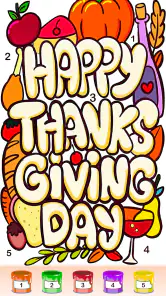
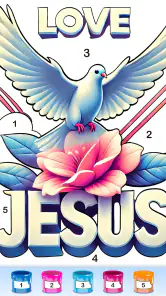
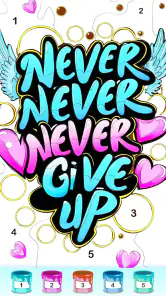
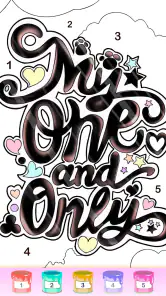
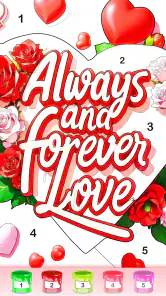
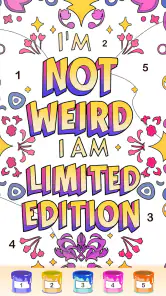
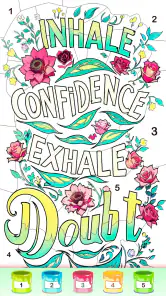
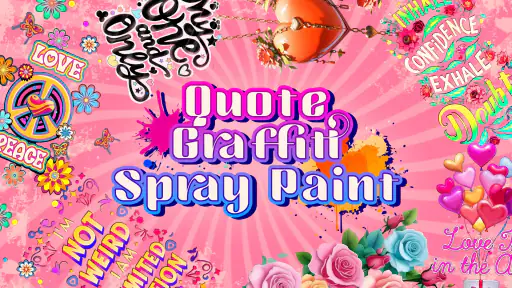
Analysis by Reviewed
If you’re trying this kind of coloring game for the first time, it helps to know what it is—and what it isn’t. Graffiti Quote Color by Number is a board-style game from Fun Coloring World, built around filling in numbered areas of text-led, graffiti-inspired pictures. I’d approach it as a calm, guided activity rather than a drawing tool: the structure gives you a clear next move, while the finished image supplies the creative payoff.
What to expect from the first session
The basic appeal is easy to grasp: choose a design, match its numbered spaces to colors, and watch the quote take shape. You don’t need drawing experience or a plan for choosing a palette, which makes the game approachable if you simply want something absorbing to do for a few minutes. Its Teen age rating is also worth noticing when deciding whether it suits younger players in your household.
The game is free to install, with optional in-app purchases ranging from $1.99 to $59.99 per item. I’d start without buying anything and see whether the available coloring experience fits your routine. Its 4.8 average from around 9,800 ratings and more than 500,000 installs suggest it has found an audience, but those figures can’t tell you whether its pace or visual style will suit you personally.
A simple route to your first finished picture
On opening it, I’d keep the first session uncomplicated: choose one design that appeals to you, focus on a single color at a time, and use the numbered areas as a guide rather than trying to rush toward a complete image. That makes the first successful moment—the quote becoming recognizable—feel clear and achievable. If a small area is awkward to tap, zooming in is more useful than repeatedly guessing at it.
For a low-pressure everyday use, imagine having a short wait before an appointment. You can make progress on a picture without needing to set up supplies or invent an image from scratch. The trade-off is that this is guided coloring, not freehand graffiti: if your main goal is to design lettering, draw your own slogans, or control every color decision, a drawing app or a paper sketchbook will give you more freedom.
Unleashing Your Inner Artist
From the moment I launched Graffiti Quote Color by Number, I was greeted with an interface that is as intuitive as it is inviting. The app doesn’t waste your time with unnecessary fluff; it gets straight to the point. You pick a graffiti quote design, and off you go, filling in the numbered spaces with the corresponding colors. It's as simple as paint by numbers, but with a twist of urban flair.
Designs that Speak
The app offers a plethora of graffiti designs, each more engaging than the last. Whether you're into motivational quotes or quirky sayings, there's something here to catch your eye. The designs are not just visually appealing; they resonate with messages that can uplift your day. It's amazing how a splash of color and a few words can transform your mood.
More From Our News Desk

Weather by Xiaomi Review: Clear at a Glance, Less Clear Up Close

X Under Pressure: Can It Recover When Posting Goes Wrong?

Clash of Clans Is Won Between the Battles

Android Auto Makes the Case for Quieter Car Software

MobiOffice: Transforming Mobile Productivity with Seamless Integration

EA SPORTS FC™ Mobile Soccer: Redefining Mobile Sports Gaming
The color palette is vibrant and varied, allowing for a truly personalized touch to each piece. I found myself getting lost in the rhythm of tapping away, watching as my artwork came to life with each tap. It's a satisfying and almost meditative experience.
Features That Add Flair
Beyond the basic color-by-number functionality, the app includes features that enhance its usability. You can save your completed masterpieces to your device or share them directly on social media, making it easy to show off your handiwork. Plus, there's an option to unlock new designs regularly, keeping the content fresh and exciting.
The app also includes a handy zoom function, which is perfect for those intricate details or when you're working on a smaller screen. I appreciated this feature as it allowed me to ensure every little segment was colored to perfection.
Why You’ll Love It
If you're a fan of coloring books or have a penchant for street art, this app is likely to become your new favorite pastime. It’s not just about coloring; it's about the joy of creation and the satisfaction of completing something beautiful. Plus, the ease of use makes it accessible for users of all ages.
One useful way to make a session feel less fiddly is to work in passes: tackle the larger, obvious numbered regions first, then zoom in for the smaller details. It gives the image a visible sense of progress early on and leaves the most careful tapping for when you’re ready to focus. I’d also treat a finished picture as a natural stopping point; the format is better suited to short, self-contained breaks than to an open-ended creative project.
Compared with a physical coloring book, this is more convenient when you have your phone but no pens or table space, and the number matching removes the pressure of picking colors. Compared with a general coloring app, the graffiti lettering and quote theme give the pictures a more specific character. That focus is also a limitation: if you prefer landscapes, detailed mandalas, or blank pages for your own ideas, a broader coloring collection or drawing tool is likely a better fit.
Making the routine work for you
I’d use the game differently depending on the time I have. With only a brief pause, I’d choose a picture and complete a small cluster of regions rather than expect to finish the whole design. For a longer, quieter break, I’d work through the image steadily and save the closer inspection for the lettering and tight corners. That small change in approach helps keep the activity relaxing instead of turning every tiny space into a test of patience.
It can also fit into a simple shared activity: one person can point out a color number while the other fills the matching areas, then swap. That keeps the focus on the picture without requiring drawing skills or a complicated set of rules. I wouldn’t treat it as a substitute for a collaborative drawing game, though; the numbered template guides the result, so the conversation and choice are more about how to proceed than about inventing the artwork together.
Small-screen habits and expectations
On a phone, the most useful habit is to avoid tapping quickly across a crowded section. I’d pause to check the number and nearby boundaries, then fill a few spaces before changing colors. If the image stops looking clear, zooming in can help with accuracy; zooming back out now and then is equally useful because it lets you judge how the quote reads as a whole. Working only at close range can make the finished composition harder to appreciate while you’re still coloring.
The number system is helpful, but it doesn’t turn every session into effortless progress. Tiny sections can interrupt the rhythm, particularly if you’re trying to finish in a hurry or using the game while distracted. I’d save detailed designs for a moment when I can give the screen a little attention, and pick a simpler-looking picture for a quick break. That is a practical distinction, not a problem with the basic idea: the same detail that rewards patience can feel fussy when you have none.
Who will get the most from it
I’d recommend it to someone who enjoys short, guided creative breaks, likes quote-based artwork, or wants the satisfaction of completing an image without needing to be good at drawing. It may also suit a parent looking for a simple activity to explore together, while keeping the Teen rating in mind. It’s less suitable for anyone who dislikes repetitive tapping, wants a competitive board-game challenge, or expects a full graffiti lettering editor.
If you’re choosing between this and a standard number-coloring app, the deciding question is whether words and street-art styling are part of the appeal. Here, the quote is central to the finished picture, so it can feel more like coloring a compact poster than filling in a generic scene. If you mainly want a wide mix of subjects, or prefer to compose your own text and arrange it freely, another coloring collection or a proper art app makes more sense. I’d choose this one for the focused theme, not as an all-purpose creative toolkit.
For anyone wondering whether there is a reason to pay immediately, I’d hold off until the free experience has shown that the designs and pace suit you. Purchases are available, but they are optional; the listed item prices span from $1.99 to $59.99, so it’s worth checking the purchase choice carefully before confirming anything. I’d also keep the Teen rating in mind when handing a device to a younger player, rather than assuming that a coloring format automatically makes the game appropriate for every age.
The game is listed as version 1.0.52 and requires Android 7.0 or later. Those details are practical checks before installing, especially if you’re using an older device. The most useful way to judge it is still to try a design at your own pace and see whether matching the numbered sections feels relaxing or tedious; the same repetitive structure that helps one person unwind may be exactly what another person wants to avoid.
A measured recommendation
For a first-time user, I’d keep the goal modest: find a quote you like, fill a handful of numbered spaces, and see whether watching the lettering emerge feels satisfying. If it does, continue in short passes and let the image develop at its own pace. If you find yourself wishing you could redraw a letter, change the composition, or pick any color you want, that is a useful sign that the guided format is not what you’re looking for.
To wrap it up, Graffiti Quote Color by Number is an app that blends creativity with relaxation, providing an outlet for artistic expression that’s both fun and fulfilling. So, if you're looking to add a splash of color to your day, this app is definitely worth a download.
Graffiti Quote Color by number Frequently Asked Questions
Is Graffiti Quote Color by Number suitable for teenagers, and what kind of game is it?
Graffiti Quote Color by Number is a board game for coloring quote-themed artwork, with a Teen content rating. Its focus is creative, number-guided coloring rather than fast-paced play, so it may appeal to people who enjoy text-based designs and a relaxed activity. If you are choosing a game for a younger player, check that the Teen rating is appropriate for them.
What is Graffiti Quote Color by Number and how does it work?
Graffiti Quote Color by Number is a creative app that allows users to color graffiti-style artwork using a number-based color palette. Users choose from a variety of quotes and designs, each segmented into different areas marked by numbers. By matching these numbers with corresponding colors, users gradually complete the artwork, creating vibrant and visually appealing pieces. The app provides a relaxing and engaging experience for art enthusiasts and casual users alike.
Is Graffiti Quote Color by Number free to use or does it have in-app purchases?
Graffiti Quote Color by Number is available for free download, offering a range of basic features and artworks without any cost. However, the app may include in-app purchases that unlock additional content, such as exclusive designs, color palettes, and an ad-free experience. These purchases are optional but enhance the overall user experience for those looking to explore more creative options. In-app purchases range from $1.99 to $59.99 per item, so review purchase choices before confirming anything.
What devices and operating systems are compatible with Graffiti Quote Color by Number?
Graffiti Quote Color by Number is compatible with both Android and iOS devices, ensuring a wide range of accessibility for users. The app supports most modern smartphones and tablets running on recent versions of Android or iOS. It is recommended to check the app store for specific device compatibility and system requirements to ensure optimal performance and user experience. On Android, the minimum supported operating system is version 7.0.
Does Graffiti Quote Color by Number have a strong player community?
The game has attracted over 500,000 installs and has an average rating of 4.8 from around 9,800 ratings, suggesting that many players have tried it and responded positively. Those figures can help you gauge its overall reception, but they cannot guarantee that every player will enjoy the same experience. Its quote-focused coloring concept is likely to suit people who enjoy relaxing, creative games.
Pros
- User-friendly interface for beginners
- Wide variety of graffiti designs
- Relaxing coloring experience
- Works offline without internet
- Regular updates with new designs
Cons
- Limited free designs available
- Some colors locked behind paywall
- Occasional app lag on older devices
- Ads can be intrusive at times
- Requires in-app purchases for full access
- Category
- Board
- Version
- 1.0.52













