Fluid Art:Color By Number
- 970.00
- 4.7
- Installs
- 100.00K
- Price
- Free

Screenshots





Analysis by Reviewed
In a shared home, Fluid Art: Color By Number works best as a small, low-pressure activity that one person can pick up for a few minutes and then hand off. I like that the numbered coloring approach gives a casual player a clear next step, so nobody needs to be an artist or learn a complicated set of rules before taking a turn. It can suit a quiet moment at the kitchen table or a short break while someone else is using the television, though the appeal is mainly watching a picture take shape rather than competing or collaborating on a board.
Sharing one device without mixing up expectations
If several people use the same phone or tablet, I’d agree on whose turn it is and whether finished artwork is something to browse together or leave for the next person. The experience is centered on filling a canvas, so it is easy to take turns choosing and coloring, but that does not make it a true group game with shared goals. A practical approach is to let one person finish a picture at a time rather than having everyone tap at once; it keeps the session calmer and makes it easier to follow the visual transformation.
It is also worth treating the device itself as shared household space. Before handing it to a child, I’d check that the right person is using it and that an adult is available if the device presents a purchase prompt. The game is free to download, but in-app purchases range from $1.99 to $59.99 per item, so I would not assume that every option is included at no cost. That is a useful boundary to set before a relaxed coloring session turns into an unexpected checkout decision.
Who will enjoy this kind of turn-taking?
I see the strongest fit for people who enjoy visual activities but do not want the pressure of inventing a design from scratch. A parent can sit nearby while a child fills numbered areas, or two adults can take turns working through a picture during a quiet evening. It is also a reasonable choice for someone who likes the look of fluid artwork but does not want paint, cleanup, or a physical workspace. Those are different needs from a traditional board game, and this app is at its best when everyone understands that it is a gentle solo activity that can be shared socially.
For a household looking for direct interaction, I would choose a conventional board game instead. This coloring game does not replace conversation, strategy, or a shared challenge; it offers an individual creative task that can happen alongside conversation. Compared with an ordinary digital coloring book, its numbered structure gives more guidance and makes it easier to start without choosing every color yourself. The trade-off is that players who want freehand control may find the guided format restrictive, while anyone expecting realistic paint handling may prefer a creative drawing app.
Age, trust, and a sensible setup
The game is rated Everyone 10+, which is a helpful starting point for deciding whether it suits a younger player, but I would still make that call based on the child and the device. Its coloring premise is approachable; purchase choices are the part I would explain in advance. I would also keep expectations clear about time: the satisfying, incremental reveal can make it tempting to continue, so a natural stopping point is finishing a section or choosing to return to the picture later.
For adults, the same structure is useful when attention is low. I might open it after work, complete a few numbered areas, and stop without needing to plan a project or tidy anything away. If the goal is to create an original illustration, learn painting techniques, or play with friends in a competitive way, this is not the right tool. If the goal is a guided, colorful pause, it makes more sense. The key household question is not whether everyone can use it, but whether everyone wants the same kind of screen time.
More From Our News Desk

Weather by Xiaomi Review: Clear at a Glance, Less Clear Up Close

X Under Pressure: Can It Recover When Posting Goes Wrong?

Clash of Clans Is Won Between the Battles

Android Auto Makes the Case for Quieter Car Software

MobiOffice: Transforming Mobile Productivity with Seamless Integration

EA SPORTS FC™ Mobile Soccer: Redefining Mobile Sports Gaming
A small routine that makes sharing easier
For a household with a shared tablet, I’d keep the handoff simple: agree on who is using it, let that person finish a short stretch of coloring, then pass it on. That avoids the awkwardness of several people trying to steer one picture at once. If the device is also used for school or work, putting the game away before handing it to the next person can help keep the household’s screen time purposeful rather than letting one relaxing session blur into another.
It can also help to decide whether each person is making their own progress or whether the group is simply enjoying the same image together. Those are different expectations. Someone who wants a personal creative break may prefer not to have another person choose every next tap, while a younger player may enjoy having a nearby adult point out which numbered area to fill. I’d treat collaboration as conversation around the activity, not as a built-in team mode.
When it fits, and when I’d choose something else
I’d recommend this to someone who likes satisfying visual changes but wants the app to make the next move clear. It suits a waiting-room pause, a quiet evening, or a short break between household tasks, especially for people who find a blank canvas intimidating. It is less suited to anyone seeking lessons, open-ended experimentation, or a game that keeps a group engaged through shared decisions. In those cases, a drawing app, a paper coloring book, or a traditional board game will better match the purpose.
That distinction is useful when choosing for different ages in the same home. A child may enjoy the numbered guidance, while an older sibling or adult may prefer more control over colors and composition. Rather than expecting one app to satisfy everyone equally, I’d offer it as one option in the household’s mix of quiet activities. It works best when nobody mistakes a guided coloring session for a multiplayer game or an art course.
Ever found yourself mesmerized by those stunning fluid art videos swirling across your social media feeds? Well, now you can dive into that satisfying and vibrant world with the Fluid Art: Color By Number app. This little gem allows you to unleash your inner artist without the mess of paints or the need for any artistic prowess. Let me walk you through my experience with this app, as I’ve been swirling and twirling colors on my screen for hours!
Getting Started with the App
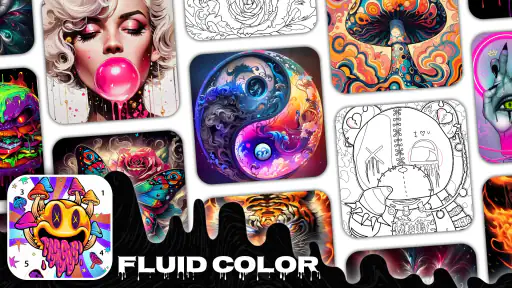
Downloading the app was a breeze, and it took just a few seconds to get it up and running on my device. Once you're in, the app greets you with a visually appealing interface that's both user-friendly and straightforward. I was ready to jump into my first masterpiece within minutes. The app provides a delightful array of canvases to choose from, each more intricate and fascinating than the last.
The Experience of Creating Art
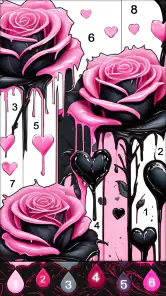
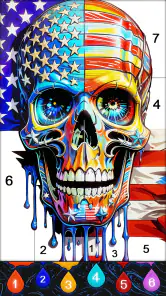
What makes Fluid Art: Color By Number stand out is its simple yet captivating approach to creating art. The app uses a color-by-number system, which is perfect for those of us who might not have a natural flair for picking the perfect palette. Each section of your canvas is numbered, and you simply tap to fill it with the corresponding color. It’s almost like a digital coloring book but with a modern twist.
The magic happens when you start to see the image come to life with each tap. There’s something incredibly soothing about watching the colors flow and merge, creating stunning fluid patterns. I found myself completely engrossed, losing track of time as I watched my screen transform into a work of art.
Features and Usability
The app is packed with features that make the whole coloring experience even more enjoyable. There are various tools and effects you can apply to your artwork, giving you the freedom to add personal touches and make each piece uniquely yours. I especially loved the option to replay the coloring process in a time-lapse video, which is perfect for sharing your creations on social media.
Moreover, the app runs smoothly with no annoying glitches or crashes, which is a huge plus in my book. It’s designed to be accessible for all ages, making it a fantastic way to keep kids occupied or to unwind after a hectic day.
Final Thoughts
In conclusion, Fluid Art: Color By Number is a delightful escape from the hustle and bustle of daily life. It’s a perfect blend of relaxation and creativity, allowing anyone to step into the shoes of an artist without any hassle. Whether you’re looking to kill some time or explore your creative side, this app offers a satisfying, colorful experience that's sure to captivate your senses. So, if you're ready to unleash a swirl of colors at your fingertips, give it a try – you might just find it as addictive as I did!
What to expect from a short session
As a board game, it is an unusual fit: there is no turn-based contest to learn, and the numbered canvas is the main activity. I would think of it as a relaxing coloring game rather than a substitute for a tabletop game night. That distinction matters if you are choosing something for a group. It can sit alongside family conversation, but it will not automatically give everyone a reason to interact or make decisions together.
For an everyday use case, imagine waiting for dinner to finish or taking a brief pause between chores. I’d pick a picture, fill a few areas, and stop when the interruption is over. The incremental progress makes that kind of stop-and-start use feel natural, while the fluid look gives the finished image more visual movement than a plain block-color page. If you tend to lose track of time with relaxing apps, deciding on a stopping point before opening it is a sensible habit.
Choosing it over other creative apps
The main trade-off is guidance versus control. Compared with freehand drawing apps, the numbered regions remove the blank-page problem and make the next action obvious, but they also limit how much of the composition comes from your own choices. Compared with physical coloring books, there is no need to gather pens or manage paper, yet the activity stays on a screen. I’d choose this one for an easy, visually focused break; I’d choose a drawing tool for experimentation or a physical book when I wanted to step away from devices entirely.
A small workflow tip is to treat the numbered sections as a sequence rather than trying to rush through the whole image. That helps preserve the pleasure of seeing the design emerge and makes it easier to pause without feeling that the session has to become a long project. The time-lapse option mentioned in the app can also make the finished process enjoyable to revisit, but sharing is an extra pleasure, not the reason I would choose the game if I simply wanted a quiet moment.
Practical details before you install
Fun Coloring World makes this free board-category game, and it has a 4.7 average from around 4.8 thousand ratings, with over 100 thousand installs. It was released on August 11, 2023, and version 1.0.37 requires Android 7.0 or later. Those details make it straightforward to judge basic compatibility, while the in-app purchase range is worth keeping in mind on a device used by more than one person. I’d check the available purchase safeguards on the device itself rather than assuming the game provides household account controls.
Overall, I’d recommend it to someone who wants guided, colorful screen time that is easy to pick up and put down, especially if the flowing visual style is part of the appeal. I would skip it for a child who needs a genuinely collaborative game, for an adult seeking open-ended art tools, or for anyone avoiding screens during downtime. For my household, it makes sense as an optional quiet activity with clear purchase boundaries—not as a shared game night centerpiece.
Fluid Art:Color By Number Frequently Asked Questions
What kind of game is Fluid Art: Color By Number?
Fluid Art: Color By Number is a board-style coloring game focused on creating artwork through a simple paint-by-number approach. It offers a relaxed way to fill liquid-art designs without needing advanced artistic skills, making it approachable for beginners as well as people who already enjoy coloring. The game is developed by Fun Coloring World.
What is Fluid Art: Color By Number?
Fluid Art: Color By Number is an innovative mobile application that allows users to create stunning artwork using a simple color-by-number approach. The app provides a relaxing and enjoyable experience, letting users unleash their creativity without the need for advanced artistic skills. It's perfect for both beginners and seasoned artists looking to unwind.
Is Fluid Art: Color By Number free to use?
Yes, Fluid Art: Color By Number is free to download and use. However, it does offer in-app purchases that provide additional features, such as exclusive color palettes and premium designs. These purchases enhance the user experience, but they are optional, allowing users to enjoy the app without any financial commitment. Individual in-app purchase items range from $1.99 to $59.99, so it is sensible to review purchase details before confirming anything.
What devices are compatible with Fluid Art: Color By Number?
Fluid Art: Color By Number is available for both Android and iOS devices. It is compatible with most smartphones and tablets running on recent versions of these operating systems. To ensure the best performance and experience, users should keep their devices updated to the latest software versions. On Android, the minimum operating system requirement is version 7.0.
How does the color-by-number feature work in the app?
The color-by-number feature in Fluid Art: Color By Number is designed to be intuitive and user-friendly. Each artwork is divided into sections, each marked with a number corresponding to a specific color. Users simply tap on a numbered section, and the app automatically fills it with the correct color, making the creative process straightforward and satisfying.
Pros
- Easy-to-use interface for all ages
- Extensive color palette options
- Relaxing gameplay experience
- Regular updates with new designs
- Offline mode available
Cons
- Contains in-app purchases
- Ads can be intrusive
- Limited free content
- Requires internet for some features
- Might lag on older devices
- Category
- Board
- Version
- 1.0.37













