Bible Color - Color By Number
- 1.31K
- 4.8
- Installs
- 1.00M
- Price
- Free

Screenshots



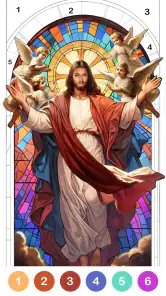


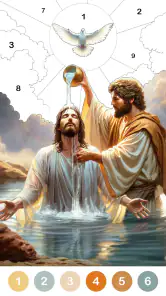

Analysis by Reviewed
I found Bible Color - Color By Number to be a quiet, low-pressure board game rather than a traditional competitive puzzle. Its appeal is simple: choose an illustration, match numbered areas with the right colors, and let the activity occupy your attention for a while. The store summary describes it as a gentle coloring journey, and that is a fair way to understand the experience. I would recommend it most to people who want a calm break, enjoy religious artwork, or like completing small visual tasks without a timer or complicated rules.
It is free to download, and the content rating is Everyone, so it is easy to suggest for a family device or for someone who wants a straightforward coloring activity. Fun Coloring World is the developer behind it. The game has built a strong audience, with an average rating of 4.8 from around 16 thousand ratings and more than a million installs. Those figures do not replace personal testing, but they do suggest that the basic idea works well for many players.
Getting comfortable with the coloring workflow
My first useful observation is that this is not really a game you “learn” in the usual sense. There is no complicated opening tutorial to master. The main challenge is becoming comfortable with the rhythm: select a picture, identify the active color, tap the matching spaces, and move through the image until it is complete. That simplicity is a strength, but it also means small interruptions can feel more noticeable because the whole experience depends on a smooth sequence of taps.
If a picture seems not to respond, I would first check whether the selected color actually matches the number in the area. It is easy to tap a tiny section while another color is active and assume the game has failed to register the touch. I found that zooming in before working on detailed areas is more reliable than repeatedly tapping the same spot. This is especially helpful around narrow outlines, small facial details, or clustered sections where several numbers sit close together.
A practical habit is to finish the large, obvious sections before chasing the smallest ones. Large areas quickly establish the image and reduce visual clutter. After that, I zoom in and work around the edges. This is more comfortable than starting with the most difficult details, and it also makes it easier to notice which number is still unfinished.
Another point worth understanding is that color-by-number games reward patience more than artistic skill. You do not need to know how to draw, blend shades, or choose a palette. The numbered guide does that work for you. That makes Bible Color particularly approachable for children, older adults, and anyone who feels intimidated by blank-page coloring apps.
At the same time, people who want creative control may find the structure restrictive. The pleasure comes from completing the supplied design, not from changing the composition or inventing an image. If your preferred coloring app lets you select every shade, use a blank canvas, or create detailed artwork from scratch, this game will feel much narrower.
More From Our News Desk

Weather by Xiaomi Review: Clear at a Glance, Less Clear Up Close

X Under Pressure: Can It Recover When Posting Goes Wrong?

Clash of Clans Is Won Between the Battles

Android Auto Makes the Case for Quieter Car Software

MobiOffice: Transforming Mobile Productivity with Seamless Integration

EA SPORTS FC™ Mobile Soccer: Redefining Mobile Sports Gaming
What to check before blaming the game
When an app like this appears stuck, I would begin with the basics. Make sure the device is running at least Android 7.0, which is the stated minimum operating system. On a compatible device, close other demanding apps if the phone feels generally slow, then reopen the game. A delayed response can come from the device rather than from the coloring screen itself.
I would also check the obvious setup points before spending time troubleshooting: enough free storage for normal app operation, a stable connection when content needs to load, and the latest installed version available for the device. The current version is 1.94.214. Keeping the app current is sensible, but I would avoid assuming that every problem needs an update; sometimes a simple restart is enough.
For a child using the game, I recommend completing the initial setup together. The content rating is Everyone, but the payment side still deserves adult attention because optional in-app purchases range from $1.99 to $59.99 per item. That does not make the game unsuitable for families, but it does mean the device’s purchase controls should be configured before handing it over. A calm coloring activity can quickly become frustrating if a child is interrupted by a purchase prompt or cannot tell which content is free.
On a shared tablet, screen size can make a meaningful difference. Larger displays give more room for small numbered sections and are usually easier for younger users or people with less precise touch control. On a compact phone, I would turn the device sideways only if the interface supports it comfortably; otherwise, zooming and working in short sections is the safer approach. I would not keep tapping aggressively, since repeated touches can make it harder to see whether the selected area has actually changed.
If the app opens but images do not appear correctly, I would try the least disruptive steps first: leave the screen and return to it, restart the app, and then restart the device. If that does not help, checking the connection and available storage is more useful than repeatedly reinstalling. Reinstallation can remove local progress in some apps, so I would treat it as a last resort rather than a routine fix.
Recovering a session without losing the relaxing part
The best way to use this game is in short, repeatable sessions. I often prefer starting a picture when I have ten quiet minutes rather than waiting for a long uninterrupted evening. That approach reduces the annoyance of being pulled away halfway through a detailed image. It also turns the game into a practical wind-down activity after work, during a waiting period, or before bed.
If you are interrupted, make a mental note of the area you were working on before leaving the screen. When you return, begin by checking the currently selected color and looking for the last unfinished cluster rather than tapping around randomly. This small reset prevents one of the most common sources of confusion: forgetting which number was active and assuming completed sections have disappeared.
For a family workflow, I would give each player a clear turn and avoid switching rapidly between pictures. The activity is more satisfying when a person can finish a small section and see visible progress. Younger players may enjoy filling broad areas, while adults can take over for the tiny spaces that require more precise taps. That makes it a cooperative quiet-time activity even though the game itself is designed around individual coloring.
One non-obvious advantage is that the numbered structure gives you a natural stopping point. Instead of quitting in the middle of a vague creative task, you can finish one color group or one part of the illustration. This matters for users who find open-ended apps tiring. The game provides a clear sense of what to do next without demanding strategic planning.
The trade-off is that this same structure can become repetitive. If you play for a long stretch, the basic action of matching and tapping may start to feel mechanical. I would switch pictures or take a break rather than forcing completion. The game works best as a gentle routine, not as an all-day challenge.
When the problem is outside the app
It is worth separating a game problem from a device or environment problem. If taps are inaccurate across several apps, the screen protector, touch sensitivity, or hardware may be involved. If only this coloring game feels slow while everything else works normally, restarting it and checking the current installation makes more sense. If the entire device is struggling, clearing space and closing background apps should come before judging the game.
Connection issues can also be misleading. A picture that takes time to load may look like a frozen screen, especially on an unstable network. I would wait briefly, move to a stronger connection if possible, and reopen the relevant screen before assuming the content is unavailable. Repeatedly switching between network types can make the situation harder to diagnose.
Purchase-related confusion should be handled separately from gameplay. The game is free, but optional items have a wide price range, so a family should review the device’s purchase settings and payment safeguards. If an unexpected charge appears, the right place to begin is the platform’s purchase history and support process, not repeated tapping inside the game. That distinction protects both the player and the account holder.
Privacy-conscious users may also want to review the app’s permissions and device settings during installation, as they should with any new game. I would grant only what seems necessary for normal use and avoid treating a coloring app as something that needs unrestricted access to unrelated parts of the phone. This is a general setup precaution, but it is particularly reasonable for a game intended for children or shared family devices.
The release history also matters when judging expectations. Bible Color - Color By Number was released on January 8, 2021, and its current version is 1.94.214. That gives the game an established presence rather than making it feel like an untested new experiment. Still, an established app can have different behavior across older phones, newer operating systems, and tablets. I would judge performance on the specific device rather than assuming the experience will be identical everywhere.
Who will enjoy it, and who should choose something else?
I think this is a good fit for someone who wants a calm activity with clear instructions. It suits players who enjoy religious themes, prefer positive and non-competitive play, and like seeing an illustration gradually become complete. It can also work for a person who wants a simple distraction during a break but does not want word puzzles, fast arcade action, or social competition.
It is less suitable for someone looking for a deep board game. Although it sits in the board category, it does not offer the strategic decisions associated with chess, checkers, or card-based tabletop adaptations. There is no meaningful opponent to outthink and no tactical system to study. Compared with those alternatives, the reward here is focus and completion rather than mastery.
Compared with a general digital coloring book, the numbered format is easier to begin but less expressive. A traditional coloring app may offer more control over brush size, color choice, and personal style. Bible Color is better when you want guidance and a finished result without making artistic decisions. A paper coloring book, meanwhile, avoids screen fatigue and gives a more tactile experience, but it is less convenient when you are traveling or waiting somewhere without supplies.
For a realistic everyday example, imagine coming home mentally tired and having a short gap before dinner. Opening this game, completing a few large sections, and stopping at a natural boundary can provide a modest reset without pulling you into a competitive loop. I would not describe it as a substitute for rest or meaningful creative work, but it can be a useful transition between busy tasks.
People who dislike religious imagery should skip it, because the theme is central rather than incidental. Likewise, users who need accessibility controls tailored to very limited motor precision should test the touch experience carefully before committing to long sessions. The small areas are part of the challenge, and no amount of enthusiasm changes that basic interaction.
My practical verdict after using it
My overall view is favorable, with a clear qualification: Bible Color - Color By Number succeeds because it stays focused. It does not try to become a strategy game, a social platform, or a full art studio. Fun Coloring World has built a simple board-style coloring experience for quiet completion, and that narrow purpose is exactly why it can be relaxing.
I would install it for a child who enjoys filling pictures, an adult who likes faith-based artwork, or anyone who wants a guided activity that can be paused easily. I would set up purchase protections first, use a compatible device, and approach small sections patiently rather than treating every missed tap as a fault. Those steps remove much of the friction that can make a simple game feel unreliable.
The free entry point is appealing, and the Everyone rating makes it broadly approachable. The optional purchase range is the main practical point families should consider, while repetition and limited creative control are the main reasons experienced coloring users may want a different app. For my own use, I would keep it as a short-session relaxation game rather than a primary source of entertainment.
My recommendation is simple: choose it when you want guided, faith-themed coloring with almost no learning curve; skip it when you want strategy, competitive play, or complete artistic freedom. Within that specific lane, it is a polished and approachable option, and its strong average rating of 4.8 reflects why many players find the gentle tap-and-complete routine satisfying.
Bible Color - Color By Number Frequently Asked Questions
Is Bible Color - Color By Number suitable for a quick, relaxing break?
Bible Color - Color By Number is presented as a gentle coloring journey to relax your mind, and its numbered-picture format suits casual play in short sessions. You can work through an illustration at your own pace rather than following a fast or competitive challenge. It may be a comfortable choice when you want a quiet creative activity, especially if biblical themes and paint-by-number games appeal to you.
What kind of artwork and themes can I expect?
The coloring experience centers on biblical stories, symbols, characters, and verses. Images are completed through paint-by-number gameplay, so the emphasis is on filling an illustration rather than drawing from a blank canvas. This makes the theme a key part of the appeal: it may be a good fit for players who enjoy Christian-inspired artwork, while those seeking general or unrelated coloring subjects may prefer a different kind of coloring game.
Is Bible Color - Color By Number free to download and play?
Bible Color - Color By Number is free to download, so you can try its coloring experience without paying upfront. The game also offers optional in-app purchases, with items ranging from $1.99 to $59.99 each. If you are downloading it for a child or prefer to avoid unexpected spending, review your device’s purchase settings and consider requiring approval for transactions.
Which devices and operating systems can run Bible Color - Color By Number?
Bible Color - Color By Number is available for Android devices that meet its minimum operating-system requirement of version 7.0. Before downloading, check your device’s software version and make sure it has enough available storage for the installation. Keeping your operating system up to date can also help with compatibility and general app performance.
What is Bible Color - Color By Number?
Bible Color - Color By Number is a relaxing coloring app inspired by biblical stories, symbols, characters, and verses. It combines traditional paint-by-number gameplay with Christian-themed artwork, allowing you to complete illustrations by selecting the correct numbered colors. The app is designed for casual entertainment, creative expression, and quiet moments of reflection, whether you are familiar with coloring games or trying one for the first time.
Pros
- Relaxing coloring sessions suitable for short breaks.
- Simple controls make it easy for beginners to start.
- Wide selection of Bible-themed illustrations.
- Helpful hints can assist with difficult sections.
- Works well as a quiet
- screen-based mindfulness activity.
Cons
- Some artwork and features may require in-app purchases.
- Frequent ads can interrupt the coloring experience.
- Small numbered areas may be difficult to tap accurately.
- Limited creative freedom compared with a blank coloring book.
- Progress may depend on having a stable internet connection.
- Category
- Board
- Version
- 1.94.214













