

Fill-in Word: Crossword Puzzle
- 6.00
- 4.9
- Installs
- 10.00K
- Price
- Free
Screenshots

Analysis by Reviewed
I approached Fill-in Word: Crossword Puzzle as the kind of game I could open for a short break without needing to learn a complicated system first. It is a free word game from CASUAL AZUR GAMES, built around filling answers into a crossword-style grid. The idea is familiar, but the experience depends less on flashy presentation and more on how comfortably the clues, letters, and crossings work together.
That makes it a useful choice for players who enjoy vocabulary challenges but do not always want a traditional newspaper crossword. I found the central appeal easy to understand: solve what you know, use the crossing letters to narrow down what you do not, and keep moving until the grid begins to make sense. The store summary describes it as a brain and logic game, and that is a fair description of the way it feels in practice.
The game is free to start, with optional in-app purchases ranging from $0.99 to $19.99 per item. Its Teen content rating is worth noticing for families deciding what to install, even though the basic concept is a clean, language-focused puzzle. It supports Android 7.0 and later, so it is accessible on many older devices as well as newer phones.
What the first few minutes feel like
My advice to a first-time player is to treat the opening puzzle as a short orientation rather than a test of vocabulary. The most useful early habit is to scan the entire grid before committing to one difficult clue. Short answers are often easier to place, and every correct crossing gives you information that can unlock a longer answer nearby.
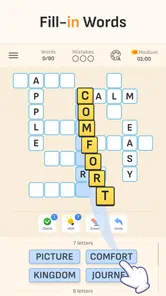
The game’s fill-in format makes this especially important. Instead of thinking of each clue as an isolated question, I read the grid as a network of partial answers. A word that seems uncertain on its own can become obvious once two or three letters are fixed by neighboring entries. That shift—from guessing individual words to reading the relationships between them—is where the logic side becomes more satisfying.
I would not expect every puzzle to suit every vocabulary level. A player who likes quick, obvious word matches may find some clues slower than expected, while someone who enjoys testing spelling and word associations will probably appreciate the resistance. The experience works best when I allow myself to leave a stubborn square temporarily and return after solving another section.
One practical detail matters immediately: this is not the same as a classic crossword in which every clue is solved independently from a blank grid. The crossing structure is the real tool. If an answer feels questionable, I use the letters around it as a check instead of repeatedly forcing the same guess. That approach reduces frustration and makes the puzzle feel more like deduction than trial and error.
More From Our News Desk

 Gmail
GmailGmail in a Busy Inbox: Who Benefits Most?
From first account to crowded workday, Gmail earns its place through dependable search and flexible sorting—but its best fit depends on how much inbox maintenance you can tolerate.

 Prime Video
Switching to Prime Video: What Changes in Your Viewing Routine
Prime Video can make a compelling second home for streaming, but switching means learning a different catalog, rental layer, and route from browsing to playback.

 Universal TV Remote Control
Universal TV Remote Control Works Best as a Reliable Backup
A phone remote earns its place through quick setup and reliable habits. Here is how to get more from Universal TV Remote Control—and where its limits show.

 Weather - By Xiaomi
Weather by Xiaomi Review: Clear at a Glance, Less Clear Up Close
Xiaomi’s weather app makes everyday forecasts quick to scan, but its calm surface can leave useful details and recovery paths harder to find than they should be.

 X
XX Under Pressure: Can It Recover When Posting Goes Wrong?
A resilience-focused review of X, examining setup, mistaken posts, interruptions, weak connections, and the gaps that matter when recovery needs to be dependable.

 Clash of Clans
Clash of Clans Is Won Between the Battles
Its raids are quick; its community is a long-term project of coordination, teaching, rivalry, and shared responsibility—with all the friction that entails.
Latest News



Getting ready without overthinking the install
Installation is straightforward for a compatible Android device, and the current version is 6.2.3. I would still begin with a simple expectation: the game is designed for casual word play, not as a full language course or a reference dictionary. It can exercise attention and recall, but it should not be treated as a formal method for learning definitions.
Because the game is free, it is easy to try without making a purchase decision first. I recommend playing enough to understand your own rhythm before considering any optional item. Some players are comfortable working through a clue slowly; others prefer help when they reach a dead end. The right choice depends on whether you enjoy the struggle itself or mainly want a smooth sequence of completed grids.
The age rating is Teen, so I would check the store settings and household expectations before handing the device to a younger child. That is a sensible step even for a simple word game, particularly if the phone is shared among family members. The rating should not be ignored simply because the gameplay looks educational or quiet.
Another useful preparation is to decide how you want to play. For a short break, I focus on one section of a grid and stop when my attention drops. For a longer session, I keep a mental note of uncertain answers rather than repeatedly tapping them. This small change prevents the game from turning into a cycle of random attempts.
How I reach the first meaningful success
The first satisfying moment comes when a few correct entries begin to reinforce one another. I usually start with clues that have an answer I can identify immediately, then enter them carefully and inspect the newly revealed crossing letters. I avoid jumping straight to the longest-looking word because length alone does not make a clue easier.
A good beginner workflow is to separate answers into three groups: certain, plausible, and unknown. I fill the certain answers first. I use plausible answers only when their crossing letters support them. I leave unknown clues alone until the grid provides more evidence. This is more reliable than trying to solve in the order the clues appear.
When I reach a word that could have multiple spellings or meanings, I compare the available spaces with the crossing pattern. That is one of the strongest lessons the game offers: the grid can correct your first impression. If a word fits the clue but creates impossible letters elsewhere, the problem is usually the word, not the surrounding puzzle.
I also recommend tapping deliberately rather than rapidly. In a fill-in puzzle, one misplaced letter can make several later clues appear impossible. Taking a moment to verify the position saves more time than rushing through familiar answers. This is a small but important trade-off: the game rewards accuracy more than speed.
For an everyday example, I can imagine opening it during a bus ride or while waiting for an appointment. I would solve the obvious entries first, pause when the surrounding noise made concentration difficult, and return to the same grid later. Because the progress is based on the puzzle rather than a timed performance, that stop-and-start routine feels more natural than it would in a fast arcade game.
Where new players are most likely to get confused
The biggest source of confusion is assuming that a clue must be solved completely before the grid can help. In reality, partial progress is valuable. Even a single confirmed letter can change how I interpret a clue, so I treat incomplete sections as useful information rather than evidence that I am stuck.
Another common mistake is trusting a familiar word too quickly. A word may match the general idea of a clue while failing the required length or crossing letters. When that happens, I erase the assumption mentally and return to the structure of the grid. This is particularly helpful for players who are confident with vocabulary but less accustomed to crossword logic.
I also would not use hints automatically. If help is available during a difficult moment, using it can keep the session moving, but relying on it too early removes the deduction that gives the game its character. My preferred rule is to wait until I have exhausted the surrounding crossings and can explain why I am stuck. That keeps assistance as a last resort rather than a default button.
There is a difference between being challenged and being blocked. If I am making no progress at all, I change direction: I inspect another corner, look for a shorter answer, or reconsider a word that seemed certain. If I am slowly narrowing down possibilities, I stay with the puzzle. Learning to recognize that difference makes the game feel much less tiring.
Players should also remember that a word game can expose gaps in vocabulary without measuring intelligence. I may know the concept but not the exact spelling, or recognize an answer only after seeing its crossing letters. The useful response is to use the grid as a learning aid and move on, not to treat every unfamiliar word as a failure.
How it compares with familiar word-game alternatives
Compared with a standard crossword app, this game feels more approachable when I want the structure of a crossword without committing to a long, highly themed puzzle. The fill-in emphasis puts more weight on placing words and using crossings, so it can be a comfortable middle ground between a simple word search and a demanding traditional crossword.
Compared with an anagram game, the experience is less about rearranging a fixed collection of letters and more about interpreting clues within a connected layout. That makes it better for players who enjoy deduction and spelling patterns. Anagram fans who prefer rapid rounds may find the pace here too deliberate, especially when a clue requires several crossings before it becomes clear.
It is also different from a pure vocabulary quiz. A quiz can reward immediate recall, while this format lets the board contribute evidence. I appreciate that distinction because it gives me a way to recover when I do not know an answer instantly. Someone seeking direct definitions, pronunciation practice, or structured language lessons would be better served by a dedicated learning app.
The free entry point is another advantage over paid puzzle collections, although optional purchases change the overall decision for players who want to use assistance frequently. I would keep the game free unless I had already confirmed that its clue style and pacing suited me. For occasional play, there is little reason to decide about spending immediately.
Small techniques that make the grid easier
My first non-obvious tip is to use crossing density as a guide. A section with many intersecting entries usually offers more information than an isolated edge, even if the clues there look harder. Solving one answer in that area can reveal several letters at once, creating a better return on effort than repeatedly attacking a lonely clue.
My second tip is to preserve uncertainty. I do not mentally promote a plausible answer to “certain” until the crossings agree. This prevents a familiar but incorrect word from controlling the rest of the puzzle. In a game built around connected entries, one early assumption can create a chain of false conclusions.
My third tip is to change the kind of thinking I use when stuck. I first ask what the clue means, then what word length is required, and finally which letters are fixed. If that still fails, I stop trying to recall the answer directly and look for another entry that can supply more crossing letters. This sequence is more effective than staring at the same clue.
A fourth useful habit is to play in focused bursts. I get better results from several attentive minutes than from a long session in which I tap randomly. The game is suitable for waiting rooms and quiet breaks, but the player still needs enough concentration to notice spelling patterns and contradictions.
These techniques also clarify the main trade-off. The more carefully I use the grid, the more logical the game feels, but careful solving takes longer than guessing. Players who value completion speed may prefer a hint-heavy approach, while players who want the puzzle itself to provide the reward should resist shortcuts.
Who will enjoy it, and who should skip it
I would recommend this game to someone who likes word puzzles, wants a casual brain exercise, and enjoys solving through partial information. It is particularly suitable for people who find traditional crosswords intimidating but still want more depth than a basic word search. The free starting point makes it easy to test that fit.
I would be more cautious about recommending it to players who need a competitive timer, elaborate progression, or a strong action component. The appeal is in quiet concentration and gradual completion. If your ideal mobile game is built around rapid reactions or constant visual rewards, this may feel restrained.
It is also not the best choice for someone looking for a guaranteed vocabulary-building curriculum. I can encounter unfamiliar words and think more carefully about spelling, but the game’s purpose is solving grids. For systematic definitions, exercises, and measurable study plans, a language-learning tool is the better option.
Likewise, players who dislike optional purchases should decide in advance how they feel about assistance items. The game remains free to begin, but the presence of purchasable items may be a distraction for people who want a completely purchase-free experience. I would simply avoid buying anything until I knew whether I could enjoy the puzzles without it.
My verdict after settling into the routine
Fill-in Word: Crossword Puzzle succeeds because its basic loop is easy to enter but has enough structure to reward patience. I like that the grid itself becomes a source of clues, turning uncertainty into a process of elimination. The best sessions are not the ones where I know every answer immediately; they are the ones where a few careful entries gradually make the rest readable.
CASUAL AZUR GAMES has positioned it as a casual word and logic game, and that description matches its practical use. It is something I can play in short sessions, pause without feeling rushed, and return to when I want a quieter challenge. Its average rating is 4.9 from around 59 ratings, and while that does not replace personal experience, it reflects the positive impression surrounding this small puzzle release.
The game has passed 10K+ installs, which gives it a modest but real player presence. I would not choose it because of that figure alone. I would choose it because the fill-in format suits a particular mood: I want to think, but I do not want to study a manual or manage a complicated game system.
My final recommendation is simple: install it if you enjoy crossword-style reasoning and are willing to let difficult clues sit for a while. Start with the obvious answers, protect yourself from premature guesses, and use crossings before reaching for help. The most rewarding way to play is to let the grid teach you where the answer belongs. If you want fast competition, formal language lessons, or a completely different kind of word challenge, another category will fit better. For relaxed, connected clue solving, however, I found Fill-in Word: Crossword Puzzle easy to recommend to a friend.
Fill-in Word: Crossword Puzzle Frequently Asked Questions
Is Fill-in Word: Crossword Puzzle suitable for beginners?
The basic idea is approachable: you work with words and fit them into a crossword-style grid, so new players can get started without learning complicated controls. Crossed entries can help narrow down possible answers as you play. The challenge comes from recognizing vocabulary and checking how words fit together, which gives beginners room to build confidence while still keeping the puzzles engaging.
What is Fill-in Word: Crossword Puzzle?
Fill-in Word: Crossword Puzzle is a word puzzle game built around completing crossword-style grids with the correct words. Instead of relying only on traditional clues, the game generally focuses on recognizing vocabulary, arranging letters, and fitting answers into the available spaces. It is designed for casual play, making it suitable for short sessions while still offering a mental challenge for players who enjoy spelling and word games.
How do you play Fill-in Word: Crossword Puzzle?
Gameplay is based on filling empty crossword spaces with words that match the provided clues or available letter combinations. You select a grid entry, consider the surrounding letters, and enter the answer one letter at a time. Crossed words are especially useful because they help confirm or eliminate possible answers. As you progress, puzzles may become longer or more difficult, requiring stronger vocabulary and careful attention.
Is Fill-in Word: Crossword Puzzle free to download and play?
The game is free to download, and it may include optional in-app purchases. Like many free puzzle games, purchases can offer additional options, so check the purchase details before confirming anything. You can decide whether the basic word-puzzle experience suits you before spending money. The game is rated Teen, which is worth considering when deciding whether it is appropriate for younger players.
Does the game require an internet connection?
An internet connection may be needed for the initial download, advertisements, updates, account-related services, or in-app purchases. Depending on the version installed, some previously loaded puzzles may remain playable offline, but this should not be assumed for every feature or level. If offline access is important to you, check the current app description and test the game after temporarily disabling Wi-Fi or mobile data.
Pros
- Relaxing wordplay suitable for short or extended sessions.
- Helpful hints make difficult puzzles less frustrating.
- Clean interface keeps attention on the crossword grid.
- Gradual difficulty provides a satisfying sense of progress.
- Offline play is convenient when traveling or without internet.
Cons
- Some puzzles may feel repetitive after extended play.
- Hints can become costly or limited without extra rewards.
- Small grid text may be difficult to read on compact screens.
- Ads may interrupt play between puzzles or attempts.
- Advanced players may find the hardest difficulty too easy.













