Dream League Soccer 2025
- 84.71K
- 4.4
- Installs
- 100.00M
- Price
- Free

Screenshots


Analysis by Reviewed
On a shared phone or tablet, a football game can turn a short wait into a friendly rivalry: one person builds a squad, another wants a quick match, and suddenly everyone has an opinion about the lineup. That is the appeal I see in Dream League Soccer 2025: it mixes playing matches with shaping a club, so it gives sports fans more to talk about than the score alone. The current release is version 12.140, and First Touch Games Ltd. has kept the series in the mobile football conversation with a free-to-play format. I’d treat it as a game to enjoy together in turns, while keeping in mind that progress and purchases are personal choices rather than household plans.
Making room for the game at home
Have you ever dreamed of building your own football team right from scratch? Well, let me introduce you to Dream League Soccer 2024, a game that's been kicking up a storm in the mobile gaming arena. As someone who’s been diving into this app, I’ve got to say, it’s quite the thrill!
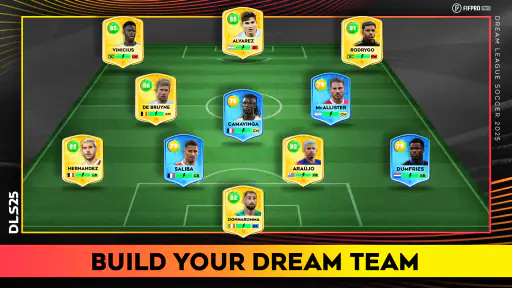
Crafting Your Dream Team
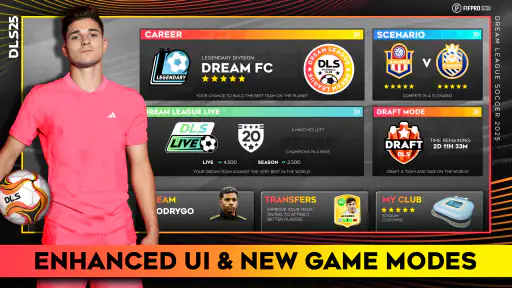
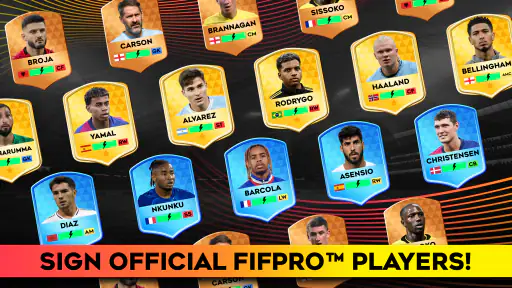
One of the standout features of Dream League Soccer 2024 is the ability to build and customize your team. You start with a modest squad, but with a bit of strategy and some savvy signings, you can transform it into a world-beating lineup. The game offers a plethora of options to tweak your team’s formation and tactics, making every match feel fresh and exciting.
Stadium and Facilities
What’s a great team without a stunning stadium to showcase their talents? In this game, you get to upgrade your stadium and facilities, which not only looks cool but also helps in generating more revenue. It’s all about balancing your spending between improving your squad and enhancing your club’s infrastructure. Trust me, seeing your stadium grow as your team climbs the league ranks is immensely satisfying.
That balancing act is also a useful reason not to rush through the club-building side. If you spend every reward on the next tempting squad change, the stadium can feel like an afterthought; if you concentrate only on facilities, the team may not feel ready for the matches you want to play. I’d make one improvement at a time and check how it affects the experience before committing more resources. On a shared device, that also makes it easier for everyone to understand why the club is being developed in a particular direction.
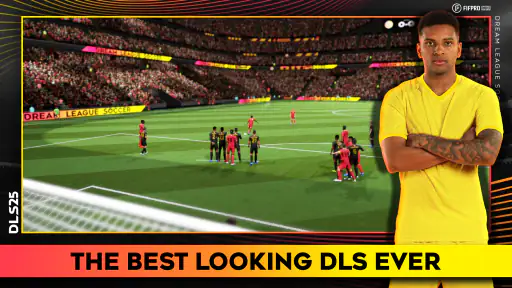
Graphics and Gameplay
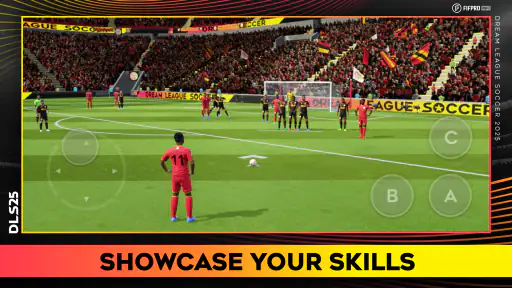
Now, let’s talk about the graphics. For a mobile game, the visuals in Dream League Soccer 2024 are top-notch. The players’ movements are fluid, and the stadiums are rendered beautifully. The developers have really outdone themselves with the attention to detail. Whether you’re watching a replay of a stunning goal or just soaking in the atmosphere during a match, the graphics keep you engaged and coming back for more.
For a practical routine, I’d use a quiet stretch of time for a full match and save squad decisions for when I can give them attention. A quick handover between siblings or friends works better if the person taking the device knows whether the next step is simply to play or to change the team. Those choices can affect the shared club, so agree on the plan before anyone spends in-game resources. This is a simple coordination habit, not a special family feature.
More From Our News Desk

Weather by Xiaomi Review: Clear at a Glance, Less Clear Up Close

X Under Pressure: Can It Recover When Posting Goes Wrong?

Clash of Clans Is Won Between the Battles

Android Auto Makes the Case for Quieter Car Software

MobiOffice: Transforming Mobile Productivity with Seamless Integration

EA SPORTS FC™ Mobile Soccer: Redefining Mobile Sports Gaming
When its mix of football suits you
The football format also helps explain who will enjoy it most. If you like controlling a team on the pitch and then making decisions about how that club develops, this offers more variety than a game focused only on short, isolated matches. If you mainly want a realistic management simulation with detailed spreadsheets, or a quick arcade kickabout without a longer club-building thread, another kind of football game may suit you better. The blend here is the draw, but it also means there is more to learn than in a bare-bones match game.
Compared with mobile football titles built chiefly around management, this puts the match itself closer to the centre of the experience; compared with simple arcade alternatives, it asks you to care about the club beyond a single result. That middle ground is useful when a household has different kinds of football fans, but it will not satisfy everyone equally. A player who wants tactical planning above all may find the on-pitch action takes too much attention, while someone looking for instant, consequence-free matches may not want the longer-term decisions at all.
Multiplayer Madness
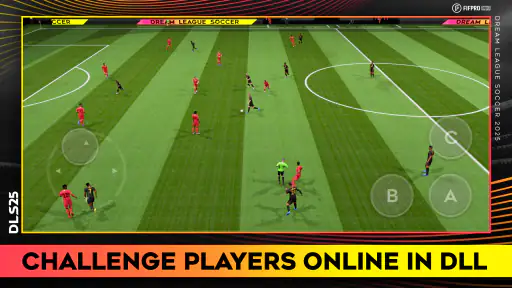
Of course, no football game is complete without the chance to test your skills against other players. The multiplayer mode here is a blast, letting you face off against opponents from around the globe. It’s not just about winning; it’s about improving your strategy with each match. Plus, there’s nothing quite like the thrill of scoring a last-minute winner against a real-life opponent!
That competitive side is best enjoyed when everyone treats a loss as part of learning rather than a reason to take over the device. I’d keep online matches separate from decisions about a shared club, especially if different players have different ideas about formations or signings. The game is rated Everyone, which makes it broadly suitable for younger players, but that rating is not a substitute for an adult’s judgement about online play, spending, or how a shared device is used.
Boundaries for shared play
Before handing over a device, I’d agree on two things: whether the next player is allowed to make changes to the squad, and whether any purchase is off limits unless an adult approves it. That avoids the awkward moment when someone returns to find the team or the household spending plan changed. I would not assume that a shared device automatically means shared progress or shared purchasing decisions; each person should know whose choices they are making.
For a younger player, the useful question is not just whether football is familiar, but whether they are ready to meet opponents online and understand that optional purchases cost real money. If the answer is uncertain, an adult can keep play within clear boundaries and stay nearby. Someone seeking a strictly private, offline experience should choose a different game rather than relying on the age label to answer every concern.
My Final Whistle
In conclusion, Dream League Soccer 2024 offers an exhilarating experience for any football enthusiast. Whether you’re a casual gamer looking to pass the time or a hardcore football fan wanting to immerse yourself in the management side of the sport, this game has something for everyone. With its superb graphics, engaging gameplay, and the freedom to build your dream team, it truly stands out in the crowded field of mobile football games.
It is free to start, but optional in-app purchases range from $0.99 to $99.99 per item, so I would keep purchases deliberate on a device used by more than one person. The game has a 4.4 average from around 12 million ratings, with over 100 million installs, which shows how widely it has found an audience without guaranteeing that every player will enjoy its pace. Its FIFPRO licensing is another football-specific draw. It runs on Android 6.0 or later, and the listed release date is January 14, 2020; the current version is 12.140.
A realistic use for it is a short evening routine: one person plays a match while dinner is being prepared, then hands over the phone without letting the next player make club changes by accident. On another day, the family can decide together whether to spend time improving the squad or the stadium. Separating those moments makes the game easier to share and keeps a casual match from turning into an argument about resources. If the household wants one common club, agreeing on a simple decision rule—such as asking before major changes—can help.
It is also worth knowing what “free to start” means in practice: the game can be tried without an upfront price, while purchases are optional and can vary substantially in cost. I’d avoid letting a child make purchase decisions alone, especially on a device used by several people. The game’s popularity and licensing may make it feel familiar, but neither removes the need to discuss spending or online play. The practical appeal is strongest when everyone knows the boundaries before the first match.
So, grab your virtual boots and get ready to make your mark in the world of football. You never know, you might just lead your team to the top of the league!
My household verdict: I’d recommend it to football-loving players who enjoy both match action and gradual club-building, especially when they can take turns without arguing over one shared squad. I’d skip it for a child who should not encounter online competition or optional spending without supervision, and for anyone who wants a purely offline, no-management football game. As a free sports game from First Touch Games Ltd., it is easy to try; the best experience comes from setting sensible boundaries and deciding together how the club should grow.
Small choices that make sessions smoother
One useful way to reduce friction is to separate playing from planning. Before starting a match, I’d settle any pending club decision instead of pausing midway to debate a formation or a signing. That keeps a quick turn genuinely quick and gives the person who enjoys team-building a fair chance to think things through. If several people use the same device, a brief spoken handover—what was changed and what should be left alone—can prevent accidental decisions without turning play into a formal chore.
I’d also treat progression as a reason to pace the game, not as a race between family members. A younger player may be more interested in scoring, while an older fan may care about the squad’s balance or stadium improvements. Letting each person choose a different role in the shared routine can make turns feel more satisfying, but it works best when everyone agrees which decisions belong to the group and which are just for an individual match.
Choosing it over other football games
If you are deciding between this and a management-first football game, ask yourself whether you want to control the action during matches. Here, the appeal is the combination of playing and developing a club, rather than concentrating primarily on menus and long-term tactical administration. On the other hand, players who want only a quick match with minimal investment in a club may be happier with a simpler arcade-style option. I find this a better fit for someone who wants a continuing project attached to the football, not merely a few minutes of kicking the ball around.
The trade-off is that the two parts compete for attention. A player who loves match control may find club decisions an extra layer to manage, while a planner may wish the managerial side went deeper. It is not a universal replacement for every football game on a phone; its middle ground is precisely why it can suit a mixed household and frustrate someone with a very specific idea of what a football game should be.
What to expect before installing
The game is free, carries an Everyone age rating, and has a 4.4 average from around 12 million ratings. It has passed 100 million installs, a sign that many players have tried it, though popularity alone cannot tell you whether its mix of action and club progression is right for your household. Its FIFPRO licensing gives the football setting a familiar professional-football connection, while the actual appeal still comes down to whether you enjoy playing matches and making choices about your team.
For a practical device check, it requires Android 6.0 or later. I’d make sure the phone or tablet is suitable for the person who will play and agree in advance how the household handles purchases and online competition. The available release is version 12.140. Those simple checks answer the everyday questions that matter most before a shared-device install: can the device run it, is the age context acceptable, and does everyone understand how play and spending will be handled?
My recommendation is strongest for football fans who like a little ownership over a club and are happy to learn the game’s rhythm over repeated sessions. It is less convincing for someone who wants a private, offline-only experience, or for a household that cannot agree on how shared progress and optional purchases should be handled. With clear boundaries, it can be an enjoyable shared sports game; without them, its club decisions and online competition may create more discussion than the household wanted.
Dream League Soccer 2025 Frequently Asked Questions
Can I play Dream League Soccer 2025 on an iPhone or iPad?
Dream League Soccer 2025 is a soccer game available for mobile play, and it is worth checking its listing in your device’s app store before downloading. Make sure the version offered there supports your particular device and operating system. The Android requirement is covered below; for an iPhone or iPad, use the compatibility details shown in the Apple App Store.
How much storage should I have available before downloading Dream League Soccer 2025?
It is sensible to check the free space on your device before downloading Dream League Soccer 2025. The game may need room not only for its initial installation but also for updates and other game data. Available space can vary by device and installation, so check the download size displayed in your app store and leave some extra room if possible.
Can I play Dream League Soccer 2025 with a controller?
If you prefer using a controller for soccer games, check the control and compatibility information in your device’s app store before installing Dream League Soccer 2025. Controller support can affect how comfortable the game feels, especially during matches, so it is worth confirming that the setup you want is supported on your device rather than assuming it will work automatically.
Does Dream League Soccer 2025 let me save my progress across devices?
If you might switch phones or play across more than one device, consider how you want to keep your progress before beginning. Check the game’s account, cloud-save, or transfer options on your device, and follow its in-game instructions if you choose to connect an account. This is particularly useful to consider before reinstalling the game or replacing a device.
Does Dream League Soccer 2025 need an internet connection to download and update?
You’ll need an internet connection to download the game, and staying connected is useful when the game needs an update. Once it is installed, the game offers some offline play, although online multiplayer and certain live events require a connection. If you expect to play while traveling or away from Wi-Fi, it’s worth checking that the features you want are available offline.
Pros
- Realistic graphics and animations.
- Extensive team customization options.
- Smooth gameplay mechanics.
- Regular updates with new features.
- Offline mode availability.
Cons
- Frequent in-app purchase prompts.
- Occasional connection issues.
- Limited commentary options.
- Repetitive background music.
- High battery consumption.
- Category
- Sports
- Version
- 12.140