

Crossword Quest
- 7.48K
- 4.7
- Installs
- 10.00M
- Price
- Free
Screenshots
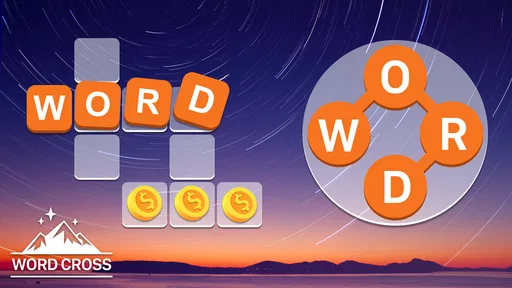
Analysis by Reviewed
Have you ever found yourself in a situation where you just want to kick back, relax, and challenge your brain a little, all at the same time? Well, let me tell you about an app that’s been keeping me hooked lately: Crossword Quest. If you’re a fan of word puzzles and love the satisfaction of finding the right word, this game might just be your new best friend.
The first move is easy to understand
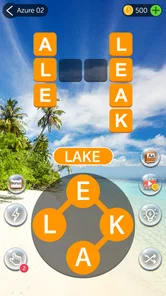
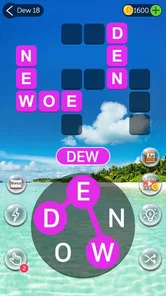
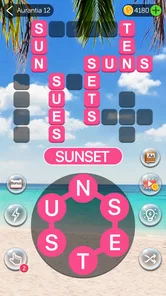
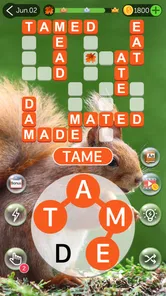
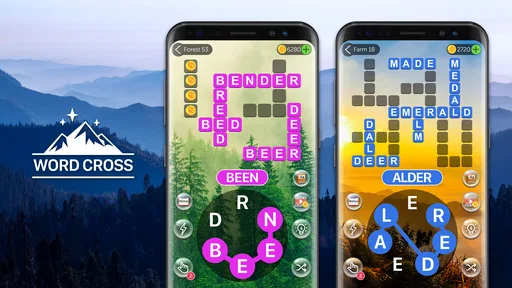
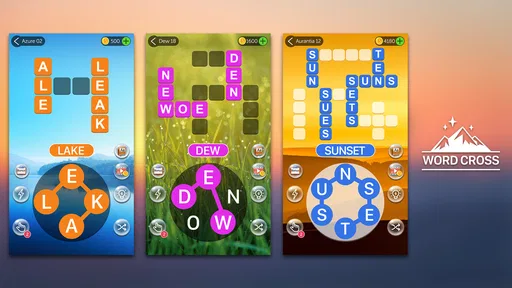
The basic action is quick to learn: look at the available letters, swipe to form a word, and watch it fit into the puzzle. I like that the goal is visible from the start, so there’s little setup between opening the game and making a move. If I have only a few minutes, I can attempt a word or two without needing to commit to a long session.
That simplicity is also the right way to approach a difficult board. I try shorter combinations first, then look again at the remaining spaces rather than repeatedly swiping the same guess. It turns the letter set into a small problem to work through, not just a test of how quickly I can tap.
A practical way to tackle a stubborn board
One useful habit is to separate finding words from filling every space. I first look for the answers that seem most obvious, then use what remains on the board to question my assumptions. If one guess does not fit, I avoid treating that as proof that I have missed a rare word; the layout itself can suggest a different arrangement. That approach keeps the puzzle manageable and makes each attempt more deliberate.
This also helps when I am playing in a noisy or interrupted setting. I can pause after a move, come back to the visible gaps, and continue without needing to remember a long chain of clues. The game suits that stop-and-start rhythm better than a crossword with a large grid and many crossing answers, where losing track of the clues can make a short break feel like work.
Why Crossword Quest Stands Out
The idea behind Crossword Quest is pretty simple. You’re given a set of letters, and you need to swipe them to create words. The more words you find, the more puzzles you unlock. It’s like a treasure hunt, but for words, and it’s incredibly satisfying to see those empty boxes fill up as you progress through each level.
Design and User Experience
First off, let’s talk about the design. The interface is clean and easy on the eyes, which is a massive plus for a game you might spend hours on. The colors are vibrant but not overwhelming, and the layout is intuitive. Even if you’re not tech-savvy, you’ll find it easy to navigate through the options and settings.
More From Our News Desk

 Gmail
GmailGmail in a Busy Inbox: Who Benefits Most?
From first account to crowded workday, Gmail earns its place through dependable search and flexible sorting—but its best fit depends on how much inbox maintenance you can tolerate.

 Prime Video
Switching to Prime Video: What Changes in Your Viewing Routine
Prime Video can make a compelling second home for streaming, but switching means learning a different catalog, rental layer, and route from browsing to playback.

 Universal TV Remote Control
Universal TV Remote Control Works Best as a Reliable Backup
A phone remote earns its place through quick setup and reliable habits. Here is how to get more from Universal TV Remote Control—and where its limits show.

 Weather - By Xiaomi
Weather by Xiaomi Review: Clear at a Glance, Less Clear Up Close
Xiaomi’s weather app makes everyday forecasts quick to scan, but its calm surface can leave useful details and recovery paths harder to find than they should be.

 X
XX Under Pressure: Can It Recover When Posting Goes Wrong?
A resilience-focused review of X, examining setup, mistaken posts, interruptions, weak connections, and the gaps that matter when recovery needs to be dependable.

 Clash of Clans
Clash of Clans Is Won Between the Battles
Its raids are quick; its community is a long-term project of coordination, teaching, rivalry, and shared responsibility—with all the friction that entails.
Latest News



The game does a great job of gradually increasing the difficulty level. It starts off easy, which is perfect for beginners, but as you move forward, you’ll find yourself spending more time thinking and strategizing. And trust me, there’s nothing more rewarding than completing a particularly tough puzzle after racking your brain for so long.
When the puzzle pushes back
When a familiar word does not fit, I find it useful to stop and inspect the empty spaces instead of assuming the board wants the obvious answer. That small pause helps me notice alternate letter arrangements and makes the puzzle feel less like guesswork. It also gives me a natural stopping point: I can leave a stubborn board and return when I have a fresh perspective.
This is a word puzzle game rather than a full crossword editor or a broad collection of different puzzle formats. If you enjoy building words from a limited set of letters, that focused loop is a strength. If you want themed clues, a large grid to fill with crossing answers, or a multiplayer contest, a traditional crossword app or a competitive word game may suit you better.
Feedback that makes each move count
The satisfying part of a correct swipe is not just seeing a word accepted; it is seeing the board change. Each filled space narrows what I need to consider next, so I can use the puzzle’s state as feedback instead of guessing blindly. When progress slows, I look at the remaining blanks and ask which letter combinations could plausibly complete them. It is a simple reasoning trick, but it makes the loop feel more thoughtful than repeatedly trying random words.
That feedback has a limit, though. This is still a focused word-forming game, not a vocabulary lesson that explains every answer in depth. I would play it to exercise recall and spot patterns, rather than rely on it to teach definitions or spelling rules. If I want a dictionary-style learning tool, I would choose one designed for that purpose; here, the pleasure comes mainly from solving the board.
Features That Keep You Engaged
One of my favorite parts of Crossword Quest is its daily challenges. These keep the game fresh and give you a reason to come back every day. There’s also a neat little feature that lets you earn hints by watching short ads or completing certain levels, which is super handy when you’re stuck on a tricky word.
Hints are most useful when I have already tried a few plausible combinations and can tell that I am stuck, rather than as the first response to a hard board. Saving them for that moment keeps the act of solving in my hands while still offering a way past a bottleneck. The trade-off is that using an ad-supported hint interrupts the puzzle, so I would not rely on that option if I wanted an uninterrupted run.
When a hint helps—and when it gets in the way
I treat a hint as a last nudge, not a shortcut for every awkward board. Before using one, I check whether I have overlooked a short word or kept focusing on a familiar answer that cannot fit the remaining spaces. This small pause preserves the satisfaction of solving most of the puzzle myself, while the hint can still stop a long stall from souring the session.
There is a practical trade-off for anyone deciding whether to spend money. The game is free to download, and optional in-app purchases range from $0.99 to $49.99 per item. I would start without buying anything and see whether the normal pace feels right. If I am comfortable with occasional ad-supported help, that may be enough; if I dislike ads or purchase prompts, I would be more cautious about expecting every part of play to feel uninterrupted.
A good fit for small breaks
I can see this working well during a commute, while waiting for an appointment, or in the quiet gap before bed: the swipe-and-solve format is easy to pick up, and a puzzle gives a short break a clear focus. For example, I might open it while waiting for a friend, try to complete the current board, and stop once I reach a harder one rather than turning the wait into an endless session.
The game is made by Words Mobile and is free to download, with optional in-app purchases ranging from $0.99 to $49.99 per item. That makes it easy to try without paying upfront, but anyone who prefers to avoid purchases should be comfortable ignoring those options. It is rated for Everyone, and its broad accessibility makes sense for a simple word puzzle, though the daily challenge and gradual difficulty will appeal most to people who enjoy returning to the same kind of task.
Choosing it over other word games
Compared with a classic crossword app, this game asks me to make words from letters already in front of me rather than interpret written clues. That makes it easier to dip into without setting aside time to work through a whole grid, but it also means I get less variety in the kind of thinking involved. A word-search game is better when I want to scan a grid visually, while a head-to-head word game is a better fit if competing with another person is the point. I would pick this one when I want a solo, low-pressure sequence of small puzzles.
It is also a more focused choice than a collection that switches between anagrams, trivia, and other formats. That focus lets the letter-and-space relationship become familiar, which can be calming after a long day. The flip side is that the same basic action remains central, so players who need a different mechanic every few minutes may lose interest. I would decide based on whether I want a steady routine or a varied puzzle sampler.
Features That Keep You Engaged
Moreover, the game doesn’t require a constant internet connection, which means you can play it while you’re on the go, whether you’re on a flight or just in an area with spotty reception. It’s a great way to pass the time without having to worry about burning through your data.
For offline play, I would treat the core puzzle experience as the dependable part and not plan around anything that may need a connection, such as ad-based hints. That distinction matters on a flight or in a weak-signal area: I can still use the game for a quiet word break, but I would not count on every optional way of getting help being available.
Who will enjoy the routine
Crossword fans who mainly want clue-based grids may find the swipe mechanic too different, while people who like quick vocabulary puzzles are more likely to settle into it. It also works for casual players who want a gentle ramp in difficulty rather than a timed contest. The repeated format can feel limiting if I am looking for variety from one session to the next, so I would choose a broader word-game collection when changing puzzle styles matters more than a steady progression.
The game has a 4.7 average from around 130,000 ratings, and it has been installed over 10 million times. It launched on November 7, 2019, and version 2.3.7 supports Android 4.0 and later. Those details make it a practical option for a wide range of Android devices, while the real deciding factor for me is whether I enjoy this particular cycle of letter choices, guesses, and completed spaces.
How I would fit it into a day
For a realistic routine, I would use it as a waiting-room game rather than something that demands a protected block of time. I can open it, solve what comes readily, and leave a tougher board for later without turning the pause into a commitment. On a quiet evening, I might give a challenge more attention; during a busy day, I can keep each visit brief. That flexibility is a better reason to return than trying to force a daily streak or finish every puzzle at once.
The best audience is someone who likes anagrams, pattern spotting, and the small reward of watching blanks disappear. It can also suit a family looking for an accessible word game, since it is rated for Everyone, though the enjoyment still depends on how comfortable each player is with the vocabulary. I would skip it if I specifically wanted clue-based crossword solving, live competition, or a wide rotation of puzzle types. Those are different pleasures, and this game does not need to imitate them to be useful.
Final Thoughts
All in all, Crossword Quest is a delightful app that manages to strike the perfect balance between challenging and entertaining. Whether you’re a word game aficionado or just someone looking for a relaxing way to unwind, this app has something for everyone. It’s engaging, it’s fun, and above all, it’s incredibly satisfying to play.
So, if you haven’t already, give Crossword Quest a try. You might just find yourself getting lost in the world of words, one puzzle at a time. And who knows, you might even learn a few new words along the way!
Crossword Quest Frequently Asked Questions
How much storage space does Crossword Quest need, and is setup straightforward?
Crossword Quest is a word game, so its basic appeal is the puzzles rather than demanding action or elaborate controls. Before downloading, make sure your device has enough free space for the game and its installation. After it is installed, you can open it and begin exploring the crossword-style challenges. The game is free to download, which makes trying it out simple.
Does Crossword Quest have an age rating, and is it suitable for family play?
Crossword Quest has an Everyone content rating, making it a broadly accessible choice for families and players of different ages. Its focus on word puzzles means the central activity is solving clues and forming words rather than engaging with mature themes. Parents can still decide whether the game fits their household, particularly when considering optional in-app purchases and the presence of advertising.
Is Crossword Quest suitable for children and casual players?
Crossword Quest is rated for Everyone, so its word-puzzle format is suitable for a broad audience, including families and people who only want to play casually. Its blend of crossword-style clues and word-search play offers a straightforward way to get started, while the range from easier to more challenging puzzles gives players room to test themselves as they become more confident.
Does Crossword Quest require a recent Android device?
Crossword Quest supports Android devices running version 4.0 or later, so it can be an option for players using older as well as newer Android phones and tablets. It is a word game rather than a demanding action title, and its interface is designed to make puzzle play easy to follow. Check your device’s operating-system version before downloading.
What is Crossword Quest and what makes it unique?
Crossword Quest is a challenging word puzzle game that combines the fun of traditional crosswords with the excitement of word search puzzles. What makes it unique is its vast collection of puzzles, ranging from easy to highly challenging levels, making it suitable for all ages. The game is designed to enhance vocabulary and cognitive skills while providing endless entertainment. Its sleek and user-friendly interface ensures that players have a smooth and engaging experience.
Pros
- Engaging puzzles keep your mind active.
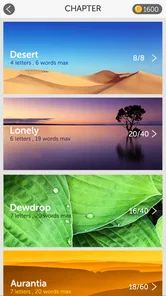
- Wide variety of levels to choose from.
- Offline mode available for on-the-go play.
- User-friendly interface for easy navigation.
- Regular updates with new puzzles.
Cons
- Contains ads that can be intrusive.
- Some puzzles may be too easy for experts.
- In-app purchases can be expensive.
- Limited hints without purchase.
- Requires occasional internet for updates.













