Crayola Create and Play
- 2.03K
- 3.9
- Installs
- 1.00M
- Price
- Free
Screenshots


Analysis by Reviewed
On a shared tablet, a creative game can become an easy way for kids to settle into a quiet activity while an adult is nearby. I find Crayola Create and Play most appealing for that kind of short, flexible play: a child can move between art and activities rather than needing one long, uninterrupted session. It is an educational game from Crayola LLC, and its mix of coloring, drawing, and play gives it a broader feel than a digital coloring book alone.
A rainy-afternoon routine that works
One realistic use is a stretch of indoor time when a child wants to do something on the family tablet while dinner is being prepared. I would offer the game as a choice, then let the child settle on one activity rather than hovering over every tap. The variety gives them somewhere to go if coloring stops holding their attention, but the adult can still stay close enough to help with navigation or a purchase prompt.
It can also work as a short shared activity between an adult and child: take turns choosing what to try, then let each person make something without judging whose result is better. That is a better fit for the app than expecting it to teach a complete art lesson. If the goal is a quiet, predictable activity, I would agree on a stopping point beforehand; moving from one kind of play to another can make “just one more” tempting.
Keeping shared-device use uncomplicated
Before a first session, I would take a few minutes to look around the app myself. That simple preview can help an adult see what choices a child is likely to encounter and explain how the family wants to handle the tablet. It is also useful to check the device’s purchase settings before handing it over, since the game is free to download but offers in-app purchases from $0.99 to $99.99 per item.
For a device used by several people, it helps to decide whether children may revisit one another’s creations or should ask first. I would not assume that a shared game will manage those boundaries for the household. If a child wants to keep a project exactly as they left it, make that expectation clear before siblings take turns; if the family is comfortable with everyone exploring, treat saved work as something that might be changed or revisited.
That distinction matters more than it sounds. A child who sees a drawing as a personal project may feel disappointed if someone else alters it, while another child may think changing it is part of the fun. A brief conversation about how the family shares the app prevents a creative activity from becoming an argument about ownership.
Taking turns on a shared device
In a household, the main benefit is that different children can approach the same app in their own way. One might want to color, while another is more interested in a puzzle or the virtual pet area. That variety can make it easier to agree on one shared activity, although it does not replace clear household rules about whose turn it is or what gets saved. I would set expectations before handing over the tablet, especially if siblings tend to edit or revisit one another’s work.
More From Our News Desk

Weather by Xiaomi Review: Clear at a Glance, Less Clear Up Close

X Under Pressure: Can It Recover When Posting Goes Wrong?

Clash of Clans Is Won Between the Battles

Android Auto Makes the Case for Quieter Car Software

MobiOffice: Transforming Mobile Productivity with Seamless Integration

EA SPORTS FC™ Mobile Soccer: Redefining Mobile Sports Gaming
A practical routine is to let each child choose an activity and then give them a moment to finish before passing the device along. That works better than treating the app as an automatic turn-taking system. For a parent who wants a low-pressure activity during a meal wait or a quiet stretch at home, the choice of creative tasks is useful; for a child who needs a tightly guided lesson, it may feel too open-ended.
What to check before handing it over
I would explore the app with a child the first time rather than assume every section will be equally obvious. A quick preview helps an adult understand where the main activities are and agree on what the child can explore independently. It also creates a natural moment to talk about keeping a shared device in one place and asking before switching to another activity.
The game is free to download, but it includes in-app purchases ranging from $0.99 to $99.99 per item. That makes purchase boundaries worth discussing before a child plays, and an adult should review the device’s purchase settings rather than relying on the game itself to manage spending. The app is rated Everyone, but age ratings are only one part of choosing a suitable activity; a younger child may still need help navigating choices, while an older child may want more freedom to make and revisit projects.
Making room for creative play
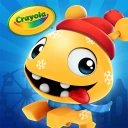
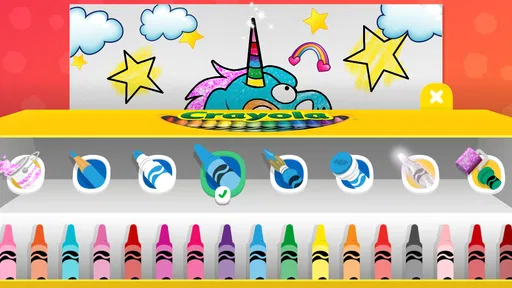
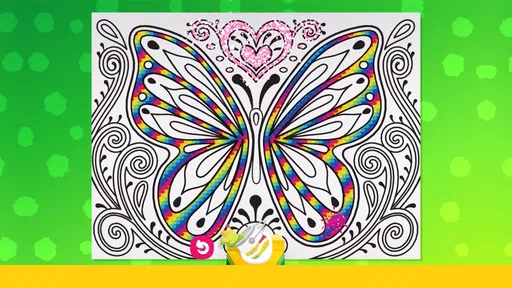
Right off the bat, Crayola Create and Play throws you into a world where imagination knows no bounds. This app is all about letting kids (and adults, no judgment here!) explore their artistic side. With a plethora of coloring pages and activities, there's something to keep everyone entertained.
The app features a beautiful array of colors and tools that mimic the experience of using real Crayola products. Whether you're using the digital crayons, markers, or paintbrushes, the tactile satisfaction is almost palpable. Seriously, it’s like having a whole art studio in your pocket!
Interactive Learning and Play
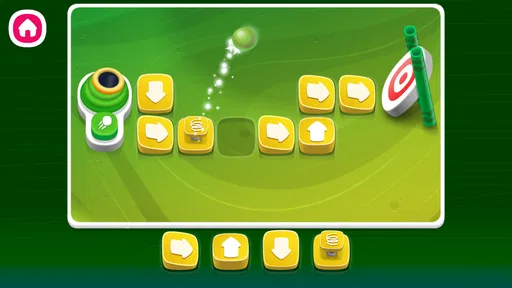
Beyond just coloring, this app offers a ton of engaging mini-games that sneak in a bit of education while you're having fun. From puzzles that challenge your brain to matching games that boost memory, Crayola Create and Play is cleverly designed to make learning feel like play.
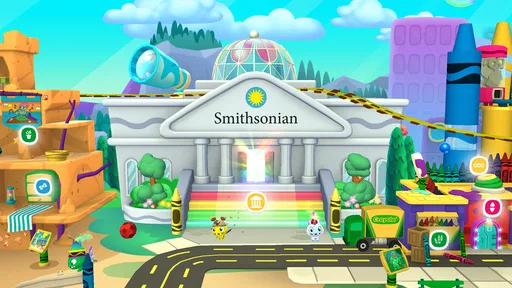
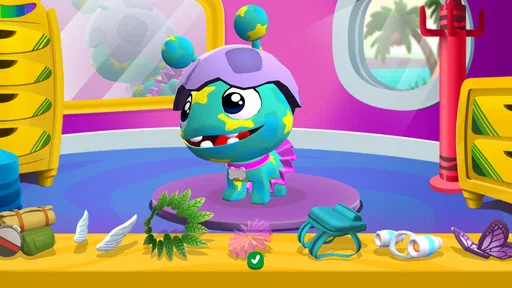
One of my favorite features is the pet park, where kids can create and take care of their own virtual pets. It’s adorable and teaches responsibility in a subtle way. Plus, who doesn't love cute little critters?
What the Everyone rating means at home
The Everyone age rating makes the game a reasonable candidate for a family device, but I would treat it as a starting point, not a parenting decision made for me. Children differ in how confidently they navigate menus, how long they stay focused, and how they respond when a purchase is offered. A younger player may be happiest with an adult nearby at first, while an older child may be ready to explore more independently once the household’s spending rules are clear.
Because this is a creative play space rather than a structured course, it is useful to ask what the child wants from it. If they want to experiment with colors and move between activities, the format makes sense. If they are looking for step-by-step instruction, a dedicated drawing lesson or an adult-led art project will be more satisfying. I would also avoid presenting the game as a replacement for paper, crayons, and hands-on making; it works best as one option among them.
Safe and Kid-Friendly Environment
As a parent or guardian, safety is always a top concern, and Crayola gets that. The app is designed to be a safe space for kids, with no ads or in-app purchases that could lead to unwanted surprises. This makes it a worry-free zone for kids to explore and create freely.
The interface is user-friendly and intuitive, so kids can navigate it on their own, which is a plus for parents who need a little break. It’s also worth mentioning that the app is COPPA compliant, ensuring it meets the necessary standards for children's online privacy.
Customization and Creativity
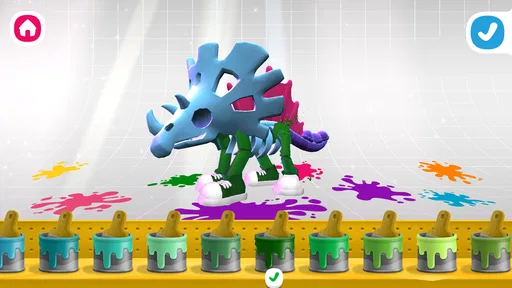
One of the coolest aspects of Crayola Create and Play is the level of customization it offers. Users can create their own unique characters, complete with personalized outfits and accessories. This feature encourages self-expression and individuality, which is always a win in my book.
The app also allows users to save their creations, so you can build a digital portfolio of your masterpieces. It's a neat way to track progress and see how your skills evolve over time.
Making saved work feel fair
On a shared tablet, I would treat the ability to save creations as a chance to return to an idea, not as a guarantee that each child has a private space. That small distinction helps set realistic expectations when more than one person uses the same device. If a child has made something they care about, give them time to show it before the next person starts exploring.
A useful approach is to let the child describe what they made before passing the tablet on. It gives them a moment to enjoy the result, and it makes the activity feel complete even if the next player chooses something different. For families who want separate, carefully organized portfolios, a dedicated art app with clearer project-management tools may be a better match.
Technical Aspects and Support
From a technical standpoint, the app runs smoothly on both Android and iOS platforms. I didn't experience any significant lags or crashes, which is always a relief. The graphics are vibrant, and the sound effects add an extra layer of enjoyment without being overwhelming.
If you ever run into issues, Crayola offers robust customer support. Their team is responsive and eager to help, ensuring that your creative journey remains uninterrupted.
How it fits beside other creative games
Compared with a basic coloring app, this game offers more ways to spend time than filling in pictures, which helps when a child quickly loses interest in coloring. Compared with open-ended drawing tools, it is more guided and playful, but that structure may not suit a child who wants a blank canvas and complete control. I’d choose it for variety and approachable activities, and a simpler drawing app for focused sketching without diversions.
There is a trade-off in that breadth: switching between coloring, mini-games, and the pet area keeps the experience varied, but it may also pull a child away from finishing one picture. If you want to encourage a particular drawing skill, I would choose a focused art tool or provide paper and materials instead. If your aim is to keep a child engaged through a mix of brief activities, the range here is the stronger point.
A small tip for shared use: treat saved creations as something to enjoy, not as a formal record of artistic progress. Let a child decide what they want to make, then leave room for another person to start fresh. This avoids turning a relaxed activity into a contest over whose work is better or who gets to change a character.
Who will get the most from it
The game suits children who like switching between making things and short, playful challenges, as well as adults looking for a casual creative activity to share. It is less suitable for families seeking a structured curriculum, a dedicated drawing studio, or an experience that requires no adult attention around purchases. The free download makes it easy to try, but I would check the available activities and purchase boundaries before making it part of a regular routine.
It is also a better fit for households that are comfortable sharing one creative space than for children who expect separate accounts or strict separation between projects. If siblings regularly use the same tablet, the adult’s simple rules about turns and saved work matter as much as the game’s activity choices. For a child who wants to draw without interruptions, or for a parent who needs a lesson plan with a clear learning sequence, another kind of app will likely be less distracting.
Crayola Create and Play has a 4.0 average from around 7.5 thousand ratings, and has passed over a million installs. It first appeared on November 12, 2018; version 2.53.0 is listed for devices running Android 8.0 or later. Those details make it a familiar, established option, though they do not tell me whether its particular mix of activities will hold a child’s attention—trying a short session is the best way to find out.
For someone deciding whether to keep it on a family device, I would start with one supervised visit and see which activities the child actually returns to. That gives a more useful answer than judging the game by its range alone. The free entry point lowers the barrier to trying it, while the in-app purchase range is a reason to set device-level limits before it becomes part of the everyday routine.
Overall, Crayola Create and Play is a delightful app that encourages creativity while subtly incorporating educational elements. It’s perfect for kids who love to color and create, and it’s equally enjoyable for adults who want to unwind with some art therapy. Whether you're a budding artist or just looking for a fun way to pass the time, this app has something for everyone. Happy creating!
Crayola Create and Play Frequently Asked Questions
Does Crayola Create and Play cost anything to download or use?
Crayola Create and Play is free to download, so families can try the game without paying upfront. Some features may involve in-app purchases, with individual items ranging from $0.99 to $99.99. It is worth checking purchase settings before handing a device to a child, so any spending is intentional and supervised.
What is Crayola Create and Play?
Crayola Create and Play is an educational app designed for children that combines creativity with interactive learning. It offers a range of activities such as coloring, crafting, and games that enhance artistic skills and cognitive development. The app is available on both Android and iOS platforms, providing a safe, ad-free environment for kids.
Is Crayola Create and Play safe for children?
Yes, Crayola Create and Play is designed with children's safety in mind. The app is COPPA-compliant, meaning it adheres to the Children's Online Privacy Protection Act standards. It is free of third-party ads and offers a secure environment for kids to explore their creativity without exposure to inappropriate content.
Does Crayola Create and Play require a subscription?
Crayola Create and Play offers a free version with limited features. However, to unlock the full range of activities and continuous updates, a subscription is required. This subscription model ensures consistent content updates and new activities, keeping the app fresh and engaging for young users.
What age group is Crayola Create and Play suitable for?
Crayola Create and Play is primarily designed for children aged 3 to 8 years old. The app's activities are tailored to support early childhood development, focusing on creativity, problem-solving, and fine motor skills. It provides age-appropriate content that is both educational and entertaining.
Pros
- Engages kids with creative activities.
- Safe
- ad-free environment for children.
- Wide variety of coloring tools available.
- Educational games enhance learning.
- Regular updates with new content.
Cons
- Requires subscription for full access.
- Limited offline functionality.
- Some features need stable internet.
- Can be repetitive over time.
- In-app purchases can add up.