Craftopia: Block Builder
- 15.00
- 3.5
- Installs
- 1.00M
- Price
- Free
Screenshots
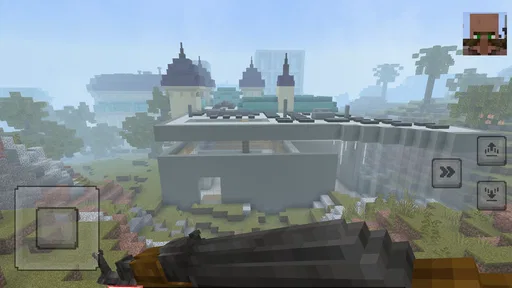
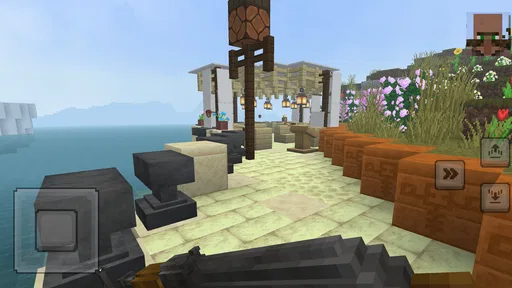
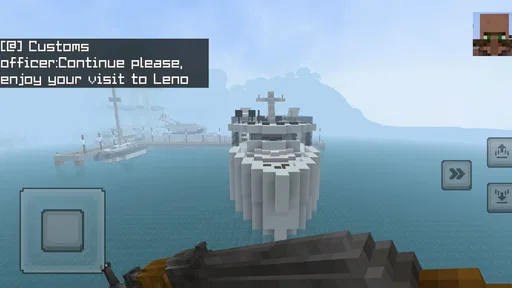
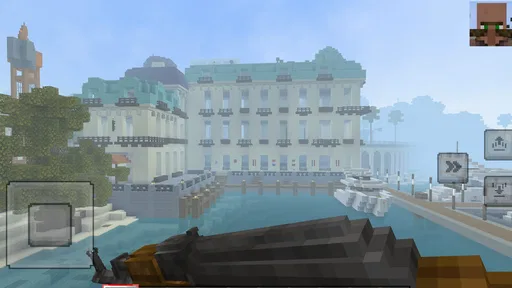
Analysis by Reviewed
I approached Craftopia: Block Builder as a casual building game: something to open for a short creative break, rather than a project that needs a plan before I start. Its appeal is the mix of shaping a place and venturing beyond it. That combination makes it more inviting than a pure construction sandbox, though it also means the experience may suit players who enjoy both sides more than those who want either one in depth.
A practical rhythm for building and exploring
My most useful habit is to decide what I want from a session before jumping between activities. If I have only a little time, I focus on one manageable building task—such as improving a small shelter—instead of beginning a large structure that I cannot finish. When I have longer, I can treat exploration and combat as a change of pace, then return to construction with a clearer idea of what I want the world to feel like. This simple rhythm helps keep the two parts from competing for attention.
That approach is also a good fit for younger players and anyone who likes making visible progress without needing a complicated goal. I would be less likely to recommend it to someone seeking a highly detailed survival simulation or a combat-first adventure: the pleasure here comes from switching between creative building and exploration, not from treating either as the sole attraction.
Discovering the World of Craftopia
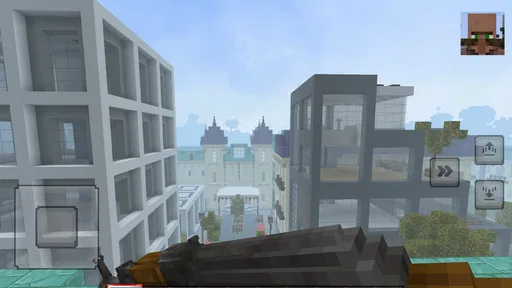
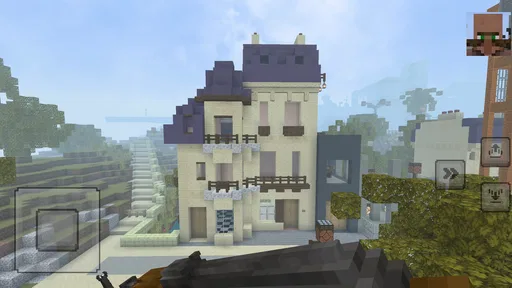
When I first launched the app, I was immediately drawn into its vibrant and expansive universe. The graphics are nothing short of stunning, with each block and structure bursting with color and detail. It’s like stepping into a world where Minecraft meets an epic fantasy adventure. The controls are intuitive, making it easy for even the most novice gamer to jump right in and start building.
One of the most impressive features of Craftopia: Block Builder is the sheer scope of what you can create. Whether you want to construct a cozy little cottage or a massive fortress, the possibilities are endless. The game offers a variety of building materials and tools, allowing for a high degree of customization. It’s incredibly satisfying to see your ideas come to life, block by block.
Make each session count
For a repeatable workflow, I would start with a compact build and give it one clear purpose: a place to rest, a landmark, or simply a shape to experiment with. That makes it easier to judge whether a design is working before committing to something ambitious. I also try to leave a visible next step for my next session, such as choosing which part of a structure to extend. It is a small planning habit, but it avoids spending the first few minutes wondering what to do.
Before settling into a longer play session, I would check the available control and display settings rather than assuming the defaults are ideal for every device. Small adjustments can make building more comfortable, especially when placing blocks precisely. I would also take a moment to learn the basic controls in a low-stakes area before attempting a larger design or a fight. That reduces the chance of a clumsy input interrupting a good run of creative work.
More From Our News Desk

Weather by Xiaomi Review: Clear at a Glance, Less Clear Up Close

X Under Pressure: Can It Recover When Posting Goes Wrong?

Clash of Clans Is Won Between the Battles

Android Auto Makes the Case for Quieter Car Software

MobiOffice: Transforming Mobile Productivity with Seamless Integration

EA SPORTS FC™ Mobile Soccer: Redefining Mobile Sports Gaming
Settings that support a steadier session
I treat the settings check as a practical first step, not a hunt for hidden advantages. The useful question is whether the controls feel manageable on the screen I am using and whether the display is comfortable for the room and time of day. If I am playing in a bright space, I want to be able to see the scene clearly; if I am settling in for a longer building stretch, comfort matters more than rushing straight into play. I would not assume that a setting changes the game’s difficulty or adds a new ability.
It also helps to make one adjustment at a time. After changing a control option, I would test it with a small placement task before relying on it during combat. That makes it easier to tell whether the change helped, and avoids adjusting several things at once and losing track of what felt better. On a shared device, I would check the settings again when I return, rather than expecting another player’s preferred setup to suit me.
A Thrilling Adventure Awaits
But don’t let the “Block Builder” part fool you—there’s more to this game than just construction. Craftopia offers a rich adventure mode where you can explore mysterious lands, battle fierce creatures, and uncover hidden treasures. This aspect of the game is what truly sets it apart from other building games. It provides a perfect balance between creativity and action, keeping you engaged for hours on end.
As you journey through the game, you’ll encounter various challenges that will test your strategic thinking and problem-solving skills. The thrill of conquering a challenging quest or defeating a formidable opponent is exhilarating. Plus, the game’s regular updates mean there’s always something new to discover!
Habits that make the mix easier to manage
I find it useful to give each visit a stopping point as well as a starting goal. For instance, I might finish a small section of a wall, then pause before launching into a new build. That creates a natural handoff to the next session: I can look at what is already there and decide whether to extend it, decorate it, or head out to explore. It is more satisfying than leaving several half-started projects scattered across my attention.
When I switch from building to exploring, I try to do so deliberately instead of treating every interruption as a reason to abandon the original plan. A quick mental note—what I was working on and what I want to try next—helps me return without rebuilding the whole idea in my head. This is especially handy during a short evening session, when I might have time for one outing but not enough to finish a large construction project afterward.
For a first visit, I would keep the test simple: make a small structure, learn how placement feels, then spend some time moving through the world and trying combat. That gives a fairer impression than judging the game only by its first building task. If the exploratory side is what catches your interest, you can make that the focus later; if it feels like a chore, you will know early that the combination may not suit you.
Where its blend works—and where it may not
Compared with a straightforward creative sandbox, this game gives me a reason to step away from building and explore; compared with a conventional action adventure, it gives me a place to express ideas through construction. That middle ground is its main strength, but it is also a trade-off. If you want uninterrupted, tool-focused building, the adventure side may feel like a distraction. If you mainly want a tightly focused action game, construction may slow the pace you are looking for.
For an everyday example, I might open it after school or work, spend a short session improving one corner of a build, then use a later, longer session to explore and tackle combat. I would avoid starting a sprawling design when I know I need to stop soon. Small, finishable goals make the game easier to enjoy in brief visits and give each return a sense of purpose without turning play into a checklist.
Who will enjoy the balance
I think the strongest audience is made up of players who like having two different moods available in one game. A younger player might enjoy shaping a recognizable home, while someone returning to the game after a busy day can choose a modest creative task instead of committing to a demanding campaign. The Everyone age rating makes it a reasonable option to consider for a broad audience, though I would still choose play time and device settings with the individual player in mind.
It is less appealing if you already know you want one thing above all else. A player who spends most of their time designing intricate builds may be happier with a dedicated creative sandbox, where exploration does not compete for attention. Someone looking for combat depth and a strongly directed adventure may prefer a game built around those priorities. The appeal here is the ability to move between activities, not a claim that either side will replace its specialist alternatives.
What to expect before committing
Craftopia is a free simulation game from Craftopia Games, rated for Everyone, and it has reached over one million installs. Its average rating is around 3.5 from roughly 1,400 ratings, a mixed reception that suggests it will not click equally with every player. I would treat that as a reason to try it with modest expectations: the central building-and-adventure mix is appealing, but your enjoyment will depend on whether both parts hold your interest.
The game was released on February 6, 2025, and the current version is build-1.20.0.02-alpha, which is worth keeping in mind if you prefer a mature, settled experience. It runs on Android 5.0 or later. If you are wondering whether it is suitable for a younger player, its Everyone content rating is reassuring; if you are wondering whether it replaces a dedicated building or combat game, I would say no. It works best as a casual blend, not as a specialist alternative.
Questions I would settle through a first session
If you are unsure whether it is worth trying, I would start with the practical question: can you enjoy both making things and leaving your build to explore? You do not need to decide on a grand project first. A small structure is enough to test whether block placement feels satisfying, and a short change of pace can show whether the adventure side adds welcome variety or simply pulls you away from the part you prefer.
Another useful question is whether the game fits the time you usually have. It can suit a brief visit when you choose a finishable task, but a large design is a poor match for a session you know will be interrupted. If you want something that always offers a tightly planned objective from the moment you open it, this self-directed rhythm may feel loose. I would pick a clear activity before starting and give myself permission to stop once it is done.
A Thrilling Adventure Awaits
But don’t let the “Block Builder” part fool you—there’s more to this game than just construction. Craftopia offers a rich adventure mode where you can explore mysterious lands, battle fierce creatures, and uncover hidden treasures. This aspect of the game is what truly sets it apart from other building games. It provides a perfect balance between creativity and action, keeping you engaged for hours on end.
As you journey through the game, you’ll encounter various challenges that will test your strategic thinking and problem-solving skills. The thrill of conquering a challenging quest or defeating a formidable opponent is exhilarating. Plus, the game’s regular updates mean there’s always something new to discover!
Final Thoughts
In conclusion, Craftopia: Block Builder is a must-try for anyone who loves building games or adventure titles. It offers a fantastic escape from reality, allowing you to immerse yourself in a world of endless possibilities. The combination of building and adventure elements ensures that the gameplay never feels stale, and the community aspect means you can share your creations and adventures with others.
Whether you’re a seasoned gamer or new to the world of mobile gaming, Craftopia is sure to captivate your imagination and provide countless hours of entertainment. So, why not give it a try and see what amazing creations you can come up with?
My verdict on settling in
I would recommend it most to players who like alternating between making a place their own and heading out for an adventure, especially those who prefer casual, self-directed goals over a rigid sequence of tasks. To get a fair sense of it, try both building and exploration early on rather than judging it from one activity alone. If one half feels like an obligation, a more focused game in that style is probably a better match.
For me, the strongest way to approach Craftopia is to keep expectations grounded, build in manageable stages, and let exploration provide variety rather than demand a marathon session. Its broad mix offers room to experiment, but the same breadth will not satisfy someone looking for deep specialization. If that balance sounds appealing, it is an easy free game to sample; if you want a polished, single-purpose experience, I would look elsewhere.
Craftopia: Block Builder Frequently Asked Questions
What kind of gameplay can I expect from Craftopia: Block Builder?
Craftopia: Block Builder is a simulation game with a block-building style. Its short description is simply “Craftopia,” while its summary invites players to build, survive, and fight with characters in a Minecraft-style world. If you enjoy games centered on making things and taking on survival challenges, that combination gives you a quick sense of its appeal.
What is Craftopia: Block Builder?
Craftopia: Block Builder is an open-world sandbox game where players can explore, create, and survive in a vibrant block-based universe. The game allows you to craft unique items, build expansive structures, and engage with a dynamic environment filled with resources and challenges. It's available for both Android and iOS platforms, offering endless possibilities for creativity and adventure.
Is Craftopia: Block Builder free to download and play?
Craftopia: Block Builder is free to download on both Android and iOS devices. However, it features optional in-app purchases that enhance gameplay, such as exclusive building materials, character skins, and special abilities. These purchases are not required to enjoy the full experience, but they do offer additional customization and convenience.
What are the system requirements for Craftopia: Block Builder?
To run Craftopia: Block Builder smoothly, Android users need a device with at least Android 8.0 and 2GB of RAM. For iOS users, the game is compatible with iOS 11 or later. While the game is designed to perform on a range of devices, having a device with higher specifications will ensure a more seamless gaming experience.
Can I play Craftopia: Block Builder offline?
Yes, Craftopia: Block Builder can be played offline. The game offers a robust single-player mode where you can explore and build without an internet connection. However, certain features such as multiplayer mode and online events will require an active internet connection to access. Therefore, having internet connectivity can enhance the overall experience.
Pros
- Intuitive building mechanics
- Vast sandbox environment
- High customization options
- Engaging multiplayer mode
- Regular updates
Cons
- Some features can be buggy
- Occasional lag in multiplayer
- Limited tutorial guidance
- In-app purchases can be pricey
- Graphics not optimized on all devices