Boggle With Friends: Word Game
- 8.40K
- 3.8
- Installs
- 1.00M
- Price
- Free
Screenshots
Analysis by Reviewed
I usually reach for a word game when I have a few spare minutes and want something more engaging than scrolling. Boggle With Friends: Word Game gives that moment a clear goal: scan a letter grid, spot words, and make quick decisions before time runs out. It is a familiar kind of puzzle, but the pace makes each round feel more like a small challenge than a quiet word search.
What to expect from a timed word puzzle
This is a word game from Zynga, aimed at players who enjoy searching for words under a little pressure. Its average rating is 3.8 from around 26,000 ratings, and it has over a million installs. Those figures suggest a game with a substantial audience, though the rating also hints that the experience will not suit everyone equally. It is free to start, rated for Everyone, and includes optional in-app purchases ranging from $0.99 to $99.99 per item.
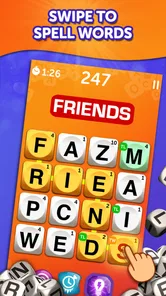
The main appeal is the quick shift between looking and choosing. You are not simply scanning a page of letters at your own pace: a timed round encourages you to move your eyes across the board, trace possible letter paths, and decide whether a word is worth entering. I find that combination satisfying because it rewards both vocabulary and visual attention. It can also be a little frantic if you prefer to think through each choice slowly.
Getting Started: Easy Peasy
Getting started with Boggle With Friends: Word Game is a breeze. As soon as you download the app, you’re greeted with a colorful and intuitive interface. You can sign in using Facebook or create a Zynga account, which is super handy if you want to save your progress and challenge your friends. I love how user-friendly the setup is, making it accessible for players of all ages.
Gameplay: A Classic Twist
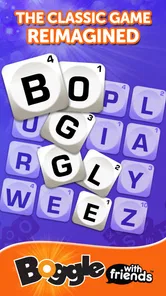
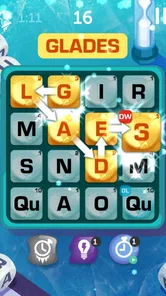
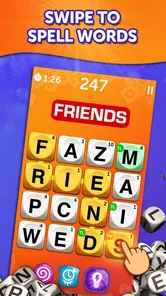
Once you're in, the game kicks off with a tutorial that guides you through the basics. The game board is a 4x4 grid of letters, and your task is to find as many words as possible by connecting adjacent letters within a limited time. It’s a thrilling race against the clock, and the adrenaline rush adds to the fun. The twist? Special tiles and power-ups that can help you rack up those scores. Talk about keeping things interesting!
Your first satisfying round
For a first-time player, I would treat the opening round as practice rather than a test of vocabulary. Start by tracing short, obvious words instead of trying to find the longest possible answer immediately. Then sweep the grid in a consistent pattern—row by row, for example—so you do not keep revisiting the same letters while the clock is running. That simple habit makes the board feel less chaotic and gives you a fairer sense of how quickly you can spot words.
After a round, take a moment to look at the words you missed if the review is available. I find that this is more useful than judging a round only by its score: a missed word may reveal a letter path you overlooked, or a familiar word you did not notice under pressure. The practical aim is not to memorize every possible answer, but to recognize recurring patterns and become more deliberate about scanning.
More From Our News Desk

 Gmail
Gmail in a Busy Inbox: Who Benefits Most?
From first account to crowded workday, Gmail earns its place through dependable search and flexible sorting—but its best fit depends on how much inbox maintenance you can tolerate.

 Prime Video
Switching to Prime Video: What Changes in Your Viewing Routine
Prime Video can make a compelling second home for streaming, but switching means learning a different catalog, rental layer, and route from browsing to playback.

 Universal TV Remote Control
 Works Best as a Reliable Backup
A phone remote earns its place through quick setup and reliable habits. Here is how to get more from Universal TV Remote Control—and where its limits show.

 Weather - By Xiaomi
Weather by Xiaomi Review: Clear at a Glance, Less Clear Up Close
Xiaomi’s weather app makes everyday forecasts quick to scan, but its calm surface can leave useful details and recovery paths harder to find than they should be.

 X
X Under Pressure: Can It Recover When Posting Goes Wrong?
A resilience-focused review of X, examining setup, mistaken posts, interruptions, weak connections, and the gaps that matter when recovery needs to be dependable.

 Clash of Clans
 Is Won Between the Battles
Its raids are quick; its community is a long-term project of coordination, teaching, rivalry, and shared responsibility—with all the friction that entails.
Latest News



Challenge Your Friends
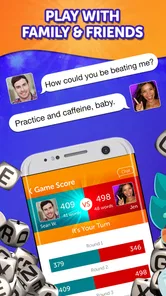
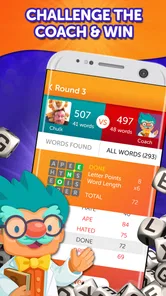
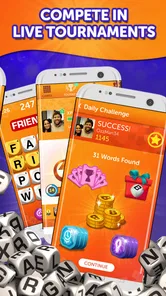
One of the best features is the ability to play against your friends or random opponents online. There’s nothing like a bit of friendly competition to spice things up! The app also offers daily challenges and tournaments, ensuring that there’s always something new to tackle. I found myself eagerly logging in every day to see what new challenges awaited me.
That mix gives the game more than one use. A quick solo challenge can suit a short break, while a match with someone you know gives the same letter hunt a social edge. For a realistic everyday example, I might open it while waiting for a coffee: play a round, check how I did, then put the phone away. If I have more time later, I can choose a friend match instead of turning a spare minute into a long session.
Choosing a mode that fits your mood
Competition is not always the best reason to play. If a close score makes you tense, a daily challenge can be a better way to focus on your own word-finding rather than someone else’s result. If you enjoy comparing strategies, a friend match makes it easy to notice how another player approaches the same kind of puzzle. I would use those options differently: casual challenges for a low-pressure break, and head-to-head play when I actually want a contest.
Compared with a traditional word-search game, this format asks for faster decisions and rewards finding connected letter paths, not simply spotting words printed in straight lines. Compared with a crossword, it puts less emphasis on clues and general knowledge, but more on speed and visual scanning. That makes it a good fit if you like quick rounds; if you want a calm puzzle with time to reason through every answer, a crossword or untimed word search may be a better choice.
Design and User Experience
The design is vibrant and appealing, with smooth animations that make the gameplay experience feel seamless. I appreciate how the developers have paid attention to detail, ensuring everything from the sound effects to the visuals enhances the overall experience. It’s one of those games where you can easily lose track of time.
The timed format is also the main source of friction. When I am tired or distracted, the clock can make the game feel hurried rather than relaxing, and a busy screen may draw attention away from the letters themselves. I would not choose it as a wind-down activity if I wanted a genuinely quiet pace. It works better when I can give the grid a little attention, even if only for a short round.
Learning Curve: From Novice to Expert
Whether you’re a word aficionado or a beginner, Boggle With Friends: Word Game caters to all skill levels. The more you play, the better you get at spotting words quickly. It’s a fantastic way to improve your vocabulary and sharpen your mind. Plus, the game gives you the option to review missed words at the end of each round, which is a neat learning feature.
One useful trade-off is that learning from a round takes a different kind of attention than playing it. During the timer, I focus on scanning and entering words; afterward, I slow down and consider what I overlooked. Keeping those jobs separate helps me avoid turning each round into a frantic attempt to remember every word I have ever seen. Beginners can build confidence with short finds, while experienced word-game players may enjoy improving their speed and accuracy.
Who will enjoy it—and who may not
I would recommend it to someone who likes word puzzles but wants more urgency than a paper word search, especially if they enjoy comparing results with friends. It can also work well for families, since the Everyone age rating makes it suitable for a broad audience, though players with very different vocabulary or reaction speeds may not find every match equally balanced. If your priority is a slow, clue-led challenge, or if timed play tends to frustrate you, another style of word game is likely a better fit.
For a first install, the reassuring part is that you can learn the basic loop through the tutorial and try a round before deciding whether the pace suits you. You do not need to begin as a word expert. Give yourself a few rounds to understand the board, then decide whether you prefer solo challenges or playing against other people. The current version is 18.9.1754, and it supports Android 5.0 or later.
In-App Purchases and Ads
Now, let’s talk about the not-so-fun part—ads and in-app purchases. While the game is free to play, it does come with ads and options to purchase coins for power-ups and extra features. The ads can be a bit intrusive at times, but they’re not a deal-breaker. If you’re someone who prefers an ad-free experience, there’s an option to purchase a premium version.
I would go in with a simple spending rule: try the free experience first and only consider a purchase if you already know which part of play you want to improve. Optional items can make the game feel less straightforward if you would rather rely only on finding words, and the listed purchase range is broad. The game is still accessible without treating every round as a reason to buy something; if you dislike ads or in-app offers on principle, that friction may outweigh the appeal.
Community and Support
The app boasts a vibrant community of players who are always ready for a match. Plus, the support team is responsive and helpful, ensuring any issues are promptly addressed. This adds to the overall positive experience and makes you feel part of a larger community.
A practical routine for improving without pressure
If you want to get more from each session, I would set a small goal before starting rather than chasing a personal best every time. One round can be about scanning the whole board systematically; another can be about checking whether you are overlooking short words. That makes progress easier to notice, even when a score varies from one board to the next. It also keeps the game from becoming a test of whether you can beat other players every time you open it.
There is a useful balance between speed and accuracy here. Entering every possibility may feel productive, but hurried guesses can distract you from words you can actually trace. I prefer to follow a clear path with my finger or eyes, confirm the sequence, then move on. When the timer is nearly over, I would rather submit a word I recognize than spend the final moments trying to force a complicated route through the letters.
How it fits into a busy day
The short-round structure is most appealing when I have a natural stopping point. A commute pause, a waiting room, or a few minutes between tasks can be enough for one focused go. I would avoid opening it during a moment when I need to listen closely or switch attention constantly: the timer rewards concentration, and interruptions make it harder to tell whether a missed word came from vocabulary or simply from losing your place.
For families or friends sharing the game, the social side is best when the competition stays light. A match can be a fun prompt to compare how each person spotted words, but it may not feel fair if one player is much quicker or more familiar with word puzzles. In that case, taking turns with a daily challenge or discussing missed words can be more enjoyable than treating every result as a serious contest.
What to know before spending
Because the game includes special tiles and power-ups, it is worth deciding what kind of challenge you want before using purchase options. If your main satisfaction comes from finding words unaided, keep your early sessions simple and see how far your own scanning takes you. If you enjoy experimenting with boosts, treat them as an optional change in approach rather than a requirement for learning the basic game. That distinction helps keep spending tied to your preferences instead of to pressure from a difficult round.
The range of in-app purchase prices—from $0.99 to $99.99 per item—makes it sensible to pause and check exactly what an offer covers before confirming anything. I would not assume that a purchase is needed to understand the game or enjoy a quick session. For someone who wants a completely uninterrupted, no-purchase experience, the ads and offers may be a genuine reason to choose a simpler offline puzzle instead.
Which word-game player is it for?
This is particularly suited to people who enjoy spotting patterns quickly and like a visible goal at the end of a short session. It is less compelling for players who want rich clues, long-form solving, or a way to play entirely at their own pace. A crossword gives more room for deduction, while a standard word search is easier to pause and resume without feeling that the clock is part of the puzzle. Here, quick recognition is the point, so the best alternative depends on whether you want speed or reflection.
It can also be a useful change of pace for someone who already plays other word games. Rather than replacing a crossword habit, it offers a different exercise: less time spent interpreting a clue and more attention on how letters connect. If you play mostly to relax, that distinction matters. I would keep it in rotation for energetic breaks, not expect it to cover every mood a word puzzle can serve.
Small habits that make the board clearer
When a grid feels overwhelming, I find it helps to stop searching for whole words at once and look for likely beginnings and endings. A familiar prefix or suffix can give your eyes a starting point, after which you can trace neighboring letters to see whether a complete word is there. This is not a shortcut to finding everything; it is a way to reduce aimless scanning and make the limited time feel more manageable.
Another practical habit is to notice where your attention tends to get stuck. If you repeatedly search one busy area, deliberately move to a different edge of the grid before returning. That simple change can uncover routes you missed without requiring a larger vocabulary. It is especially useful for newer players, who may assume they need to know more words when the real problem is that they are looking at the same letters in the same order each time.
All in all, Boggle With Friends: Word Game is a delightful mix of fun and mental exercise. Whether you’re looking to kill some time, challenge your vocabulary skills, or just have a good laugh with friends, this game ticks all the boxes. So, if you haven’t already, give it a whirl—it might just become your new favorite pastime!
Boggle With Friends: Word Game Frequently Asked Questions
Is Boggle With Friends suitable for children?
Boggle With Friends: Word Game has an Everyone content rating, so it is presented as suitable for a broad audience. Its word-puzzle format focuses on finding words in a jumble of letters, making it a choice for players who enjoy language games. Parents can also check the app’s permissions and purchase settings on the device before a child plays.
How much storage space does Boggle With Friends need?
The amount of storage required can vary with the device and the version being installed. Before downloading, check the app’s current size in your device’s app store and make sure you have enough free space for installation and updates. Keeping some additional space available can help avoid problems when the game needs to update.
What devices can run Boggle With Friends: Word Game?
Boggle With Friends: Word Game is an Android word game that requires Android 5.0 or later. It is a casual option for players who enjoy searching for words in a letter grid, and it is rated for Everyone. Before downloading, check that your device meets the minimum operating-system requirement so the game can install and run as expected.
Who makes Boggle With Friends, and what kind of game is it?
Boggle With Friends is a word game developed by Zynga. Its central idea is to spot words among a jumble of letters, turning a familiar word-search challenge into a mobile game. The store describes it as a word search and brain game, so it may appeal to players looking for a quick puzzle as well as those who enjoy competing with others.
What is Boggle With Friends: Word Game?
Boggle With Friends: Word Game is a social word puzzle app where players compete to find as many words as possible from a jumble of letters within a time limit. It offers multiplayer options, allowing you to challenge friends or random opponents, enhancing the classic Boggle experience with digital features like leaderboards and daily challenges.
Pros
- Engaging multiplayer mode enhances social play.
- Daily challenges keep the gameplay fresh.
- User-friendly interface with intuitive controls.
- Variety of power-ups to boost your performance.
- Cross-platform play with friends on iOS and Android.
Cons
- In-app purchases can become costly over time.
- Ads may interrupt gameplay occasionally.
- Requires a stable internet connection.
- Limited offline features for solo play.
- Some users report occasional lag issues.