Boddle: Math & Reading Game
- 1.24K
- 4.4
- Installs
- 500.00K
- Price
- Free

Screenshots
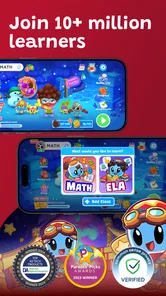
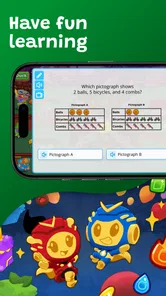
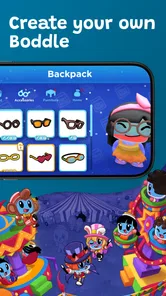
Analysis by Reviewed
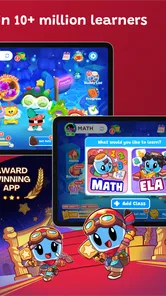
I’d judge Boddle not just by whether it makes practice feel like play, but by how comfortably a child can actually use it. That matters in a game built around looking at a screen, following prompts, and answering questions. Its colorful 3D presentation may draw in children who switch off when faced with a plain worksheet, though a lively game world can also be a lot to take in for some kids. I’d try a short session together first and watch whether the child can focus on the learning task as well as the visuals.
How the screen and navigation feel
Because the game wraps learning in a virtual world, children may need a little time to understand where to go and what to do before the math practice feels straightforward. I wouldn’t assume every child will find the layout intuitive on the first try. Sitting alongside them at the beginning can help: ask them to explain what they think a prompt is asking, rather than taking over the controls. That gives you a better sense of whether the challenge is the math itself or simply figuring out the next step.
For a child who can read independently, the written prompts may support practice without an adult translating every question. For a younger learner or one who is still building reading confidence, staying nearby is sensible. The game’s educational focus includes English as well as math, but I’d still treat it as a practice activity, not a substitute for a teacher’s explanation or a reading session chosen for a child’s needs.
Movement, attention, and sensory comfort
Touchscreen play can suit children who like direct interaction, but it may be less comfortable for a child who has difficulty with precise taps or sustained hand control. If that applies, try a brief session and see whether answering feels manageable instead of frustrating. I also wouldn’t mistake a child’s enthusiasm for the game for proof that the questions are easy: they may enjoy the setting while still needing help with a particular skill.
The bright, animated style is part of the appeal, but it will not suit every learner. A child who gets distracted by visual activity may do better with a quieter practice tool or a paper exercise, especially when they are tired. Keeping sessions short and choosing a calm moment can make it easier to tell whether Boddle is helping them engage or simply adding stimulation.
A World of Learning Wrapped in a Game
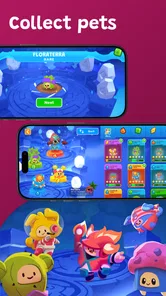
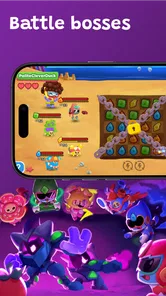
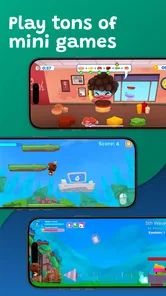
First off, Boddle is more than just an app; it’s a whole universe waiting to be explored. Kids step into a virtual world filled with adorable characters and exciting adventures. But here’s the catch: to advance, they need to solve math problems. The game cleverly integrates educational content so that learning becomes a natural part of the gameplay. It’s like sneaking veggies into a smoothie—kids are getting their vitamins without even realizing it!
Interactive and Engaging Gameplay
What sets Boddle apart is its interactive gameplay. Kids aren’t just passively clicking through questions. They’re actively engaging with the content, which keeps them motivated and interested. The app adapts to each child’s learning pace, ensuring they’re neither bored nor overwhelmed. It’s like having a personal tutor on standby 24/7. Plus, with its colorful graphics and charming animations, even the most reluctant learners find themselves drawn into the game.
More From Our News Desk

Weather by Xiaomi Review: Clear at a Glance, Less Clear Up Close

X Under Pressure: Can It Recover When Posting Goes Wrong?

Clash of Clans Is Won Between the Battles

Android Auto Makes the Case for Quieter Car Software

MobiOffice: Transforming Mobile Productivity with Seamless Integration

EA SPORTS FC™ Mobile Soccer: Redefining Mobile Sports Gaming
Parental Peace of Mind
As a parent, I know how important it is to feel confident about the content our kids are consuming. With Boddle, you can rest easy knowing that your child is in a safe, educational environment. The app offers detailed progress reports, so you can track your child’s learning journey. It’s incredibly satisfying to see those math skills improve while they’re having a blast!
For practical use, I’d treat those reports as a conversation starter rather than a verdict. If a child has been playing after school, check what seems to be going smoothly and ask where they got stuck; then help with just that point instead of turning the next session into a test. This makes the game easier to fit into a family routine and keeps practice from feeling like another assignment. If you are choosing it for independent play, first see whether your child can get through the opening steps without repeated help.
Why Boddle Stands Out
In a sea of educational apps, Boddle stands out with its unique approach to learning. It’s not just about memorizing formulas or drilling numbers. It’s about nurturing a genuine love for math through play. And let’s be honest, who wouldn’t want to turn screen time into something productive? Whether your child is a math whiz or needs a little extra help, Boddle caters to all skill levels, making it an invaluable tool in their educational arsenal.
That game-first approach is the key comparison point. A worksheet or a basic quiz app gets children to the questions with less visual activity, which can be preferable when the goal is a quiet, focused review. Boddle is a better fit when a child needs a playful reason to begin practicing and is willing to engage with a 3D setting. I’d use it as one part of a learning routine, not as the only way to study or as a replacement for direct help with a confusing topic.
Making room for different routines
A realistic use might be a short after-school turn while dinner is being prepared: the child can practice independently if they already understand the controls, then tell you what they worked on. On a day when they are tired, distracted, or struggling with the screen, I’d switch to a simpler activity rather than insist that the game must work for every mood. The useful question is not whether it can fill a long stretch of screen time, but whether it helps this particular child start and sustain a manageable bit of practice.
Boddle is a free educational game from Boddle, with an average rating of 4.3 from around 2,000 ratings and over 500,000 installs. It is rated for Everyone, and the current version is 1.25.2. In-app purchases range from $0.99 to $48.99 per item, so I’d check the purchase options before handing a device to a child and make sure any spending decisions are handled by an adult. The game was released on November 14, 2021, and requires operating system version 9 or later.
Choosing a good starting point
Before a child plays alone, I’d set up a small trial with a clear stopping point: one brief session, followed by a question about what felt easy and what was confusing. This is more useful than asking only whether they liked it. A child may love the character-filled setting yet need help understanding the prompts, or may find the questions comfortable but lose interest in the surrounding game. Separating those reactions gives you a fairer picture of whether it suits their learning style.
It can also help to connect practice to something the child has already encountered in class or at home. If they have been working on a particular math idea, invite them to explain the idea before opening the game, then ask afterward whether the questions helped them feel more confident. That simple before-and-after conversation keeps the activity purposeful without turning play into an exam. If the app’s questions seem mismatched to what they need that day, use another exercise instead of forcing the fit.
Where it fits beside other learning tools
Compared with a workbook, the game offers a more animated way into practice, but a workbook is easier to pause, annotate, and work through slowly with an adult. Compared with a basic quiz app, Boddle gives the questions a virtual-world context; that can help a reluctant child get started, though it may also mean more visual activity between the learning moments. I would choose based on the child’s immediate need: motivation and engagement point toward Boddle, while quiet repetition or step-by-step explanation may call for a simpler format.
It is also worth keeping expectations modest about what a game can do. Practice can reinforce skills, but when a child repeatedly misses the same kind of question, they may need someone to explain the underlying idea in a different way. I’d pause the game, talk it through with an example, and return only if the child feels ready. That avoids confusing persistence with understanding and makes the app a helper rather than the whole lesson.
Costs, device fit, and adult oversight
The game can be downloaded for free, but in-app purchases are available, so I’d check what is being offered before a child uses it without supervision. A free starting point makes it easier to see whether the style suits your family before considering any spending. I would not treat a purchase as necessary for learning without first deciding what the child actually needs and reviewing the options together as an adult.
Device compatibility is another practical first check: the current version requires operating system version 9 or later. If you are setting it up on a child’s device, make sure the software is compatible and the screen is comfortable for them to use. The game is rated Everyone, which makes it broadly intended for all ages, but that does not mean every child will find its pace, visuals, reading demands, or touch controls comfortable. A short supervised trial is still the better guide.
Who is likely to enjoy it—and who may not
I’d consider it for a child who likes game worlds, benefits from a playful nudge to practice, and can manage touchscreen interaction with little frustration. It may be less suitable for a learner who needs a very calm interface, has trouble reading the prompts without support, or prefers direct instruction before trying problems alone. In those cases, a parent, teacher, or quieter practice format may be the better starting point; the game can still be revisited when the child is ready for a more animated approach.
My main practical tip is to observe the first few sessions rather than judging the app by its opening appeal. Notice whether the child understands the task, stays with the questions, and can recover when an answer is wrong. If the play is fun but the learning remains unclear, pause and talk through the skill together. That small check helps separate genuine practice from simply spending time in a game.
My inclusive verdict
To wrap it up, if you’re looking for an app that makes learning math an adventure, then Boddle is your go-to. It’s fun, effective, and most importantly, it’s designed with kids in mind. So why not give it a try? Your child might just become a math enthusiast without even knowing it!
My inclusive verdict is more measured: it is worth trying when its playful presentation matches a child’s interests and the screen is comfortable for them, but it is not automatically the right fit for every ability or setting. I’d start with a shared, low-pressure session, keep an eye on how the child responds, and choose another approach if navigation, reading, movement, or sensory load gets in the way. Used that way, it can be a useful option for practice without asking it to do the work of a teacher or a family’s wider learning routine.
Boddle: Math & Reading Game Frequently Asked Questions
Is Boddle suitable for practicing English as well as math?
Yes. Boddle is an interactive 3D educational game that motivates kids to learn and practice both math and English. Its game-based format gives children an engaging way to work on these subjects, while the playful characters and activities help make practice feel less like a traditional worksheet. Parents looking for an educational game can consider whether its learning focus suits their child.
What is Boddle and how does it work?
Boddle is an educational app designed to make learning math engaging for kids through gamified experiences. The app uses interactive 3D characters and a fun storyline to keep children motivated. Students solve math problems to advance in the game, and teachers can track progress through a dashboard. This blend of education and entertainment ensures that kids learn effectively while having fun.
What age group is Boddle suitable for?
Boddle is primarily designed for children in kindergarten through sixth grade. The app covers a range of math topics appropriate for these early educational stages, ensuring that content is age-appropriate and aligns with common core standards. Parents and teachers can customize the difficulty level to suit the individual learning pace of each child, making it versatile for various learning needs. Its Everyone content rating also makes it suitable for a general audience.
Is Boddle free to use, or does it require a subscription?
Boddle is free to download and offers a freemium model, where users can access basic features and content for free. However, optional in-app purchases range from $0.99 to $48.99 per item, and some advanced features, additional math topics, and customization options may require payment. This allows for a more enriched learning experience, but the free version still provides content to benefit young learners. Check purchase options before letting a child make transactions.
Can teachers use Boddle for classroom instruction?
Yes, Boddle is an excellent tool for classroom instruction. Teachers can set up classrooms within the app, assign specific math problems, and monitor students' progress through a comprehensive dashboard. This feature allows educators to tailor lessons to the needs of their students and provides them with valuable insights into each child's learning journey. Its game-based approach can complement classroom practice, while teachers remain able to guide how it fits into their lessons.
Pros
- Engaging educational content
- Adaptive learning paths
- Interactive 3D graphics
- Rewards system for motivation
- Easy to navigate interface
Cons
- Requires internet connection
- Limited subjects available
- In-app purchases present
- Occasional glitches
- Not suitable for older students