BabyBus Kids: Play & Learn
- 89.00
- 4.7
- Installs
- 10.00M
- Price
- Free

Screenshots



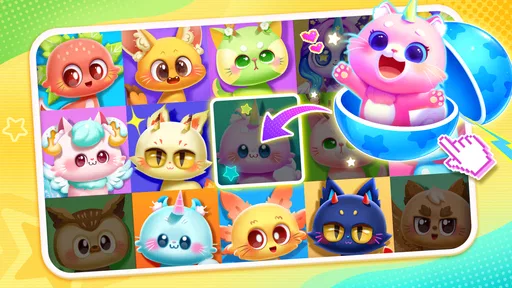


Analysis by Reviewed
What I notice first about BabyBus Kids: Play & Learn is the breadth of what it tries to put in one place: it is an educational game for children, but it also brings together play activities and stories. That can be useful when a child wants to switch between doing something and listening or looking through a story, without an adult having to choose a separate app for each. The trade-off is that a large collection is not automatically easy to navigate, especially for a young child who is still learning how to make choices on a screen.
BabyBus has built a familiar kind of early-learning experience here, aimed at children rather than adults looking for a structured teaching tool. I would consider it for short, supervised periods at home, particularly when a child enjoys moving between different kinds of content. It is free to download and rated for Everyone, though in-app purchases range from $2.99 to $41.99 per item, so I would check purchase controls before handing over a device.
Finding a way through a large collection
When I look at a collection this broad, I find it works best to make the first choice together rather than asking a child to explore everything at once. In this section, I focus on how a parent can turn browsing into a calmer, more deliberate routine, while keeping the child’s interests and comfort at the center.
Readability and navigation
The scale of the collection is the first practical thing to think about. The game brings together more than 200 BabyBus games and over 1,000 stories, which offers plenty of choice but can also make a simple “pick something” moment take longer than expected. For a child who likes exploring, that variety may be part of the fun. For a child who gets overwhelmed by many options, an adult may need to help narrow the choice rather than expect independent browsing from the start.
I find it helpful to treat the app as a shared library, not as a screen that a child must master in one sitting. An adult can help a child settle on a game or story, then let them spend a short stretch with that choice. This reduces aimless tapping and gives the child a clearer beginning and end to the activity. If your child is not yet comfortable navigating apps, sitting nearby for the first few sessions is a sensible way to see which parts they can manage and where they need help.
Stories and games also ask for different kinds of attention. A story is a natural option when a child is ready to sit and listen or look, while a game may suit a moment when they want to interact. I would choose between them based on the child’s energy rather than assuming every activity works equally well in every situation. This small choice can make a broad app feel more manageable.
BabyBus is the developer, and the game’s educational focus gives the collection a clear family-friendly purpose. Still, I would not treat the app as a complete learning plan. It is better approached as a source of varied, casual activities that can complement play, books, and everyday conversation—not as a replacement for them.
More From Our News Desk

Weather by Xiaomi Review: Clear at a Glance, Less Clear Up Close

X Under Pressure: Can It Recover When Posting Goes Wrong?

Clash of Clans Is Won Between the Battles

Android Auto Makes the Case for Quieter Car Software

MobiOffice: Transforming Mobile Productivity with Seamless Integration

EA SPORTS FC™ Mobile Soccer: Redefining Mobile Sports Gaming
Motor and sensory considerations
Because this is a game collection for children, the experience is likely to involve looking at a screen and interacting with it, but children vary widely in how comfortably they handle those tasks. I would watch a child try an activity before assuming it is a good match. Notice whether they can follow what is happening, make the needed choices, and stay comfortable with the pace. If a particular activity feels frustrating, switching to a story or taking a break may be more useful than encouraging them to push through it.
A practical tip is to keep the device steady and within easy reach, especially for a child who is still developing precise touch control. A wobbly tablet or a phone held at an awkward angle can make simple interaction harder. If the child is sharing the device with a sibling, take turns rather than letting several hands compete for the screen; that keeps the activity calmer and makes it easier to see whether the game itself suits them.
For sensory comfort, I would pay attention to the child’s reaction to screen time and to each activity’s visual and audio presentation. Children who are sensitive to busy screens or sound may prefer a quieter moment and a brief session, with an adult ready to stop or change activities if they seem unsettled. I would not assume the whole collection feels the same: a story and an interactive game can place different demands on attention, so trying one at a time is a more useful test than making a judgement from the app’s overall label.
That advice is not a claim that the game offers specialist accessibility settings. It is a way to make a fair decision for an individual child: observe, adjust the setting around them, and stop when the experience is no longer comfortable. If a child needs specific controls or a carefully adapted interface, I would compare this with an app designed explicitly around those needs instead of relying on general children’s content.
When and where it fits
The game makes the most sense in everyday moments when an adult can help a child choose and stay nearby. For example, during a quiet part of the afternoon, a parent could invite a child to pick one story, share it together, and then put the device away before moving on to another activity. On a short wait at home, a brief game may be a reasonable way to occupy a child, provided the adult is comfortable with screen use in that setting.
I would be more cautious about using a large collection as an automatic solution for every waiting room, meal, or transition. A child may come to expect the device whenever there is a pause, and browsing many choices can take longer than the moment allows. A better routine is to decide in advance whether this is a screen-time moment and, if so, help the child choose one activity. That makes it easier to stop without turning the end of the session into another negotiation.
It is also worth thinking about the device itself. The game supports Android 6.0 and later, so compatibility is relevant if you are considering an older Android phone or tablet. The current version is 3.2.3.0. I would check that the device runs smoothly and that the child can use it comfortably before relying on it for a trip or a planned quiet activity.
For households with more than one child, the range of stories and games may make it easier to find something that appeals to different interests, but it does not remove the need for turn-taking or adult guidance. A younger child may need help choosing, while an older sibling may want to browse independently. Agreeing on whose turn it is, and what happens when that turn ends, can be more important than having a large catalogue available.
What it does well—and where it can frustrate
Compared with a single-purpose early-learning app, BabyBus Kids: Play & Learn offers more variety in one place. That is useful if a child loses interest in repeating one kind of activity and enjoys alternating between games and stories. Compared with a physical picture book or an adult-led activity, however, a screen collection makes it easier for a child to move on quickly. I would use the variety as a way to offer choices, not as a reason to leave the child browsing indefinitely.
The breadth can also be a drawback. A child who benefits from predictable routines may prefer one carefully chosen activity over a large menu. And if you want a particular lesson, a tightly focused learning app or a book chosen for that topic may be a better fit. This game is most appealing when the goal is flexible, child-friendly entertainment with an educational angle, rather than a specific curriculum or a measurable practice routine.
The free download lowers the barrier to trying it, but the in-app purchase range is a real consideration for parents. I would review purchase settings on the device before a child uses the app alone, and explain that choosing an activity does not mean buying it. That conversation is useful even when an adult is present: it sets a clear boundary and avoids surprising charges. The game’s 4.7 average rating from around 32,000 ratings and more than 10 million installs indicate that many families have tried it, but popularity cannot tell you whether its navigation or sensory feel will suit your particular child.
There is another useful distinction between a large collection and a curated routine. If you already know that your child likes listening to stories, opening directly into a story-led session may be more purposeful than exploring the full range. If they want to interact, choose a game together and let the child focus on that rather than hopping between options. These small adult-led choices help the app serve a real need without requiring the child to manage the whole catalogue.
Who I would recommend it to
I would recommend giving it a try if you want a free starting point for child-oriented games and stories, and you are happy to guide a young child through the choices. The Everyone content rating makes it suitable for a broad audience, but it does not mean every activity is ideal for every age, ability, or temperament. I would still supervise, especially at first, and make decisions based on how the child responds rather than relying on the age label alone.
I would be less enthusiastic if you need a highly predictable interface, a specific accessibility feature, a screen-free activity, or tightly sequenced lessons. A physical book, a simple single-purpose app, or an activity led by an adult may be a better choice in those cases. The app’s strongest use is variety; that same variety is not necessarily an advantage for a child who needs fewer choices or for a parent who wants one clearly defined learning objective.
Overall, I see BabyBus Kids: Play & Learn as a flexible option for short, supervised periods, not a universal fit. Its mix of games and stories gives families room to match an activity to a child’s mood, while its size and purchase options call for adult involvement. My main recommendation is to try one activity at a time and judge the experience by the child’s comfort, not by the size of the collection. If that approach works for your family, it can be a handy addition to a child’s app choices; if it creates confusion or friction, a simpler alternative may serve them better.
BabyBus Kids: Play & Learn Frequently Asked Questions
What is BabyBus Kids: Play & Learn?
BabyBus Kids: Play & Learn is a collection of child-friendly games and activities designed to introduce young children to early learning through play. Depending on the content available in the app, children may explore topics such as letters, numbers, shapes, everyday routines, and problem-solving. Its colorful characters and simple interactions are intended to make activities approachable for preschool-age users, while parents should check the specific games and age guidance before downloading.
Is BabyBus Kids: Play & Learn suitable for my child’s age?
The app is primarily aimed at young children, particularly preschoolers, but the best fit depends on a child’s development and the activities included in the version available in your region. Younger children may need an adult to help them navigate menus, while older children may find some introductory activities easy. Review the store listing’s age rating and the app’s content, and supervise your child’s first sessions.
Is BabyBus Kids: Play & Learn free, and does it include purchases or ads?
The app may be available to download without an upfront charge, but that does not necessarily mean every feature or activity is free. Depending on the current version and platform, it may offer in-app purchases, subscriptions, advertising, or additional content. Check the Google Play or App Store listing and the purchase settings on your device before letting a child use it. Parental controls can help prevent unintended purchases.
Does BabyBus Kids: Play & Learn work offline?
Some activities may be playable without an internet connection after they have been downloaded, but availability can vary by game, app version, and device. An internet connection may be needed to install or update the app, load certain content, or access online features. If offline use matters, test the activities your child plans to play before traveling, and avoid assuming that every section will remain available without connectivity.
Is BabyBus Kids: Play & Learn safe for children, and what should parents check?
The app is made for children, but parents should still review its privacy disclosures, age rating, advertising practices, and any links or purchase options before use. Features and policies can change with updates, so check the current store listing and settings rather than relying on older descriptions. Set device-level parental controls, supervise younger children, and confirm that the app’s permissions are appropriate for its activities.
Pros
- Offers a broad mix of puzzles
- pretend play
- and simple learning activities.
- Bright visuals and familiar characters can help hold young children’s attention.
- Activities are generally easy for preschoolers to understand and navigate.
- Short play sessions make it convenient for quick learning breaks.
- Designed specifically for young children
- with age-appropriate content.
Cons
- Some activities and content may require an internet connection.
- Ads or prompts to access paid content may interrupt play.
- The number of available activities can depend on the subscription or version.
- Repetitive tasks may lose their appeal for children who play often.
- Parents may need to supervise screen time and in-app interactions.













