

Astraware Wordsearch
- 60.00
- 4.5
- Installs
- 10.00K
- Price
- Free
Screenshots
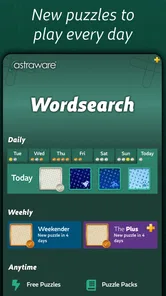
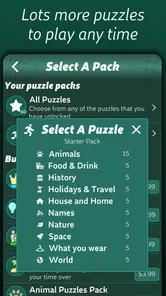
Analysis by Reviewed
I enjoy word games that are easy to start but still reward a little concentration, and Astraware Wordsearch fits that description well. It is a straightforward word-search game from Astraware Limited: the task is to locate hidden words as quickly as possible, but the appeal comes from learning how to scan a puzzle rather than simply tapping at random. I found it especially comfortable for short sessions, whether I wanted something quiet before bed, a distraction during a break, or a simple game that did not require learning a complicated rule set.
The game is free to download and is suitable for Everyone, which makes it an approachable choice for families and casual players. Its store summary focuses on finding every hidden word in the fastest time, and that emphasis is important: this is not mainly a vocabulary lesson or a story-driven adventure. It is a focused test of visual attention, word recognition, and speed. The current release is version 2.93.002, and the game requires iOS 9 or later, so it is designed for a broad range of compatible devices.
How I use the basic word-search workflow
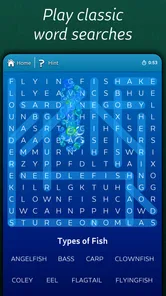
My usual session starts by treating the word list as a map rather than a checklist. I read through the available words first and notice unusual letter combinations, repeated endings, and words that are likely to stand out in a crowded grid. Then I scan the puzzle in a consistent direction instead of jumping between random areas. That small habit makes the experience feel much less tiring, because I always know what part of the board I have already examined.
When I spot a likely first letter, I check the surrounding lines for the rest of the word. I try not to drag or tap immediately if the continuation is unclear. A quick confirmation prevents wasted movements and keeps the search rhythm intact. Once a word is found, I return to the remaining list and choose another target. This is more effective than repeatedly searching for the same familiar pattern while overlooking a less obvious word.
The game works well for a relaxed player because there is no complicated opening process. You can pick it up without studying instructions, and the central action is instantly understandable. That simplicity is also useful when sharing the device with someone who does not regularly play mobile games. A child can understand the objective quickly, while an adult can still enjoy trying to improve personal speed.
For an everyday example, I might play a short round while waiting for an appointment. I begin with a broad scan, find the easiest words, and then slow down for the final few. That last stage is where the game becomes more interesting than it first appears. The remaining answers are often harder to see because the obvious lines have already been checked, so I change my approach and inspect diagonals, reverse directions, and dense clusters of similar letters.
The most useful beginner habit is consistency: scan the grid in sections and deliberately revisit the unfinished areas. Without that routine, it is easy to circle the same central region several times and assume the missing word must be somewhere else. With it, the puzzle becomes a manageable visual search rather than a frustrating guessing exercise.
More From Our News Desk

 Gmail
GmailGmail in a Busy Inbox: Who Benefits Most?
From first account to crowded workday, Gmail earns its place through dependable search and flexible sorting—but its best fit depends on how much inbox maintenance you can tolerate.

 Prime Video
Switching to Prime Video: What Changes in Your Viewing Routine
Prime Video can make a compelling second home for streaming, but switching means learning a different catalog, rental layer, and route from browsing to playback.

 Universal TV Remote Control
Universal TV Remote Control Works Best as a Reliable Backup
A phone remote earns its place through quick setup and reliable habits. Here is how to get more from Universal TV Remote Control—and where its limits show.

 Weather - By Xiaomi
Weather by Xiaomi Review: Clear at a Glance, Less Clear Up Close
Xiaomi’s weather app makes everyday forecasts quick to scan, but its calm surface can leave useful details and recovery paths harder to find than they should be.

 X
XX Under Pressure: Can It Recover When Posting Goes Wrong?
A resilience-focused review of X, examining setup, mistaken posts, interruptions, weak connections, and the gaps that matter when recovery needs to be dependable.

 Clash of Clans
Clash of Clans Is Won Between the Battles
Its raids are quick; its community is a long-term project of coordination, teaching, rivalry, and shared responsibility—with all the friction that entails.
Latest News



Settings I would check before chasing faster times
I recommend spending a moment looking through the available settings before trying to play competitively. Even when the core game remains simple, small presentation choices can affect how comfortably you read the grid. I pay attention to whether the text and puzzle are easy to distinguish on my screen, particularly when playing in bright surroundings or when the device is being held farther away than usual.
It is also worth checking how the game handles interaction before beginning a serious attempt. Some players prefer tapping a word, while others naturally drag across it. The best method depends on the device and on how accurately you can control your finger. I find that a deliberate movement is better than a fast one when the letters are tightly packed, because a rushed gesture can make me question whether I selected the intended line.
Sound is another practical consideration. For a quiet public place, I keep the device discreet and rely on the visual response. At home, audio feedback can make a successful find feel more satisfying, but it is not essential to understanding the game. The important point is to choose a setup that lets you concentrate. A distracting environment can make an easy puzzle feel difficult, so I would not judge my ability from a hurried round played with constant interruptions.
Because the game is free, it is easy to try without committing money at the start. Optional in-app purchases range from $0.99 to $7.99 per item, so I would approach them as convenience choices rather than something necessary for discovering whether the basic game suits me. I would first play several sessions with the standard experience, then decide whether any optional purchase genuinely improves the way I want to use the game.
That approach matters for parents as well. Since the content rating is Everyone, the game is broadly accessible, but a free download with optional purchases still deserves the same sensible device-level purchase controls as any other game. I would let a child play independently only after checking the device’s purchase settings and explaining that a button connected with extra content may involve payment.
Patterns that make the search noticeably faster
Speed comes less from moving quickly and more from reducing uncertainty. I begin with words that have distinctive letters, unusual beginnings, or a length that makes them easier to trace. A rare letter can act like an anchor: once I locate it, I inspect the lines extending from that position instead of scanning every row equally.
Another useful pattern is to search by direction. I might check horizontal lines first, then vertical ones, and finally diagonals and reversed words. The order is not important; repeating the same order is. It prevents me from mentally mixing completed areas with untouched ones. If the game highlights found words clearly, I use those marks as boundaries and focus on the remaining visual space rather than continuing to examine already solved lines.
I also avoid reading every letter individually. Instead, I look for the first two letters of a target and then test whether the next characters follow in a straight line. This is particularly helpful with longer words, where the opening sequence can be easier to recognize than the entire answer. For short words, I do the opposite and check likely ending letters, because small targets can disappear into the general noise of the grid.
When only a few answers remain, I stop trying to solve everything at once. I select one word, identify its most distinctive letter, and inspect every direction from that point. If that fails, I move to the next unusual letter rather than continuing with a vague full-board scan. This makes the final stage more methodical and reduces the temptation to tap speculative lines.
Experienced players can also separate practice rounds from speed rounds. In practice, I deliberately observe which directions or letter shapes cause me trouble. In a timed attempt, I use the routine I have already chosen and avoid experimenting. That distinction is valuable because changing tactics halfway through a fast game usually costs more attention than it saves.
A further trade-off is accuracy versus momentum. Selecting a word immediately feels fast, but correcting a mistaken selection or losing track of the list can interrupt the whole rhythm. I prefer a brief visual confirmation before committing. Over several rounds, that pause feels faster than repeated uncertain taps.
Where the game reaches its limits
Astraware Wordsearch is deliberately focused, and that will be a strength for some people and a limitation for others. If you want a narrative campaign, character progression, social competition, or a large collection of unrelated mini-games, this is unlikely to replace a broader puzzle app. Its pleasure comes from the search itself, not from a surrounding story or elaborate reward system.
The same focused design may also feel repetitive if you need constant novelty. Word-search games naturally rely on a familiar loop: inspect the grid, locate the answers, and improve your time or accuracy. I enjoy that repetition when I want a calm mental exercise, but I would choose a richer puzzle collection when I am looking for changing rules or more varied challenges.
Visual comfort can become a personal limitation. Dense letter grids demand sustained attention, and players with tired eyes may find longer sessions uncomfortable. I get better results by increasing the distance between myself and other distractions, taking short breaks, and avoiding the assumption that every round needs to be completed at maximum speed. The game is casual, but the act of scanning can still be mentally demanding.
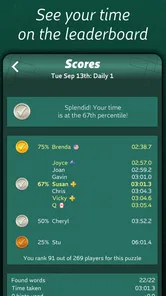
There is also a difference between being good at finding words and being good at finding them quickly. A player who enjoys careful completion may not care about the fastest possible result, while someone chasing personal records may become frustrated by a single difficult final answer. I think the game works best when speed is treated as an optional personal challenge rather than the only measure of success.
Compared with solving printed word-search books, the digital format is more convenient for carrying a puzzle in a phone or tablet and for playing in short bursts. Paper can still be better for people who prefer a larger page, a pencil, and a slower offline routine. Compared with general word-game apps, this title is more specialized: it does not ask me to build words, define them, or compete through a broad vocabulary system. That narrowness makes it easier to start, but it also means it will not satisfy someone seeking language practice in a deeper sense.
Who should play it, and who should skip it
I would recommend it to casual puzzle fans, families looking for an accessible word game, and anyone who enjoys visual concentration without a complicated ruleset. It is a good fit for short breaks because I can begin immediately and stop after a single puzzle without needing to remember a story or manage a long-term strategy. It also suits players who like improving through repeatable habits rather than unlocking elaborate systems.
It may be particularly useful for someone who wants a quiet alternative to action games. There is no need for fast reflexes in the conventional sense; the challenge is noticing patterns and maintaining attention. That makes it approachable for players who enjoy competition with themselves but do not want pressure from multiplayer matches.
I would skip it if my main goal were advanced vocabulary building, a campaign with a strong sense of progression, or constant mechanical variety. I would also look elsewhere if I disliked repeated visual scanning or found word-search puzzles satisfying only when they are printed on paper. The free price makes trying it low-risk, but no purchase can change the basic nature of the experience: the central activity remains finding hidden words in a grid.
The game has attracted an average rating of 4.5 from around 410 ratings, with roughly 60 written reviews, and it has passed 10K+ installs. Those figures suggest a modest but positive audience rather than a massive mainstream hit. I see that as consistent with the app’s identity: it is a specific, uncomplicated word game for people who already enjoy this puzzle format.
My verdict after settling into a repeatable routine
Astraware Wordsearch works because it does not bury its main idea. I can open it, understand the objective, and begin searching within moments. The real improvement comes from small choices: reading the list before scanning, checking directions in a fixed order, using distinctive letters as anchors, and slowing down just enough to avoid uncertain selections.
The developer, Astraware Limited, has positioned this as a focused word game rather than an all-purpose entertainment package. That focus is exactly why I would keep it available for short, low-pressure sessions. It gives me something to concentrate on without demanding a large time commitment, while still leaving room to improve through better habits.
My final recommendation is simple: try the free version if you enjoy word searches and want a portable option for everyday breaks. Give it a few rounds before deciding whether the repetition suits you, and explore the settings so the grid feels comfortable on your device. If you want a story, extensive progression, or a wider range of word mechanics, choose another category of game. If your ideal puzzle is a clean search for hidden words with a personal speed challenge, Astraware Wordsearch is an easy game to recommend.
Astraware Wordsearch Frequently Asked Questions
What devices can I play Astraware Wordsearch on?
Astraware Wordsearch is a mobile word game for Android and iOS, so you can play it on a compatible phone or tablet through the relevant app store. Before downloading, check that your device meets the operating system requirement: the current version requires Android 9 or later. The game is developed by Astraware Limited.
What is Astraware Wordsearch?
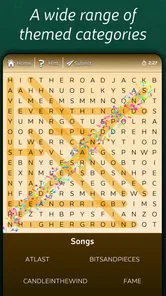
Astraware Wordsearch is a word-search puzzle game for Android and iOS in which you find hidden words in letter grids. It is designed for casual play, with themed puzzles, adjustable difficulty, and a straightforward interface. The game is suitable for short sessions or longer puzzle-solving periods, depending on the mode and puzzle size you choose.
Does Astraware Wordsearch work offline?
Astraware Wordsearch is generally suitable for playing without a continuous internet connection once it has been installed. This makes it convenient for travel, commuting, or situations where mobile data is unavailable. However, certain functions—such as downloading additional content, checking updates, viewing advertisements, or using platform-related services—may require an internet connection.
Is Astraware Wordsearch free to download?
Astraware Wordsearch is free to download, with optional in-app purchases ranging from $0.99 to $7.99 per item. The game’s free download lets you try its word-search puzzles, while purchases may offer additional options. Check the app-store purchase details before confirming any transaction, particularly if children use your device or you want to keep spending within a set limit.
Is Astraware Wordsearch suitable for children and beginners?
The basic gameplay is easy to understand, making Astraware Wordsearch accessible to beginners and players who enjoy relaxed vocabulary puzzles. Its content rating is Everyone, and children can also find it approachable, although parents should review the purchase options before installation. Difficulty can depend on grid size, word themes, and how challenging the selected puzzle is.
Pros
- Large collection of themed wordsearch puzzles
- Adjustable difficulty suits both casual and experienced players
- Clear interface makes the grid easy to read
- Offline play is convenient when traveling
- Helpful hints prevent players from getting completely stuck
Cons
- Some puzzle packs or features may require additional purchases
- Small screens can make longer word lists feel cramped
- Repeated themes may reduce variety during extended sessions
- No competitive multiplayer for head-to-head wordsearch matches
- Ad interruptions may affect the experience in the free version












