Applaydu Play & Discover
- 1.23K
- 4.2
- Installs
- 50.00M
- Price
- Free

Screenshots







Analysis by Reviewed
When I judge a learning game for young children, I look beyond whether it holds their attention: can a child understand what to do, and can an adult make it fit a real day? Applaydu Play & Discover is an educational game from Ferrero Trading Lux S.A. that aims to pair playful activities with stories. It is free, rated for Everyone, and has reached more than 10 million installs, so it is clearly a familiar choice for families. Its average rating is 4.3 from around 110,000 ratings, but those numbers tell me less than the practical question: will its style suit your child?
Clear screens, with an adult nearby
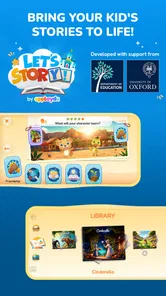
In my experience, the strongest accessibility point is the child-friendly presentation. The bright visuals, straightforward instructions and spoken narration can make activities easier to follow than a text-heavy learning app, especially for children who are not yet confident readers. Stories also give the activities context, which can help a child understand why they are tapping or making a choice rather than simply working through an abstract exercise.
That does not mean every child will navigate it independently. A young player may still need help finding an activity, understanding a prompt or returning to a previous screen. I would sit with a child for the first session and watch where they hesitate; that quickly shows whether the visual cues and narration are enough for them. The game is better treated as a shared starting point than as a guaranteed hands-free activity for every age and ability.
Different ways to take part
Simple touch controls are a sensible fit for little hands, while voiceovers offer another way to take in instructions. Those choices may help children who find small amounts of text difficult, but they do not remove every motor or sensory hurdle. Tapping still calls for a degree of aim and coordination, and colorful, animated screens can be tiring or distracting for some children. I would keep the first play session short and notice whether a child seems engaged, overwhelmed or frustrated, rather than assuming that a playful look works for everyone.
A useful way to try it is to let the child lead while an adult reads or explains anything that causes a pause. This keeps the experience social and gives the child time to respond without turning a game into a test. If sound is uncomfortable or unavailable, an adult can help interpret instructions, though that changes the experience from independent play to supported play. For a child who needs very large controls, reduced sensory stimulation or a highly predictable layout, a simpler app designed around those needs may be a better match.
Engaging Adventures Await
Right from the get-go, Applaydu Play & Discover pulls you in with its engaging storytelling and vibrant graphics. The app is designed to be an edutainment powerhouse, and boy, does it deliver! Whether it's exploring ancient civilizations or diving deep into the ocean, each adventure is crafted to spark curiosity and fuel young minds.
What I love most is how the app manages to balance fun with learning. It's not just about playing games; it's about discovering the world. Each activity is designed to teach something new, be it numbers, colors, or even some basic history. The interactive nature ensures that kids don't just sit back and watch; they're part of the story, making choices and solving problems along the way.
More From Our News Desk

Weather by Xiaomi Review: Clear at a Glance, Less Clear Up Close

X Under Pressure: Can It Recover When Posting Goes Wrong?

Clash of Clans Is Won Between the Battles

Android Auto Makes the Case for Quieter Car Software

MobiOffice: Transforming Mobile Productivity with Seamless Integration

EA SPORTS FC™ Mobile Soccer: Redefining Mobile Sports Gaming
A Parent's Best Friend
For parents, this app is a godsend. In a world overflowing with digital distractions, having a tool that not only entertains but educates is invaluable. The parental controls are robust, allowing you to monitor your child's progress and ensure they're getting the most out of their screen time. Plus, there's no pesky ads to worry about, which is always a win in my book!
The app also encourages offline activities. It's not just about keeping kids glued to the screen. There are suggestions for crafts and games you can play together as a family, making it a wonderful tool for bonding.
From a quick break to shared play
I find this kind of story-led activity most useful when a child has a short stretch to fill, such as waiting for an appointment or winding down at home before dinner. A practical routine is to choose one activity together, let the child make the choices, and then ask them to tell you one thing they noticed. That small conversation helps turn screen time into a bridge to offline curiosity rather than an open-ended session.
Compared with a basic alphabet or counting app, the appeal here is the mix of stories, varied activities and playful presentation; a focused early-learning app may be better if you want repeated practice in one narrow skill. Compared with a video, the interactive choices give a child more to do than simply watch, but they also mean the child may need an adult’s help at the start. I would pick Applaydu for variety and shared discovery, not as a substitute for a structured lesson or a calm, low-stimulation activity.
What parents should check first
Parents often want to know whether a child can use it alone, whether it suits a particular age, and whether it is appropriate for a quick outing. My answer is to try it together first: the Everyone content rating is broad, while a child’s reading, attention and coordination needs are individual. The app can be a handy option for a short wait if the device is ready and the child is comfortable with its sounds and visuals, but it is not my first choice when a child needs a completely independent, predictable experience.
It is free to download, and the current version is 5.6.6, with Android support from version 8.0. I would still check the device and the app’s current settings before handing it over, then agree on a stopping point so a quick distraction does not stretch longer than intended. That simple boundary is especially useful when a child finds transitions away from a game difficult.
A Parent's Best Friend
For parents, this app is a godsend. In a world overflowing with digital distractions, having a tool that not only entertains but educates is invaluable. The parental controls are robust, allowing you to monitor your child's progress and ensure they're getting the most out of their screen time. Plus, there's no pesky ads to worry about, which is always a win in my book!
The app also encourages offline activities. It's not just about keeping kids glued to the screen. There are suggestions for crafts and games you can play together as a family, making it a wonderful tool for bonding.
Designed for Young Explorers
One of the standout features of Applaydu is its intuitive design. It's clear that the developers put a lot of thought into making it accessible for little fingers. The controls are easy to grasp, and the instructions are clear, ensuring that even the youngest users can navigate without a hitch.
The characters are endearing, and the voiceovers are top-notch, adding a layer of immersion to the experience. It's these little touches that make the app feel polished and complete.
Limits worth keeping in view
I would not choose this as a universal solution for accessibility or for every learning goal. A child who needs quiet visuals, larger targets or tightly structured, repeatable drills may fare better with a specialist learning tool; a child who enjoys stories and responds to spoken prompts is more likely to find the format inviting. In either case, an adult’s observation matters more than the age label alone.
One practical tip is to treat the first visit as a discovery session rather than trying to cover everything. Notice which prompts the child follows unaided, which ones need explanation, and whether the sound and pace feel comfortable. That gives you a useful basis for deciding when to use it again and whether you should play alongside them. The game’s strongest use is not replacing a parent or teacher, but giving them an approachable way to start a conversation about what a child has seen.
The game was released on December 14, 2020, and has about 1,100 written reviews alongside its much larger rating count. I see it as a lively option for families who want a child to explore stories and activities with an adult close by, especially when variety matters more than a single narrowly defined lesson. Its colorful, interactive approach will not suit every sensory profile or every need for independent access, so I would try it with the child rather than assume it is a fit. For shared, low-pressure discovery, though, it can be a pleasant addition to a family’s screen-time choices.
Making the first session useful
I would set up the first try when there is no rush to leave, rather than introducing it in the middle of a stressful wait. That gives the child room to explore at their own pace and gives me a fair chance to notice what the interface asks of them. If they keep tapping the wrong area or lose track of how to continue, I can help without turning the moment into a lesson in following directions.
For a child who likes choosing, I would offer a simple choice about what to explore and let them take the lead from there. For a child who is more cautious, I would demonstrate one action and then pause instead of narrating every step. This small adjustment can make the same story activity feel either inviting or overly directed, and it helps an adult tell whether the child is interested in the content or simply responding to prompts.
Choosing it for a particular child
The strongest fit, in my view, is a young child who enjoys characters, spoken guidance and switching between playful activities, with a caregiver available when something is confusing. It can also work well for siblings who want to take turns making choices, provided an adult is comfortable helping them share the device and take turns. The story format gives a family something specific to talk about afterward, rather than leaving the interaction at “Did you like it?”
I would look elsewhere if the main goal is sustained practice in one skill, such as repeating a particular early-reading or number exercise. A narrowly focused learning app is usually easier to use for that purpose because it keeps attention on one task. Likewise, if the child is easily unsettled by animated scenes or needs to control every part of a predictable routine, a quiet book, offline activity or simpler digital tool may be a better choice. The useful question is not whether this game is educational in general, but whether its particular mix of story, sound and touch suits the child in front of you.
Practical choices at home and away
For a short outing, I would open the game before handing over the device, check that the child can hear the narration comfortably, and agree on a natural stopping point. This avoids asking a young player to manage setup and an abrupt transition at the same time. At home, I would be more inclined to share a session and follow it with a drawing, a question about a character, or one of the suggested offline activities. That makes the app a starting point for interaction rather than the whole activity.
One trade-off is that spoken prompts can make early navigation friendlier, but they also make sound part of the experience. If a child cannot or does not want to use audio, adult support may be needed to keep the instructions clear. I would also avoid treating a brief successful session as proof that independent use will work in a different place: background noise, fatigue and the pressure of waiting can all change how a child handles the same screens.
What I would expect from the experience
The game’s value is variety and a story-shaped reason to engage, not a promise that every activity will match every child’s learning pace. I would let the child spend more time with the parts that spark questions, while resisting the urge to turn each moment into a quiz. If they are interested in a topic, an adult can extend that interest with a conversation or an offline activity; if they are only tapping quickly to move on, it may be a sign to pause rather than push through.
That approach also makes it easier to judge whether the game is earning its place in a family’s routine. I would look for signs of curiosity, comfortable participation and a manageable ending, not just how long the child stays on screen. If those pieces are missing, the right response may be to use it less often, play together, or choose a different kind of activity for that moment.
A balanced recommendation
My inclusive verdict is that this is a promising option for shared discovery, but not an accessibility solution that I would recommend without trying it with the child. The narration, stories and touch interactions create several ways into the experience, while the bright presentation and need to tap accurately can still be obstacles for some players. A short, supported first session is the most reliable way to see whether its strengths outweigh those frictions in your household.
For families who want a free educational game that can prompt conversation and offer more variety than a basic drill app, I can see the appeal. For children who need a quieter interface, highly consistent tasks or independent operation from the outset, I would choose a different option. My recommendation is to start together, keep the first session modest, and let the child’s comfort and interest—not the popularity of the game—decide whether it becomes part of your routine.
Applaydu Play & Discover Frequently Asked Questions
Is Applaydu Play & Discover suitable for young children?
Applaydu Play & Discover is an educational game with an Everyone content rating, and its focus is learning, stories and games for children. Families considering it for a child can explore the activities together and decide whether the playful format suits their needs. The age rating offers a broad guide, while a parent or guardian can judge what is appropriate for their own child.
What kind of app is Applaydu Play & Discover?
Applaydu Play & Discover is an educational game built around a playful mix of learning, stories and games for kids. It is intended to make exploring its activities feel enjoyable rather than like formal lessons. Children and parents looking for a game with an educational focus may find that combination appealing, while the best fit depends on the child’s interests and how they like to play.
Is Applaydu Play & Discover free to download?
Applaydu Play & Discover is a free educational game for children, so families can try it without paying to download the app. It offers playful activities, stories and games in a child-focused format. As with any app, a parent or guardian may want to review the available settings and features together with the child before they begin using it.
What devices can run Applaydu Play & Discover?
Applaydu Play & Discover is available for Android and iOS devices. On Android, it requires version 8.0 or later, so it is worth checking the device’s operating system before downloading. The app is aimed at children and is presented as a playful world of learning, stories and games, making it a choice to consider for a compatible family phone or tablet.
Who develops Applaydu Play & Discover, and how popular is it?
Applaydu Play & Discover is developed by Ferrero Trading Lux S.A. It has an average rating of 4.3 from around 110,000 ratings, with more than 10 million installs, giving families a sense of its broad reach among users. Those figures can be useful context, though a parent’s own impression of the activities and fit for their child remains important.
Pros
- Engaging educational content for kids
- Colorful and intuitive interface
- Includes various fun mini-games
- Encourages creativity and imagination
- Parental controls for safe usage
Cons
- Requires internet for some features
- May have in-app purchases
- Limited content for older kids
- Ads can be distracting
- Some games may be repetitive











