

Airline Commander: Flight Game
- 10.66K
- 4.3
- Installs
- 50.00M
- Price
- Free

Screenshots
Analysis by Reviewed
When I decide whether to recommend a mobile flight game, I look past the aircraft on the screen and ask a practical question: does it make flying itself satisfying, or is the appeal mostly in collecting and progressing? Airline Commander: Flight Game leans on both. It pairs hands-on flights with the longer-term goal of growing an airline, so there’s something to work toward beyond completing one landing.
That combination makes it a better fit for someone who enjoys learning a flight routine in short sessions than for someone who wants a purely open-ended aircraft sandbox. I’d also consider how much patience you have for gradual progression and optional purchases before settling in. The game is free to download, but in-app purchases range from $0.99 to $104.99 per item, so it’s sensible to treat spending as optional rather than part of the basic appeal.
What the flying loop asks of you
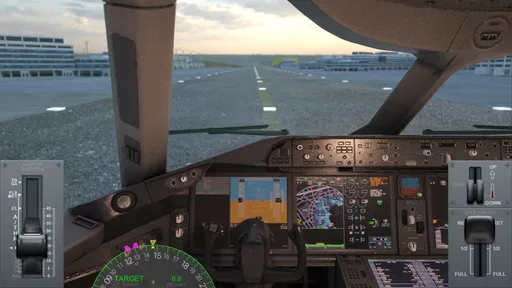
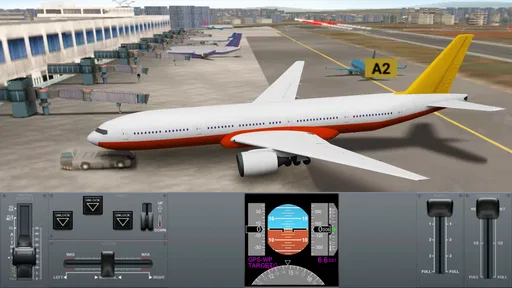
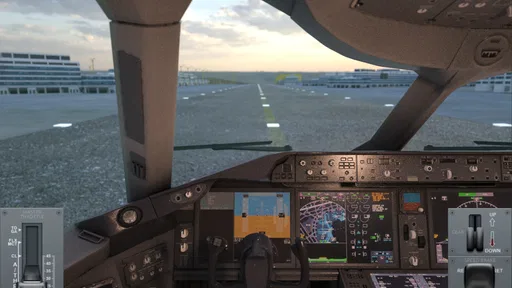
The most useful way to approach a flight is to treat each stage as a small task: get comfortable with the controls, pay attention during the approach, and avoid rushing the landing just to move on. That makes the challenge feel more rewarding than simply tapping through. Switching camera angles can also help; I’d use a cockpit view when I want immersion, then choose a clearer outside perspective if I’m finding an approach hard to judge.
On an ordinary evening, I can see this working well as a focused break: complete a flight, see how the airline is progressing, then stop without needing to set aside a long block of time. The trade-off is that the game’s appeal depends on enjoying repeated flights and incremental goals. If you only want instant action or a quick arcade-style burst, the deliberate takeoff-and-landing rhythm may feel slow.
First Impressions and Gameplay
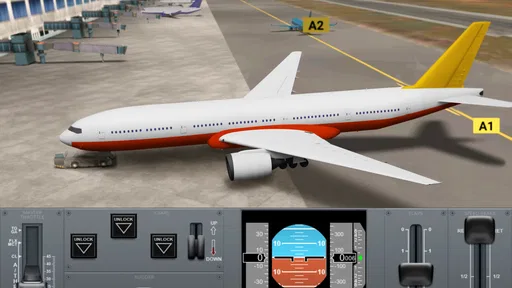
Upon launching the game, you're greeted with stunning graphics that are sure to catch your eye. The developers have really outdone themselves with the level of detail and realism in the planes and environments. From the bustling airports to the serene skies, everything feels incredibly immersive.
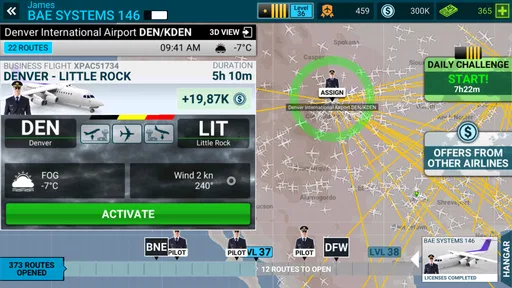
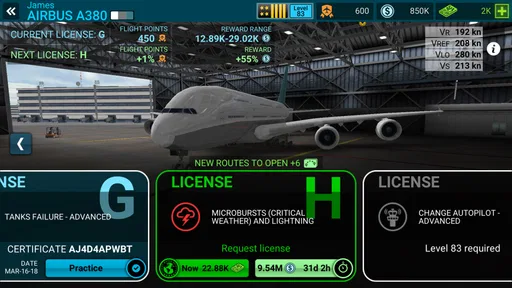
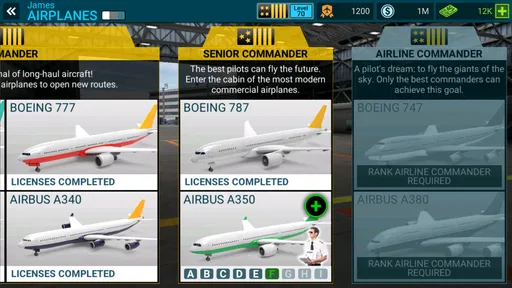
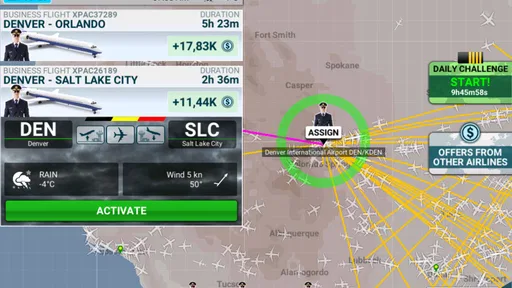
The game puts you in the captain's seat, literally! You start off with a small fleet and as you progress, you can unlock new aircraft, routes, and licenses. The gameplay is a mix of strategy and skill, as you manage your airline and ensure smooth flights. It's not just about piloting; you also have to make business decisions to grow your airline empire.
Flying Experience
Now, let's talk about the flying experience. The controls are intuitive, making it easy for beginners yet challenging enough for seasoned players. You can choose from different camera angles, including a cockpit view that gives you the full pilot experience. Navigating through turbulent weather and ensuring a safe landing adds a layer of excitement and realism to the game.
More From Our News Desk

 Instagram
Instagram’s Power Comes From Its Place in Your Phone
A close look at how Instagram turns Meta’s reach, recommendation systems and everyday camera habits into durable platform power—and what that costs users.

 Gmail
GmailGmail in a Busy Inbox: Who Benefits Most?
From first account to crowded workday, Gmail earns its place through dependable search and flexible sorting—but its best fit depends on how much inbox maintenance you can tolerate.

 Prime Video
Switching to Prime Video: What Changes in Your Viewing Routine
Prime Video can make a compelling second home for streaming, but switching means learning a different catalog, rental layer, and route from browsing to playback.

 Universal TV Remote Control
Universal TV Remote Control Works Best as a Reliable Backup
A phone remote earns its place through quick setup and reliable habits. Here is how to get more from Universal TV Remote Control—and where its limits show.

 Weather - By Xiaomi
Weather by Xiaomi Review: Clear at a Glance, Less Clear Up Close
Xiaomi’s weather app makes everyday forecasts quick to scan, but its calm surface can leave useful details and recovery paths harder to find than they should be.

 X
XX Under Pressure: Can It Recover When Posting Goes Wrong?
A resilience-focused review of X, examining setup, mistaken posts, interruptions, weak connections, and the gaps that matter when recovery needs to be dependable.
Latest News



But don't worry if you're not a pro pilot. The app provides tutorials and guidance to help you get the hang of things. Plus, the satisfaction of completing a flawless flight is unbeatable. It’s like getting a virtual pat on the back!
Building Your Airline
One of the most engaging aspects of Airline Commander is building and managing your airline. You’ll need to acquire new licenses to expand your services, which adds a strategic element to the game. It’s crucial to plan your routes wisely and upgrade your fleet to maximize efficiency and profits.
As you climb the ranks, you’ll unlock new challenges and achievements, keeping the gameplay fresh and exciting. The constant progression and rewards system make it hard to put the game down.
Choosing the right kind of flight game
Compared with the usual alternatives, this sits between a dedicated flight simulator and a lightweight arcade flyer. I’d choose it over a free-roaming sandbox when I want clear goals and a reason to return; I’d choose a more technical simulator if I wanted to focus on aircraft procedures rather than airline growth. Its business layer gives flights a purpose, but players who dislike unlocking systems may prefer a simpler game that puts every session’s fun upfront.
A practical tip is to use the tutorials as a learning tool rather than something to rush past. Build a steady approach and landing routine before worrying about airline expansion; a clean flight makes the progression loop more satisfying. When a maneuver feels awkward, change the camera angle instead of assuming the controls are the problem. Those small adjustments are useful whether you’re new to flight games or returning after a break.
Who should take the controls
RORTOS developed this free simulation game, which is rated for Everyone and has a 4.3 average from around 530,000 ratings. It has passed 50 million installs, and version 2.4.9 requires Android 6.0 or later. Those figures suggest broad appeal, but the better test is whether you enjoy balancing piloting with gradual airline management. If that mix sounds appealing, it’s an easy game to try without paying upfront.
I’d skip it if I wanted a strict, highly technical simulator, a purely casual game with no learning curve, or a flight experience without a progression focus. It’s also worth deciding in advance whether you’re comfortable with optional purchases; the game can be approached as a free experience, but the purchase range is wide enough that I wouldn’t spend impulsively. For me, its strongest use case is a player who likes improving at landings and seeing that practice feed into a larger goal.
Building Your Airline
One of the most engaging aspects of Airline Commander is building and managing your airline. You’ll need to acquire new licenses to expand your services, which adds a strategic element to the game. It’s crucial to plan your routes wisely and upgrade your fleet to maximize efficiency and profits.
As you climb the ranks, you’ll unlock new challenges and achievements, keeping the gameplay fresh and exciting. The constant progression and rewards system make it hard to put the game down.
Final Thoughts
In a nutshell, the game is a thrilling blend of simulation and strategy. Whether you're an aviation geek or just looking for a fun and immersive game, this app offers plenty to keep you entertained. The attention to detail and the rewarding gameplay loop make it a standout in the world of mobile flight simulators.
So, if you're ready to take to the skies and build your own airline empire, give this game a try. Trust me, once you start flying, you won't want to come back down to earth!
Making a short session count
The game’s mix of flying and management makes it easier to enjoy when I give a session a small purpose. I might focus on one flight and pay attention to the landing, rather than trying to push through several stages while distracted. That approach suits a commute break or a quiet moment at home, especially if I want something more involved than a quick arcade round but don’t want to commit to a long simulator session.
There’s also a useful distinction between practicing and progressing. When I’m still getting used to a maneuver, I’d treat the flight as practice and resist judging the whole game by one awkward landing. Once the controls feel familiar, the airline goals provide a reason to keep going. If I’m short on time, though, I’d stop at a natural point rather than start a flight I can’t give attention to; the appeal depends on actively managing the approach, not merely leaving the game running.
Small choices that improve the experience
Camera changes are more than a cosmetic option here. The cockpit view helps me feel involved in the flight, but an outside angle can make it easier to read the aircraft’s position when I’m lining up. I’d switch views in response to what I need instead of settling on one as the “correct” way to play. A player who values immersion may stay in the cockpit, while someone still learning the landing rhythm may benefit from a broader view.
I’d also avoid treating every unlock as an instruction to expand as quickly as possible. The game asks for both piloting and airline decisions, and those are different kinds of attention. Taking time to understand the flight routine first can make later progress feel earned rather than like a checklist. The trade-off is that players who mainly want to see new aircraft and routes immediately may find the gradual structure less exciting.
For anyone wondering whether the game is approachable without aviation knowledge, its tutorials and guidance give newcomers a starting point. I wouldn’t expect that to make every landing effortless; the satisfying part is learning to handle the sequence more confidently. Experienced sim fans may find the business progression more appealing than the depth of procedure, while beginners can use the guided start to decide whether they enjoy this style of flight before investing much time.
How it compares when you’re choosing
Airline Commander is a middle ground, not a replacement for every kind of flying game. A pure arcade flyer is the easier pick when I want immediate action and minimal planning. A technical simulator makes more sense when I want the aircraft operation itself to be the central challenge. This game is the more natural choice when I want each flight tied to airline development, with a mix of hands-on flying and longer-term goals.
That middle ground is also its main limitation. The management layer may feel too prominent to someone who wants only to fly, while the flight model and guidance may feel too accessible to someone seeking a demanding simulation. I’d decide based on which activity I want to repeat: practicing approaches and landings, or progressing through the airline structure. If neither sounds appealing, another genre will probably be a better use of your time.
Progress, purchases, and patience
Because the game is free to start, it’s reasonable to try it before deciding whether it fits. I’d set my own limit on optional spending ahead of time, particularly because individual purchases span a broad range. The purchase menu should not be mistaken for a requirement to enjoy the basic loop: the central question is whether repeated flights and gradual goals are rewarding enough for you without paying.
For a younger player, the Everyone age rating is reassuring as a content classification, but I’d still keep purchases in mind when sharing a device or account. The game’s broad audience and large player base don’t tell me whether its pace will suit a particular person; attention span and interest in aviation matter more. A parent or casual player can try the free experience first and make a considered decision about purchases later.
My recommendation
I’d recommend this to someone who wants a mobile flight simulation with clear reasons to keep improving, especially if building an airline sounds as appealing as making a controlled landing. It works best when you’re willing to practice, use the camera options thoughtfully, and accept that progression is gradual. RORTOS has made a game with a recognizable identity: the flying matters, but it serves a wider airline-building goal.
I’d pass if I wanted a no-learning-curve time-killer, a purely open aircraft sandbox, or a highly technical cockpit experience. For everyone else, it’s worth trying free and seeing whether the balance clicks. My advice is simple: take the tutorial seriously, focus on one flight at a time, and decide whether the pleasure of improving is enough to bring you back. If it is, the airline goals give that practice a satisfying direction.
Airline Commander: Flight Game Frequently Asked Questions
What are the main features of Airline Commander: Flight Game?
Airline Commander is a simulation game about flying and building an airline fleet. Its central activities follow the main stages of a flight, including taking off, flying, and landing. If you enjoy aviation and want a game focused on piloting rather than quick arcade action, its flight-centered approach may be appealing.
How much storage space does Airline Commander: Flight Game need?
Before downloading, check the available storage on your device and the game’s current store page, since app files and updates can affect how much space is needed. Keeping some extra room free can also help with installing updates and maintaining normal device performance. The game is free to download, but its optional in-app purchases are separate from storage requirements.
What kind of flying experience should I expect from Airline Commander: Flight Game?
Airline Commander is designed around the core stages of a flight: taking off, flying, and landing. Its simulation focus makes it a good fit for players who want to handle aircraft and build an airline fleet, rather than simply play a quick arcade flying game. The experience centers on piloting and completing flight activities, with realistic graphics and physics contributing to the sense of being in the cockpit.
Is Airline Commander: Flight Game suitable for younger players?
The game is rated Everyone, so its content is intended for a broad audience. It is a simulation game, which may appeal to children and adults interested in planes and flying. Parents should also be aware that optional in-app purchases are available. The game can be downloaded and played for free, but purchases can cost money, so it may be worth reviewing device purchase settings before handing it to a child.
What is Airline Commander: Flight Game about?
Airline Commander: Flight Game is a simulation app that allows you to experience the life of an airline pilot. You can manage your airline, fly a variety of planes, and complete different missions and challenges. The game offers realistic graphics and physics, providing an immersive flying experience for aviation enthusiasts.
Pros
- Realistic flight simulation experience
- Wide variety of aircraft to unlock
- Engaging missions and challenges
- Intuitive controls for all levels
- Frequent updates and new content
Cons
- In-app purchases can be expensive
- Requires internet connection to play
- Graphics could be more detailed
- Some missions feel repetitive
- Limited customization options for aircraft











