

Craftsman: Building Craft
- 18.91K
- 3.5
- Installs
- 100.00M
- Price
- Free

Screenshots
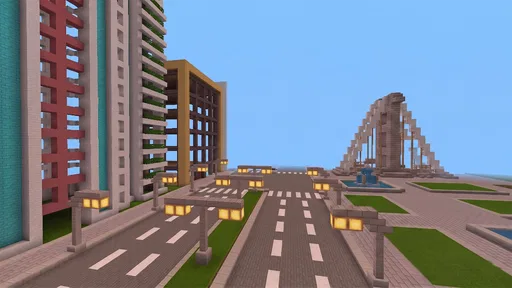
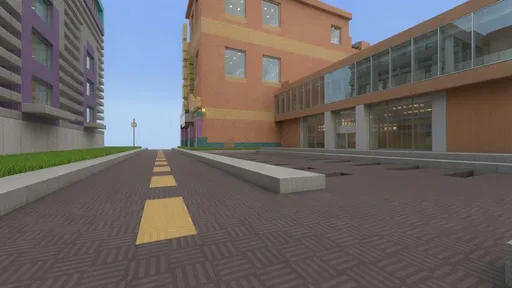
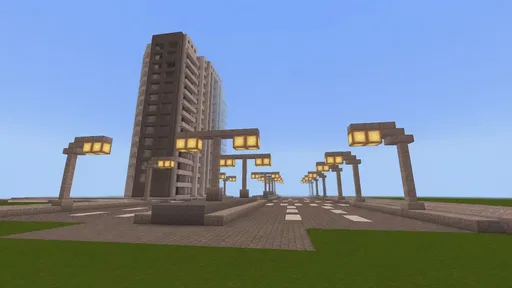
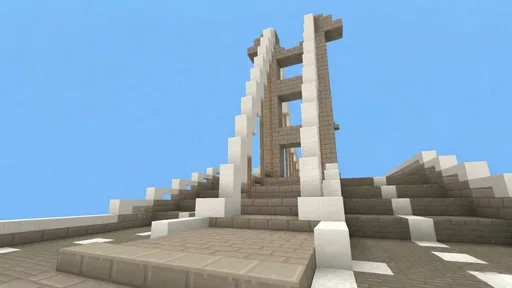
Analysis by Reviewed
When I want a game that lets me make something rather than follow a long chain of objectives, I reach for Craftsman: Building Craft. Its block-based world makes the basic appeal clear: shape a space into a house, a castle, or whatever structure I feel like attempting. The relaxed building focus is inviting, though the experience changes noticeably when I move from designing freely to dealing with survival challenges.
A quick first impression, with room to experiment
As a free simulation game from StarGame12, Craftsman is easy to consider if you enjoy building on a phone or tablet without paying upfront. It has a 3.5 average from around 3.6 million ratings, and more than 100 million installs, so it has reached a large audience even if that rating suggests it is not a perfect fit for everyone. It is rated Everyone 10+, and version 1.51 requires Android 5.1 or later.
The best way to begin is to treat the first build as a small experiment rather than a grand project. I’d sketch out a simple cabin or a compact courtyard, learn how moving around and placing blocks feels, and only then scale up. That approach makes the controls easier to get used to and helps avoid the familiar mobile-building frustration of realizing halfway through a giant structure that its footprint is awkward.
Block by Block: Your Imagination is the Limit
First things first, let’s dive into the world of Craftsman: Building Craft. This game is like walking into a universe made entirely of blocks where you can create anything your heart desires. From towering skyscrapers to cozy cottages, you name it, you can build it. The game’s interface is pretty intuitive, making it feel like second nature to start crafting your empire.
Getting Started: Easy Peasy, Block Squeezy
When you first jump in, the game eases you into the building mechanics. There’s a handy tutorial that guides you through the basic controls, so even if you’re a newbie, you’ll be stacking blocks like a pro in no time. Trust me, once you start, it’s hard to stop. You’ll find yourself saying, "Just one more block," until you realize it’s 3 AM. Been there, done that!
The creative mode is where the magic happens. It’s perfect for those days when you just want to let loose and see where your creativity takes you. There’s no pressure, just you and your imagination running wild. And if you’re feeling competitive, switch over to survival mode. Here, you’ll not only build but also gather resources and fend off any pesky challenges that come your way. It adds a layer of excitement that keeps the adrenaline pumping!
Making a build work on a small screen
On a phone, I find it useful to plan in layers: decide the outline first, raise the walls next, then add details such as windows and roof shapes. It is a simple workflow, but it keeps a larger idea manageable and makes it easier to spot proportions that feel off before spending time decorating. For a castle, I’d start with a clear central shape and a few towers rather than trying to place every detail at once.
More From Our News Desk

 X
XX Under Pressure: Can It Recover When Posting Goes Wrong?
A resilience-focused review of X, examining setup, mistaken posts, interruptions, weak connections, and the gaps that matter when recovery needs to be dependable.

 Clash of Clans
Clash of Clans Is Won Between the Battles
Its raids are quick; its community is a long-term project of coordination, teaching, rivalry, and shared responsibility—with all the friction that entails.

 Android Auto
Android Auto Makes the Case for Quieter Car Software
The car interface is no longer judged by how much it can do, but by how quietly it helps. Android Auto shows what drivers now expect—and what still gets in the way.

 MobiOffice: Word, Sheets, PDF
MobiOffice: Transforming Mobile Productivity with Seamless Integration
MobiOffice: Word, Sheets, PDF is redefining mobile productivity with a surprising blend of functionality and innovation.

 EA SPORTS FC Soccer Mobile 26
EA SPORTS FC™ Mobile Soccer: Redefining Mobile Sports Gaming
Dive into EA SPORTS FC™ Mobile Soccer, where immersive gameplay and strategic depth transform mobile sports gaming.

 Microsoft OneDrive
How Microsoft OneDrive Became a Mobile Productivity Giant
Discover how Microsoft OneDrive defies expectations, reshaping mobile productivity with its surprising features and unmatched integration.
Latest News



That same small-scale approach suits everyday play. If I have a short break, I can work on one room, a gate, or a path instead of expecting to finish an entire build. For a longer session, survival mode offers a different kind of task: gathering what I need and adapting the design around the resources I can get. The trade-off is that this mode asks for more patience than free-form building, so it is not my pick when I only want an effortless creative outlet.
Graphics and Gameplay: A Pixelated Paradise
Now, let’s chat about the graphics. While it may not boast the hyper-realistic visuals of some other games, the pixelated design has a charm of its own. It brings a nostalgic vibe that reminds me of the classic games we all grew up loving. The visuals are crisp, and the color palette is vibrant, making each creation pop on the screen.
That blocky look also gives a build a readable silhouette: a roofline, tower, or courtyard can be understood at a glance, even before I add small decorative touches. I like that the style encourages clear shapes instead of demanding realistic detail. If you mainly want polished scenery, character animation, or a cinematic setting, though, a more visually ambitious simulation may suit you better. Craftsman’s appeal is the structures you make, not spectacle around them.
Sound and the pace of a session
The game’s mood works best when I set my own pace. Building is naturally suited to stopping after a small milestone, while survival shifts attention toward gathering and responding to challenges. That contrast gives the two modes different rhythms: one is a quiet space for planning, the other makes each construction choice feel more practical. I’d choose the mode based on my mood rather than assuming every session needs to become a long project.
For a realistic evening scenario, I might open the game after dinner intending to add a porch to a small house, then use the next few minutes to adjust its entrance and roof. If I have more time another day, I can expand the surrounding area. The advantage is that a build can grow in manageable stages; the downside is that mobile controls and a large idea can make fine placement feel fiddly. Keeping the next goal specific helps me avoid aimless block placement.
Choosing it over other building games
Compared with the usual alternatives in the simulation genre, Craftsman is most appealing when the main thing I want is direct, block-by-block construction, with a survival option for added pressure. It is less suitable if I want a guided campaign, complex management systems, or a detailed story to carry me from one task to another. Players who prefer a sandbox can enjoy setting their own goals; players who need frequent direction may find the open-ended nature less satisfying.
A useful trade-off is to decide whether I’m building for appearance or function before I start. In creative play, I can focus on a striking outline and experiment without worrying about supplies. In survival, I’d keep the first structure practical and expand it as I gather resources. That distinction makes the modes feel less interchangeable and gives each build a clearer purpose.
Making the most of a short session
One small habit makes the open-ended format easier to enjoy: I decide on a visible finish line before I begin. “Make the entrance readable” is more useful than “work on the house,” because it gives a short session a satisfying stopping point. I can check whether the doorway feels balanced against the front wall, then leave larger choices for another time. This also reduces the temptation to keep adding details without knowing what the build is meant to communicate.
For a bigger project, I’d keep a mental or written note of the next two steps, such as finishing a roof and then shaping the yard. That way, returning to the same build does not require me to reconsider the whole design. It is a practical workaround for a game whose freedom can otherwise turn into indecision: the more options I imagine, the more helpful a modest plan becomes.
Community and Updates: Keeping it Fresh
One of the things I love about Craftsman: Building Craft is the active community behind it. There’s a bustling online forum where players share tips, tricks, and showcase their creations. It’s inspiring to see what others are building and get some ideas for your next project. Plus, the developers are pretty active in rolling out updates, ensuring the game stays fresh and exciting.
They’ve been adding new features and blocks regularly, which keeps me coming back for more. Whether it’s new building materials or additional challenges in survival mode, there’s always something new to explore.
Who will enjoy the atmosphere—and who may not
I’d recommend this game to someone who likes making their own goals, enjoys block-based design, and is happy to improve a structure over several short sessions. It can also suit younger players within its Everyone 10+ rating when a parent is comfortable with the game. If you want a tightly directed experience or a highly realistic building simulator, I’d look elsewhere; the simple visual language and self-led play are central to its appeal, not a temporary hurdle to a different kind of game.
It is free to play, which makes trying it a low-commitment decision, but free does not automatically mean it will match every player’s taste. The clearest question to ask yourself is whether placing blocks and shaping a space sounds enjoyable on a touchscreen. If yes, start with a modest design and see whether the creative freedom hooks you. If you need a clear checklist of goals or deeper simulation systems, a more structured alternative is likely a better use of your time.
Picking a mode for the mood you want
If I’m deciding whether to open creative or survival, I think about what kind of attention I have available. Creative play is the more natural choice when I want to test a layout, change its proportions, or simply build without turning the session into a resource task. Survival suits me better when I want constraints to influence the design. A compact, useful shelter can be a more satisfying goal there than an elaborate showpiece, because each choice has a practical reason.
This distinction is also helpful for families or friends choosing a game together. Someone who enjoys inventing a look may be happiest in the freer building style, while a player who likes a challenge may prefer gathering and responding to hazards. The game’s Everyone 10+ rating gives families a useful starting point, but I’d still consider whether its open-ended play and survival pressure fit the particular player.
My atmosphere verdict
In conclusion, if you’re looking for a game that lets you unleash your creativity while offering a fun and challenging experience, give it a try. It’s the perfect blend of creativity, exploration, and a dash of nostalgia. So grab your virtual hard hat, and let’s get building!
My recommendation comes with one practical caveat: enjoy it as a flexible building sandbox, not as a substitute for a story-driven game or a deep management sim. I like that it lets a small idea become a larger construction at my own pace, and the survival option gives me another reason to rethink how I build. If that combination sounds appealing, begin with a simple home, learn the controls, and let the next project grow from there.
Craftsman: Building Craft Frequently Asked Questions
Is Craftsman: Building Craft a good fit if I prefer structured goals over open-ended play?
Craftsman: Building Craft is a simulation game built around creative construction, so its appeal is strongest if you like choosing your own projects. The premise focuses on designing houses and castles, rather than following a home-design course or a tightly directed set of building tasks. If you prefer clear objectives and step-by-step guidance, the open-ended approach may feel less structured.
How much room does Craftsman: Building Craft leave for creativity?
The game’s central idea is to let you shape a block-based world by deciding what to build. Houses and castles are part of its premise, and the flexible building focus can suit players who enjoy experimenting with designs and working at their own pace. It is best approached as a creative game, rather than a detailed architectural planning tool.
What kind of building can I create in Craftsman: Building Craft?
The game is centered on designing and building in a block-based world. Its premise invites you to create houses and castles, so it may appeal if you enjoy shaping a world at your own pace and deciding what to construct. It is a simulation game focused on creative building, rather than a guided home-design tool.
What devices can run Craftsman: Building Craft?
Craftsman: Building Craft is available for Android and iOS, so it is intended for compatible mobile devices. On Android, the game requires version 5.1 or later. Before downloading, check that your device uses a supported operating system and has enough available storage for the installation and game data. The game’s current version is 1.51.
What is Craftsman: Building Craft?
Craftsman: Building Craft is a sandbox-style game that allows players to construct, explore, and survive in a block-based world. Similar to popular games like Minecraft, it provides an open-ended platform for creativity where players can build various structures, gather resources, and engage in adventures either solo or with friends. It's available for both Android and iOS platforms.
Pros
- Highly interactive building mechanics
- Engaging and expansive world to explore
- Offers multiplayer mode for collaboration
- Frequent updates with new features
- User-friendly interface for all ages
Cons
- Graphics are relatively basic
- Limited tutorial for beginners
- In-app purchases can be frequent
- Occasional bugs and glitches
- Requires constant internet connection










