2 3 4 Player Mini Games
- 5.30K
- 4.3
- Installs
- 100.00M
- Price
- Free

Screenshots

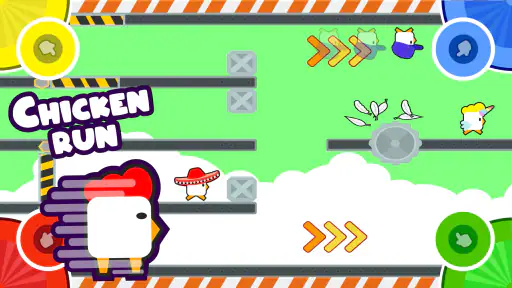
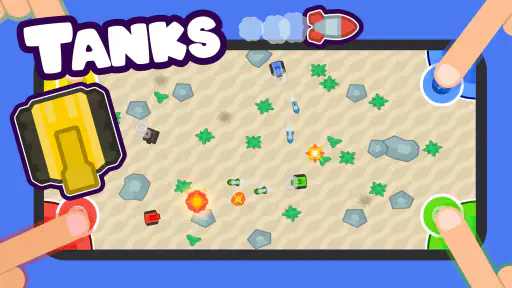
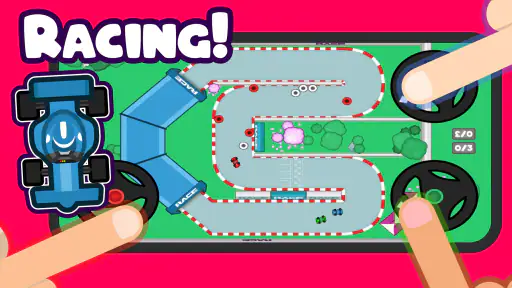
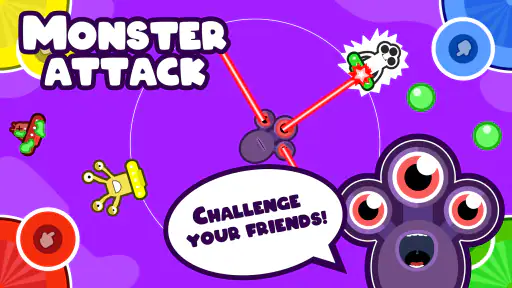
Analysis by Reviewed
On a shared phone or tablet, it helps when a game can turn a short wait into something everyone can join. 2 3 4 Player Mini Games is built around that simple idea: a collection of quick activities for two, three, or four people gathered around one screen. I’d reach for it when friends are visiting, siblings need a low-effort activity, or a family wants a brief game between other plans. It is a free simulation game from Better World Games, and its appeal is less about a long solo journey than about making a small group laugh together.
Making one device work for a group
The shared-screen format is the main practical distinction. Rather than asking everyone to install the same game and connect separately, the group can take turns or compete around a single device. That makes it handy at a kitchen table or while waiting for food: one person can open the game, and the others can join in without turning the moment into a setup project. It is also a useful alternative to passing around a phone to watch clips, because each person has a reason to pay attention and participate.
There is a trade-off, though. A shared screen works best when people can sit close enough to see it and have room to reach it. Four players around a small phone may feel cramped, while a tablet is naturally easier for a group to gather around. Before starting, I’d choose a comfortable surface, agree who holds or positions the device, and make sure everyone can see the play area. Those little choices reduce accidental bumps and arguments about whose turn it is.
Reads About 2 3 4 Player Mini Games
Game Variety That Packs a Punch
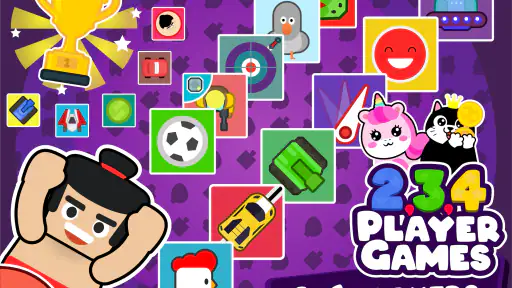
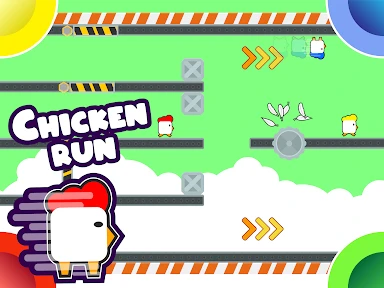
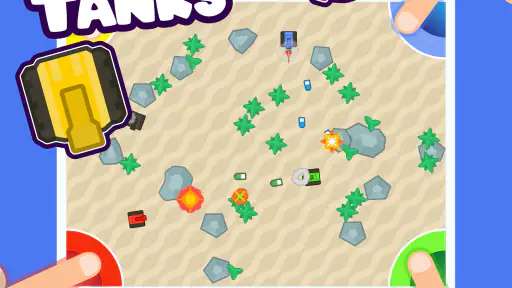
One of the coolest things about 2 3 4 Player Mini Games is the sheer variety of games available. Whether you're in the mood for a quick duel or a team showdown, this app's got you covered. With games ranging from sports to action and even a little strategy, it keeps everyone entertained. The best part? You don't need a separate controller – just gather around and let your fingers do the talking! It's perfect for those spontaneous "let's play something" moments.
Easy Peasy Setup
Setting up the game is as easy as pie. Just download the app, and you're good to go. No sign-ups, no lengthy tutorials – just pick a game and start playing. The interface is super intuitive, which means that even your tech-challenged buddy won't have a hard time navigating through it. And because the app supports 2, 3, or even 4 players, it’s incredibly versatile for any group size.
For a smoother first session, I’d let one person browse while the others decide whether they want a quick head-to-head round or something everyone can play. That avoids the common shared-device snag where several people reach for the screen at once before the rules are clear. If a younger player is joining, an adult can preview a game and explain the basic aim before the first round; it keeps the pace friendly without expecting everyone to learn by trial and error.
Competitive Fun for Everyone
If you’re a sucker for competition, then you’ll love this app. Each game is designed to get the adrenaline pumping, with everyone vying for the top spot. From racing games to head-to-head battles, it’s a test of speed, strategy, and sometimes just plain luck. And trust me, the laughter and playful banter that ensue are what memories are made of. Plus, the games are short and sweet, so you can pack a ton of fun into even the shortest hangout.
More From Our News Desk

X Under Pressure: Can It Recover When Posting Goes Wrong?

Clash of Clans Is Won Between the Battles

Android Auto Makes the Case for Quieter Car Software

MobiOffice: Transforming Mobile Productivity with Seamless Integration

EA SPORTS FC™ Mobile Soccer: Redefining Mobile Sports Gaming

How Microsoft OneDrive Became a Mobile Productivity Giant
Short rounds make it easy to keep the mood light, but they can also make a close loss feel immediate, especially with children or a very competitive group. I’d rotate who chooses the next game instead of letting the winner control the whole session. That gives quieter players a way to shape the evening and prevents one favorite from taking over. If your group prefers careful planning, deep progression, or a story to follow, this fast-changing format may feel too lightweight; a traditional board game or a longer strategy game will offer more room to settle in.
Age, trust, and who should play
The game is rated for Everyone, which makes it an approachable option to consider for mixed-age gatherings. That age label is helpful context, not a substitute for adult judgment about a particular household or how children use a shared device. I’d keep the session visible and agree on simple boundaries: take turns choosing, keep the device on the table, and stop when the group is ready to move on. This is especially useful when the phone belongs to one person but is being handled by several people.
It has a broad audience, but it will not suit every player. It is a good fit for friends who enjoy quick contests, families looking for a simple shared activity, and anyone who wants a casual game without a separate controller. It is less suitable for someone seeking a substantial single-player simulation, a private account-based experience, or a game built around long-term character growth. Compared with the usual solo-focused simulation games, its strength is immediate group play; compared with a physical deck of cards, it offers a menu of digital mini-games but depends on everyone sharing one screen.
Choosing well for a mixed group
One useful way to make the variety work is to treat the game menu as a set of short trials rather than a promise that every option will become a group favorite. Start with a simple contest to get everyone comfortable with the shared controls, then let a different person choose the next activity. If the first pick feels confusing or too hectic, switching promptly is part of the appeal; nobody has invested a long stretch in a mode that is not clicking.
This also helps when the group has different confidence levels. A player who is quick with touch controls may dominate a fast round, while someone new to mobile games may need a moment to understand where to interact. I’d keep early rounds low-stakes and avoid turning the first session into a scorekeeping contest. The practical benefit is not just fairness: once people feel free to experiment, they are more likely to find a style of mini-game that suits them.
Keeping the shared device orderly
Because the game is designed for several people around one screen, it helps to separate choosing from playing. I’d have one person navigate the menus and invite suggestions, then place the device where all players can reach it without passing it back and forth. On a phone, keeping it flat on a stable surface can make the session less awkward than having one person hold it while everyone else leans in. On a tablet, agree who is responsible for moving it before a round begins.
There is no need to turn this into a formal household routine, but a simple handoff rule can prevent friction: the device owner keeps control of the phone, while players take turns selecting games. That is especially helpful when children are involved or when the device also contains personal messages and apps. The game can be the shared activity without making the whole device communal.
When a different kind of game is better
The nearest alternative depends on what your group wants from the moment. A physical card game is better if you want conversation to continue without everyone focusing on a screen, and a board game suits a group willing to spend longer learning rules and making plans. A separate-device multiplayer title is a stronger fit when friends are apart or each person wants an individual view and controls. This collection makes more sense when the group is physically together and wants the quickest route from “what should we do?” to a playable round.
That convenience has limits. A crowded table, a very small phone, or a group that dislikes taking turns can make the shared-screen arrangement more awkward than fun. It is also not the choice I’d make for a solo player looking for a campaign, persistent goals, or a simulation that rewards steady progress. Knowing that distinction before downloading is useful: this is an occasional group activity, not a substitute for every kind of game night.
Perfect for Any Occasion
One of the strongest points of this app is its adaptability. Whether you're hanging out at home, waiting for food at a restaurant, or even on a road trip, it's a fantastic way to kill time and bond with your friends or family. The games are designed to be quick and engaging, making it the perfect companion for any occasion. And since it’s available on both Android and iOS, no one is left out!
A realistic use is a family waiting for a meal: one adult sets the device down, the group picks a short game, and they play a round or two before the food arrives. In that situation, I’d keep the session brief and avoid choosing a game that needs everyone to crowd the screen if the table is already busy. On a road trip, it is better suited to a stop or a parked vehicle than to distracting the person driving. It works best as a shared activity, not as something to occupy one player for hours.
The game has a 4.3 average from around 1.3 million ratings, and it has passed 100 million installs. It launched on February 8, 2018; version 5.0.1 requires Android 5.0 or later. Those details point to a well-established casual option, but popularity does not guarantee that every mini-game will suit every group. I’d treat the variety as a way to find a few favorites rather than assume everyone will enjoy every choice. The price is free, and the Everyone content rating makes it an easy candidate to try with a group, while the actual fit still depends on your household’s preferences.
A practical first session
If I were introducing it to a household, I’d keep the first play session deliberately small: choose a moment when nobody is rushing, let one person handle the menu, and agree that each player gets a turn to nominate an activity. That approach answers a common question about group games: how do you make sure the person holding the device does not decide everything? A simple rotation is enough, and it keeps the shared experience from becoming a one-person demo.
Another useful boundary is to decide in advance whether the group wants a winner or simply wants to try a few games. Some players enjoy keeping score, while others would rather move on as soon as a round ends. For siblings or mixed-age groups, I would favor the latter at first. It makes it easier to stop when attention fades and avoids treating a brief casual game as a serious competition.
It is also worth thinking about the setting before opening the game. A quiet waiting room, a crowded restaurant table, and a relaxed living room are not interchangeable: the first two may call for a short, low-volume session, while home gives people more space to gather around the screen. If the device is needed for navigation, calls, or another immediate task, I would not make it the center of the activity. The game is most convenient when the group can give the device a little focused attention without inconveniencing its owner.
Final Thoughts? If you're looking for a fun, easy, and highly engaging way to entertain a group, 2 3 4 Player Mini Games is a no-brainer. It's like carrying a mini arcade in your pocket, ready to turn any dull moment into a fun-filled experience. So next time you're scratching your head wondering how to spice up your hangout, just whip out your phone, open this app, and let the good times roll! I’d recommend it most when people are together and want a low-commitment way to compete. If your group would rather play separately, needs a larger display, or prefers deeper progression, another kind of game will be a better match.
2 3 4 Player Mini Games Frequently Asked Questions
Is 2 3 4 Player Mini Games free to download?
Yes. 2 3 4 Player Mini Games is free to download, so you can try its group-focused mini-games without paying upfront. It is a casual choice for friends or family who want to start a quick game together. The app is developed by Better World Games, and its central idea is to bring several players together around one device.
What should I know about the app’s age suitability before downloading?
The game has an Everyone content rating, making it broadly suitable for players of different ages. Its short, simple rounds can work well for a family game session as well as casual play among friends. As with any game, parents can decide whether the shared-device experience and the particular mini-games are a good fit for their child.
Does 2 3 4 Player Mini Games need an internet connection?
The game is built around playing together on one device, so its main appeal is easy local multiplayer rather than online matchmaking. That makes it a handy choice for a shared break or a family gathering, where players can take turns or compete side by side. Check that the game is installed and ready before you pass the device around.
How many people can play at the same time?
As the name suggests, the game supports two, three, or four players on a single device. The store description highlights 30 different mini-games for groups of that size, making it suitable for a quick match with a friend or a larger group. The shared-screen format keeps everyone in the same game, though players will need to be comfortable gathering around one device.
What is "2 3 4 Player Mini Games" and how does it work?
"2 3 4 Player Mini Games" is a multiplayer game app designed for friends or family to enjoy together on a single device. It features a variety of mini-games that accommodate two, three, or four players simultaneously. The app is equipped with intuitive controls, making it easy to pick up and play. Each mini-game is designed to be quick and fun, providing endless entertainment without the need for complex setups or lengthy tutorials.
Pros
- Engages multiple players for fun.
- Variety of mini-games included.
- Easy to understand controls.
- Regular updates with new games.
- Supports offline play.
Cons
- Limited single-player options.
- Ads can be intrusive.
- Graphics are basic.
- Some games require in-app purchases.
- Occasional connectivity issues.
- Category
- Simulation
- Version
- 5.0.1