RaceChrono Pro
- 68.00
- 4.6
- Installs
- 10.00K
- Price
- $18.99
Screenshots
Analysis by Reviewed
For a driver who wants to understand a track session rather than simply record a lap time, RaceChrono Pro offers a lot to explore. I see its strongest appeal in the way timing, GPS-based information, session logs and video can work together: the result can be more useful than a single “best lap” number. It is a sports app from RaceChrono, aimed squarely at motorsport rather than casual fitness tracking, and that focus shapes both its strengths and the effort it asks of you.
Reading the screen and finding your way around
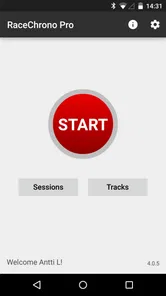
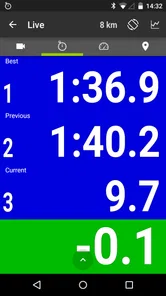
I found the interface approachable once I was looking at it in a calm setting. The original impression is of an organized dashboard and a short route to starting a session, which matters when you are preparing for a track day and do not want to hunt through menus. There is also room to choose which data points appear on the dashboard, so a driver can prioritize the information that makes sense to them instead of treating every metric as equally important.
That flexibility has a practical trade-off. A display packed with numbers may be useful while reviewing data, but it can become distracting if you try to read it while driving. I would set up the screen before the session, keep the live view focused on only what I can glance at safely, and leave detailed comparisons for a stop or for after the drive. Customization helps, but it does not turn a phone screen into a substitute for attention on the road or track.
RaceChrono Pro is a paid app, listed at $18.99, with in-app purchases priced from $0.99 to $11.99 per item. It has a 4.6 average from around 960 ratings and over 10,000 installs. For me, those figures are useful context, not a reason to buy it: the better question is whether I will use session analysis often enough to justify a dedicated motorsport tool. It is rated for Everyone, though the subject matter and track-focused workflow will naturally appeal most to people already interested in driving events.
Getting Started with RaceChrono Pro
I was immediately drawn in by the app’s user-friendly interface. Setting it up was a breeze, and the app’s design is intuitive, which is always a plus. As soon as I launched RaceChrono Pro, I was greeted with a clean and organized dashboard that made navigation as smooth as a well-oiled machine.
One of the first things I noticed was how easy it was to start a new session. Just a few taps and I was ready to hit the track. The app supports a wide range of GPS devices, which is fantastic if you want to ensure pinpoint accuracy in your data.
Features That Rev Up Your Racing Experience
What really sets this app apart is its robust set of features. The live timing capability is a standout feature for me. It’s like having a pit crew right by your side, feeding you real-time data as you race. This feature alone can help you shave seconds off your lap times by allowing you to make on-the-fly adjustments.
More From Our News Desk

Weather by Xiaomi Review: Clear at a Glance, Less Clear Up Close

X Under Pressure: Can It Recover When Posting Goes Wrong?

Clash of Clans Is Won Between the Battles

Android Auto Makes the Case for Quieter Car Software

MobiOffice: Transforming Mobile Productivity with Seamless Integration

EA SPORTS FC™ Mobile Soccer: Redefining Mobile Sports Gaming
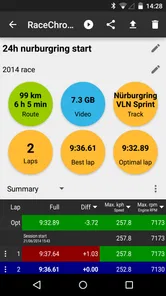
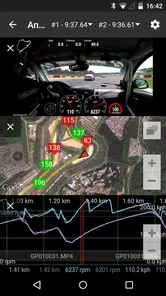
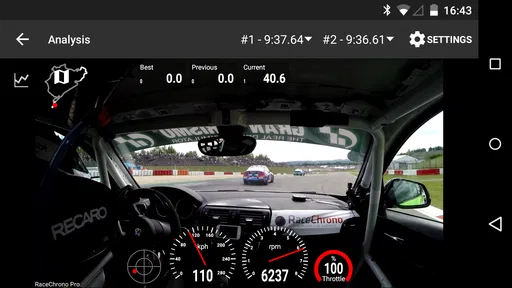
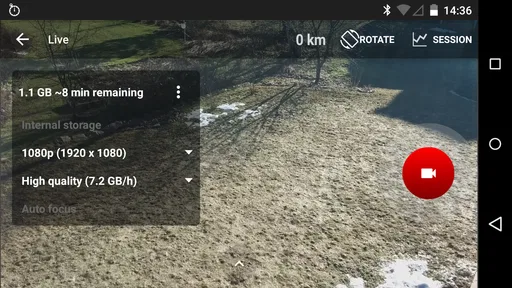
Another killer feature is the video overlay. With this, you can record your sessions and overlay them with lap data, which is perfect for reviewing your performance post-race. Trust me, seeing where you can improve is invaluable, especially if you’re chasing personal bests.
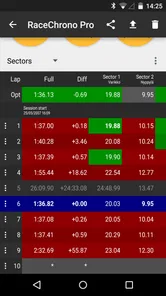
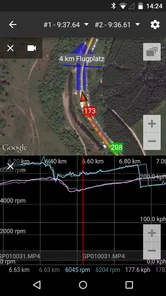
The app also offers data logging and analysis, which lets you dive deep into the nitty-gritty details of your performance. From speed graphs to acceleration data, it’s all at your fingertips. This feature is particularly useful for those who love to dissect every aspect of their driving.
Making a session useful after the drive
A strong way to use these tools is to treat each track visit as a small experiment rather than a hunt for one perfect lap. I would pick one corner or one section to work on, then compare a clean lap with a later attempt. The logged speed and acceleration information can help me notice whether a change in approach affected the whole section, while the video overlay gives that information a visual reference. That is more actionable than staring at a list of lap times and guessing where the difference came from.
For a realistic track-day routine, I would check the setup while parked, start the session before heading out, and avoid fiddling with the phone once moving. After a run, I could review the video and data during a break, mark one observation to test next time, and keep the next session focused. This workflow makes the app useful even if I am not trying to compete; it can help a hobby driver learn a circuit and remember what happened between visits.
There is also a worthwhile trade-off around GPS equipment. The app supports a range of GPS devices, which gives experienced users options beyond relying on a basic setup, but choosing and configuring extra hardware adds cost and preparation. I would begin with the simplest setup that meets my needs, then consider an external device only if the results leave me wanting more dependable or detailed measurements. More equipment is not automatically better if I do not have a clear question the extra data will answer.
The Thrill of Customization
Customization is king with RaceChrono Pro. You can tailor the app to suit your specific needs, whether that’s setting up custom notifications or choosing which data points to display on your dashboard. This level of personalization makes the app not just a tool, but a personalized racing companion.
Plus, the community aspect of the app shouldn’t be overlooked. The ability to share your sessions and data with friends or fellow racers adds a social dimension that makes the whole experience even more engaging. It’s always fun to compare notes and see who’s the fastest in your circle!
Motor, sensory and situational access
Different drivers may find the same interface comfortable or demanding. Someone who prefers visual information can benefit from reviewing graphs and video after a session, while someone who finds dense screens tiring may want to limit the live display to a few essentials. The app’s adjustable dashboard can help with that choice, but I would not assume every metric is equally readable in bright outdoor conditions or while wearing gloves; those are reasons to configure and test the setup while stationary.
Motorsport itself also sets limits on access. A driver should not be expected to operate a phone while moving, and live timing is best treated as information to check safely, not as an invitation to make hurried adjustments mid-lap. A passenger or team member may be better placed to monitor information where that is appropriate. For drivers who cannot comfortably use a touchscreen or interpret fast-changing visual data, a simpler timing tool or support from another person may be a better fit.
Where it fits—and where it doesn’t
Compared with a basic lap timer, RaceChrono Pro asks more of the user but can give more material to learn from: timing, logs, graphs and video can be considered together. Compared with a general navigation or fitness app, it is much more specifically built around motorsport sessions. That specialization is exactly why I would choose it for repeated track days, testing, or careful personal improvement, but it is unnecessary if I only want directions, a casual drive log, or a quick stopwatch reading.
It is also not the right choice for someone who wants a completely hands-off experience. The useful results depend on preparing the session, selecting a sensible display, and making time to interpret what was recorded. The app’s purchase price and optional in-app purchases are another consideration for a newcomer who may only visit a track once. I would first decide whether I enjoy reviewing driving data, rather than buying it in the hope that numbers alone will make me faster.
Choosing a useful level of detail
For a first outing, I would resist the temptation to turn on every display option or attach extra equipment before I know what I want to learn. A lap-time comparison can answer a simple question, while video paired with timing is more useful when I need to connect a change in pace to what I was doing on track. Starting with one question keeps the review manageable and makes the app less intimidating for a newcomer.
It also helps to separate what the app records from what I can safely act on. Live timing may be interesting, but detailed graphs and video are better suited to a break between sessions or a quiet review later. If I am sharing a car or attending with friends, one person can handle the parked setup and another can help discuss the footage afterward. That division reduces the temptation to multitask behind the wheel and makes the results easier to discuss.
Who benefits most from the extra tools
I would recommend it most to someone who attends track days regularly, tests a car, or enjoys learning a circuit through repeat visits. A driver who likes to compare a few laps and can explain what they are trying to improve is likely to get more from the logs than someone who only wants a quick time at the end of a session. Coaches and enthusiastic friends may also find the recorded material useful as a basis for a specific conversation, provided the driver is comfortable sharing it.
For a one-off event, the choice is less clear. A simple timer may be enough if all I want is a result to remember, and a paper note or a post-session conversation can be less distracting than managing a phone. The dedicated app makes more sense when I expect to return to the same kind of driving and use what I learned. Its age rating is Everyone, but that does not mean its motorsport-oriented controls and analysis are equally accessible or relevant to every person.
Making comparisons fair and useful
When I compare runs, I would avoid treating the fastest lap as automatically the best lesson. A lap with traffic, a different pace, or a mistake can make a neat number misleading; video and the surrounding session context can help explain why. I would look for a repeatable change across comparable attempts and focus on one section at a time, rather than drawing a broad conclusion from a single result.
That approach is especially helpful if I am new to data review. A graph can look authoritative even when I have not asked a clear question of it. The practical value is not in collecting the most information, but in using a small amount of relevant information to decide what to try safely next. If the analysis starts to feel like homework, I would scale back to lap timing and one short review rather than abandoning the tool entirely.
Final Thoughts
After spending some quality time with RaceChrono Pro, I can confidently say it’s a must-have for any racing enthusiast. It’s packed with features that not only enhance your racing experience but also help you improve your skills on the track. Whether you’re a pro or just starting out, this app offers something for everyone.
The combination of real-time data, detailed analysis, and the ability to review your sessions makes it an invaluable tool for anyone serious about racing. So, if you’ve got a need for speed and want to get serious about your track days, RaceChrono Pro is definitely worth a spin!
My recommendation is strongest for a driver who returns to the track, enjoys comparing sessions, and is willing to spend a little time setting up a useful workflow. Someone who only wants a simple lap counter, dislikes interpreting data, or needs a screen-free experience should look elsewhere. RaceChrono was released on May 19, 2014, and its established focus is clear: it is most rewarding when a driver uses its records to ask better questions about a session, then tests those ideas safely on the next one.
RaceChrono Pro Frequently Asked Questions
How much does RaceChrono Pro cost, and are there optional purchases?
RaceChrono Pro is a paid motorsport app priced at $18.99, with optional in-app purchases ranging from $0.99 to $11.99 per item. Consider the upfront cost alongside any extras you may want before downloading. Its focus is on recording and reviewing track sessions, so it is most relevant to drivers who plan to use those tools rather than someone looking for a general navigation app.
Can RaceChrono Pro help me review a session after I leave the track?
Yes. RaceChrono Pro is intended not only for timing laps while driving but also for examining recorded session data afterward. Its analysis tools can help you compare laps and review performance, while video integration can bring footage together with telemetry for a more useful look at what happened on track. That makes it practical for reviewing a session once you are no longer driving.
Is RaceChrono Pro suitable for casual track-day users as well as competitive racers?
RaceChrono Pro can suit both occasional track-day drivers and people who take motorsport more seriously. Its timing and recording features are useful for keeping track of laps, while the more detailed data tools offer room to examine performance and refine technique. Casual users may choose to begin with the phone’s built-in GPS, while enthusiasts can explore compatible external equipment for more detailed data collection.
What is RaceChrono Pro and how does it enhance my racing experience?
RaceChrono Pro is an advanced application designed for motorsport enthusiasts, providing features like lap timing, data logging, and video recording integration. It enhances your racing experience by offering detailed race analytics and performance metrics, allowing you to improve your skills and understand vehicle dynamics better. Ideal for both amateur and professional racers, it supports various GPS devices and OBD-II readers for precise data collection.
Is RaceChrono Pro compatible with both Android and iOS devices?
Yes, RaceChrono Pro is available for both Android and iOS platforms, ensuring a wide range of compatibility with different smartphones and tablets. Users can download the app from Google Play Store for Android devices or from the Apple App Store for iOS devices. It's designed to work seamlessly across these platforms, providing a consistent user experience.
Pros
- Accurate lap timing
- Comprehensive data analysis
- User-friendly interface
- Wide device compatibility
- Customizable dashboards
Cons
- High battery usage
- No free trial
- Complex setup for beginners
- Limited customer support
- Requires external sensors





