PixShaft
- 14.00
- 4.9
- Installs
- 10.00K
- Price
- Free

Screenshots




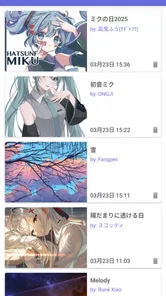



Analysis by Reviewed
I would look at PixShaft as a place to browse illustrations and other creator-made work, rather than as a general-purpose comic reader. That distinction matters: it is aimed at helping art fans discover work across illustrations, comics, and novels, so the appeal is the range of creative material in one app. In my experience, that makes it most useful when I want to explore and follow my curiosity, not when I already know exactly what I need to read.
It is a free comics app from CeuiLiSA, with an Everyone age rating. The current version is 4.9.5, and it runs on Android 7.0 or later. Its audience is still relatively modest, with over 10,000 installs, but its average rating is 4.9 from around 255 ratings. Those figures suggest a strong reception among its users, though I would treat them as an encouraging sign rather than proof that the app suits every reader.
Browsing works best when your connection is steady
I find that a steady connection changes more than how quickly PixShaft opens a piece: it lets me follow a discovery without losing the thread between one kind of work and the next. In this section, I’ll look at how that shapes casual browsing and why I’d choose a clear stopping point before moving into the practical realities of using it on a phone.
Discovery is the main draw
The central idea is simple: use PixShaft to find appealing work from creators around the world. I like that the focus is broader than comics alone. Someone drawn to a particular illustration style might also come across a comic or a novel that they would not have searched for directly. That kind of cross-format browsing can make a short visit feel like an art discovery session rather than a checklist of chapters to finish.
That browsing-first approach also means your experience is shaped by what the app can load and show while you are exploring. With a reliable connection, moving between works and following a newly interesting creator is a natural way to use it. If the network is slow or inconsistent, discovery can lose its rhythm: waiting for content interrupts the process of comparing pieces and deciding what to open next. I would plan longer browsing sessions around a dependable connection, especially if I am opening a lot of work in one sitting.
A useful habit is to browse with a small question in mind instead of scrolling indefinitely. For example, I might look for a visual style I enjoy, explore a comic after noticing its artwork, or use a novel as a change of pace. That gives the app’s mix of formats a practical purpose and helps me stop when I have found something worth spending time with. It is a better fit for curious readers than for anyone expecting a tightly controlled, single-purpose reading queue.
One app, several kinds of creative work
Having illustrations, comics, and novels in the same discovery space is a genuine advantage, but it also asks you to be comfortable switching modes. An illustration is something I can appreciate quickly; a comic needs more sustained attention; a novel may call for a longer, quieter session. PixShaft’s breadth is helpful when I want options, while a dedicated comic app may feel more direct if all I want is to continue a particular series.
More From Our News Desk

 Gmail
Gmail in a Busy Inbox: Who Benefits Most?
From first account to crowded workday, Gmail earns its place through dependable search and flexible sorting—but its best fit depends on how much inbox maintenance you can tolerate.

 Prime Video
Switching to Prime Video: What Changes in Your Viewing Routine
Prime Video can make a compelling second home for streaming, but switching means learning a different catalog, rental layer, and route from browsing to playback.

 Universal TV Remote Control
 Works Best as a Reliable Backup
A phone remote earns its place through quick setup and reliable habits. Here is how to get more from Universal TV Remote Control—and where its limits show.

 Weather - By Xiaomi
Weather by Xiaomi Review: Clear at a Glance, Less Clear Up Close
Xiaomi’s weather app makes everyday forecasts quick to scan, but its calm surface can leave useful details and recovery paths harder to find than they should be.

 X
X Under Pressure: Can It Recover When Posting Goes Wrong?
A resilience-focused review of X, examining setup, mistaken posts, interruptions, weak connections, and the gaps that matter when recovery needs to be dependable.

 Clash of Clans
 Is Won Between the Battles
Its raids are quick; its community is a long-term project of coordination, teaching, rivalry, and shared responsibility—with all the friction that entails.
Latest News



I would use that variety deliberately. On a short break, I would browse illustrations and save the longer reading decision for later. When I have more time, I would follow a comic or novel that caught my attention. Separating those intentions keeps a discovery tool from turning into a distraction: it is easy to open an app for one image and spend longer than planned jumping between different kinds of work.
The app’s international creative focus is another reason to approach it with an open mind. Work from creators worldwide can expose me to styles and storytelling choices I may not encounter in a narrowly curated collection. The trade-off is that discovery may feel less predictable than searching a familiar library. If I want a specific title, known creator, or highly organized reading catalogue, a specialist service built around that task may be more convenient.
Phone-sized sessions and longer reading
On a phone, the most comfortable use is likely to depend on what I am opening. A quick look at an illustration suits a brief wait or a spare moment. Comics and novels are better when I can give them more attention and avoid constantly switching tasks. I would not treat every visit as a full reading session; PixShaft’s mix makes it useful for both browsing and more focused time, but those are different activities.
A realistic everyday routine might be checking the app during a commute while waiting for a connection or a ride, then leaving a longer comic or novel for home. The important caveat is that mobile network conditions can change along the way. If pages or other content take time to appear, a short gap may not be enough to enjoy a substantial work. I would choose a brief browsing goal for uncertain travel moments and keep longer reading for a place where the connection and my attention are less likely to be interrupted.
That advice is not about assuming a particular offline mode; I would not rely on being able to keep reading after losing service. Instead, I would treat PixShaft as a connected discovery experience and make choices accordingly. Before heading somewhere with unreliable coverage, I would avoid starting a long session that depends on loading more work as I go. This small adjustment prevents a promising read from being cut short by a weak signal.
When loading stalls, reset the session rather than guessing
Any app centered on browsing online creative work can feel fragile when a connection drops. If something stops appearing, I would first check whether the network is behaving normally, then return to browsing once it is stable. Repeatedly tapping the same item is unlikely to make a slow connection faster and can make it harder to tell whether the issue is temporary or whether I need to try again later.
For a smoother recovery, I would keep the session simple: finish or leave the current item, wait for connectivity to settle, and reopen the content I wanted to see. If a mobile connection is inconsistent, switching to a more reliable network before continuing is a sensible next step. That is practical advice rather than a claim about PixShaft’s internal error handling; the key point is to distinguish a network interruption from a problem with the work or the app itself.
There is also a small attention cost to interrupted discovery. When I am browsing for something new, a failed load can make me forget which creator or piece caught my eye. I find it helpful to pause long enough to note what I intended to return to, rather than starting a fresh chain of searches after every interruption. This is especially useful when moving between illustrations, comics, and novels, because each format can lead in a different direction.
Use mobile data with a little intention
Because the app is designed around discovering visual and written creative work, I would be mindful of how much browsing I do on mobile data. I would not assume that every item has the same loading demands, and I would avoid leaving a session open while casually jumping through large amounts of content if I am trying to conserve data. A focused visit—searching for a style, exploring a promising creator, or reading one chosen work—is easier to manage than an open-ended scroll.
On a limited plan, Wi-Fi is the more comfortable setting for an extended discovery session. If I am away from it, I would keep the visit brief and pay attention to how quickly content is loading before continuing. This is a useful trade-off to consider: broader discovery is part of the attraction, but the more freely I explore, the less control I have over how long I stay connected and how much content I bring up.
There is a parallel battery consideration on a phone. A quick look is different from a long session spent browsing and reading, so I would not start an extended exploration when my battery is nearly depleted and I need the device for something else. That is not a unique flaw; it is simply a practical part of using a connection-dependent media app on the go. Keeping sessions purposeful makes the experience easier to fit around everyday phone use.
Who will enjoy it—and who may prefer another option
I would recommend PixShaft to people who enjoy finding new visual work and are happy to move between illustrations, comics, and novels. It is especially appealing if the fun is partly in discovering creators rather than only consuming a known series. Its free price makes it easy to try, and the Everyone content rating makes its intended general-audience classification clear.
I would be less likely to recommend it as the sole choice for someone who wants a carefully organized library of familiar titles, a narrow comic-only experience, or uninterrupted reading in places with poor connectivity. In those cases, a dedicated catalogue or a reader whose central purpose matches that exact need may be the better fit. PixShaft’s strength is its breadth and discovery angle, not a promise that every reading preference or network situation will feel equally convenient.
For someone deciding whether to install it, I would start with one short, connected browsing session. Look at the kinds of work that surface, see whether the mixture of formats feels inviting, and notice whether discovering creators is more enjoyable than searching for a specific title. The app has over 10,000 installs and a strong 4.9 average, which gives a newcomer some reassurance, but personal fit still comes down to whether this browsing style suits you.
My connectivity verdict
PixShaft is at its best when a steady connection supports relaxed exploration. It brings illustration, comics, and novels into a discovery-focused experience that can turn a spare moment into a search for something new. I would use it with a clear browsing intention, save longer sessions for a reliable network, and be cautious about treating it as a dependable companion in places where service frequently disappears.
That balance is what makes the app easy to recommend to the right person, rather than to everyone. If you like encountering unfamiliar creators and do not mind that browsing works most smoothly when online, PixShaft is worth trying. If your priority is a predictable, offline-ready reading routine or a highly focused comic catalogue, another kind of app may fit better. For curious art fans, though, the chance to move from an illustration to a comic or novel without changing apps is a distinctive reason to give it a place on your phone.
A practical way to decide if it fits your routine
I would test the app against the way I actually use my phone, rather than judging it by how many formats it brings together. For instance, if I often have a few minutes between errands, I could open it on a stable connection and look for one illustration or creator whose work catches my attention. If that small session leaves me curious to explore more later, the discovery approach is doing its job. If I keep wishing for a fixed reading list or a direct route back to a known series, a more focused reader is likely to suit me better.
That distinction also helps answer whether it is suitable for a family device or for a particular reading preference. Its Everyone rating indicates a general-audience classification, but I would still make choices based on the individual reader and what they want to see. Someone seeking visual inspiration may get more from browsing than a reader who mainly wants a long novel uninterrupted. Matching the app to the person matters more than treating its broad mix as a universal advantage.
For connectivity, I would make the first trial deliberately modest: use a reliable network, open a few different kinds of work, and notice which transitions feel worthwhile. That gives a clearer sense of whether its connected browsing suits me without committing a long stretch of time or mobile data. The best reason to keep it installed is curiosity; if I prefer a predictable shelf and a specific next chapter, the usual specialist alternatives remain the more practical choice.
PixShaft Frequently Asked Questions
What is PixShaft, and what can you use it for?
PixShaft is the name of an app, but its purpose and feature set can vary depending on the specific version or publisher. Before downloading, check the app-store description and screenshots to confirm whether it matches what you’re looking for. Also review the publisher’s identity, update history, and user feedback; the name alone is not enough to verify what the app does or whether a particular listing is official.
Is PixShaft available for Android and iOS?
Availability depends on the version and region. Search for PixShaft directly in Google Play or Apple’s App Store and check that the listing matches the publisher and description you expect. If it is not listed in your store, be cautious about download links from third-party sites, especially APK files or configuration profiles. A listing on one platform does not necessarily mean the app is available on the other.
Is PixShaft safe to download and use?
No app can be confirmed as safe from its name alone. Before installing PixShaft, verify the developer, read recent reviews, and check the permissions requested against the features the app claims to provide. Download through a trusted app store when possible, keep your device updated, and avoid granting access that seems unnecessary. If the listing is unclear about who operates the app or how it handles data, consider waiting until you can verify those details.
Does PixShaft cost money, or does it include in-app purchases?
Pricing can differ between platforms, regions, and versions, so check the current store listing before installing PixShaft. Look for details such as a purchase price, subscriptions, in-app purchases, or advertising disclosures. If the app offers a subscription, review its billing period, renewal terms, and cancellation instructions before confirming payment. Do not assume that an app is entirely free just because downloading it does not require an upfront charge.
What should I check before installing PixShaft?
First, confirm that the store listing is for the PixShaft app you intend to download and that your device meets its requirements. Review the latest update date, publisher information, permissions, privacy details, and recent user feedback. Make sure you have enough storage and use a reliable internet connection for installation. If you encounter a download page that asks for unrelated personal information, payment, or unusual device access, stop and verify the source before proceeding.
Pros
- Simple interface makes core tools easy to find.
- Quick edits are convenient for small
- everyday tasks.
- Useful for users who want image adjustments on a mobile device.
- Lets you work with pictures without needing desktop software.
- A lightweight option for basic photo-editing needs.
Cons
- Advanced editing controls may be limited.
- Large or high-resolution images can take longer to process.
- Some tools may require an internet connection.
- The final image quality may depend on export settings.
- Availability and features may vary by device or app version.