CarParts.com
- 820.00
- 4.7
- Installs
- 100.00K
- Price
- Free

Screenshots





Analysis by Reviewed
When I shop for a repair part on my phone, the hardest part is often not finding a result; it is making sure I have searched for the right thing. A headlight, mirror, or bumper can vary by vehicle details and configuration, so a familiar-sounding name is not enough. CarParts.com is built around browsing and buying auto parts, and I find it most useful when I treat each search as a fitment check rather than a quick shopping guess.
Where a search can go wrong
The app’s large catalog is helpful, but breadth can also make the first results feel less decisive than a mechanic’s recommendation. Before choosing a part, I would keep the vehicle’s year, make, model, and any relevant trim or engine details close at hand. If the listing presents fitment information, I would compare it with those details instead of relying on a product photo or a broad label such as “fits my car.” That small pause can save the hassle of ordering a component that looks right but is not the right match.
This is especially useful when shopping for parts that differ across versions of the same vehicle. For a routine repair, I would search using the exact part name and then check the product details against the vehicle rather than browsing by appearance alone. If I am unsure what a mechanic meant by a part name, I would confirm the terminology first; an app can help find products, but it cannot resolve an unclear diagnosis.
Checks before placing an order
The app is free and is published by Carparts.com. It is an auto-and-vehicles app, rated for Everyone, and the Android listing shows version 1.0.8 with Android 7.0 or later as the minimum requirement. It has a 4.7 average from around 8,500 ratings and more than 100,000 installs. Those figures give a useful sense of its audience, but they do not replace checking whether a specific item suits your vehicle or your repair plan.
Before checkout, I would review the selected item and its fitment details one more time, especially if the repair is time-sensitive. It is also sensible to compare the part number or description with a repair estimate or the old component when available. A low price is only a saving if the part is correct; if a repair shop is doing the work, I would ask whether it can install a customer-supplied part before ordering.
Getting back on track
If a search does not turn up what I expect, I would try a more precise part name, then a broader category, and check that the vehicle details have not been entered incorrectly. For a product that seems close but not certain, I would pause rather than placing an order just to see whether it works. Keeping a note of the vehicle details and the exact repair need makes it easier to repeat a search without starting from memory each time.
For everyday use, picture a cracked side mirror discovered before a commute. I would identify the vehicle details, search for the mirror, check the listing’s fitment information, and compare the result with the damaged part before deciding whether to order. That is a more reliable workflow than searching only for “car mirror” and picking the first attractive result. It also helps me separate a catalog question from a repair question: finding a part is one task, deciding whether I can safely install it is another.
When another route makes more sense
Compared with searching a general marketplace, a dedicated auto-parts catalog is a more focused place to begin when I already know the part and vehicle. A local parts counter or a mechanic is often the better choice when I need advice diagnosing a fault, want to inspect a component in person, or cannot risk waiting for delivery. For a repair that affects safe operation, such as braking or steering, I would get qualified guidance rather than treating a shopping app as a substitute for inspection.
The app is most appealing to DIY owners who are comfortable identifying their vehicle and checking product details before buying. Someone who wants a person to confirm a diagnosis, needs a part immediately, or finds fitment choices confusing may be better served by calling a parts shop or asking a repair professional. I would also avoid making a purchase until I understand any delivery timing and ordering terms shown during checkout, particularly when the car is needed every day.
A Seamless Shopping Experience
First things first, let’s talk about the shopping experience. The CarParts.com app is like your friendly neighborhood auto parts store, but in your pocket. You pop in, type the part you need, and voilà! You've got a list of options to choose from. It's super intuitive, making it easy even for those who might not be so tech-savvy.
Extensive Catalog
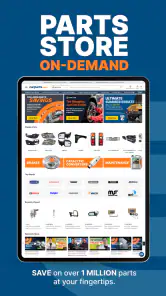
One of the standout features is its extensive catalog. From brakes to bumpers, and everything in between, if it’s a part your car needs, chances are this app has it. The categorization is on point, and searching for parts is as breezy as a Sunday morning drive. Plus, they offer parts for a variety of car models, making it versatile for different users.
User-Friendly Interface
Let’s not forget about the interface. It’s clean, straightforward, and doesn’t bombard you with unnecessary ads or pop-ups. Navigating through the app feels like a smooth ride down a freshly paved highway. The search function is robust, and filtering results is a cinch, allowing you to zero in on exactly what you’re looking for.
Price Comparisons and Deals
Now, who doesn’t love a good deal? The app offers price comparisons that let you see if you’re getting the best bang for your buck. Plus, they often have deals and discounts that can save you some serious cash. I’ve found myself checking out their clearance section more times than I care to admit!
Ease of Ordering and Delivery
Ordering through the app is as simple as it gets. You don’t have to jump through hoops to get your parts delivered. Just a few taps, and you’re done. They offer various shipping options, so whether you need it ASAP or can wait a few days, they’ve got you covered. My orders have always arrived on time, and the parts were exactly as described.
Using the catalog without rushing a decision
I get the most value from a parts catalog when I treat it as a comparison workspace, not just a checkout shortcut. If I am replacing a visible exterior piece, I would use the vehicle information and item description to narrow the search, then compare the listing details with the part already on the car. A photo can help me recognize the general shape, but it is a poor substitute for checking connector style, side, finish, or other distinctions that may matter for a particular repair.
That is also why I would avoid opening several nearly identical results and relying on memory to tell them apart. I would keep a short note of the exact product name or part number I am considering, then return to it after checking the repair estimate or asking the person doing the work. This is a simple habit, but it reduces the chance of confusing a left-side item with a right-side one or overlooking a description that changes the intended application.
A useful routine for planned repairs
For a repair that is not urgent, I would split the job into two short sessions. First, identify the needed component and use the app to see what options appear for the vehicle. Then, before committing, verify the repair terminology and fitment with a trusted source, such as the old part or the technician’s written estimate. Coming back with that confirmation is less stressful than trying to make a final decision while standing beside a disabled car.
This approach particularly suits maintenance planning. If a mechanic flags a worn or damaged component but the vehicle remains usable, I can compare possible replacements at home and ask focused questions before ordering. It is less helpful when the repair diagnosis itself is uncertain: searching multiple part names may produce more shopping results without making the underlying fault any clearer.
Choosing between online browsing and local help
Against a general online marketplace, a specialist auto-parts app has a clearer purpose: helping me look for vehicle parts rather than sorting through unrelated goods. That focus is useful once I know what I need. A local counter still has an advantage when I want a person to look at a part, discuss an ambiguous name, or help me avoid a mismatch face to face. Neither route is automatically better; the right one depends on whether my biggest problem is finding options or confirming the repair.
I would also factor in the cost of a wrong choice, not just the displayed price. For a low-risk cosmetic replacement, comparing listings may be a reasonable first step. For a component that affects safe operation, or one whose fitment details I cannot interpret, I would prefer professional confirmation before buying. A focused catalog can make shopping easier, but it does not turn a complicated repair into a simple one.
What I would check if results seem off
If the results look unrelated or unexpectedly narrow, I would first revisit the vehicle information and make sure I am using the name of the part rather than a symptom. A noise, warning light, or handling change can have several possible causes, so searching for a guessed replacement may send me down the wrong path. I would then try a common alternate term for the component, or browse its broader part category, while keeping the intended vehicle details consistent.
If the app itself behaves unexpectedly, I would take ordinary steps before assuming the catalog is at fault: close and reopen it, check that the phone has a working connection, and confirm the installed version is current for the device. On Android, the listed minimum operating system is version 7.0, so I would check compatibility if an older device has trouble installing or running it. These checks cannot resolve a product-fitment question, but they can help separate a basic app or connection issue from a search problem.
Who will get the most from it
I think this is a sensible option for an owner who already has a fairly clear repair list and wants to browse parts from a phone. It can also be useful for someone comparing a few possible replacements before discussing the choice with a mechanic. CarParts.com, from developer Carparts.com, is free to use, and its 4.7 average across roughly 8,500 ratings suggests that many users have found it worthwhile. Its Everyone age rating makes it suitable for a broad audience, though the practical value still depends on how confidently a person can identify the right component.
I would be more cautious recommending it to a first-time car owner who has only a symptom and no diagnosis, or to someone who needs a part immediately and cannot wait for an online order. A shop employee or technician can ask follow-up questions and inspect the vehicle in a way a search screen cannot. The app makes the most sense when I bring the right information to it; it is not a replacement for that information.
What to expect before checkout
People often want to know whether browsing is enough to guarantee the right part. I would not read any fitment assurance as a reason to skip the item-level checks: confirm the vehicle selection, read the product description carefully, and compare any identifying details you have. If anything conflicts, stop and get clarification rather than hoping the discrepancy does not matter. That extra minute is especially worthwhile when returning a wrong component would disrupt a repair schedule.
Another practical question is whether it is a good choice for a repair being done by a shop. It can be useful for researching options, but I would ask the shop first whether it accepts customer-supplied parts and whether it has a preferred specification. If the shop is supplying the part, browsing can still help me understand the terminology and discuss the estimate, without creating an avoidable mismatch between what I order and what the repair requires.
In conclusion, CarParts.com is more than just an app; it’s a trusty sidekick for anyone who loves their car and wants to keep it in tip-top shape without breaking the bank. It’s reliable, easy to use, and packed with features that make finding and ordering parts a breeze. If you haven’t already, give it a whirl and see for yourself. Trust me, your car (and wallet) will thank you!
CarParts.com Frequently Asked Questions
Can I check whether a part fits my vehicle before ordering?
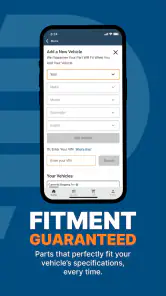
Fitment is central to the CarParts.com experience: the app is presented as a way to find parts for a specific vehicle, with vehicle make, model, and year used to help identify compatible options. Its summary highlights guaranteed fitment, so it is worth checking the vehicle details carefully before choosing a product. This can help narrow the search and reduce the chance of selecting the wrong part.
What is CarParts.com and how does it work?
CarParts.com is an online platform designed to help users find and purchase a wide range of automotive parts and accessories. The app provides a user-friendly interface where customers can search for parts by vehicle make, model, and year, ensuring compatibility. The app offers quick shipping options and a seamless checkout process, making it a convenient tool for both professional mechanics and DIY enthusiasts.
Is CarParts.com available on both Android and iOS devices?
Yes, CarParts.com is available for download on both Android and iOS devices. The app can be found on the Google Play Store for Android users and the Apple App Store for iOS users. This cross-platform availability ensures that users can access the app's features and order parts regardless of their preferred mobile operating system.
Are there any costs associated with downloading or using CarParts.com?
Downloading the CarParts.com app is completely free for both Android and iOS users. There are no hidden fees or subscription costs associated with using the app. Users only need to pay for the parts and accessories they purchase through the platform. The app also frequently offers promotions and discounts, providing additional savings opportunities for customers.
How reliable is the inventory and product quality on CarParts.com?
CarParts.com prides itself on providing a vast inventory of high-quality automotive parts from reputable manufacturers. The app's database is regularly updated to reflect real-time inventory levels, ensuring that users have access to the latest products. Additionally, customer reviews and ratings are available for each product, helping users make informed purchasing decisions based on the experiences of other customers.
Pros
- User-friendly interface for easy navigation.
- Wide range of car parts available.
- Competitive pricing and discounts.
- Fast shipping with tracking options.
- Responsive customer service team.
Cons
- Limited payment options available.
- Some parts may be out of stock.
- No international shipping available.
- Occasional website slowdowns.
- Returns process can be cumbersome.

- Category
- Auto & Vehicles
- Version
- 1.0.8











