Best Bowling
- 9.00
- 4.0
- Installs
- 1.00K
- Price
- $4.99

Screenshots
Analysis by Reviewed
Before treating this as a bowling game, it helps to know what it is actually meant to do: Best Bowling is a scorekeeping app for people who play the sport in person. That distinction changes the recommendation. I’d reach for it after setting up at a real lane, not when looking for animated throws, virtual tournaments, or a phone-based substitute for bowling.
A focused tool for keeping a real score
Built by Wasabi Applications (わさびアプリ), this sports app is aimed at bowlers who want to manage scores without relying on paper or asking one person in the group to keep everyone’s frame straight. Its simple purpose is also its main strength: during a casual night out, you can keep attention on the game and let the phone handle the arithmetic.
For example, imagine a few friends meeting after work. Rather than passing a score sheet around or trying to remember a spare while the next player is ready, one person can use the app to track the game as it unfolds. That is most useful when the group is chatting, players take turns at different speeds, or someone wants to compare how the evening went afterward.
Who benefits from a dedicated scorecard
I see the clearest fit for people who bowl often enough that scorekeeping has become a small recurring annoyance. If your group takes turns entering frames on paper and then debates whether a spare was recorded correctly, a dedicated app can make that part of the evening feel less fiddly. It is also a reasonable choice for the friend who naturally keeps score and wants a consistent method instead of carrying a notebook.
There is a trade-off, though: one person still needs to operate the phone. Before starting, I’d agree who is entering scores and keep the device with that person, rather than passing it around after every turn. That simple decision avoids interruptions and makes it easier to catch an entry mistake before the next player’s result is added.
For a group that wants everyone to follow along at a glance, a lane display or a large paper score sheet may be more sociable. A phone is convenient for the person holding it, but it is not automatically the best shared surface. I would choose this app when the priority is having one tidy record, not when the whole group needs to read the score from across the seating area.
What the current release tells me
The app is currently at version 1.5.3, following its December 20, 2017 release. That gives it a long-standing presence, but a version number alone does not tell me which changes were made or how frequently the app has been updated. I would not mistake its age for proof that it is either neglected or actively evolving.
More From Our News Desk

Weather by Xiaomi Review: Clear at a Glance, Less Clear Up Close

X Under Pressure: Can It Recover When Posting Goes Wrong?

Clash of Clans Is Won Between the Battles

Android Auto Makes the Case for Quieter Car Software

MobiOffice: Transforming Mobile Productivity with Seamless Integration

EA SPORTS FC™ Mobile Soccer: Redefining Mobile Sports Gaming
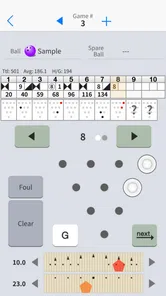
For someone already using it, a scorekeeping tool can become part of a familiar routine: start a game, enter each player’s progress, and check the result at the end. The practical benefit is consistency, not a new way to bowl. If you are considering switching from a notebook or another scoring method, the key question is whether the app’s entry flow feels quick enough to use between turns.
What I can say about its evolution is limited but useful: the current release number provides a reference point for checking compatibility and identifying the version on a device. It does not, by itself, establish what changed between releases. Existing users should judge the app by whether their established scorekeeping routine still works smoothly, rather than assuming a new version necessarily means new capabilities.
Its store rating is a 4.0 average from 68 ratings, while 1K+ installs suggest a smaller audience than the big mainstream sports titles. It costs $4.99 and is rated for Everyone; on Android, it requires version 6.0 or later. Those details make it worth deciding whether you will use a dedicated score manager regularly before paying, rather than assuming a bowling-themed app is automatically a game.
What the price should mean in practice
Because this is a paid download, I would make the decision based on repeated use, not on the novelty of trying a bowling app once. Think about how often you bowl, whether you usually keep the score yourself, and whether writing scores down currently causes mistakes or slows the group. If the answer to those points is yes, paying for a focused tool may feel worthwhile; if bowling is an occasional outing, paper is a perfectly sensible alternative.
The age rating is Everyone, which makes the app suitable in that broad content-rating sense for a family bowling night. That does not change the practical question of who will handle the phone. If children are taking turns, I would have an adult or one designated scorekeeper enter results so the device does not become another object being passed around between throws.
Where it fits—and where it doesn’t
Compared with a paper score sheet, a phone-based scorekeeper can reduce manual calculation and keep the current game together in one place. Compared with a general notes app, it is purpose-built for bowling scores. But a paper sheet is free, easy to share across the table, and independent of battery life; if you bowl only once in a while, that may be the more sensible choice.
There is also a practical distinction between a dedicated scorekeeper and the scoring display already available at a bowling venue. A lane display is often easier for the entire group to see, while a personal app can be useful when you want to manage the score on your own device. I would not treat one as a guaranteed replacement for the other; the better choice depends on whether you value shared visibility or keeping your own score record close at hand.
I’d recommend this to regular recreational bowlers who want a dedicated way to follow scores, especially if they often play with the same group and value a repeatable routine. I’d skip it if you are shopping for a bowling simulator, social competition, lane-finding, coaching, or broad sports tracking. A scorekeeping tool should not be expected to replace those different needs.
Rolling into the Gameplay
The first thing that caught my attention was how intuitive the game mechanics are. You don't need to be a bowling pro to get the hang of it. The controls are smooth and responsive, allowing you to flick your finger to roll the ball down the lane. It's almost like you're actually there, feeling the weight of the ball in your hand!
The graphics in Best Bowling are pretty impressive too. The developers didn't skimp on the details, from the polished lanes to the shine on the bowling balls. And the sound effects? Spot on. Hearing that strike is as satisfying as in real life, if not more!
Features That Stand Out
What makes this app a standout are its various modes and challenges. Whether you want to play a quick game or dive into a tournament, Best Bowling has you covered. I personally enjoyed the challenge mode, which tests your skills with tricky pin setups. It's a great way to improve your game and keep things interesting.
Another feature worth mentioning is the customization options. You can personalize your bowling ball and even the alley. It might seem like a small detail, but it adds a nice personal touch to the game. Plus, who doesn't love showing off a snazzy-looking ball?
Multiplayer mode is where the app really shines. You can compete with friends or players from around the world. It's thrilling to see your name climb up the leaderboard, and the friendly competition keeps you coming back for more.
The Final Frame
After spending some quality time with Best Bowling, I can confidently say it's a strike in the mobile gaming world. Whether you're a seasoned bowler or just looking for some fun, this app delivers on all fronts. The engaging gameplay, coupled with fantastic features and multiplayer action, makes it a must-try.
If you're ready to roll, you won't want to miss out on Best Bowling. It's available for both Android and iOS, so grab your virtual bowling shoes and hit the lanes!
Making scorekeeping work in practice
A useful habit with any digital scorecard is to enter each frame as soon as it is completed, rather than trying to reconstruct several turns at the end. That keeps the score current and makes it easier for the group to catch a missed or mistyped result while the details are fresh. I’d also decide in advance who is entering scores; passing one phone between players can interrupt the rhythm more than a shared paper sheet.
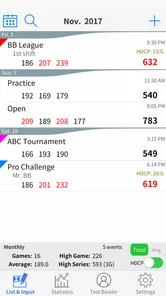
If you bowl with a mix of beginners and experienced players, a dedicated score manager can make the game easier to follow without making anyone responsible for mental arithmetic. It is also handy for a bowler who wants to compare sessions from memory, although I would treat any comparison as informal unless the app’s available record-keeping options suit the way you want to track your games.
One small workflow choice can make the session noticeably calmer: enter the result at a natural pause, before the next player starts, instead of waiting until the group has moved on. That gives the scorekeeper a chance to confirm the frame with the bowler while everyone remembers what happened. If the group is moving quickly, I would keep entries simple and avoid turning every turn into a discussion about the app; the point is to reduce scorekeeping friction, not create a second activity.
For a player who likes to review how a night went, a useful habit is to note the context mentally along with the score: who was playing, whether it was a relaxed session, and whether the group used the same scoring method throughout. A number on its own can be easy to misremember later, while a consistent routine makes comparisons more meaningful. I would not rely on a scorekeeper to provide coaching or explain why a game went well; its practical role is to keep the result organized.
Questions worth settling before paying
The main practical question is whether this is a tool for use at a bowling alley or a game to play on your phone. Its stated purpose is managing bowling scores, so I would approach it as a companion to real-world play. The next question is whether it suits your group: if everyone wants to see the score at once, a phone may be less convenient than a visible lane display or a paper card passed around.
Another consideration is the purchase. At $4.99, I’d weigh the cost against how often I bowl and whether replacing manual scorekeeping would genuinely make those visits easier. The app has a 4.0 average and 9 reviews, which offers some context but is not a reason by itself to assume it will match every player’s preferences. I would check that its current version, 1.5.3, is compatible with the Android device I plan to use before installing; Android 6.0 is the stated minimum.
That compatibility check is especially worth doing before a bowling night if the phone is older or has not been updated in a while. I would also make sure the device has enough charge for the outing and decide in advance whether the scorekeeper will use their own phone throughout the game. Those are ordinary preparations, but they matter more for a tool used beside a lane than they do when casually trying an app at home.
If you are already comfortable with paper, the change is not automatically an upgrade. The strongest reason to switch is avoiding repeated arithmetic and keeping the current game in one place; the strongest reason to stay with paper is that it is immediately visible and requires no phone at all. I would choose based on which annoyance you actually encounter, rather than expecting a digital scorecard to improve the bowling itself.
A measured recommendation
My practical advice is to try a short game with one person entering scores and see whether the process stays out of the way. If it does, this focused sports utility could be a worthwhile alternative to paper for regular bowlers. If you need a digital record that multiple people can comfortably share, or you mainly want the sights and sounds of a virtual bowling game, I’d choose a different option. Best Bowling makes the most sense when its narrow job—keeping a real game’s score—is exactly the job you need done.
I would also keep expectations tied to that narrow purpose. This is a paid sports utility from Wasabi Applications, not something I would buy expecting animated lanes, online opponents, or training advice. Its rating and modest install base give a little perspective on its audience, but they do not settle whether the workflow suits your group; a real session is the best test of whether recording scores on one phone feels easier than your current method.
For me, the deciding test is straightforward: if I bowl regularly and want a dedicated way to manage a real game, this is a plausible option to consider. If I bowl rarely, rely on a venue’s display, or want a game to play while away from the lanes, I would save the money and choose a tool that matches that purpose. The best reason to install it is that scorekeeping itself is the problem you want to solve.
Best Bowling Frequently Asked Questions
What does Best Bowling help me do during a bowling session?
Best Bowling is a sports app from Wasabi Applications (わさびアプリ) for managing bowling scores. Its store summary describes it as a tool for keeping track of your bowling score, making it a practical choice if you want a dedicated place to record your games. It is called Best Bowling and is listed for everyone.
What is Best Bowling?
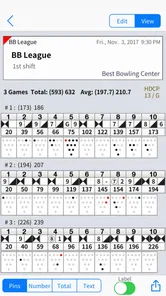
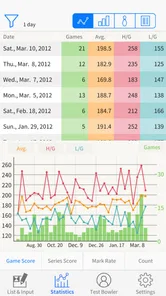
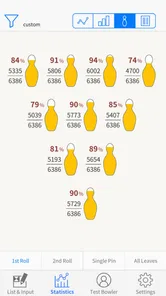
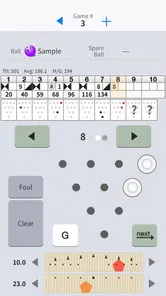
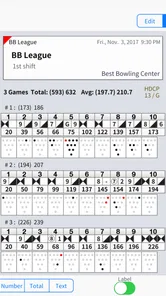
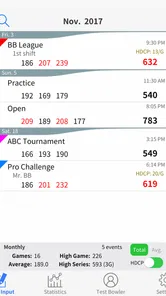
Best Bowling is a mobile application designed for bowling enthusiasts, offering a comprehensive platform to track your bowling scores, analyze your performance, and improve your game. It provides features like frame-by-frame scoring, statistics tracking, and detailed reports to help you refine your bowling skills.
How can I track my bowling scores with Best Bowling?
Best Bowling allows users to track their scores through an intuitive frame-by-frame scoring system. You can easily input your scores during or after a game, and the app will automatically calculate your total score and provide detailed statistics. This feature helps bowlers monitor their performance over time and identify areas for improvement.
Is Best Bowling suitable for professional bowlers?
Yes, Best Bowling is suitable for both amateur and professional bowlers. The app offers advanced tracking features and in-depth performance analysis, making it a valuable tool for professionals who want to fine-tune their skills. It provides comprehensive stats and reports that can be used to strategize and enhance your gameplay.
Can I use Best Bowling to track multiple bowlers?
Yes, Best Bowling supports tracking scores for multiple bowlers. This feature is ideal for group games or family bowling nights, allowing each participant to have their scores recorded and analyzed separately. The app makes it easy to switch between different players and view individual performance statistics.
Pros
- User-friendly interface enhances experience
- Realistic physics for true bowling feel
- Multiplayer mode for competitive play
- Variety of alleys and balls available
- Regular updates with new features
Cons
- Ads can be intrusive during gameplay
- Limited free features without purchases
- Requires stable internet for best play
- Occasional bugs in multiplayer sessions
- Some alleys need in-app purchases





