

Words with EZ Cheats
- 49.00
- 3.8
- Installs
- 10.00K
- Price
- Free

Screenshots
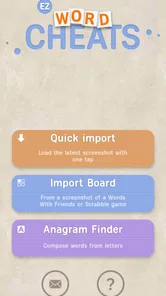
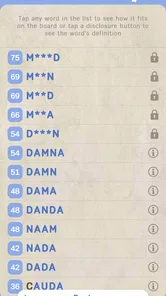
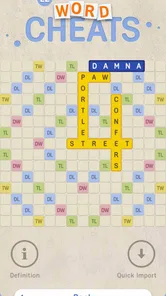
Analysis by Reviewed
Words with EZ Cheats is a focused word-game companion from Games Extras, built around the simple idea of helping you find playable words in WWF. I approached it as a practical tool rather than a traditional game, and that distinction matters: it is most useful when you are stuck on a board and want help interpreting the letters you already have. The app is free, rated for Everyone, and sits in the word category, so it is easy to understand even if you have never used a helper of this kind before.
My first impression was that the appeal comes from speed and convenience rather than presentation. The store summary calls it an OCR cheat for WWF, while its short description presents it as a way to get word help quickly. In everyday use, that means the important question is not whether it replaces the word game, but whether it reduces the annoying pause between seeing a difficult board and deciding what to play. For occasional assistance, it can do that well. For players who want to solve every rack unaided, however, the experience can feel less satisfying.
How I used Words with EZ Cheats in a normal match
The most sensible baseline workflow is to treat the app as a second pair of eyes. I would first look at the board and my rack, identify the area where I was genuinely blocked, and only then open the helper. That order keeps the tool from becoming an automatic button for every turn. It also makes the result more useful because I already have a theory about the best opening, the valuable square, or the awkward letter that needs attention.
Because the app is centered on OCR, the practical step is getting a readable view of the relevant game screen. A cluttered board, small letters, unusual tile colors, or an obstructed section can make any recognition-based workflow less comfortable. I found it better to pause and frame the board clearly than to rush through repeated attempts. This is one of the first habits that separates a smooth session from a frustrating one: clean input is more important than frantic tapping.
A realistic example is a late-evening match when I have a rack containing several common consonants but no obvious word. Instead of repeatedly rearranging the same letters, I check the board for open hooks and short extension opportunities, then use the helper to broaden my view. The result is not just a suggested answer; it gives me a prompt to inspect words I might otherwise overlook. Afterward, I still compare the candidate with the board and the scoring opportunities before committing to it.
That final check is essential. A word helper can point toward a playable word, but the strongest move is not always the longest word. In WWF, placement, premium spaces, existing letters, and future rack balance can matter as much as vocabulary. I would never copy the first attractive result without checking whether it opens a better lane for the opponent or wastes a valuable board square.
The app is particularly useful for learning how small words fit into a board. Beginners often search only for long, impressive combinations, while experienced players notice two-letter hooks, plural endings, and ways to attach a word to an existing tile. Using the helper selectively can reveal those patterns. I recommend noting why a suggested word works instead of merely entering it. That turns a rescue tool into a modest vocabulary exercise.
More From Our News Desk

 Gmail
GmailGmail in a Busy Inbox: Who Benefits Most?
From first account to crowded workday, Gmail earns its place through dependable search and flexible sorting—but its best fit depends on how much inbox maintenance you can tolerate.

 Prime Video
Switching to Prime Video: What Changes in Your Viewing Routine
Prime Video can make a compelling second home for streaming, but switching means learning a different catalog, rental layer, and route from browsing to playback.

 Universal TV Remote Control
Universal TV Remote Control Works Best as a Reliable Backup
A phone remote earns its place through quick setup and reliable habits. Here is how to get more from Universal TV Remote Control—and where its limits show.

 Weather - By Xiaomi
Weather by Xiaomi Review: Clear at a Glance, Less Clear Up Close
Xiaomi’s weather app makes everyday forecasts quick to scan, but its calm surface can leave useful details and recovery paths harder to find than they should be.

 X
XX Under Pressure: Can It Recover When Posting Goes Wrong?
A resilience-focused review of X, examining setup, mistaken posts, interruptions, weak connections, and the gaps that matter when recovery needs to be dependable.

 Clash of Clans
Clash of Clans Is Won Between the Battles
Its raids are quick; its community is a long-term project of coordination, teaching, rivalry, and shared responsibility—with all the friction that entails.
Latest News



The right role for OCR assistance
OCR support is most helpful when the board is already visible and the problem is reading or processing it quickly. It is less useful as a substitute for understanding the board. Before relying on a result, I check that the letters were interpreted correctly and that the proposed placement matches the actual open squares. A single misread tile can send the search in the wrong direction, especially when letters such as I, L, and T are close together on a small display.
This is also why I would not use it as a background process during every turn. The best rhythm is: inspect, attempt your own solution, use the tool when stuck, verify, and return to the match. That sequence preserves some of the mental challenge while still removing the most tedious dead ends. It is a better compromise than either refusing all assistance or handing every decision to the app.
Settings and preparation that are worth checking
There is no reason to begin with an elaborate setup. I would first make sure the phone is running a compatible system, since the app supports Android 8.0 and later. Then I would open the app before an important match and become familiar with the basic path from the game screen to the word search. Learning that route in advance is more valuable than discovering it while a timed or competitive turn is waiting.
Screen visibility deserves attention too. Increasing brightness, clearing visual clutter, and holding the phone steady can improve the usefulness of an OCR-based tool without changing anything inside the app. If the game board is compressed into a small window, rotating or resizing the view may make letter recognition easier, provided the game itself supports that arrangement. These are simple adjustments, but they reduce false starts.
I also recommend deciding how much help you actually want before playing. One approach is to use the app only when you cannot find any legal move. Another is to ask for assistance after forming a candidate, using it as a check rather than a replacement. A third is to use it after the match to study missed opportunities. The third method is the least disruptive to competition and, in my view, the most educational.
That choice matters because the app is free, which removes a financial barrier but not the question of fairness. If you are playing casually with friends, agree on whether helpers are acceptable. If the match is intended to test personal vocabulary or strategic skill, constant assistance changes the nature of the game. I would be comfortable using it for practice, recovery from an unusually difficult rack, or learning; I would be more cautious in any setting where independent play is the point.
The current version is 7.5.0, so I would still keep the app updated through the normal platform process rather than assuming that an older installation will behave identically forever. More importantly, I would test it with the particular WWF screen layout I use. Small changes in display scaling or board presentation can affect how comfortable OCR feels, and a quick trial is better than relying on assumptions.
Shortcuts that make repeated use less tiring
The fastest users are not necessarily the ones who search most often. They are the ones who prepare a repeatable routine. I keep the game open, identify the exact board area that matters, and avoid switching back and forth without a purpose. If I already know that a particular rack has a promising hook, I inspect that manually before asking the helper to do broader work.
Another useful shortcut is to search for the smallest useful answer first. Short words can unlock several placements and often expose a path for a longer word. Looking only for the maximum-length result can hide the strategic value of a compact play. When the helper presents possibilities, I compare them by board impact, not just by letter count.
I also separate vocabulary problems from placement problems. If I know the best square but cannot see a word, a focused search is appropriate. If I know several words but cannot decide where to place them, I use the app only as a vocabulary check and spend my attention on the board. This prevents the tool from becoming a distraction when the real issue is strategy.
A third habit is keeping a small mental list of recurring patterns. When I notice a useful two-letter combination, a common ending, or a way to attach a letter to an existing word, I try to remember it for the next match. The helper becomes more valuable when each use leaves something behind. Otherwise, it solves the immediate turn but does nothing for the next difficult rack.
For players who use the app regularly, reviewing the reason behind a missed move is more productive than collecting a long list of answers. Ask yourself whether you missed a hook, ignored a premium square, overlooked a plural, or misjudged the value of keeping a flexible vowel. Those questions connect the app’s word-finding purpose with the strategic decisions that it cannot make for you.
Where the app helps, and where it reaches its limits
The main limitation is built into the concept: OCR can assist with recognizing a board, but recognition is not the same as perfect understanding. If the image is unclear or the board is partially hidden, you may need to correct the situation manually. That extra step can be irritating when you expected an instant answer. I would consider this a normal trade-off for a tool that works from what is shown on screen.
Another limit is that a word suggestion does not automatically explain the quality of a move. The app can help with the vocabulary gap, but it does not replace judgment about defense, board control, or rack management. Someone who wants a complete strategic coach may prefer a more analytical word-game platform. Someone who only needs quick help with difficult letters may find a full coaching system unnecessarily heavy.
There is also a motivational limit. If every hard turn is solved externally, the original word game becomes more like a verification exercise. That may be exactly what a casual player wants, but it is not ideal for someone trying to strengthen recall. I would skip this app if my main goal were a pure, uninterrupted vocabulary challenge. I would also skip it if I wanted detailed lessons, progress tracking, or a deep explanation of why one move beats another, because its identity is much narrower.
Compared with a dictionary, Words with EZ Cheats is more directly tied to the board situation. A dictionary is better when I want definitions, spelling context, or a deeper understanding of a word. Compared with manually shuffling tiles, this app is faster when the obstacle is simply seeing possibilities. Compared with a general anagram solver, its OCR-oriented approach is more convenient for a visible WWF position, while a manual solver can be more flexible when I only have letters written down.
Those alternatives are not competitors in every situation. I would use a dictionary to learn, a manual solver to practice, and this app when the board itself is the bottleneck. The best choice depends on whether I want knowledge, training, or immediate assistance. That is the clearest way to understand its value: it is a specialized shortcut, not a universal replacement for every word tool.
Who should install it
Words with EZ Cheats makes the most sense for casual WWF players who occasionally hit a wall, users who want to explore possible words from a difficult board, and learners who are willing to examine the answers they receive. Its Everyone age rating also makes the presentation approachable for a broad audience, though the question of whether to use a cheat remains a personal and social choice rather than a technical one.
I would especially recommend it to someone who gets annoyed by spending several minutes staring at the same rack but still wants to make the final placement decision themselves. Used in that limited role, it removes friction without completely removing thought. It can also help a returning player rebuild confidence after a long break from word games.
I would not recommend making it the center of every match. Players who enjoy the satisfaction of recalling words unaided should keep it for post-game review or rare emergencies. Competitive users should consider the rules and expectations of the people they play with. And anyone looking for a full dictionary, detailed definitions, or strategic analysis should choose a broader tool instead.
My verdict after building a repeatable routine
With an average rating of 3.8 from around 222 ratings and roughly 10K-plus installs, the app has found a modest audience without feeling like a huge, all-purpose word platform. Those figures suggest a niche utility rather than a mainstream game, which matches my experience: its value is clear when the specific problem is finding words from a WWF board, but it does not try to be more than that.
Games Extras has kept the concept straightforward. I like that the app can fit into a disciplined workflow: try first, use OCR assistance when necessary, verify the board, and learn from the result. The strongest practical insight is that speed comes from preparation and consistent habits, not from repeatedly pressing a search button. Clear screenshots, deliberate checks, and attention to short board-changing words make a bigger difference than rushing.
My final recommendation is therefore conditional but positive. If you want a free, focused word helper for difficult WWF turns, Words with EZ Cheats is worth trying. Use it as a safety net and a learning aid, not as an automatic replacement for your own decisions. When I follow that rule, the app feels useful and unobtrusive. When the goal is independent mastery or detailed word education, a dictionary, manual practice, or a strategy-focused alternative is the better choice.
Words with EZ Cheats Frequently Asked Questions
Who developed Words with EZ Cheats, and what kind of app is it?
Words with EZ Cheats is a word-game app developed by Games Extras. Its focus is helping players work through letter-based puzzles by finding possible words from the letters they have. That makes it useful both as a quick helper during a difficult round and as a way to explore vocabulary or check possible word combinations while playing.
What devices can run Words with EZ Cheats?
Words with EZ Cheats is available for Android devices running Android 8.0 or later. Before downloading, check the operating system version on your device to make sure it meets that requirement. The app is free to download and is rated for Everyone, so it may suit a broad range of players, including people looking for a straightforward word-game helper.
What is Words with EZ Cheats?
Words with EZ Cheats is a word-game helper designed to assist players when they are stuck on a puzzle or want to find stronger word options. You enter the available letters, and the tool suggests possible words based on the selected game or rules. It can be useful for learning vocabulary, checking an anagram, or getting past a particularly difficult round.
How does the Words with EZ Cheats tool work?
The tool generally works by analyzing the letters you provide and comparing them with a word database. Depending on the available options, you may be able to specify blank tiles, word length, prefixes, suffixes, or required letters. After submitting the information, it displays matching words. Results can vary according to the game mode and dictionary supported by the app.
Is Words with EZ Cheats free to download and use?
Words with EZ Cheats is free to download. You can try it without an upfront purchase, which makes it easy to see whether its word-finding approach suits your puzzles. The app has an average rating of 3.8 from 222 ratings, offering a quick sense of how users have responded to it. Review the app details before installing so you know what to expect.
Pros
- Simple interface makes it easy to start playing quickly.
- Helpful hints can assist when you get stuck on difficult words.
- Short rounds are convenient for quick
- casual play sessions.
- Word challenges can support spelling and vocabulary practice.
- Suitable for solo play without requiring a constant internet connection.
Cons
- Some puzzles may feel repetitive after extended play.
- Difficulty can vary noticeably between consecutive levels.
- Hints may reduce the challenge for players seeking pure wordplay.
- Small screens can make longer word grids harder to scan.
- Ads may interrupt gameplay
- depending on the app version.











