

WordFinder by YourDictionary
- 1.63K
- 4.5
- Installs
- 500.00K
- Price
- Free

Screenshots

Analysis by Reviewed
I opened WordFinder expecting a simple word-game helper, and that is exactly where it makes the most sense: as a quick companion when I am stuck in a word puzzle or want to check which letters can produce a playable answer. It is a free word game in the category of word tools, developed by LoveToKnow Media, with a 4.5 average from around 6,500 ratings and roughly 1,600 written reviews. More than 500,000 people have installed it, which gives it a useful track record without making it feel like an overwhelming, all-purpose app.
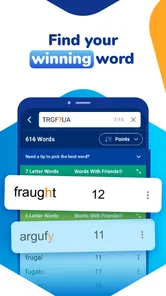
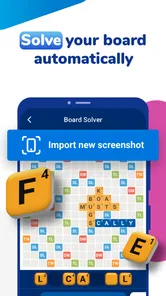
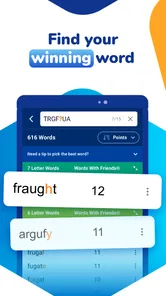
The central idea is straightforward. I enter the letters I have, use the available options to narrow the search, and look through possible words for games such as Words With Friends, Scrabble, and similar challenges. That makes it less like a standalone game and more like a practical assistant for word-game sessions. It can help when my vocabulary fails me, but it can also be used as a learning tool if I pause to understand why a suggested word works instead of copying the first result.
How WordFinder fits into real word-game sessions
The most useful way to think about this app is as a bridge between a board game and a dictionary. In a typical round, I may have an awkward group of letters, a limited number of spaces, or a promising word that does not seem to fit the rules. Rather than searching the internet manually, I can use a focused word finder designed around that exact problem. The difference is small in theory, but valuable when I am playing on a phone and want an answer without opening several unrelated pages.
I found the app especially suitable for short interruptions in the day. If I am waiting for a bus and receive a move in a word game, I can check possible combinations quickly and return to the match. It also works for a more deliberate session at home, where I might compare several options rather than accept the first word that appears. That flexibility is important because not every user wants the same kind of help: some want speed, while others want to explore language.
The app's store summary positions it as a solver and cheater for Words With Friends, Scrabble, and more. I would treat the word “cheater” as a warning about how I use it, not as a reason to dismiss it. Using a solver during a competitive match can remove the challenge and make a win feel hollow. On the other hand, using it after a move to examine missed possibilities, learn unfamiliar words, or prepare for a casual game can make the experience more educational. The value depends heavily on whether I use the answers to improve or simply to bypass the puzzle.
What I can do with the letter search
The basic workflow is easy to understand: I provide the letters available to me, then inspect the words that can be formed. This is more helpful than a general dictionary search because the problem is usually not “What does this word mean?” but “What can I build from this exact rack?” A solver built around letter combinations saves the mental effort of testing every arrangement myself.
A less obvious benefit is that I can use it to study patterns rather than individual answers. When I see several words sharing a suffix, a short prefix, or an unusual letter pairing, I start noticing structures that are useful in later games. I would not expect the app to replace serious vocabulary study, but repeated use can make common word-building habits more visible. For me, that is a better long-term use than treating every search as a one-time rescue.
More From Our News Desk

 Gmail
GmailGmail in a Busy Inbox: Who Benefits Most?
From first account to crowded workday, Gmail earns its place through dependable search and flexible sorting—but its best fit depends on how much inbox maintenance you can tolerate.

 Prime Video
Switching to Prime Video: What Changes in Your Viewing Routine
Prime Video can make a compelling second home for streaming, but switching means learning a different catalog, rental layer, and route from browsing to playback.

 Universal TV Remote Control
Universal TV Remote Control Works Best as a Reliable Backup
A phone remote earns its place through quick setup and reliable habits. Here is how to get more from Universal TV Remote Control—and where its limits show.

 Weather - By Xiaomi
Weather by Xiaomi Review: Clear at a Glance, Less Clear Up Close
Xiaomi’s weather app makes everyday forecasts quick to scan, but its calm surface can leave useful details and recovery paths harder to find than they should be.

 X
XX Under Pressure: Can It Recover When Posting Goes Wrong?
A resilience-focused review of X, examining setup, mistaken posts, interruptions, weak connections, and the gaps that matter when recovery needs to be dependable.

 Clash of Clans
Clash of Clans Is Won Between the Battles
Its raids are quick; its community is a long-term project of coordination, teaching, rivalry, and shared responsibility—with all the friction that entails.
Latest News



Another practical workflow is to search before committing to a move. If I have several possible plays, I can compare the available words and think about which one leaves a better group of letters for the next turn. The app does not make that strategic decision for me, and that is a limitation as well as a benefit. I still need to understand the board, the scoring opportunities, and the risk of giving an opponent an easy opening. WordFinder helps with word discovery, not the whole game.
Free access and the paid-value question
WordFinder is free to download, so I can try the core experience without paying at the start. That matters for this type of utility because I may only need it occasionally. If I play word games once in a while, free access makes it easy to keep the tool available for those moments when a difficult rack appears. The app also carries an Everyone content rating, so it is presented as suitable for a broad audience rather than a narrowly targeted adult product.
There are in-app purchases ranging from $0.99 to $29.99 per item. I would not describe the app as automatically good value simply because it has optional purchases. The sensible question is whether I use it often enough for any paid element to justify the expense. For a casual player, the free entry point is likely the strongest part of the value proposition. For a frequent player who wants a more convenient or expanded experience, a purchase may be more reasonable, but the decision should come from actual use rather than curiosity.
I also appreciate that the price structure makes it possible to test the app before making a commitment. I can see whether the search process suits my habits, whether the results are useful for the word games I play, and whether I return to it regularly. That trial period is more meaningful than buying based on the name alone. If I only open the tool twice in a month, paying for extras would be difficult to defend; if it becomes part of every game session, the calculation changes.
Where it is more convenient than usual alternatives
The usual alternatives are a paper dictionary, a general web search, or another word-game solver. A paper dictionary can be excellent for learning definitions and usage, but it is slow when I need to test a specific collection of letters. A general search engine can find answers, yet it often requires more careful wording and may return pages that are not designed for the exact game situation. WordFinder is more focused, which reduces that friction.
Compared with simply asking another person, the app is private and available whenever I need it. That sounds minor, but it matters when I am playing late at night or do not want to interrupt someone. Compared with a full dictionary app, its strength is the practical puzzle workflow rather than broad reading. If my main goal is to explore word origins, definitions, pronunciation, or examples, a dedicated dictionary would probably serve me better.
The trade-off is that a focused solver can encourage shallow use. A dictionary invites me to read around a word, while a search tool encourages me to scan a list and move on. I get the best results when I choose a word, then look it up separately or remember it for later. That two-step habit turns a convenience feature into something closer to practice.
Limitations I noticed in the way it should be used
The biggest limitation is not a missing button; it is the temptation to rely on the app too much. If I use it for every difficult turn, I lose the memory-building part of the game. I also become less confident at recognizing useful letter patterns on my own. For friendly matches, that may not matter, but for anyone who enjoys the satisfaction of solving independently, constant assistance can make the game less rewarding.
There is also a difference between finding a word and knowing whether it is the best play. A long word may look impressive but score poorly or consume letters that would be more useful later. A short word may be strategically stronger because it uses a valuable tile or fits a scoring position. WordFinder can support the first stage of that decision, but I still need the game board and my own judgement for the second stage.
I would also skip it if I wanted a complete replacement for a word-game app. This is not the same as playing a full match against another person or a computer. It is a support tool, so users seeking built-in competition, a campaign, or a self-contained puzzle experience should look elsewhere. Its appeal comes from helping with an existing word-game habit, not from creating that habit by itself.
Who will get the most from it
WordFinder is a good fit for people who already play letter-board games and occasionally get stuck. It is also useful for learners who want to see how a small set of letters can produce more possibilities than they first imagined. Parents and children can use the search process as a starting point for vocabulary conversations, provided the adult keeps the focus on learning rather than simply supplying answers.
Competitive players may find it useful for reviewing completed turns. After a match, I can revisit the letters I had and see whether I overlooked a more interesting combination. That approach preserves the challenge during play while still giving me a way to improve. It is one of the strongest use cases because it turns the app into a training aid instead of an automatic move generator.
It is less suitable for someone who rarely plays word games and does not enjoy experimenting with letters. If I have no interest in Words With Friends, Scrabble, or related puzzles, there is little reason to keep a specialized solver installed. A general dictionary would be more versatile for everyday language questions, while a standalone word puzzle would be more entertaining for someone looking for an actual game.
Compatibility and everyday practicality
The app supports devices running Android 7.1 or later, which makes it accessible on many older phones as well as newer ones. Its current version is 7.8.16, so I would still check compatibility on the particular device I plan to use, especially if it is an older handset. In practical terms, this is the kind of app I would keep ready for quick searches rather than open for long reading sessions.
Because the app is free to start and rated for Everyone, it is easy to recommend as a low-risk trial for a household that enjoys word games. The presence of optional purchases means I would pay attention during use and avoid assuming that every convenience is included at no cost. I would first establish whether the free experience solves my actual problem, then decide whether additional spending has a clear benefit.
One tip I would give new users is to avoid searching only for the longest possible word. Try examining shorter options too, especially when the board rewards flexibility. Another is to keep a small note of unfamiliar words that appear repeatedly; that turns spare searches into vocabulary practice. Finally, use the solver after a match at least as often as during one. Reviewing missed combinations is less disruptive to fair play and usually teaches more than copying a result under time pressure.
My buy-or-skip verdict
I would recommend trying WordFinder if I were speaking to a friend who plays word games and wants a fast way to work through difficult letters. The free access is the clearest reason to try it, while the optional purchases make more sense only for people who use the tool frequently enough to notice a real improvement in convenience. I would not buy anything immediately; I would use the free experience first and judge how often it becomes part of my routine.
My final view is positive but measured. This is a practical word-game companion from LoveToKnow Media, not a replacement for vocabulary knowledge, board strategy, or the fun of solving a challenge yourself. It is strongest when I use it to review mistakes, discover patterns, or get unstuck without turning every match into an automated exercise. If that is the role I want, the app earns a place on my phone. If I want a pure game or a full dictionary, another option will be a better fit.
WordFinder by YourDictionary Frequently Asked Questions
Is WordFinder by YourDictionary suitable for beginners?
Yes. Its word-search approach can be useful whether you are new to word games or already know their rules: enter the letters you have and narrow the results using any relevant pattern or word-length filters. The suggestions can also give you a way to explore unfamiliar words. For a more enjoyable learning experience, try working out an answer yourself before checking the app.
What is WordFinder by YourDictionary?
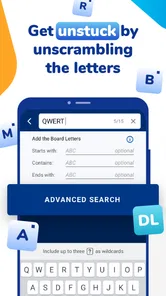
WordFinder by YourDictionary is a word-game helper and vocabulary reference designed for players who need assistance with games such as Scrabble, Words With Friends, and crossword-style puzzles. You can enter available letters, add known patterns or blank tiles, and receive possible words. It is also useful for checking definitions, spelling, word length, and playable word options before making a move.
How does the WordFinder search tool work?
The search tool generally works by combining the letters and conditions you provide. Enter your rack or available characters, then use filters for word length, starting or ending letters, included letters, or blank tiles when supported. The results show matching words, often with definitions and game-related information. More accurate input produces more useful and relevant suggestions.
Is WordFinder by YourDictionary suitable for Scrabble and Words With Friends?
Yes, WordFinder is primarily aimed at people playing popular word games, including Scrabble and Words With Friends. However, the exact words accepted can vary depending on the game, language, dictionary, region, and current rules. Before relying on a result in a competitive match, check that the selected game dictionary or word list matches the rules being used.
Can WordFinder by YourDictionary be used to improve vocabulary?
The app and website can be useful for learning as well as finding answers. Many results include definitions, word lengths, letter values, and related information, allowing you to understand unfamiliar words instead of simply copying them. It can help with spelling, discovering prefixes and suffixes, and expanding vocabulary, although regular reading and independent practice remain important for long-term improvement.
Pros
- Covers Scrabble
- Words With Friends
- and other popular word games.
- Anagram and pattern tools make difficult letter combinations easier to solve.
- Definitions and word lists help verify unfamiliar entries quickly.
- Useful filters let you search by word length
- starting letter
- or ending letter.
- Clean mobile layout works well for quick searches during a game.
Cons
- Some features may be limited or interrupted by advertising.
- Results can feel overwhelming when broad searches return many matches.
- The app is less useful if you need a completely offline word reference.
- Word-game dictionaries may differ from the official rules used in your version.
- Frequent players may find advanced tools require extra taps to reach.











