

Word Solitaire Hotel
- 59.00
- 4.8
- Installs
- 10.00K
- Price
- Free
Screenshots

Analysis by Reviewed
Word Solitaire Hotel is the kind of word game I can open for a few quiet minutes without needing to learn a complicated rule set first. It combines solitaire-style card play with word building and a hotel makeover theme, giving each round a small sense of progress beyond simply clearing a board. I reviewed it as a casual word game from Lotum two GmbH, and my overall impression is that its strongest quality is the way it turns familiar letter play into a more visual, goal-oriented routine.
The basic appeal is easy to understand: I look for useful words, manage the available cards, and gradually contribute to the hotel’s appearance. That combination makes it more inviting than a plain anagram exercise, especially when I want something relaxing rather than intensely competitive. It is free to start, rated for Everyone, and has reached over ten thousand installs, so it sits comfortably in the accessible, pick-up-and-play part of the mobile game market.
How the game feels to read and navigate
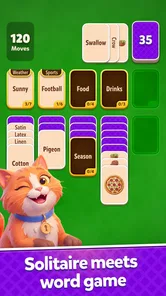
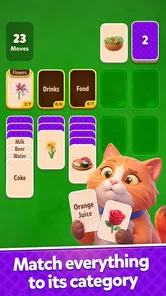
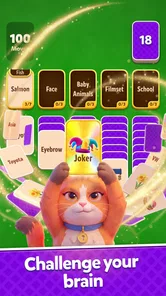
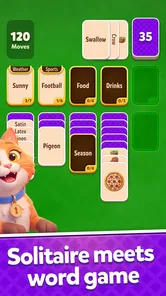
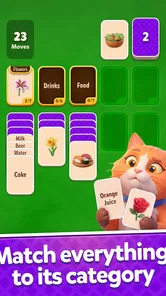
The first thing I pay attention to in a word game is whether the board explains itself without making me stop and search for instructions. Here, the solitaire presentation gives the screen a familiar visual hierarchy: cards are the immediate objects, letters are the material I work with, and the hotel theme provides the wider context. That matters because a player should be able to focus on spotting words instead of decoding a dense interface.
In my experience, the visual structure works best when I treat each round as a short sequence of decisions rather than as a race. I scan the visible letters, identify a word that seems safe, and then check what that move is likely to expose. This habit is useful for players who prefer a measured pace. It also makes the game less intimidating than word puzzles that place a large blank grid in front of you and expect an immediate answer.
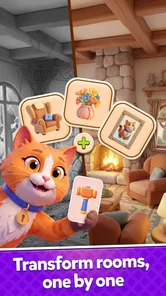
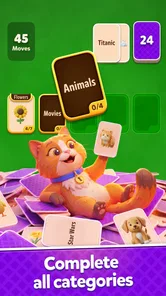
The hotel makeover layer gives successful play a visible destination. I find that helpful on days when a score alone does not feel motivating. Improving a room or property creates a reason to return, while the word challenge remains the activity rather than becoming a separate menu option. The result is a game loop that can appeal to people who enjoy decorating themes but still want a little mental work.
That said, the interface is not automatically ideal for every reader. Word games depend on distinguishing letters quickly, and the card layout can become visually busy when several possible moves compete for attention. Players with reduced vision may need to hold the device closer or enlarge the system display, although changing system text size does not guarantee that every in-game element will scale with it. I would test the opening rounds personally rather than assume the presentation will suit every screen or eyesight level.
A useful approach is to avoid searching randomly across the whole board. I start with the clearest short words, then reassess the newly available cards. This reduces visual scanning and makes the game easier to follow when concentration is limited. It is also a better strategy than immediately chasing the longest possible word, because a spectacular word can sometimes leave less useful cards behind.
More From Our News Desk

 Gmail
GmailGmail in a Busy Inbox: Who Benefits Most?
From first account to crowded workday, Gmail earns its place through dependable search and flexible sorting—but its best fit depends on how much inbox maintenance you can tolerate.

 Prime Video
Switching to Prime Video: What Changes in Your Viewing Routine
Prime Video can make a compelling second home for streaming, but switching means learning a different catalog, rental layer, and route from browsing to playback.

 Universal TV Remote Control
Universal TV Remote Control Works Best as a Reliable Backup
A phone remote earns its place through quick setup and reliable habits. Here is how to get more from Universal TV Remote Control—and where its limits show.

 Weather - By Xiaomi
Weather by Xiaomi Review: Clear at a Glance, Less Clear Up Close
Xiaomi’s weather app makes everyday forecasts quick to scan, but its calm surface can leave useful details and recovery paths harder to find than they should be.

 X
XX Under Pressure: Can It Recover When Posting Goes Wrong?
A resilience-focused review of X, examining setup, mistaken posts, interruptions, weak connections, and the gaps that matter when recovery needs to be dependable.

 Clash of Clans
Clash of Clans Is Won Between the Battles
Its raids are quick; its community is a long-term project of coordination, teaching, rivalry, and shared responsibility—with all the friction that entails.
Latest News



Why the word-and-solitaire combination works
Traditional solitaire usually asks me to think about suits, ranks, and card order. A conventional word puzzle, by contrast, focuses on spelling, vocabulary, and letter placement. This game sits between those two habits. I still get the satisfaction of uncovering and organizing cards, but my decisions are based on language rather than only on numerical sequences.
That difference makes it a good alternative for someone who has grown tired of standard solitaire but does not want a fast action game. It is also less demanding than many competitive word apps because the hotel setting gives the experience a softer, more leisurely identity. If I want a serious vocabulary workout, a dedicated crossword or anagram app would probably offer deeper language analysis. If I want a purely calming card game, classic solitaire may be cleaner. This title is most convincing in the middle ground.
The makeover theme also changes how I judge a failed move. In a bare puzzle, an unsuccessful round can feel like a dead end. Here, the broader hotel project gives the session a more playful frame. I still care about making good choices, but I am not relying entirely on a high score for satisfaction. That is a subtle strength for casual players who enjoy visible progression more than leaderboards.
Motor, sensory, and cognitive considerations
From a motor perspective, a card-based word game is generally easier to approach than a game that demands rapid swipes, repeated tapping, or precise timing. I can make decisions one at a time and keep my attention on the current group of letters. That makes it suitable for relaxed play with one hand in some situations, although the practical comfort depends on the device size and how widely the cards are arranged.
Players with limited dexterity should still watch for accidental selections. Letter cards can be close together, and a small screen leaves less room for a precise touch. My practical advice is to use a stable grip, avoid playing while walking, and pause rather than trying to correct a rushed tap. A stylus may help some people, but I would not assume that every interaction is designed specifically for stylus use.
The game can also work well for people who prefer low-pressure cognitive activity. Finding words exercises recognition and recall, while the solitaire structure encourages planning several moves ahead. I would not describe it as a formal educational tool, and I would not use it as a substitute for a structured language-learning program. Its value is more modest and more enjoyable: it gives me a reason to notice letter patterns while playing at my own pace.
For players who process information more comfortably in small pieces, the best routine is to make one move, wait for the board to settle, and then scan again. Trying to memorize every possible word before touching anything is unnecessary and can make the round feel harder than it is. This is one of the more useful ways to make the game manageable during fatigue or reduced concentration.
Sensory comfort is more complicated. A makeover game naturally relies on visual presentation, and word play requires legible text. Players sensitive to bright colors, animations, or changing scenes should check how the game feels during an ordinary session and use the device’s general brightness or display settings when necessary. Those adjustments can improve comfort, but they cannot replace dedicated in-game controls if a particular visual effect is bothersome.
Sound is another consideration for anyone playing in a shared room, at work, or in a quiet public place. I would begin with the device volume low and then decide whether audio adds anything useful. The game’s central information is visual, so muted play is a sensible option when sound is distracting or unavailable. This also makes it more practical for short sessions in places where headphones are inconvenient.
Readers with dyslexia or other language-processing differences may have a mixed experience. The word-building format can be satisfying because it lets me manipulate individual letters, but it can also make similar-looking characters harder to distinguish. I would not assume that a familiar word game automatically offers specialized support. The fairest way to judge it is to try a few rounds with the display settings that already help you, then see whether the letter presentation remains comfortable.
Using the game in ordinary situations
I can imagine playing it during a short wait at a clinic, on a lunch break, or in the evening when I want something more engaging than scrolling. The round-based structure suits interruptions better than a long narrative game. If someone calls me away, the sensible habit is to stop after a move rather than begin a complicated chain of guesses. That keeps the mental state of the board easier to recover.
It is also a reasonable choice for shared downtime. One person can suggest possible words while another handles the cards, turning the game into a small cooperative conversation even though the core play is individual. This can be useful for families with different gaming preferences: one person gets the word challenge, while another enjoys watching the hotel develop.
For commuters, the main question is not whether the game is entertaining but whether the screen remains readable in changing light and whether touch input feels reliable on a moving vehicle. I would avoid making delicate moves on a crowded bus or train. A stable environment is better, particularly for anyone with tremors or difficulty maintaining a precise touch.
People who need completely predictable offline access should make their decision based on how the game behaves on their own device and connection rather than assuming that every part of the experience will be available everywhere. The same caution applies to anyone with strict data or battery limits. A short test session is more useful than planning to rely on it for a long trip without checking first.
Where the experience still creates barriers
The biggest limitation is that the game’s accessibility depends heavily on visual reading. If I struggle to distinguish letters, follow card positions, or notice changes in the hotel scene, the central loop becomes difficult. A game can be simple to understand and still be hard to use when its most important information is concentrated in small visual elements.
Another barrier is the lack of a truly quiet alternative to visual attention. Word play cannot be transferred entirely to audio without changing the nature of the game, and I would not expect this title to replace a screen-reader-friendly puzzle. Players who need spoken descriptions, highly adjustable contrast, or large dedicated controls should compare it with a word app built specifically around those needs.
The free entry point is helpful, but in-app purchases ranging from less than a dollar to nearly a hundred dollars per item deserve attention. I would keep spending controls in place, particularly if children use the device. The age rating is Everyone, which makes the game broadly approachable, but an Everyone rating does not remove the need for adults to supervise purchases or decide whether the makeover progression is a good fit for a particular child.
There is also a motivational trade-off. The hotel theme may keep me interested after the novelty of the word mechanics fades, but players who dislike decoration and progression layers may find it unnecessary. Someone looking for an endless, minimalist word board could prefer a dedicated anagram game. Someone seeking deep strategic card play may find classic solitaire variants more satisfying. The game’s identity is strongest when both halves—the words and the hotel—sound appealing.
Players who need a completely consistent difficulty curve should approach it with realistic expectations. Casual word games often feel uneven from one board to the next because vocabulary recognition varies from person to person. A round that is easy for one player may be frustrating for another, especially when a familiar word is not immediately visible. I see that as part of the genre’s tension, but it can still be a genuine source of fatigue.
Version 1.6.0 is the current version, and the game supports devices running at least Android 7.1. That gives it a relatively broad technical starting point for Android users, but compatibility alone does not tell me how comfortable it will be on an older handset. Screen size, touch responsiveness, and general performance can affect the experience more than the operating-system requirement suggests.
Who I would recommend it to
I would recommend this game to someone who likes casual word puzzles but wants a stronger sense of place than a plain list of letters. It is especially suitable for players who enjoy gradual visual goals, short sessions, and decisions that reward looking one move ahead. The hotel makeover provides a gentle reason to continue without turning the game into a demanding strategy title.
I would also suggest it to a solitaire fan who wants a change from suits and numbers. The familiar card presentation lowers the learning curve, while the word element gives each move a different kind of purpose. It is a good choice for an evening routine when I want to stay mentally active but do not want a complicated story, competitive match, or timed challenge.
I would hesitate to recommend it as the main choice for someone with significant visual access needs unless the opening play is comfortable with their existing device settings. I would also steer away from it for players who want advanced crossword-style clues, a serious vocabulary curriculum, or a purely offline minimalist experience. Those users may be happier with a specialist app designed around that single priority.
For families, I would explain the purchase model before handing over the device. The game is free to begin, but optional items can cost from $0.99 to $99.99 each. That does not make the game unsuitable for children, yet it does make device-level purchase protection and a clear household rule worthwhile.
My inclusive verdict
After spending time with it, I see Word Solitaire Hotel as a thoughtful casual game rather than a universal accessibility solution. Its strongest inclusive quality is the low-pressure structure: I can approach a board slowly, pause between decisions, mute the device, and play in short bursts. The combination of word recognition and card clearing also gives different kinds of players something to enjoy, whether they are drawn more to language or to visual progress.
Its weaknesses are concentrated in the same place as its appeal. The game needs readable letters, reliable touch input, and enough visual comfort to follow both the cards and the hotel setting. Players who need specialized text presentation or nonvisual interaction may encounter barriers that general device settings cannot fully solve. That is not a reason to dismiss it, but it is an important reason to try it before committing to a long-term routine.
The rating of 4.7 from around 493 ratings suggests that early players have responded positively, while the more modest install base shows that it remains a relatively small title rather than an established giant of the word-game category. I would treat that as a reason to explore it on its own merits, not as proof that it will suit every player.
My final view is favorable with clear qualifications. If you want a free word game that softens solitaire with a hotel makeover and gives you something pleasant to do in short sessions, this is worth trying. The best way to make it work for different abilities is to adjust the playing situation first: use a stable grip, choose comfortable brightness, mute distracting audio, and stop after individual moves when concentration is low. If your priority is specialist accessibility, deep vocabulary training, or completely stripped-back solitaire, another app will likely be a better match.
Word Solitaire Hotel Frequently Asked Questions
What does the hotel makeover add to the word puzzles?
The hotel theme gives the word-and-card puzzles a light progression goal: as you play, you can move through a hotel adventure and give its spaces a makeover. This adds a visual reason to keep progressing beyond clearing individual boards. The central appeal remains connecting letters into words, while the hotel setting provides a casual backdrop for players who like a little decoration and advancement alongside puzzle solving.
Who developed Word Solitaire Hotel, and what kind of game is it?
Word Solitaire Hotel is a word game developed by Lotum two GmbH. Its premise combines familiar solitaire-style card play with vocabulary challenges: you work with letter cards to form words and make progress through a hotel-themed adventure. That blend may appeal to players who enjoy word puzzles but want a format with more structure than a simple word list or crossword.
What is Word Solitaire Hotel?
Word Solitaire Hotel is a casual word-and-card puzzle game that combines solitaire-style gameplay with vocabulary challenges. Instead of only arranging cards, you form words to clear levels and progress through a hotel-themed adventure. The game is designed for short sessions, making it suitable for players who enjoy relaxing puzzles, light progression systems, and gradually increasing difficulty.
How do you play Word Solitaire Hotel?
Gameplay generally involves selecting available letter cards and arranging them to create valid words, while following objectives presented in each level. Completing words helps clear the board and earn rewards, and careful planning is important because some cards may be blocked or limited. As you advance, levels can introduce larger boards, special cards, and more demanding word targets.
Is Word Solitaire Hotel free to download and play?
Word Solitaire Hotel is free to download, and you can begin playing without an upfront purchase. Optional in-app purchases are available, with individual items ranging from $0.99 to $99.99, so it is worth checking purchase settings if you want to manage spending. The game is rated Everyone, but parents may still want to supervise purchases when children play.
Pros
- Relaxing solitaire gameplay suited to short sessions.
- Hotel-themed progression adds a light sense of purpose.
- Simple controls make it accessible for casual players.
- Daily challenges can encourage regular play.
- Playable offline in many situations.
Cons
- Frequent ads may interrupt the flow between rounds.
- Some rewards and features can depend on in-app purchases.
- Later levels may feel repetitive for experienced players.
- Progression can be slower without watching ads.
- Large downloads or updates may use considerable storage.











