

Word Search Journey: Find Word
- 653.00
- 4.8
- Installs
- 500.00K
- Price
- Free

Screenshots
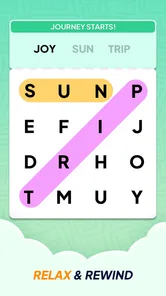
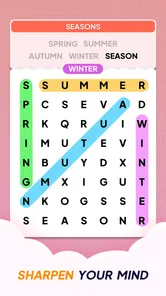
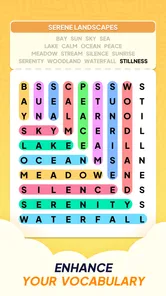
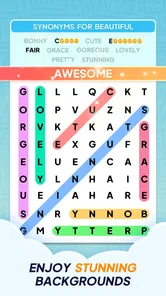


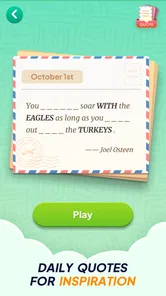
Analysis by Reviewed
I spent time with Word Search Journey: Find Word as a quiet word game rather than a quick, high-pressure challenge. It is made by Playful Bytes, and its central appeal is easy to understand: open a puzzle, scan a letter grid, find the hidden words, and keep going at your own pace. That simple loop works particularly well when I want something relaxing that does not demand a story, fast reflexes, or a long uninterrupted session.
The game is free to download and is aimed at Everyone, which makes it approachable for families and older players as well as regular word-puzzle fans. Its store presence shows a 4.8 average from around 4.9K ratings, with more than 500K installs. Those figures suggest that it has found a sizeable audience, but I still think the more important question is whether its calm format matches the way you like to play.
How the puzzle experience feels in everyday use
The first thing I noticed is how naturally the game fits into small gaps in the day. I can imagine opening it while waiting for an appointment, taking a short break from work, or sitting with a cup of tea in the evening. A word search does not require me to remember a complicated plot or rebuild a strategy after leaving it for several hours. I simply return to the letters and focus on the puzzle in front of me.
That makes it a sensible choice for players who enjoy familiar mental exercises. The appeal is not dramatic discovery; it is the steady satisfaction of spotting a word that was hiding in plain sight. For seniors especially, the uncomplicated format can feel more welcoming than a game built around timers, combat, or a crowded interface. I also found that the basic activity encourages careful scanning instead of frantic tapping.
The offline positioning is one of the most useful parts of the package. A word search game is at its best when it remains available during travel, in a waiting room, or somewhere with unreliable reception. I would still make sure the content is available before leaving a connection, rather than assuming every part of the experience behaves identically offline. In practical terms, though, the ability to play without depending on a live connection is a strong reason to consider it over a browser-based puzzle site.
The game was released on March 2, 2025, and the current version is 1.2.3. It supports Android 8.0 and later. That combination is helpful for people using an older but still functional Android phone or tablet, although device performance and screen size can affect comfort. On a small display, finding diagonal or reversed words may be more tiring than it is on a tablet.
A good routine for relaxed play
My preferred way to use it is in short, deliberate sessions. I start by scanning the word list, then look for unusual letter combinations rather than dragging randomly across the board. When I find one word, I use its surrounding letters as landmarks and inspect nearby rows and columns before moving across the rest of the grid. This approach feels less tiring than repeatedly sweeping the entire screen.
More From Our News Desk

 Gmail
GmailGmail in a Busy Inbox: Who Benefits Most?
From first account to crowded workday, Gmail earns its place through dependable search and flexible sorting—but its best fit depends on how much inbox maintenance you can tolerate.

 Prime Video
Switching to Prime Video: What Changes in Your Viewing Routine
Prime Video can make a compelling second home for streaming, but switching means learning a different catalog, rental layer, and route from browsing to playback.

 Universal TV Remote Control
Universal TV Remote Control Works Best as a Reliable Backup
A phone remote earns its place through quick setup and reliable habits. Here is how to get more from Universal TV Remote Control—and where its limits show.

 Weather - By Xiaomi
Weather by Xiaomi Review: Clear at a Glance, Less Clear Up Close
Xiaomi’s weather app makes everyday forecasts quick to scan, but its calm surface can leave useful details and recovery paths harder to find than they should be.

 X
XX Under Pressure: Can It Recover When Posting Goes Wrong?
A resilience-focused review of X, examining setup, mistaken posts, interruptions, weak connections, and the gaps that matter when recovery needs to be dependable.

 Clash of Clans
Clash of Clans Is Won Between the Battles
Its raids are quick; its community is a long-term project of coordination, teaching, rivalry, and shared responsibility—with all the friction that entails.
Latest News



For an older player, I would suggest increasing the device’s general display size if needed before blaming the puzzle itself. Larger text and a brighter screen can make a meaningful difference during extended sessions. I would also play with the phone held steadily, because a small accidental movement while tracing a word can be more frustrating than the actual search.
One useful habit is to pause when a puzzle starts feeling visually crowded. I do not treat every unsolved word as a sign that I need a hint immediately. Instead, I revisit the list and search for distinctive starting letters. This preserves the mental challenge and makes assistance, where available, more of a last resort than the default way to finish.
Where progress can become pressure
Word searches are relaxing only while the player feels in control. If the game presents a long run of puzzles, I can see how completion goals might quietly turn a restful activity into a task. That is not necessarily a flaw in this particular title, but it is an important personal boundary: I would use it as a break, not as another daily obligation.
The free entry point is inviting, but in-app purchases range from $0.99 to $15.99 per item. That matters because a player who enjoys the core loop may eventually be tempted to spend for convenience or additional help. The purchase range is clear enough to justify checking the payment prompt carefully before confirming anything, especially on a shared family device.
I appreciate that the purchase information gives a useful spending frame without requiring me to treat the game as a subscription commitment. At the same time, a free game with optional items can feel different depending on how often those items appear during play. I would not promise that every player will experience the same level of pressure, so my practical advice is to decide in advance whether you want a completely no-spend pastime. If that is your goal, avoid treating a difficult puzzle as a reason to buy something on impulse.
For parents or relatives setting this up for an older family member, the safest workflow is simple: install it, open the game together, and make sure the device’s purchase controls match the household’s preference. That is more useful than assuming an Everyone rating automatically answers every question about spending. The age rating describes suitability, while payment decisions still belong to the person managing the device.
Fairness when there is no need to compete
This is not the kind of word game I would choose for competitive comparison. Its strength is the personal search, not proving that I can beat another player or climb a public ranking. That makes the question of fairness different from what it would be in a multiplayer action game. I am mainly judging whether the puzzle gives me a reasonable chance to solve it without making paid assistance feel necessary.
From that perspective, the format is naturally fairer than games where spending can improve a character, unlock stronger equipment, or affect a match against another person. A player who pays is not automatically taking a win away from me. The more relevant trade-off is between patience and convenience: someone may prefer to spend rather than sit with a difficult grid, while another player may enjoy working it out unaided.
I would still separate fair competition from fair personal progression. A noncompetitive puzzle can be comfortable for one player and irritating for another if the route through the content feels too dependent on optional help. Since the available purchase range is known but the exact role of each item is not something I can responsibly describe beyond that, I judge the game mainly as a free word-search experience and not as a guaranteed no-purchase journey.
This distinction also helps explain who should skip it. If you want head-to-head matches, timed leaderboards, or a strong social layer, this is probably not the right destination. I would choose it for solitary concentration and gentle repetition. If you want a competitive test of vocabulary, a dedicated multiplayer word game will likely give you a clearer sense of achievement.
What makes it different from usual alternatives
The obvious alternative is a newspaper or printed puzzle book. Paper has advantages: no battery, no accidental taps, and a familiar physical routine. The digital version wins when I want a large supply of puzzles in one place and the convenience of carrying only a phone. Offline access makes that comparison more favorable, because the game can preserve much of the independence of paper while adding the convenience of a touchscreen.
A browser search puzzle is another alternative, but it usually depends more heavily on a connection and can be surrounded by unrelated page elements. A dedicated app feels cleaner for a short session. On the other hand, a printed collection may be better for someone who dislikes screens, experiences eye strain, or wants to mark words with a pen.
Compared with a crossword, this game asks for less open-ended recall. The letters are already present, so the challenge is visual recognition and persistence rather than producing an answer from a clue. That makes it gentler for a tired player, but it may feel too repetitive for someone who wants vocabulary building, clues, or layered deduction. Compared with a word scramble, it is also less about rearranging letters and more about noticing patterns in space.
One non-obvious advantage is that the low cognitive setup makes it suitable for interrupted routines. If a phone call stops me halfway through, I do not lose a complicated chain of reasoning. I can return later and reorient myself quickly. The trade-off is that the same simplicity may reduce long-term variety for players who need new mechanics to stay interested.
Questions I would consider before installing
If you are wondering whether it works for an older relative, my answer is cautiously positive. The Everyone rating and straightforward word-search format are encouraging, and the offline focus is practical. I would first test the text size, touch accuracy, and screen brightness on the actual device. A game can be simple in concept but still uncomfortable if the letters are too small or the tracing gesture is difficult.
If you are asking whether it is genuinely free, it is free to download, but optional in-app purchases are present and individual items range from $0.99 to $15.99. I would therefore describe it as free to start, not as a promise that every possible convenience is included without payment. That wording gives a more realistic expectation and helps avoid surprise spending.
If you want to play without internet access, the game is presented as an offline-friendly word-search experience. I would prepare it while connected and then test airplane mode before relying on it during a journey. That small check is worthwhile for any app intended for travel, particularly if you expect every screen, purchase option, or progress element to behave exactly the same away from a network.
If you are concerned about whether spending creates a competitive advantage, there is no reason to treat this as a player-versus-player contest. The meaningful question is whether you personally are comfortable paying for optional convenience. I would keep the game in the category of a private puzzle pastime, where the main cost is the choice between spending and taking more time.
Finally, if you are looking for a deep word-learning tool, I would set expectations lower. The core value is finding hidden words and relaxing, not structured lessons or a formal vocabulary course. Someone studying spelling or language may prefer an educational app with definitions, pronunciation, and progress tracking designed specifically for learning.
Trust, value, and my final recommendation
Playful Bytes has kept the proposition easy to understand: a free word game for Android users who want a large, calm puzzle routine, with offline play as an important practical benefit. The published rating of 4.8 from around 4.9K ratings and more than 500K installs show that the concept has attracted substantial interest. I would treat that as useful context rather than a substitute for checking whether the visual style and purchase approach suit you.
My trust verdict is positive but measured. I like that the game can fit into ordinary moments without demanding a powerful phone, a constant connection, or a competitive mindset. I also like the clear age positioning and the fact that the entry price is zero. The main point I would keep in mind is spending discipline: the presence of items priced from $0.99 to $15.99 means a relaxed session can still involve a payment decision if you pursue optional conveniences.
For me, the best use case is an evening wind-down or a short offline break, especially for someone who enjoys visual puzzles and does not want complicated rules. It is also a reasonable choice for introducing a senior player to a mobile game, provided the screen and touch controls feel comfortable. I would skip it if I needed competitive multiplayer, detailed learning tools, or a constantly changing set of mechanics.
My recommendation is to try it as a patient, no-pressure word search first. Give the free experience enough time to show whether the puzzle rhythm suits you, decide beforehand whether you will make purchases, and use the offline option deliberately rather than assuming it will solve every travel need automatically. With those expectations, Word Search Journey: Find Word is an approachable choice for quiet concentration, and its limitations are easier to accept because the central activity remains simple, familiar, and easy to return to.
Word Search Journey: Find Word Frequently Asked Questions
How much storage space does Word Search Journey: Find Word need?
Before downloading, it is worth checking that your device has enough free space for the game and its installation. Word Search Journey: Find Word is a word puzzle game, so it is a simple option to consider if you want something focused on finding words rather than a more demanding type of game. The amount of space required can vary by device and may change with updates, so check the app page on your device before installing.
Which devices can run Word Search Journey: Find Word?
Word Search Journey: Find Word is available for Android devices running version 8.0 or later. If you are using an older Android version, check your device settings before downloading to see whether an operating system update is available. Compatibility can also depend on the device itself, so the app page on your platform is the best place to confirm that installation is offered for your particular phone or tablet.
What is Word Search Journey: Find Word?
Word Search Journey: Find Word is a casual word puzzle game built around classic word-search challenges. Players look for hidden words in a grid of letters and progress through themed levels or stages. The journey-style format generally adds new puzzles and increasing difficulty, making it suitable for short sessions as well as longer play. It is a relaxed option for users who enjoy vocabulary games, concentration exercises, and offline-friendly puzzle entertainment.
How do you play Word Search Journey: Find Word?
Gameplay is straightforward: each puzzle displays a grid filled with letters and a list of target words to find. You swipe across adjacent letters to mark words, which may appear horizontally, vertically, diagonally, or in reverse depending on the level. Completing the required list allows you to advance. The game is easy to understand for beginners, while larger grids, longer words, and less obvious placements provide additional challenge as you progress.
Is Word Search Journey: Find Word free to download and play?
The game can generally be downloaded at no initial cost, allowing users to try its core word-search puzzles without purchasing the app upfront. However, free games may include advertising, optional in-app purchases, or paid items such as hints, coins, extra lives, or ad removal. Before downloading, check the current Google Play or App Store listing for the exact purchase options, supported devices, and any regional differences in pricing or availability.
Pros
- Relaxing gameplay suitable for short breaks
- Large variety of word puzzles to explore
- Helpful hints assist when a puzzle feels difficult
- Simple controls make it easy for all ages
- Offline play is convenient when traveling
Cons
- Some puzzles may feel repetitive after extended play
- Hints and extra features may depend on in-app purchases
- Ads can interrupt the flow between puzzles
- Difficulty progression may be uneven in some levels
- Small text can be uncomfortable on compact screens












