

Word Search Game: Offline
- 123.00
- 4.6
- Installs
- 10.00K
- Price
- $1.99

Screenshots

Analysis by Reviewed
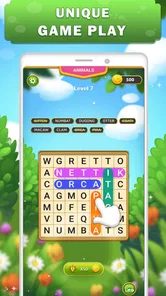
I like word searches because they give me something small and satisfying to focus on without demanding a long session. Word Search Game: Offline is aimed at that kind of quick puzzle break: you look for words in a grid, make a selection, and move on at your own pace. It is a word game from otto games, and its appeal is the familiar format rather than a complicated set of rules.
Before your first puzzle
If you are new to this particular game, the reassuring part is that the basic idea needs little explanation: read the words you need to find, scan the grid, and select each one. I would begin with a short, unhurried session rather than trying to finish quickly. That gives you time to learn how the board responds when you trace a word and to decide whether the pace suits you.
The offline focus is useful when you want a puzzle that does not depend on being connected. I would still treat “offline” as a reason to try it in a low-stakes moment, not as a promise that every surrounding app feature behaves the same way without a connection. The main appeal is the grid itself: it gives you a self-contained task that is easy to pause when your day interrupts.
How I approach a new grid
My first meaningful success is usually finding one word without help. I scan the list for a longer entry or an unusual letter combination, then check the grid in straight lines rather than sweeping my eyes randomly. Once I spot a likely start, I trace carefully and confirm that the selection matches the word. That small routine makes the game feel approachable, especially if you have not played a word search in a while.
If your first attempt does not register, I would not assume the puzzle is broken. Check whether you began at the correct letter and followed the word in the right direction, then try another pass. A grid can look busy when you first open it, but choosing one target at a time is less tiring than trying to solve everything at once. When a letter pattern seems close but not exact, compare it with the word list before spending a hint.
Finding Words, Finding Fun
Word Search Game: Offline does exactly what it says on the tin. It's a straightforward word search game that you can play without needing an internet connection. So, whether you're on a long flight or just chilling at home, this app has got you covered. The design is sleek and simple, making it easy to navigate and jump right into the action.
What to expect from the puzzles
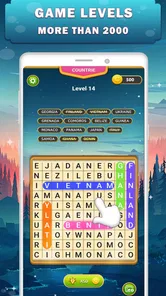
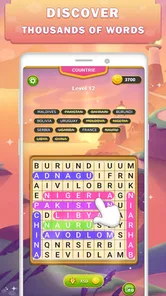
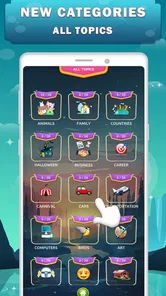
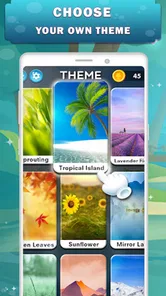
One of the features I really appreciate is the variety of categories available. You can choose from themes like animals, food, sports, and more. This keeps things fresh and ensures that you're not just searching for the same old words over and over again. Plus, the app automatically adjusts the difficulty level as you progress, which is a nice touch for keeping the game challenging.
More From Our News Desk

 Gmail
GmailGmail in a Busy Inbox: Who Benefits Most?
From first account to crowded workday, Gmail earns its place through dependable search and flexible sorting—but its best fit depends on how much inbox maintenance you can tolerate.

 Prime Video
Switching to Prime Video: What Changes in Your Viewing Routine
Prime Video can make a compelling second home for streaming, but switching means learning a different catalog, rental layer, and route from browsing to playback.

 Universal TV Remote Control
Universal TV Remote Control Works Best as a Reliable Backup
A phone remote earns its place through quick setup and reliable habits. Here is how to get more from Universal TV Remote Control—and where its limits show.

 Weather - By Xiaomi
Weather by Xiaomi Review: Clear at a Glance, Less Clear Up Close
Xiaomi’s weather app makes everyday forecasts quick to scan, but its calm surface can leave useful details and recovery paths harder to find than they should be.

 X
XX Under Pressure: Can It Recover When Posting Goes Wrong?
A resilience-focused review of X, examining setup, mistaken posts, interruptions, weak connections, and the gaps that matter when recovery needs to be dependable.

 Clash of Clans
Clash of Clans Is Won Between the Battles
Its raids are quick; its community is a long-term project of coordination, teaching, rivalry, and shared responsibility—with all the friction that entails.
Latest News



Another cool feature is the hint system. If you're ever stuck, you can use a hint to reveal a letter. But be warned, these hints are limited, so use them wisely! It's a great way to ensure that the game remains engaging without being too frustrating.
A reassuring first session
When I start a new word-search game, I first scan the word list rather than tracing random lines across the board. I look for an unusual letter or a longer word, then check likely rows and columns. That simple habit makes the first find feel manageable, and it is especially useful here if you are still getting used to the puzzle’s pace. If a word will not appear, I pause before spending a hint: a fresh scan often catches a letter pattern I missed.
Why You'll Love It
If you're a fan of word games, this app is a must-have. It's perfect for killing time while also keeping your brain engaged. Plus, the offline capability means you're not tied down by Wi-Fi availability. It's like having a pocket-sized puzzle book that never runs out of pages.
For those who love a bit of competition, there's a leaderboard feature where you can see how you stack up against other players. It's a fun way to add an extra layer of challenge and motivation to improve your word-finding skills.
Where it fits in a busy day
I find this format works best in the gaps that are too short for a story-driven game but long enough to settle into a small task: waiting for a meal, sitting through a quiet commute, or taking a screen break between chores. A useful trick is to choose a category that already feels familiar when I only have a minute or two; I can get oriented quickly. If I have longer, I switch my attention to less obvious letter sequences instead of racing to complete the grid. That turns the same basic activity into either a quick reset or a more focused challenge.
A realistic example is a few minutes in a waiting room. I would open a familiar theme, pick one word, and work across a row or down a column instead of trying to clear the whole board before my name is called. If I need to stop, the activity is easy to leave mentally; I do not have to remember a plot or a chain of complicated rules. That makes it a better fit for broken-up spare time than games that punish interruptions or ask for a long uninterrupted session.
The offline play is also a practical distinction from word games that depend on a connection or emphasize daily online events. It makes this a sensible travel companion, though it is not the right pick if you want live multiplayer, elaborate story progression, or a broad collection of different puzzle types. A dedicated crossword or anagrams game will suit those preferences better. This one stays close to the pleasure of spotting words in a grid.
Choosing it over other word games
Compared with a crossword, this asks less of your general knowledge: you are locating words that are already named, rather than solving clues and supplying answers. Compared with an anagram game, it puts more emphasis on visual scanning than rearranging letters. I reach for this format when I want a calm, concrete task and do not want to invent words under pressure. If you prefer vocabulary tests, clue-solving, or head-to-head play, another style will probably hold your attention longer.
It is also worth thinking about the kind of challenge you enjoy. Automatic difficulty adjustment can make progression feel natural, but it is not the same as selecting a fixed level and staying there. If you like comparing your performance under identical conditions, a word game with explicit difficulty choices may be a better match. Here, I would judge success less by speed and more by whether the grid gives you the satisfying pause-and-spot rhythm you came for.
Small trade-offs before you settle in
The automatic difficulty adjustment is convenient, but it means players who want to choose a precise level of challenge may prefer a game with manual settings. I also treat limited hints as a backstop, not a routine shortcut: saving one for a genuinely stubborn word keeps the search enjoyable and lets me practise scanning. If you tend to tap for help whenever progress slows, the limits may feel restrictive. For a first try, I would start without a hint, make one careful pass through the list, and use help only after checking the likely directions.
A useful way to avoid wasting help is to change your scanning method before reaching for a hint. If you have been checking rows, switch to columns; if you have been following the first letter, look for a distinctive pair of letters elsewhere in the word. This is not a hidden mode or a special control, just a practical habit that makes the search more deliberate. It also helps you tell the difference between a genuinely difficult target and one you simply overlooked during your first pass.
The game is a better fit for people who enjoy repetition with small variations than for anyone expecting a campaign or a constantly changing set of mechanics. The category themes provide a reason to shift focus, but the central action remains word-finding. I would skip it if a simple grid quickly feels monotonous, or if you want to compete directly with friends rather than compare progress through a leaderboard.
The game has an Everyone age rating, a 4.6 average from over 400 ratings, and more than 10,000 installs. It costs $1.99, with optional in-app purchases ranging from $0.99 to $3.99 per item, so I would check the purchase details before buying anything extra. It was released on May 15, 2022, and version 1.7 requires Android 6.0 or later. Those details make it easier to judge whether it fits your device and budget before you begin.
What to consider before installing
The up-front price is worth weighing against how often you actually play word searches. If you enjoy this exact format and expect to return to it during travel or small breaks, a focused puzzle app may feel worthwhile. If you are only curious, or usually lose interest after a few grids, compare the cost with free alternatives before committing. Optional purchases are another reason to review the purchase screen carefully; I would not assume they are necessary to enjoy the basic search routine.
For a first-time player, the practical questions are simple: can you play a puzzle when you are away from Wi-Fi, can you choose a theme that feels comfortable, and does the changing challenge keep the game interesting? The offline design addresses the first use case, and the categories help with the second. The difficulty adjustment may be welcome if you want the game to evolve on its own, but less appealing if you prefer to control every step. Those preferences matter more than any single feature when deciding whether it belongs on your phone.
Final Thoughts
Overall, Word Search Game: Offline is a fantastic app for anyone who enjoys word puzzles. It's easy to use, offers a variety of categories, and keeps things challenging with its dynamic difficulty adjustments. Whether you're a seasoned wordsmith or just looking for a fun way to pass the time, this app is definitely worth a download. So go ahead, give it a try, and happy word hunting!
Word Search Game: Offline Frequently Asked Questions
Who developed Word Search Game: Offline, and what should I know before installing it?
Word Search Game: Offline is a word puzzle game from otto games, intended for players who enjoy finding words in letter grids. It is rated Everyone, so its content is suitable for a broad audience. The game is listed for Android devices running version 6.0 or later, making your operating system version a useful first check before downloading.
Which devices can run Word Search Game: Offline?
The listed minimum requirement is Android 6.0, so check your device’s operating system before you install the game. This requirement is especially worth noting if you use an older phone or tablet. Word Search Game: Offline is a mobile game, and the Android version is the one described here; make sure you are viewing the appropriate store page for your device.
What is the Word Search Game: Offline about?
The Word Search Game: Offline is a puzzle game designed for word enthusiasts. It allows players to find hidden words from a grid of letters. With various categories and difficulty levels, it offers a challenging yet fun experience. The offline mode ensures you can enjoy the game anytime and anywhere without needing an internet connection.
How do I play the Word Search Game: Offline?
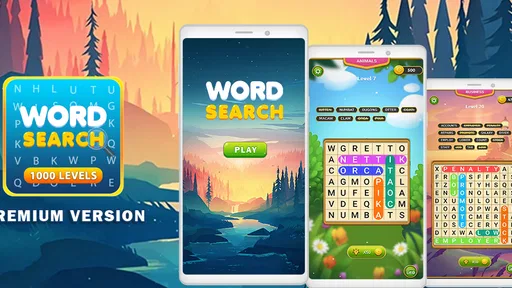
Playing the Word Search Game: Offline is simple. You are presented with a grid of letters and a list of words to find. Swipe your finger over the letters to form the words. Words can be arranged horizontally, vertically, or diagonally. The goal is to find all the listed words as quickly as possible.
Can I play the Word Search Game: Offline without an internet connection?
Yes, one of the key features of the Word Search Game: Offline is its ability to be played without an internet connection. This makes it a perfect travel companion or a great way to pass time when you're in areas with limited or no internet access. Simply download and enjoy the game anytime.
Pros
- Engaging and relaxing gameplay.
- No internet connection required.
- Variety of word themes.
- User-friendly interface.
- Suitable for all age groups.
Cons
- Limited to word puzzle genre.
- Ads in free version.
- No multiplayer options.
- Repetitive after extended play.
- Limited language options.











